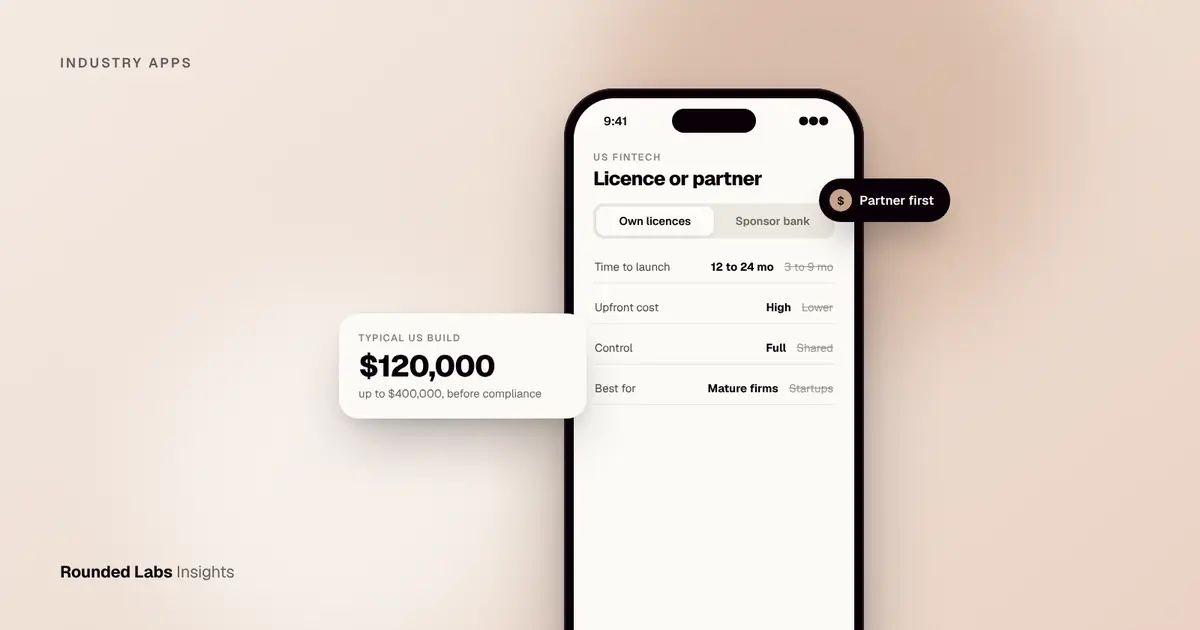


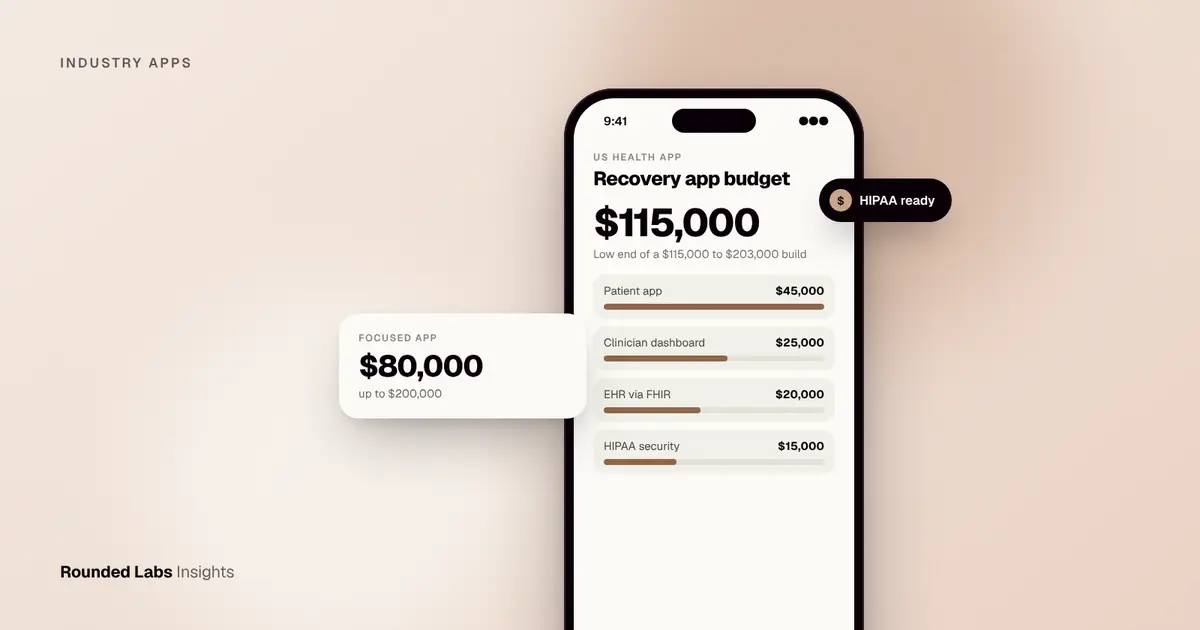
Building a healthcare app in the US means deciding who pays, which rules apply and which features to build first. A focused app typically costs $80,000 to $200,000, and a platform with EHR integration and remote monitoring often costs $200,000 to $500,000 or more (market estimates, not quotes). The biggest swing factor is whether you handle protected health information for a provider or health plan.
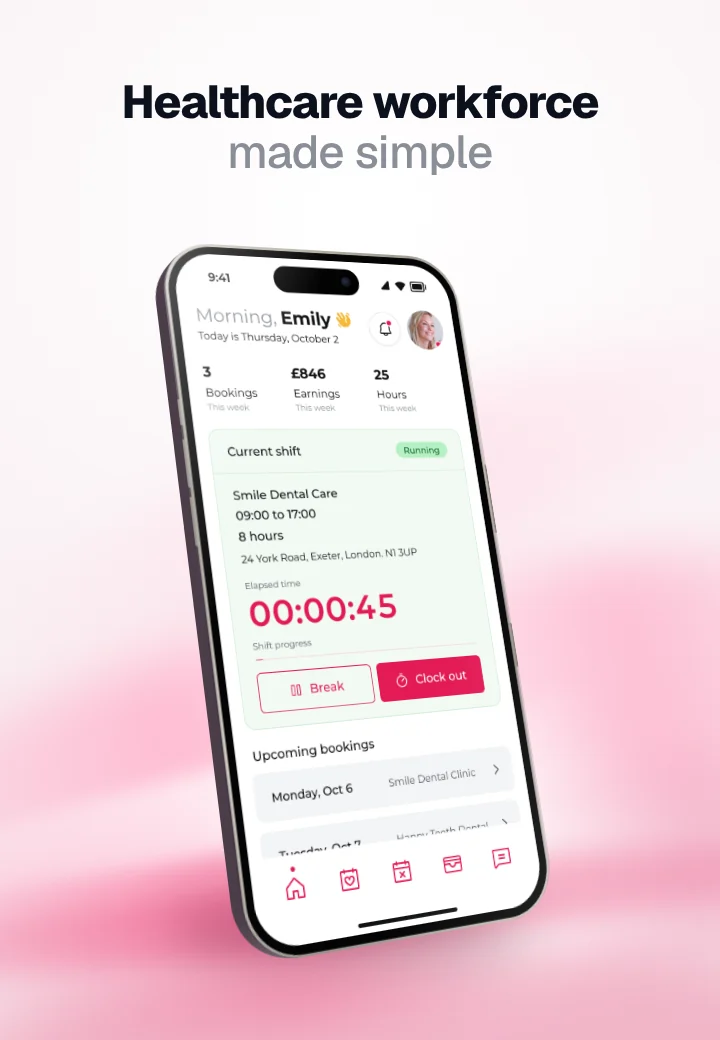
Rounded Labs has 19 years of experience building apps where trust matters, including MoBank, the UK’s first mobile banking app, and First Agency Direct, a platform that handles shifts, timesheets and compliance checks for dental nurses. This guide is a planning walkthrough for founders and product owners: the business models, features, rules and costs that shape a US health app, with our mobile app development service as the delivery route. It is general information, not legal advice, so have a healthcare lawyer review your plan.
Key facts
- Who pays decides your rules: providers and health plans bring HIPAA, while direct-to-consumer apps fall under FTC and state health data laws.
- Medicare and many private payers reimburse some remote monitoring and telehealth services, so billing support can be a core feature.
- Software that diagnoses or treats disease may be a regulated medical device. Most scheduling, messaging and wellness apps are not.
- Apple and Google both require clear privacy disclosures and extra evidence for health claims.
- Rounded Labs works to a fixed price agreed before development starts. Projects typically run from £30,000 to £250,000+ (about $38,000 to $318,000), see our pricing page.
Who pays for your healthcare app?
Start with the buyer, because the buyer sets the compliance load and the sales cycle.
| Model | Who pays | What it means for the build |
|---|---|---|
| Provider-led (clinic, hospital, group practice) | The practice licenses or commissions it | HIPAA applies, EHR integration is expected, security reviews are long |
| Payer-led (health plan, employer) | The plan pays per member or per outcome | Member eligibility checks, reporting, strict vendor assessments |
| Direct to consumer | The user subscribes or pays per visit | FTC and state laws apply, store billing rules, faster launch |
| Reimbursed services | Medicare or private insurance pays the clinician | Time tracking, consent and documentation features tied to billing codes |
Many US startups choose one buyer first. A clinic-facing tool can sell to ten practices before you need a payer contract, while a consumer app needs marketing budget from day one. If you are weighing the choice, How to build a HIPAA-compliant app explains what changes once a provider becomes your customer.
How do the buyer types differ in practice?
| Question | Provider-led | Payer-led | Direct to consumer |
|---|---|---|---|
| Typical sales cycle | 3 to 12 months | 6 to 18 months | Days, once live |
| Who signs off security | Hospital or practice IT and compliance | Vendor risk team | The app stores and your own policy |
| Biggest hurdle | EHR access and clinical workflow fit | Contracting and evidence of outcomes | Acquiring users profitably |
| Compliance focus | HIPAA Security Rule, business associate agreement | HIPAA, vendor assessments, sometimes HITRUST | FTC, state health data laws, store rules |
| Revenue shape | Licence per clinician or per site | Per member per month or per outcome | Subscription or per visit |
These timings are rules of thumb from public discussion of health IT sales, not measured figures, and they vary with the size of the organisation. The practical lesson is that a provider-led or payer-led product needs a sales plan as well as a build plan. Budget for the time between “built” and “paid”.
Which kinds of healthcare app are there?
Health apps are not one category. The type decides which rules apply and what the first version looks like.
| App type | Typical users | Main rules to check | Typical first feature |
|---|---|---|---|
| Patient engagement | Patients of a practice | HIPAA if provider-led, TCPA for texts | Reminders and check-ins |
| Remote patient monitoring | Patients and care teams | HIPAA, FDA if the device or algorithm is regulated, billing rules | Device data and alerts |
| Telehealth | Patients and clinicians | HIPAA, state licensing and telehealth rules, consent | Video visit and scheduling |
| Clinician tools | Doctors, nurses, therapists | HIPAA, EHR access, clinical safety | Secure messaging or notes |
| Care coordination and staffing | Agencies and facilities | Employment and credential checks, HIPAA if PHI appears | Shift booking and compliance records |
| Mental health and wellness | Consumers | FTC, state laws, store rules, sometimes FDA | Mood tracking and content |
| Medication adherence | Patients | HIPAA if provider-led, FDA if the app makes clinical decisions | Reminders and logging |
For a view of what staffing-style workflows involve, see Staffing and shift booking apps for healthcare agencies. For a wider look at what users expect, read Health apps in the US: what users expect and what regulators look at.
Which features should a first version include?
Pick the smallest set that proves the workflow works for one user group.
- Identity and consent. Multi-factor sign-in, role-based access, and recorded consent for data use and, where relevant, for telehealth. Our guides How to add user login and sign-up to your app and How to add two-factor authentication to your app cover the building blocks.
- One core workflow. For example, symptom check-ins before a visit, post-discharge follow-up, or medication reminders. Do not build all three.
- Secure messaging. Keep health details out of push notifications and email. How to add in-app chat to your app shows what a secure chat involves.
- Scheduling and reminders. Reminders by SMS must respect US consumer messaging rules (the TCPA), so capture opt-in clearly. See CAN-SPAM and TCPA for app messaging.
- Data access. Read records through standard APIs rather than manual entry.
- Audit logging. Every view and change to a record is logged, which providers will ask to see.
- Accessibility. Large text, screen reader labels and plain language. Many patients are older adults, and accessibility lawsuits against health sites and apps are common. See ADA and WCAG: accessibility rules for US apps.
Features to defer: AI triage, wearables beyond one or two devices, and multi-language support, unless your first customer needs them. To decide what stays and what goes, use How to choose features for version one and What is an MVP?.
What makes a health app feature different from a normal one?
Many features sound the same as in any app, but healthcare adds requirements that change the cost.
| Feature | Ordinary app | Healthcare app |
|---|---|---|
| Login | Email and password, maybe social login | Multi-factor, session timeouts, role-based access, account recovery that does not leak data |
| Notifications | Content in the message | Generic prompts only, details after sign-in |
| Photo upload | Stored in a bucket | Encrypted, access-controlled, retention rules, audit trail |
| Chat | Plain messaging | Encrypted, logged, linked to a patient record, retention rules |
| Analytics | Standard tools | Privacy-reviewed, no health identifiers sent to advertising or analytics partners |
| Admin tools | Basic dashboard | Role-based, logged, with break-glass access and reviews |
| Deletion | Delete the account | Records retention rules versus the right to delete under state law |
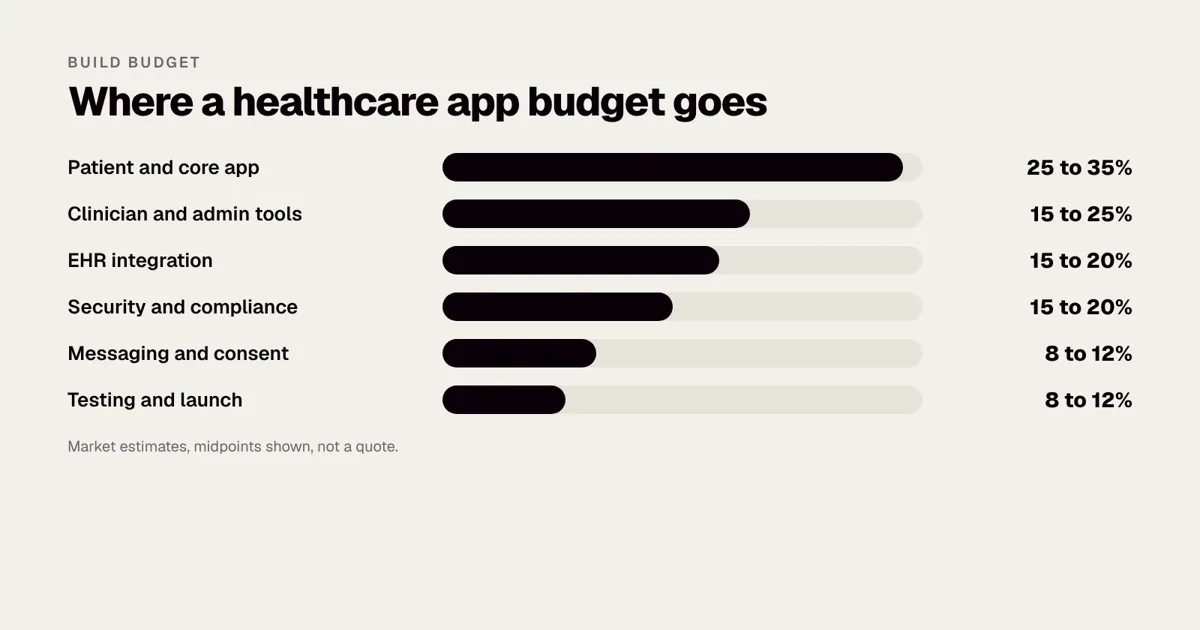
None of these is hard in isolation. Together they add 15 to 30% to a typical build, a point we return to in the cost section.
Which US rules apply to your app?
The rule set depends on the business model above, not the technology. This is a map to help you ask the right questions, not a complete statement of the law. At the time of writing these are the main regimes, but laws, guidance and enforcement priorities change, so check each official source and take advice from a healthcare lawyer before launch.
HIPAA
If you create, receive or store protected health information for a covered entity, you are a business associate and must sign a business associate agreement and meet the Security Rule. Updates to the Security Rule were proposed in 2025, so check their current status on the HHS HIPAA pages. Our guides to HIPAA Security Rule technical safeguards and HIPAA business associate agreements go deeper.
In practice, being a business associate means:
- Signing a business associate agreement with each covered entity customer, and with your own subcontractors, such as your cloud host, that touch the data.
- Putting administrative, physical and technical safeguards in place: risk analysis, access control, encryption, audit logs, workforce training and incident response.
- Using and sharing only the minimum necessary data for each purpose.
- Notifying your customer after a breach within the timescales in your agreement and the rules.
FDA
Software meant to diagnose, treat or prevent disease can count as a medical device. The FDA has issued guidance on clinical decision support and general wellness products, and uses enforcement discretion for many low-risk functions. See FDA rules for medical device software and decide early, because clearance can add months. The FDA’s Digital Health Center of Excellence is the official starting point.
A rough sorting guide for planning, not a legal classification:
| What the app does | Likely position | Next step |
|---|---|---|
| Records and shows data the user enters | Often outside device rules | Confirm with counsel |
| Reminds users to take medication | Often low risk | Confirm with counsel |
| Calculates a risk score that guides treatment | May be a device | Seek regulatory advice early |
| Analyses images or signals to detect a condition | Likely a device | Plan a regulatory route before building |
| Controls or reads from a medical device | Likely linked to that device’s status | Check the device maker’s terms |
FTC
Apps outside HIPAA must not share health data in ways users did not agree to. The Health Breach Notification Rule requires notice after unauthorised disclosure, and the FTC has taken action against health apps for sharing data with advertisers. Read FTC Health Breach Notification Rule and check the Federal Trade Commission for current guidance.
State laws
Washington’s My Health My Data Act, Nevada’s health privacy law and California’s CCPA and CMIA all reach health data in different ways, and some give users a private right to sue. US state privacy laws and your app explains how to design once for several states, and California Consumer Privacy Act for app owners covers the largest. Also see Virginia, Colorado and Texas privacy laws.
Substance use records and biometrics
If you handle records from certain substance use disorder programs, 42 CFR Part 2 adds stricter consent rules than HIPAA. If you use face or fingerprint matching beyond the phone’s own sign-in, state biometric laws may apply. BIPA and biometric data in apps explains the risk.
Does HIPAA apply? Some scenarios
| Scenario | HIPAA likely applies? | Why |
|---|---|---|
| A clinic commissions an app that stores patient data | Yes | You are a business associate of the clinic |
| A consumer buys a wellness app and enters their own data | Usually no | No covered entity involved, but FTC and state laws apply |
| A health plan offers your app to members | Yes | Plan is a covered entity |
| A clinician uses your app for their own patients | Yes, for that use | Provider is a covered entity |
| An employer wellness app with no health plan link | Often no | Depends on how data flows, take advice |
| A data broker buys de-identified data from your app | Depends | De-identification must meet the HIPAA standard |
This table is general information, not legal advice. The answer depends on the facts, so take advice from a healthcare lawyer on your own model.
Not sure which rules your idea triggers? We map HIPAA, FDA and state requirements before quoting, so the fixed price already includes them. Book a 30-minute call with a co-founder.
How do you connect to US health records?
Most US providers use an electronic health record (EHR) system such as Epic, Oracle Health or athenahealth. Modern integrations use HL7 FHIR APIs, commonly launched through SMART on FHIR so a clinician or patient signs in with their existing credentials. The standard is published at HL7 FHIR. Federal rules under the 21st Century Cures Act require certified EHR vendors to provide patient access APIs, and information blocking rules discourage providers from restricting access. The US Office of the National Coordinator for Health IT publishes the current position at HealthIT.gov.
Practical points:
- Each vendor has its own developer programme, sandbox and review. Budget 6 to 16 weeks for a first integration.
- Smaller practices often use older systems with limited APIs, so you may need an integration service or file-based exchange.
- Patient-facing apps can use consumer access routes, but data fields vary by provider.
- Read access is simpler than write access. Writing notes or orders back into the record usually needs clinical sign-off and a longer vendor review.
- Plan for test data. You cannot use real patient records in development.
What does an integration project involve?
| Stage | What happens | Typical duration |
|---|---|---|
| Vendor application | Register with the EHR developer programme, describe your app and data use | 1 to 4 weeks |
| Sandbox build | Build against test data and the vendor’s sample patients | 3 to 6 weeks |
| Security and privacy review | Vendor reviews your security, policies and data flows | 2 to 6 weeks |
| Customer connection | Each provider site approves and configures access | 2 to 8 weeks per site |
| Go-live support | Monitor first live data, fix mapping gaps | 2 to 4 weeks |
These stages run partly in parallel, which is why a first integration is estimated at 6 to 16 weeks overall. For more general guidance on connecting systems, see What is an API integration?.
How should you design for security and privacy?
Security is the part of a health app that buyers inspect hardest. Build it into the design, not onto the end.
- Map the data first. List every piece of health data you collect, where it is stored, who can see it and which third parties receive it.
- Minimise. Collect only what the workflow needs. Data you do not hold cannot leak.
- Encrypt in transit and at rest. Use current, standard encryption for network traffic, databases, backups and file storage.
- Control access by role. A nurse sees assigned patients, an administrator sees system settings but not clinical notes, and support staff see what they need to answer a ticket.
- Log everything that touches a record. Who viewed, who changed, when and from where.
- Review your software supply chain. Every analytics tool, crash reporter or messaging service that sees health data needs a business associate agreement or must not receive that data.
- Test. Commission a penetration test before launch and after major changes. See What is penetration testing for apps? and our Mobile app security checklist.
- Plan for incidents. Write an incident response plan and rehearse it. Our Incident response plan template is a free starting point.
Which services in your stack need special care?
| Service | Risk | Practical approach |
|---|---|---|
| Cloud hosting | Holds the data | Use a service that signs a business associate agreement and configure it for health data |
| Analytics and crash reporting | Can capture identifiers or screen content | Strip identifiers, disable screen capture, or use a vendor that signs an agreement |
| Email and SMS providers | Message content may reveal health information | Send generic prompts only, or use providers that sign agreements |
| Video calling | Carries clinical conversations | Choose a provider that supports health use and signs an agreement |
| Crash and session replay tools | Can record sensitive screens | Avoid on screens that show health data |
| AI services | May send data to third parties | Check retention, training use and contracts. See Making AI features safe |
Enterprise buyers will ask for evidence. A SOC 2 report or a HITRUST certification can shorten sales, though both are business decisions rather than day-one requirements. Our free Security questionnaire answers template helps you prepare answers once and reuse them.
What do Apple and Google require?
- Apple. The App Store Review Guidelines have a section on health, health research and medical apps. Apps that give measurements or diagnostic advice need to show how they were validated, and apps using HealthKit must not use that data for advertising or sell it.
- Google Play. Health apps must complete the Health apps declaration, and apps that use Health Connect must follow its data policy. Medical claims face closer review. Check the current policy on Android Developers.
Both stores require an accurate privacy policy and data safety or privacy label. A mismatch between the label and your real data flows is a common cause of rejection and, for health apps, of FTC attention. Our guides Why Apple rejects apps, and how to avoid it and App age ratings explained cover common review problems.
A worked example: a post-surgery recovery app for a surgical group
Imagine an orthopedic group wants patients to log pain, wound photos and exercises for six weeks after knee surgery, with nurses alerted when scores worsen. This is an illustrative scenario with market-estimate costs, not a client project.
| Work item | Estimated cost |
|---|---|
| Patient iOS and Android app with check-ins and photo upload | $45,000 to $70,000 |
| Clinician web dashboard with alerts | $25,000 to $40,000 |
| Secure messaging and consent records | $10,000 to $18,000 |
| EHR read and write via FHIR for one vendor | $20,000 to $45,000 |
| HIPAA security design, audit logs and penetration test | $15,000 to $30,000 |
| Total | $115,000 to $203,000 |
Because the app records and displays data but does not diagnose, it likely stays outside FDA device rules, though the group’s counsel should confirm. The timeline is roughly 5 to 7 months, and the EHR work is the main risk. If the group’s EHR vendor is slow to approve access, start that application in week one. A Mobile Product Discovery Sprint at £9,500 (about $12,000) is a sensible way to settle scope before committing to the full build.
What does the timeline look like?
| Phase | Weeks | Main output |
|---|---|---|
| Discovery and compliance mapping | 1 to 3 | Scope, data map, risk list |
| Design and prototype | 3 to 7 | Clickable prototype tested with 5 to 8 patients and 2 to 3 nurses |
| Build, sprint cycles | 7 to 20 | Working patient app and clinician dashboard |
| EHR integration | 4 to 18, in parallel | Read access first, write access later |
| Security testing | 20 to 23 | Penetration test report, fixes |
| Pilot with one clinic | 23 to 28 | Live data, feedback, clinical review |
| Launch | 28 onward | Wider rollout, support routine |
Dates move with vendor approvals, so keep a buffer and ask your partner where the waiting points are.
What does a US healthcare app cost?
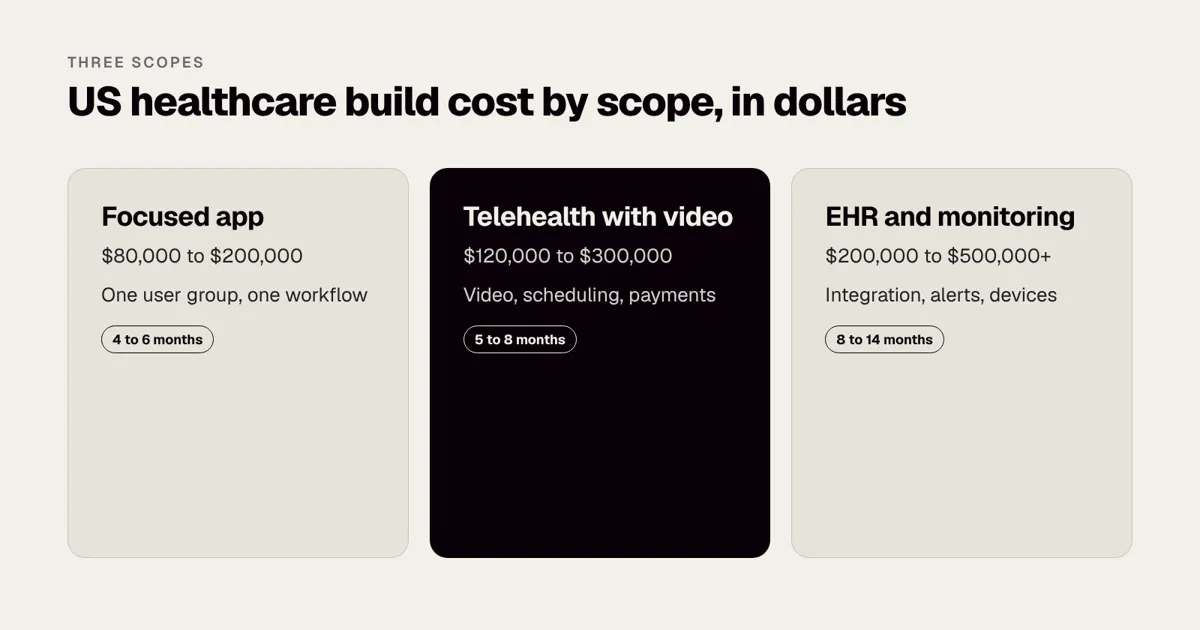
| Scope | Typical range (US agency) | Typical timeline |
|---|---|---|
| Focused patient or clinician app | $80,000 to $200,000 | 4 to 6 months |
| Telehealth with video and payments | $120,000 to $300,000 | 5 to 8 months |
| Platform with EHR integration and monitoring | $200,000 to $500,000+ | 8 to 14 months |
These are market estimates. Compliance work typically adds 15 to 30% to a build, a topic covered in How much does a HIPAA-compliant app cost?. For telehealth specifically, see How much does a telehealth app cost in the US?. Running costs also matter: HIPAA-eligible hosting, video minutes, SMS fees, monitoring and annual security testing often add up to 15 to 20% of the build cost per year. For general benchmarks, see How much does it cost to build an app in the US? and App maintenance cost in the US.
What drives the price up or down?
| Driver | Pushes cost up | Keeps cost down |
|---|---|---|
| Integrations | Several EHRs, write access, custom interfaces | One vendor, read-only |
| Platforms | Native iOS, Android and web dashboard | One cross-platform app plus a simple web view |
| Clinical content | Custom clinical logic and content review | Standard forms and plain-language prompts |
| Regulation | FDA pathway, state licensing rules | Wellness or workflow tools outside device rules |
| Users | Patients with accessibility needs, several languages | A single, well-defined user group |
| Evidence | Outcomes studies, clinical validation | Pilot feedback only |
| Security | Enterprise attestations, formal audits | Baseline controls, with attestation later |
If budget is tight, the biggest savings usually come from one integration, one platform first and one user group. Our guide How to cut app development costs without cutting quality lists further options, and How much does an MVP cost in the US? puts prices on a lean first version.
How do clinicians get paid for using health apps?
For some services, Medicare and private insurers reimburse remote patient monitoring and telehealth under specific billing codes and conditions. If your product depends on reimbursement, treat billing support as a core feature, not a later extra. That usually means:
- Recording the time a clinician spends and the data a patient submits, in a form a billing specialist can use.
- Capturing patient consent in a way that matches payer rules.
- Producing reports that match the payer’s documentation requirements.
- Keeping the evidence trail for audits.
Rules, codes and rates change, so check the Centers for Medicare and Medicaid Services for the current position and speak to a billing specialist before you promise a revenue model to a customer. As a rule, do not promise that a particular service is reimbursable until a qualified person has confirmed it for your use case.
How should you choose a build partner?
Ask for evidence rather than promises. Can the team explain a business associate agreement in plain words? Have they passed enterprise security questionnaires? Will they quote a fixed price, with compliance items listed separately? For buyers, a third-party attestation such as HITRUST for health apps can shorten sales cycles, but it is a business decision, not a day-one requirement. A UK team can build for the US market if it works to HIPAA, uses US-based or HIPAA-eligible hosting and signs the agreements your customers require.
What questions should you put to a supplier?
- Have you signed business associate agreements before, and will you sign one with us?
- How do you handle health data in development, test and support environments?
- Which cloud services do you use, and do they sign agreements for health data?
- How do you keep health details out of logs, analytics and push notifications?
- Who reviews code for security, and how often is penetration testing done?
- How have you handled an EHR vendor review before?
- What is in the fixed price and what is excluded? Are compliance tasks itemised?
- Who will own the code, the accounts and the data at the end?
- What does support look like after launch, and who responds to an incident?
- Can we speak to two clients with similar compliance needs?
Our guides 20 questions to ask an app developer before you sign and Due diligence checklist for US companies hiring abroad add more. For the practical side of working with a UK team from the US, see Hiring a UK app development company from the US and In-house team vs agency in the US. We explain why we work to a fixed price in Fixed price vs time and materials for app projects.
What changes if you build telehealth?
Telehealth adds video, scheduling and often payments, and it brings its own rules. The technology is the easy part. The operating model is where plans fail.
- Clinician licensing. In the US, clinicians are generally licensed by state, and telehealth rules vary by state and over time. Your product may need to check where the patient is during the visit and which clinicians are allowed to treat them. Check each state’s board and take advice.
- Consent. Many settings require documented patient consent to telehealth. Build the consent step into the booking flow and keep a record.
- Video quality and fallback. Calls should degrade gracefully on poor connections, with an audio-only option and a clear way to reconnect. See How to add video calling to your app.
- Payments and insurance. Self-pay visits need a payment flow, and insured visits need eligibility checks and documentation. How to add in-app payments to your app covers the payment side.
- Records. Visit notes must reach the clinician’s record system, which brings you back to EHR integration.
- Emergency handling. The app should state clearly that it is not for emergencies and give a route to emergency services.
For a cost view, read How much does a telehealth app cost in the US?. If you also plan to serve European patients, the rules change again, and GDPR for US companies launching an app in Europe is a good starting point.
What about patient rights, retention and deletion?
Health data sits between two pulls. Providers must keep records for set periods, and privacy laws give people rights over their own data. Your design has to handle both.
| Question | What to decide | Design consequence |
|---|---|---|
| How long must records be kept? | Retention periods set by law and by your customer’s policy | Configurable retention per customer, with documented defaults |
| Can a patient delete their data? | Depends on whether you are a business associate or a consumer service | Different flows for each, and clear wording in the privacy policy |
| Can a patient get a copy? | Patients generally have access rights to records held by providers | Export in a standard format on request |
| Who can see audit logs? | Customers and sometimes the patient | Logs that can be searched and exported |
| What happens when a customer leaves? | Return or destroy data under the agreement | Documented export and deletion procedure, with proof |
| What happens after a breach? | Notification duties and timescales | Incident plan, contact tree, tested at least yearly |
Write these decisions into your business associate agreements and privacy policy. Our free App privacy policy template is a starting point, but a health app needs legal review of the final text.
A second example: a staffing and compliance app for a care agency
Not every health app is clinical. Many are workflow tools for agencies and facilities, and these often have simpler rules and faster sales. Our work on First Agency Direct, a platform that handles shifts, timesheets and compliance checks for dental nurses, is an example of this pattern in the UK. To illustrate the same pattern in the US, imagine a regional agency that places nurses in care homes.
| Work item | Estimated cost |
|---|---|
| Nurse app: availability, shift offers, timesheets | $30,000 to $50,000 |
| Facility web portal: requests, approvals, invoices | $25,000 to $40,000 |
| Credential and licence tracking with expiry alerts | $12,000 to $22,000 |
| Payroll and invoicing export | $8,000 to $15,000 |
| Admin back office and reporting | $12,000 to $22,000 |
| Security design and testing | $8,000 to $16,000 |
| Total | $95,000 to $165,000 |
This is an illustrative scenario with market-estimate costs, not a client project or a quote. HIPAA may apply only lightly, if clinical details are kept out of the system, which is a design choice worth making early. The main costs are the credential rules, which differ by state, and the payroll links. Our guide Staffing and shift booking apps for healthcare agencies goes deeper into this type of product.
How do you keep the project on track?
Healthcare projects slip for predictable reasons: waiting for approvals, changing clinical requirements and late security findings. A few habits help.
- Run a short paid discovery first. It surfaces rule questions and integration risks before the main budget is committed. See What happens in a discovery phase.
- Agree a fixed price against a written scope, with compliance tasks itemised so you can see what you are paying for. Changes then go through a written change request.
- Put one clinical owner on the project. Someone with authority over workflow and wording must answer questions within days, not weeks.
- Track external dependencies on a separate list, such as vendor approvals, legal review and customer IT. These cause more delay than development does.
- Demonstrate every two weeks to real users, not only to the product owner.
- Hold a security review at the midpoint, not only before launch, so design problems surface while they are cheap to fix.
What mistakes do healthcare app founders make?
- Building before choosing the buyer. The buyer decides the rules, the sales cycle and the integrations. Choose one first.
- Assuming “wellness” avoids all rules. Even without HIPAA, the FTC and state laws apply to health data.
- Putting health details in push notifications. Lock screens are visible to others, and notification services are third parties.
- Sending health events to ad or analytics tools. This has led to regulatory action and lawsuits. Keep analytics privacy-reviewed.
- Leaving EHR approval to the end. Vendor reviews take weeks. Start the application in the first sprint.
- Treating compliance as a one-off. Risk analysis, training and testing are ongoing duties. Budget for them every year.
- Overbuilding. A first version with one workflow for one user group is easier to sell, test and fix. See How to validate an app idea before you spend £50k.
- Ignoring accessibility. Older and disabled patients are core users. Bake it in from design.
- Forgetting the exit. Contracts should state who owns the code, how data is returned and how accounts transfer. See Who owns the code?.
How should you test a healthcare app?
Testing a health app covers more than bugs. You are checking that the right people see the right data and that the workflow works for real patients and clinicians.
- Functional testing of every journey on current and older devices. See App testing explained: QA, UAT and beta testing.
- Role testing. Sign in as each type of user and try to reach data you should not see.
- Security testing. Penetration testing, dependency checks and a review of third-party services.
- Usability testing with the real audience. Include older adults and people who use assistive technology.
- Clinical review. A qualified clinician reviews content, alerts and thresholds so that guidance is safe.
- Pilot. Run with one clinic or one cohort before wider rollout, and track outcomes and support tickets.
- Release checks. Use a written checklist before each store submission. Our Release checklist template is free.
How do you measure whether a health app works?
Early in a product’s life, usage and outcome measures matter more than downloads. Pick a few measures and review them monthly.
| Measure | What it tells you | Typical use |
|---|---|---|
| Activation rate | Share of invited patients who finish setup | Spot onboarding problems |
| Weekly active patients | Whether the workflow becomes a habit | Check engagement |
| Task completion | Share of scheduled check-ins completed | Judge the clinical value |
| Alert response time | How fast clinicians act on alerts | Test the workflow |
| Support tickets per 100 patients | Where users struggle | Prioritise fixes |
| Clinician time saved | Whether staff benefit | Support the sales case |
| Outcome measures agreed with the clinic | Whether care improves | Evidence for payers |
Be careful with claims. Do not state that your app improves outcomes until you have evidence that stands up to scrutiny, and take advice on how store and advertising rules treat health claims. See App retention: the metrics that matter after launch and App analytics: what to track from day one for the general approach.
What should you do next?
- Choose your first buyer and write down who pays and who signs off.
- Decide whether the app handles protected health information for a provider or health plan, and take legal advice to confirm.
- Pick one workflow and a measurable result for the first six months.
- List the integrations you need and start vendor approval conversations now.
- Plan security from day one, including hosting that signs agreements and a penetration test before launch.
- Get a fixed price for a scoped first version. If you are not ready, a paid discovery step is the cheapest way to settle the questions above. Our fixed-price productised services include the Mobile Product Discovery Sprint at £9,500 and the Tech Architecture Audit at £7,500, see the pricing page.
If you would like a candid view of your idea, book a call with a co-founder and we will tell you which rules, integrations and costs we would expect, and what we would leave out of version one. Our related guide How to launch an app in the US from the UK covers the business side of reaching US customers.
Costs and timelines in this guide are market estimates for planning, not quotes. Rules and fees change, so check each official source before you rely on it.
Frequently asked questions
Do I need HIPAA compliance for a wellness or fitness app?
Usually not, if the app is used independently by consumers and no provider or plan is involved. The FTC Act, the Health Breach Notification Rule and state health data laws still apply, so treat the data carefully. Take legal advice if your model could change.
Can I use standard analytics and advertising tools in a health app?
Be very careful. Sending health-related events to ad or analytics tools has led to FTC actions and lawsuits. Use a privacy-reviewed analytics setup and keep identifiers and health data apart.
How do clinicians get paid for using my app?
For some services, Medicare and private insurers reimburse remote patient monitoring and telehealth under specific billing codes. Rules and rates change, so check the CMS site and talk to a billing specialist before promising a revenue model.
How long does a first EHR integration take?
Plan 6 to 16 weeks, depending on the vendor and the provider’s IT team. Begin the vendor approval early, because it often runs in parallel with development.
Is a UK team suitable for a US healthcare app?
Yes, if it builds to HIPAA, signs a business associate agreement and has experience with FHIR and US hosting. Ask for security documentation and references. See UK vs US app development agencies for how to weigh the choice.
How much does it cost to keep a healthcare app running?
Plan on 15 to 20% of the build cost per year for hosting, monitoring, updates and security testing, as a market estimate. Costs rise with video minutes, SMS volume and the number of integrations. Ask your supplier for a written support scope.
Does my app need FDA clearance?
Only if it is intended to diagnose, treat or prevent disease in a way the FDA regulates as a device. Scheduling, messaging and many wellness functions are not. Check the FDA’s digital health pages and ask a regulatory adviser early, because the answer affects your timeline.
Official sources and further reading
Talk it through with one of our co-founders. 30 minutes, no pressure.