

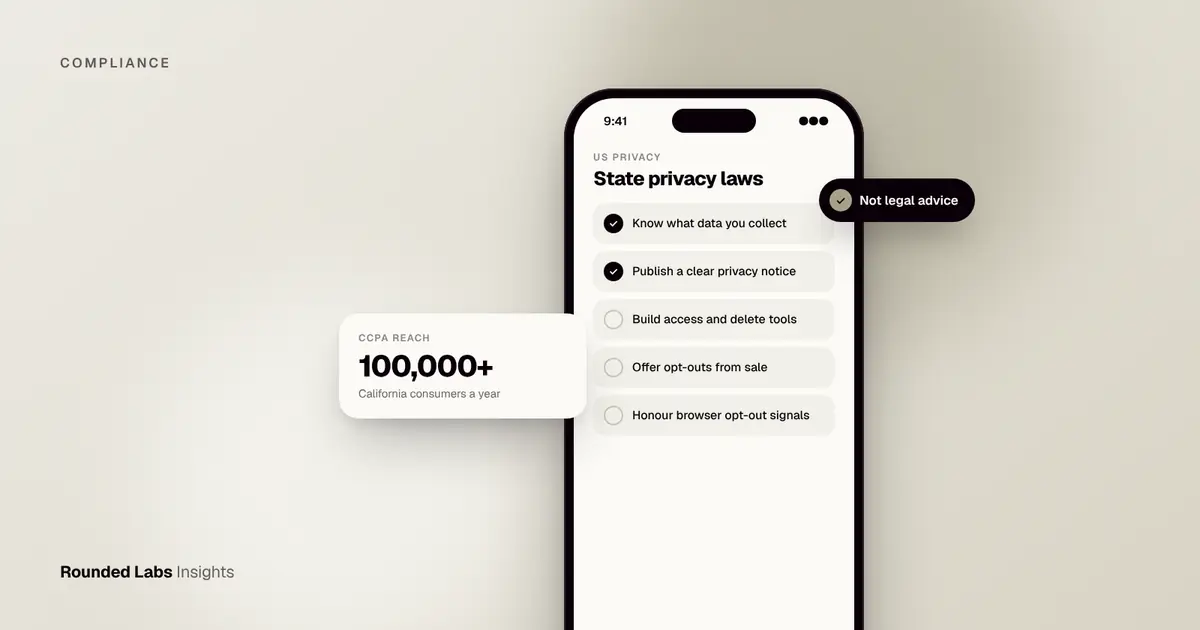
There is no single federal privacy law in the US, so apps must deal with a growing patchwork of state laws, led by California’s CCPA and now joined by roughly 20 other states with comprehensive privacy laws at the time of writing. If your app meets a state’s thresholds, you typically need a clear privacy notice, ways for users to access, delete and correct data, an opt-out from the sale or sharing of data and targeted advertising, and extra care with sensitive data such as health, location and children’s information.
We build apps for clients who sell in the UK, Europe and the US, and we design privacy features once so they work across all three. Rounded Labs has been building mobile software since 2007, and privacy has moved from a footer link to a product requirement in that time. This guide explains what US state laws mean for an app and what to build. It is general information, not legal advice. Laws, thresholds and dates change often, so check the official source for each law and take advice from a US privacy lawyer on your own situation.
Key facts
- CCPA, as amended by the CPRA, applies to many for-profit businesses that collect California residents’ data, based on revenue or data volume thresholds.
- Roughly 20 states had comprehensive privacy laws at the time of writing, including Virginia, Colorado, Connecticut, Texas, Oregon, New Jersey and Minnesota.
- Most require opt-outs from sale of data and targeted advertising; several require honouring browser signals such as Global Privacy Control.
- Sensitive data, including precise location and health data, often needs opt-in consent.
- Health data has extra protection in some states, such as Washington’s My Health My Data Act.
- Most of the work is in the app, not the policy: SDK control, consent state, rights requests and vendor contracts.
Why is US privacy law a patchwork?
In the European Union, one regulation (GDPR) covers most personal data. The US has taken a different path. Congress has passed laws for specific sectors and groups: health data under HIPAA, financial data under the Gramm-Leach-Bliley Act, children’s data under COPPA, education records under FERPA. It has not passed a general consumer privacy law. In the gap, states have legislated, starting with California and followed by a steady stream of others.
For an app owner, this has three practical effects.
- Your obligations depend on where your users live, not where your company is based. A company in London or Berlin can be covered by California law if it does business there and meets the thresholds.
- The laws are similar but not identical. They share a common structure, but definitions, thresholds, exemptions and consent rules differ in ways that matter for design.
- The set keeps changing. New laws take effect on different dates, and existing laws are amended or supplemented by regulations. Treat compliance as a maintained product feature, not a one-off project.
Which laws sit alongside the state laws?
State comprehensive laws sit on top of, and sometimes exempt, sector laws. A health app may have to think about HIPAA, state health data laws and the FTC rules at the same time.
| Area | Main source | Where to read more |
|---|---|---|
| General consumer data | State comprehensive laws (CCPA and others) | This guide, California Consumer Privacy Act for app owners and Virginia, Colorado and Texas privacy laws |
| Children under 13 | COPPA (federal) | COPPA and apps used by children |
| Health data held by covered entities | HIPAA | How to build a HIPAA-compliant app |
| Consumer health data outside HIPAA | State laws and the FTC | FTC Health Breach Notification Rule |
| Financial data | GLBA and state rules | GLBA for fintech apps |
| Biometric data | State laws, notably Illinois | BIPA and biometric data in apps |
| Marketing messages | CAN-SPAM, TCPA | CAN-SPAM and TCPA for app messaging |
| Education records | FERPA | FERPA for education apps |
| Tracking on Apple devices | Platform rules | App Tracking Transparency and US privacy |
For a wider view of how these fit together for a business selling across the UK, US and EU, see App compliance in 2027: what UK, US and EU businesses get wrong.
Does the CCPA apply to my app?
The CCPA applies to for-profit businesses that do business in California and meet at least one threshold, set out by the California Privacy Protection Agency (CPPA):
| Threshold | Notes |
|---|---|
| Annual gross revenue above a set amount | About $26.6 million at the time of writing, adjusted for inflation every two years |
| Buy, sell or share personal information of 100,000+ California consumers or households a year | Includes data shared for cross-context behavioural advertising |
| Derive 50% or more of annual revenue from selling or sharing personal information | Common for ad-funded apps and data businesses |
Small apps with few California users and no data selling are often below the thresholds, but a popular consumer app or one that shares data with ad networks can cross the 100,000 line quickly. The California Attorney General’s page on the CCPA is at oag.ca.gov, and the thresholds are adjusted over time, so check the current figures.
What counts as “doing business in California”?
The term is broad. A company does not need an office or staff in the state. Selling to California residents through an app, or collecting their data, can be enough. If you are a US company with an international user base, assume California users are present unless you have blocked them, and do the threshold maths on real numbers.
A worked threshold check
Imagine a subscription meditation app with 450,000 registered users worldwide. Analytics show about 12% are in California, so about 54,000 users. The company earns $8 million a year, mostly from subscriptions, and shows no ads.
| Test | Result | Covered? |
|---|---|---|
| Revenue above the threshold | $8 million is below the amount | No |
| Handles data of 100,000+ California consumers or households a year | 54,000 registered users, but visitors and devices may push the count higher | Borderline |
| 50% of revenue from selling or sharing data | No, revenue is subscriptions | No |
The second line is the one to examine. If the app shares device identifiers with an analytics or ad network, “sharing” can include those users, and the count may include website visitors and unregistered devices, not just account holders. The app might not be covered today, but growth could change that quickly. A practical response is to build the controls now at modest cost, rather than retrofit them in a hurry when the count rises.
Does the size of the company matter in other states?
Yes, but often in a different way. Most state laws use the number of state residents whose data you process, commonly 100,000, or a lower number such as 25,000 combined with revenue from selling data. A few laws, such as Texas’s, apply broadly to businesses that are not small businesses as defined by the US Small Business Administration, and treat small businesses differently for particular acts, such as selling sensitive data. Florida’s law is aimed at very large companies. Check each law’s definition of “controller” and its thresholds.
What do the other state laws look like?
Most other state laws follow a similar model, often closer to Virginia’s law than California’s. Thresholds are usually based on the number of state residents whose data you process, often 100,000, or a lower number combined with revenue from selling data. Some newer laws, such as Texas’s, apply more broadly to businesses that are not small businesses.
| Feature | CCPA (California) | Typical newer state law |
|---|---|---|
| Right to access, delete, correct | Yes | Yes |
| Opt-out of sale | Yes | Yes |
| Opt-out of targeted advertising | Yes (“sharing”) | Yes |
| Opt-out of profiling with significant effects | Regulations on automated decisions | Yes in many states |
| Sensitive data | Right to limit use | Often opt-in consent |
| Universal opt-out signals (GPC) | Required | Required in a growing number of states |
| Private right of action | Only for certain data breaches | Generally none; enforced by attorneys general |
The IAPP (iapp.org) tracks which states have passed laws and when they take effect. New laws and amendments arrive every year, so check the current official text of each law that applies to you.
Common terms, in plain English
Understanding the vocabulary makes the laws easier to apply to a product.
| Term | Plain meaning | Why it matters to an app |
|---|---|---|
| Controller or business | The organisation that decides why and how data is used | Usually you, the app owner |
| Processor or service provider | A vendor that handles data on your behalf under contract | Hosting, support tools, many analytics tools |
| Third party | A recipient who is not your service provider | Ad networks often fall here |
| Sale | Giving personal data for money or other valuable consideration | Broader than selling a list for cash |
| Sharing (California) | Giving data for cross-context behavioural advertising | Triggered by many ad and attribution SDKs |
| Targeted advertising | Ads based on activity across other businesses’ apps and sites | Needs an opt-out |
| Sensitive data | Categories such as precise location, health, biometrics, race, religion | Often needs opt-in consent |
| Profiling | Automated processing to evaluate or predict personal aspects | Opt-out or assessment in some states |
| Data minimisation | Collect only what is needed for stated purposes | Some states set stricter tests than others |
| Deidentified data | Data that cannot reasonably be linked to a person, with safeguards | Not a free pass; conditions apply |
Differences that change design decisions
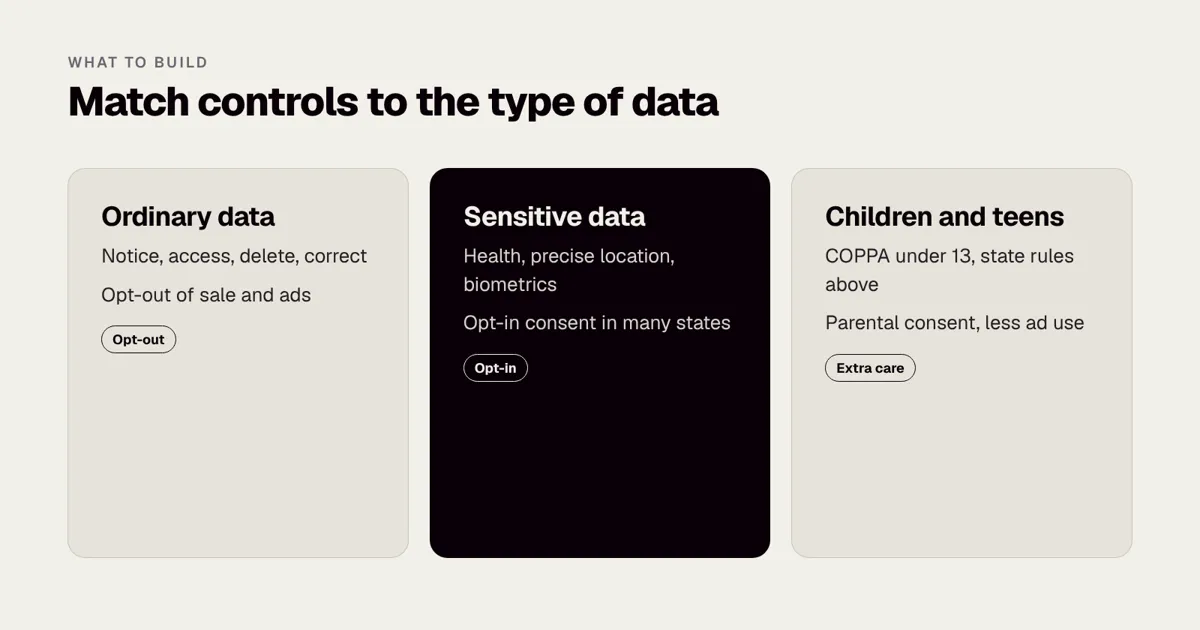
- Opt-in versus opt-out for sensitive data. California generally lets you process sensitive data with a right to limit use, while many other states require opt-in consent first. If you operate in several states, building opt-in consent for sensitive data is the simpler single standard.
- Universal opt-out signals. Several states require honouring signals such as Global Privacy Control. Build it once for everyone.
- Data minimisation. Some laws, such as Maryland’s, set tighter limits on what you may collect and process. Treat “collect only what you need” as a design principle, not a slogan.
- Data protection assessments. Many laws require a documented assessment for activities with higher risk, such as targeted advertising, sale of data, profiling and processing sensitive data. Keep a short template and reuse it.
- Teens and minors. Some states restrict targeted advertising and sale of data for under-18s, and several have age-appropriate design or social media laws, some of which are being challenged in court. Check the current status before you rely on a rule.
- Thresholds and exemptions. Some laws exempt nonprofits, higher education or entities already covered by sector laws such as GLBA. Others exempt only the covered data. Ask your lawyer which applies to you.
Where does the build effort go?
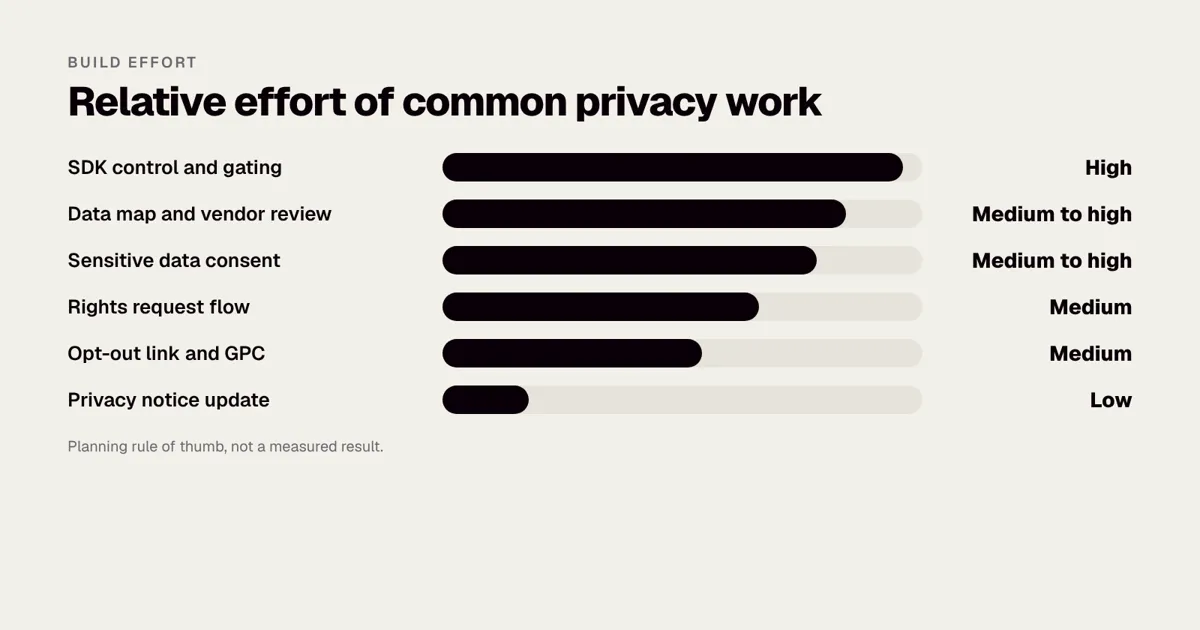
Teams expect the notice to be the big job and find that the real work sits in the code and the vendors. As a planning rule of thumb, not a measured result, the relative effort looks like this.
| Work | Relative effort | Why |
|---|---|---|
| SDK control and gating | High | Every SDK must stop sending data when a user opts out or has not consented |
| Data map and vendor review | Medium to high | Finding every flow and checking every contract takes time |
| Sensitive data consent | Medium to high | Just-in-time screens, stored proof, withdrawal and tests |
| Rights request flow | Medium | Export, correction and deletion across systems and vendors |
| Opt-out link and GPC | Medium | Simple to display, careful to wire up and test |
| Privacy notice update | Low | Quick once the data map is right |
What should the app actually do?
The laws are written for organisations, but compliance happens in product. The eight steps below turn legal duties into build tasks.
1. Know your data. Map what you collect, from which SDKs, and who receives it. Ad networks, analytics and attribution SDKs are where most “sale” and “sharing” happens.
2. Publish a clear privacy notice. Explain categories collected, purposes, retention, and how to exercise rights. Link it from the app store listing and inside the app.
3. Build rights requests into the product. In-app download of personal data, account deletion (also required by Apple and Google for apps with account creation), and correction through profile settings.
4. Offer opt-outs. A “Do not sell or share my personal information” or “Your privacy choices” link, and an in-app setting that actually switches off ad SDKs and data sharing for that user.
5. Honour Global Privacy Control. For web apps, read the GPC signal and treat it as an opt-out where required.
6. Handle sensitive data carefully. Precise location, health, biometrics, racial or ethnic origin, sexual orientation and children’s data need opt-in consent in many states and a “limit use” option in California.
7. Check vendor contracts. Service provider or processor agreements must restrict how vendors use your users’ data.
8. Protect children and teens. COPPA applies to children under 13 nationwide (COPPA and apps used by children), and several states add rules for teenagers.
The sections below go through each in more depth.
Step 1 in depth: the data map
A data map is a table, not a diagram. For each piece of personal data, record what it is, where it is collected, why, where it goes, who receives it and how long you keep it. For an app, start with the SDK list in your build, because each SDK is a recipient.
| Data item | Collected by | Purpose | Recipient | Category under state law | Retention |
|---|---|---|---|---|---|
| Email address | Sign-up form | Account, receipts | Your database, email provider | Identifier | Life of account |
| Device ID | Analytics SDK | Product analytics | Analytics vendor | Identifier | 14 months, say |
| Advertising ID | Ad SDK | Targeted ads | Ad network | Identifier, possible “sharing” | Per vendor |
| Precise location | Location feature | Nearby results | Your server, maps vendor | Sensitive | Delete after use |
| Purchase history | Backend | Support, personalisation | Your database | Commercial information | 7 years for tax, say |
| Health measurements | Wellness feature | Insights | Your database | Sensitive or health data | Until deletion |
Treat the “Recipient” column with suspicion. Many teams are surprised to find that a convenience SDK sends device data to third parties. Our guide How to keep third-party SDKs under control shows how to review them, and the glossary entry on what an SDK is explains the term. A Tech Architecture Audit at £7,500 fixed price includes this kind of review of code and data flows if you want an outside view.
Step 2 in depth: the privacy notice
A good notice is accurate before it is attractive. It should say what you collect in the last twelve months by category, why, whether you sell or share it, how long you keep it and how users exercise their rights, including how to appeal a decision where the state requires it. Write it in plain language, link it in the app’s settings, onboarding and store listing, and update it when the data map changes. Our guide How to write an app privacy policy covers structure and wording. Keep the notice and the app in step: a notice that says you do not share data while an SDK does exactly that is a common source of regulatory trouble.
Step 3 in depth: rights requests
The core rights are to know and access, delete, correct and, in some states, to port data. Most laws require a response within a set period, commonly 45 days with a possible extension, but check the exact period in each law. Design for the whole lifecycle:
- Intake. In-app buttons, a web form and an email address. Make the method match how users normally contact you.
- Verification. Confirm the requester is the account holder without asking for more data than you already hold.
- Search. Know which systems hold data about a person, including backups, logs and vendor tools.
- Action. Export, correct or delete, and instruct vendors to do the same.
- Record. Log the request, dates and outcome, since regulators can ask for evidence.
- Appeal. Several states require an appeal route when you refuse a request.
For deletion specifically, see How to handle data deletion requests. Apple and Google both expect apps that let people create accounts to offer in-app account deletion, so build it once and use it for legal requests too. Authorised agents, who act on behalf of consumers, are recognised in some states, so decide how you will verify them.
Step 4 in depth: opt-outs and the “Your privacy choices” link
If you sell personal data, share it for cross-context behavioural advertising or use it for targeted advertising, users need an easy way to opt out. On the web this is a link in the footer. In an app, put it in settings and, where practical, in the privacy notice and onboarding. California’s regulations also require the opt-out to be as easy as opting in, and prohibit interfaces that nudge users to the less private choice, sometimes called dark patterns. The main design rules:
- Use clear words and a neutral layout. Do not hide the choice or use guilt wording.
- Apply the choice to the user’s account across devices when they are signed in, and to the device when they are not.
- Make the choice take effect in the code, not only in a database flag. The SDK that sends data must not fire after an opt-out.
- Keep the choice for the period the law requires before asking again.
Step 5 in depth: Global Privacy Control
Global Privacy Control (GPC) is a browser signal, described at globalprivacycontrol.org, that tells a website a user wants to opt out of sale and sharing. California and several other states require businesses to treat it as a valid opt-out request. In practice, your web app must detect the signal and switch off the relevant sharing for that browser, and for the signed-in account if there is one. Native iOS and Android apps do not receive a browser signal in the same way, but you should still provide in-app controls and honour opt-outs consistently across your web and app experiences.
A short test plan for GPC:
- Turn on GPC in a supporting browser.
- Load your site and open developer tools to check which third-party requests fire.
- Confirm that ad and sharing tags do not load, or that data is not sent.
- Sign in, and confirm that the account’s opt-out status is recorded.
- Repeat after each release, since marketing tags are often added without engineering review.
Step 6 in depth: sensitive data and consent
Sensitive data categories vary by state but usually include precise geolocation, health information, biometric and genetic data, racial or ethnic origin, religious beliefs, sexual orientation, citizenship or immigration status and data of known children. Many states require opt-in consent before processing. Valid consent generally means a clear affirmative act, specific to the purpose, freely given, informed and easy to withdraw. Pre-ticked boxes, bundled consents and consent buried in terms do not meet the standard.
For apps, this means:
- Ask for consent at the moment of need, with a short explanation of the benefit, not on first launch for everything at once.
- Store consent with a timestamp, version of the text and the state of each choice.
- Provide a settings screen to withdraw consent, and stop processing when the user does so.
- Do not collect precise location in the background unless the feature truly needs it. See How to add maps and location tracking to your app.
- Check the interplay with platform prompts. Apple’s App Tracking Transparency prompt, covered in App Tracking Transparency and US privacy, and operating system permission dialogs are not a substitute for legal consent.
Step 7 in depth: vendor contracts
Most state laws require a contract between controllers and processors setting out instructions, duties of confidentiality, security, deletion or return of data, and audit rights, and prohibiting the vendor from using the data for its own purposes. California requires specific terms for “service providers” and “contractors”, and if a vendor uses data for its own advertising, it is a “third party” and the disclosure may be a sale or sharing.
| Vendor type | Typical status | What to check |
|---|---|---|
| Cloud hosting | Service provider | Contract terms, security, data location |
| Crash reporting | Service provider | Whether data is used for the vendor’s own purposes |
| Product analytics | Service provider or third party | Settings that limit use, such as turning off data sharing |
| Ad network | Third party | Treat as sale or sharing, offer opt-out |
| Attribution tool | Third party in many setups | Configuration, data fields passed |
| Customer support tool | Service provider | Access controls, retention |
| AI model provider | Service provider if terms restrict use | No training on your data, retention, location (see Making AI features safe) |
Keep a register of vendors, the contract date, the data they receive and the owner on your team. When you raise investment or sell the business, this register will be requested; see How to prepare an app for due diligence.
Step 8 in depth: children and teens
COPPA applies to operators of apps directed to children under 13, and to apps with actual knowledge that they collect data from children under 13. It requires verifiable parental consent, among other duties, and the Federal Trade Commission (ftc.gov) enforces it. Many state laws treat data of known children as sensitive and some add restrictions for teenagers, such as banning targeted advertising to users under 18 or requiring opt-in for sale of data. Several states have also passed laws on age-appropriate design and social media; some are subject to legal challenge, so check current status. If your app is aimed at young people, read COPPA and apps used by children and, if you also serve UK users, the ICO children’s code for apps.
Not sure which state laws apply to your app? We audit your SDKs and data flows and build the opt-outs, consent and data rights your users need. Book a 30-minute call with a co-founder.
How does this compare with GDPR?
US state laws are mostly opt-out: you can process data by default, but must let people stop sale, sharing and targeted advertising. GDPR is opt-in for most tracking and needs a lawful basis for everything. If you launch in both markets, building to the stricter GDPR model and adding US-specific links and GPC handling usually covers both. See GDPR for US companies launching an app in Europe.
| Question | US state laws (typical) | GDPR and UK GDPR |
|---|---|---|
| Default for ordinary data | Allowed, with notice and opt-out | Needs a lawful basis such as consent or legitimate interests |
| Tracking and ads | Opt-out of sale, sharing and targeted ads | Consent required for most non-essential tracking |
| Sensitive data | Often opt-in | Special category data needs a stricter basis |
| Rights | Access, delete, correct, opt-out | Wider set, including objection and restriction |
| Enforcement | Attorneys general, in California the CPPA | Data protection authorities, with higher maximum fines |
| Transfers abroad | Few restrictions in state laws | Restricted, see EU-US Data Privacy Framework for apps |
For UK readers, UK GDPR lawful bases for apps and The UK Data (Use and Access) Act 2025 set out the home rules. A company that sells in all three regions should have one consent and preferences service, with regional rules applied by configuration, instead of three separate builds. That is how we design apps for clients such as those described in How to launch an app in the US from the UK.
What about health data outside HIPAA?
Many health and wellness apps are outside HIPAA but not outside the law. Washington’s My Health My Data Act and similar laws in Nevada and Connecticut require consent before collecting consumer health data and give users strong rights, including a private right of action in Washington. The FTC also enforces its Health Breach Notification Rule against apps that share health data without authorisation. How to build a HIPAA-compliant app covers HIPAA apps.
Is my app handling “consumer health data”?
Consumer health data is broader than medical records. It can include data about fitness, sleep, diet, reproductive health, mental health, medication, symptoms and even inferences drawn from other data. The table shows how common app features map to risk.
| App feature | Likely treatment | Design response |
|---|---|---|
| Step count shown only on the device | Low risk if not collected | Keep local where possible |
| Sleep tracking sent to your servers | Consumer health data in some states | Consent before collection, deletion path |
| Period or fertility tracking | High sensitivity | Strict consent, no ad SDKs, minimal retention |
| Symptom checker | Health data, maybe medical device issues | Consent, careful claims, see FDA rules for medical device software |
| Mental health journal | High sensitivity | Strict consent, no sharing with advertisers |
| Gym check-in with location | Location and fitness data | Avoid precise location unless needed |
Health data and advertising SDKs are a difficult mix. If you collect health data, review each SDK and remove any that send identifiers alongside health events. The FTC’s site is ftc.gov, and HHS publishes HIPAA material. Our guide HIPAA Security Rule technical safeguards covers the security side for regulated apps.
What do the app stores add?
Apple and Google require apps to disclose data practices in their store listings, and the disclosures must match what the app and its SDKs do. Apple’s privacy “nutrition labels” and Google Play’s data safety section are not state law, but they are public statements, and inaccurate ones can lead to store action and may be treated as misleading by regulators. See App store privacy labels and Google Play data safety section. Check the stores’ current policies on developer.apple.com and the Android developer site, since requirements, including account deletion rules, change.
A habit that prevents drift: whenever you add or update an SDK, run a short checklist covering what it collects, who receives the data, whether the privacy notice and store disclosures are still accurate and whether an opt-out controls it.
What does a worked example look like?
Imagine a US wellness app, “StrideWell”, with 300,000 users across the states, including 40,000 in California. It offers workout plans, sleep tracking and a paid tier. It uses an analytics SDK, an ad network on its free tier, an attribution tool and a cloud database. It also lets users add their weight and sleep patterns.
What does the law probably require?
| Practice | Likely requirement |
|---|---|
| Ads on the free tier through an ad network | Opt-out of sale and sharing, “Your privacy choices” link, honour GPC on the web |
| Weight and sleep data | Consumer health data: opt-in consent in several states, strong deletion rights |
| Attribution tool receives device IDs | Treat as sharing unless contract and configuration make it a service provider |
| 40,000 California users plus other states | Likely above thresholds in several states once visitors and devices are counted |
| Under-13 users possible | Age screen, no collection from children without parental consent |
| Account creation | In-app account deletion and data export |
What would the team build?
| Work item | Description | Effort (market estimate) |
|---|---|---|
| Data map and vendor review | Inventory SDKs and data flows, update contracts | 1 to 2 weeks |
| Consent and preferences service | Stores choices, applies them to SDKs, supports withdrawal | 2 to 4 weeks |
| Rights request flow | In-app export and deletion, admin tools for requests | 2 to 4 weeks |
| Web GPC handling | Detect signal, switch off tags, record account state | 3 to 5 days |
| Health data consent screens | Just-in-time consent with plain language | 1 to 2 weeks |
| Privacy notice and store disclosures | Rewrite and align with the data map | 3 to 5 days |
| Testing | Network traces, consent state tests, regression checks | 1 to 2 weeks |
These are rough planning estimates for a team working on the project, not quotes. Real effort depends on how clean the existing code is. Rounded Labs prices projects at a fixed price agreed before development starts, typically £30,000 to £250,000+, and privacy features are scoped as part of that build, not billed as surprises; see our pricing page. For an existing app, our Tech Architecture Audit at £7,500 fixed price is a quick way to find out what SDKs send and where the gaps are before you scope the work.
What would the decisions be?
StrideWell has three options for the ad SDK. It can remove ads on any screen that shows health data. It can keep ads, but disable the identifiers for users who opt out and for all users in health sections. Or it can move to contextual advertising, which does not need personal identifiers. The third costs some ad revenue but removes the largest source of risk. A business decision, not a legal one, but legal advice should inform it.
How should you think about enforcement and fines?
Enforcement of state laws is carried out mostly by attorneys general, and in California also by the California Privacy Protection Agency. Public enforcement has so far included cases about opt-out signals, consent interfaces and failure to honour rights requests. Penalties are usually set per violation, and some states provide a period to fix a problem after notice, though several have ended or are ending that cure period, so do not count on it. Because a violation can be counted per affected user, totals can grow quickly. Check the regulator’s current guidance and published actions on cppa.ca.gov and oag.ca.gov, and see the sector-specific enforcement notices on ftc.gov.
Washington’s My Health My Data Act is different, because it allows individuals to bring claims. That raises the stakes for health apps, which is why our advice for them is to design for consent first and avoid advertising identifiers altogether.
Breaches are another source of risk. California gives individuals a limited private right of action for certain data breaches caused by failure to keep reasonable security. Plan your security as well as your privacy: How to prepare for a security audit, How to handle a data breach in an app and What is penetration testing for apps? help here. If you sell to enterprises, the security questions will also bring up SOC 2 for startups.
What mistakes do app owners make?
- Assuming they are too small. Counting only registered users, not devices and visitors, understates exposure.
- Treating the policy as the work. A perfect notice does not help if SDKs ignore opt-outs.
- Opt-out that does nothing. A switch that changes a database flag but leaves SDKs running is worse than no switch, because it is a misleading statement.
- Forgetting the web. Marketing sites, landing pages and web apps have tags that fire before consent or after GPC.
- Ignoring vendor changes. An SDK update can add data collection. Review after each upgrade.
- Bundled consent. One tick box for terms, marketing and sensitive data fails the standard in many states.
- Collecting precise location by default. Ask only when needed, and prefer approximate location.
- No deletion path in the app. Users and platforms expect it.
- Keeping data forever. Retention rules need to exist and be applied.
- No owner. Privacy needs a named person and a review rhythm.
- Copying another company’s notice. Notices must describe your own practices.
- Overlooking AI. If you send user data to a model provider, that is a disclosure to a vendor and perhaps a sale or sharing, depending on the terms. See How to keep customer data out of AI training and, for the emerging AI laws, Colorado AI Act for app builders.
How do you keep compliance running after launch?
Launching with the right controls is half the job. Laws, SDKs and features keep changing.
| Rhythm | Task |
|---|---|
| Every release | Check that new features and SDKs are in the data map, notice and opt-out logic |
| Every quarter | Review rights request logs, vendor register and consent rates |
| Every six months | Re-run GPC and network tests, check store disclosures against the app |
| Every year | Re-check thresholds by state, update the notice, review assessments and training |
| On a new law | Read the official text, note effective date and differences, adjust configuration |
Track which new laws take effect using the IAPP state law tracker and the regulators’ own sites. For analytics, make sure the events you track respect consent; see App analytics: what to track from day one and the entries on consent management platforms and cookie banners. For web cookie consent, How to add cookie consent to a web app gives the build steps.
Who should own privacy in a small team?
In a small business, privacy often falls to whoever notices. Choose one owner, usually the product lead or the founder, give them a short list of tasks, and bring in a privacy lawyer for interpretation and a developer for implementation. Larger companies add a privacy officer and a review board. What matters is that someone is accountable and that privacy changes are part of the release process, not a surprise in a legal email.
Which is the right plan for your situation?
The three examples below are illustrative, not client case studies.
A pre-revenue startup with a small US user base. You are probably under the thresholds, but you are collecting the habits that will matter later. Build a clean data map, keep the SDK list short, publish an honest notice, offer account deletion and design consent for sensitive data from the start. Cost is modest now, and expensive to retrofit later.
A growing consumer app with ads and 500,000 users. You are likely covered by several laws. Prioritise the consent and preferences service, SDK gating, GPC on the web, rights request tooling and vendor contracts. Do a data protection assessment for targeted advertising. Consider whether a contextual advertising model would reduce risk.
A health or fintech app. You may be under sector law as well as state law, and have the most sensitive data. Get specialist advice, design for opt-in consent, avoid advertising SDKs, and invest in security and audit logs. See How to build a HIPAA-compliant app, GLBA for fintech apps and PCI DSS for apps that take payments.
What should you do next?
- Count your users by state, including visitors and devices, and compare with the thresholds.
- List every SDK and vendor, and what each receives.
- Check that your notice matches reality, and that the store disclosures do as well.
- Build or fix in-app deletion and data export.
- Add an opt-out that stops data leaving the app, and test it with network traces.
- Add GPC handling on the web.
- Move sensitive data to opt-in consent, collected at the moment of need.
- Put contracts with vendors in order.
- Set a review rhythm and name an owner.
- Take legal advice on your own situation.
If you would like a technical review of what your app sends, where, and what to build, talk to a co-founder and we will scope it at a fixed price before any work begins. Our experience across retail and consumer apps, including the Superdry app for a brand with 768 locations in over 100 countries and the app, mobile site and eBooks API we delivered for Waterstones in 12 weeks, taught us that consent and data flows are far cheaper to design in than to bolt on.
Frequently asked questions
Does CCPA apply to apps outside California?
It can. The CCPA applies to businesses that do business in California and meet its thresholds, wherever they are based. An app with many California users can be covered even if the company is in another state or country.
Do I need a "Do Not Sell" link in my app?
If you are covered and you sell or share personal information, including sharing for targeted advertising, you need a clear opt-out method. In apps this is usually a link or setting in the privacy menu.
What is Global Privacy Control?
A browser setting that sends a signal telling websites the user wants to opt out of the sale or sharing of their data. California and several other states require businesses to treat it as a valid opt-out request.
How much can CCPA fines be?
The CPPA and California Attorney General can impose administrative fines of several thousand dollars per violation, higher for intentional violations or those involving minors. The amounts are adjusted over time, so check the current figures with the regulator. Because each affected user can be a separate violation, totals can grow quickly.
Is there a federal privacy law coming?
Federal bills have been proposed several times without passing. Until one does, plan for state laws, which keep growing in number.
Do state privacy laws apply to B2B apps?
Some laws exclude data about individuals acting in a commercial or employment context, and others, including California’s, cover employee and business contact data. The rules differ by state and have changed over time, so check the definitions of “consumer” in each law that applies to you and take advice.
Can I use one global privacy policy for the US, UK and EU?
You can use one document with regional sections, but it must accurately describe your practices in each region and include the specific disclosures each law requires. In the product, apply regional rules through configuration, so users in each area get the right consents and choices.
Official sources and further reading
Talk it through with one of our co-founders. 30 minutes, no pressure.