

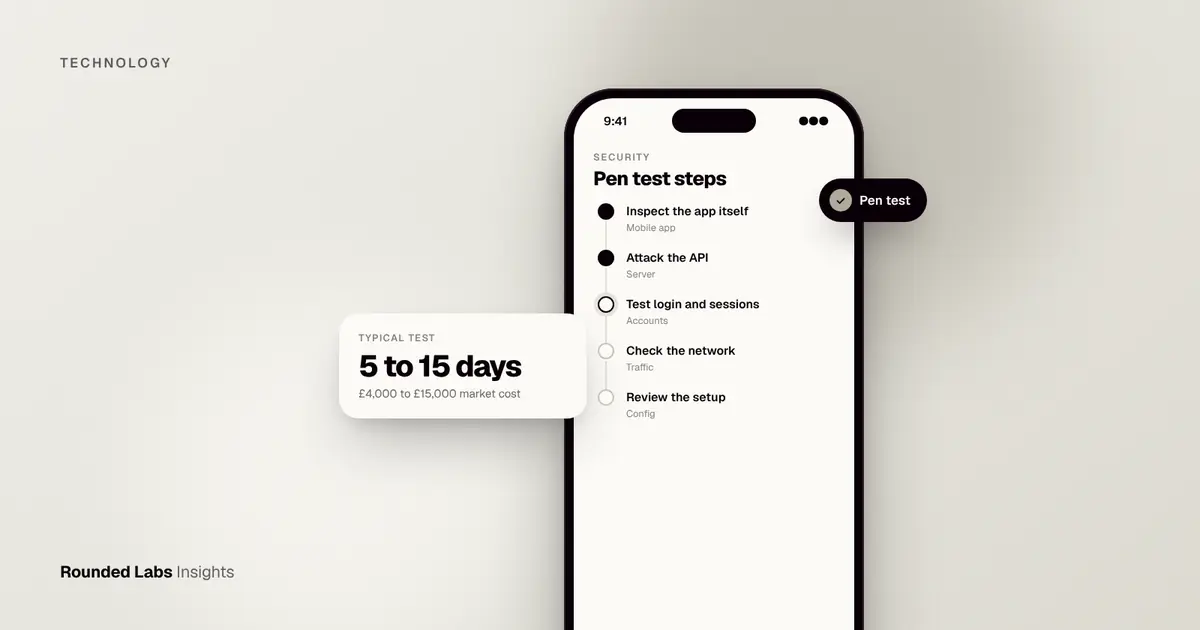
Penetration testing is an authorised attack on your app by a security specialist, who tries to break in as a criminal would and then reports what they found and how to fix it. For a typical mobile or web app it takes 5 to 15 working days and costs roughly £4,000 to £15,000 at market rates.
We built MoBank, the UK’s first mobile banking app, so testing the security of an app that holds real money has been part of our work for a long time. This guide explains what a penetration test covers, how it differs from automated scanning, what it costs, when to schedule it and what to do with the report. Our mobile app development service includes security planning from the first sprint, and the MoBank case study shows how that looked on a regulated product.
Key facts
- A penetration test (or “pen test”) is manual, goal-driven testing by a person. A vulnerability scan is an automated tool. You usually want both.
- Most apps need a test before launch, after major changes and at least once a year after that.
- Typical market cost for a single mobile or web app is £4,000 to £15,000, or about $5,000 to $19,000. Complex apps with several back-end services cost more.
- The output is a written report that ranks each finding by severity and explains how to fix it. It is not a certificate that you are secure.
- Many enterprise customers, banks and payment partners will ask for a recent test report before they sign.
- All cost figures here are market estimates, not quotes. Rounded Labs builds to a fixed price agreed before development, and recommends an independent tester for a formal test.
What does a penetration tester actually do?
The tester agrees a scope with you in writing, then works through the app the way an attacker would. For a mobile app that usually means:
- Inspecting the app itself. They unpack the installed app to see whether secrets, keys or private data are stored on the phone where they can be read.
- Attacking the API. Most serious problems live in the server, not the screen. Testers try to read another user’s data, skip login steps or change a price in a request.
- Testing login and sessions. Weak password reset flows, tokens that never expire and missing rate limits are all common findings.
- Checking the network. They look for traffic that can be intercepted or altered.
- Reviewing the setup. Open storage buckets, exposed admin pages and out-of-date components often turn up here.
The standards testers use are public. The OWASP Mobile Application Security project publishes a verification standard and testing guide, and we explain the checklist side in Mobile app security checklist: OWASP MASVS in plain English.
The stages of a test, from first call to retest
A professional test follows a predictable path, and knowing it helps you plan.
| Stage | What happens | Who does it | Typical time |
|---|---|---|---|
| Scoping | Agree what is in and out of scope, test dates, accounts, rules of engagement | You and the tester | 1 to 2 hours of calls, plus a written scope |
| Preparation | Set up a test environment and test accounts, share documentation | Your team | 1 to 3 days |
| Testing | Manual and tool-assisted attacks within the agreed scope | Tester | 5 to 15 working days |
| Reporting | Findings written up with evidence, severity and fixes | Tester | 2 to 5 days |
| Debrief | Walk-through of the report, questions and priorities | Both | 1 hour |
| Fixing | Developers address findings | Your team | Days to weeks |
| Retest | Tester checks that the fixes work | Tester | 1 to 3 days |
The retest is the stage most often forgotten at the quoting stage. Without it you have a list of problems and no evidence that they were solved.
What a tester looks for, area by area
The OWASP Mobile Application Security Verification Standard groups its checks into areas. The table below translates them into plain English with a typical example of what goes wrong.
| Area | Plain English | Example of a finding |
|---|---|---|
| Storage | What the app keeps on the phone | An access token saved in plain text where another app on a rooted phone can read it |
| Cryptography | How data is scrambled | A home-made encryption routine, or a key written into the app code |
| Authentication | Proving who you are | A password reset link that never expires |
| Network | How data travels | The app accepts any certificate, so traffic can be intercepted on public wifi |
| Platform | How the app uses the phone | A deep link that opens a sensitive screen without a login |
| Code quality | Mistakes in how the app is written | Debug features left switched on in the release build |
| Resilience | How hard the app is to tamper with | No checks at all on a payment app that holds funds |
| Privacy | What the app collects and shares | Analytics sending personal data that the privacy notice does not mention |
Each area has relevance for different apps. A game with no accounts has little to protect in authentication. A banking app has plenty to protect in all of them.
How is a pen test different from a vulnerability scan?
| Vulnerability scan | Penetration test | |
|---|---|---|
| Who does it | Automated software | A security specialist using tools and judgement |
| What it finds | Known, common weaknesses | Known weaknesses plus logic flaws and chained attacks |
| Typical cost | Low, often built into a tool subscription | £4,000 to £15,000 per app (market estimate) |
| Frequency | Continuous or on every release | Before launch, after big changes and yearly |
| Weak spot | Cannot understand your business rules | Only covers what was in scope on the test days |
A scanner will not notice that a customer can view someone else’s invoice by changing a number in a web address. A person will. Equally, a pen test is a snapshot, so scanners between tests catch new problems quickly.
Where other kinds of security work fit
“Pen test” is sometimes used loosely for several different services. Knowing the differences stops you buying the wrong one.
| Service | What it is | Best used for | Limits |
|---|---|---|---|
| Vulnerability scan | Automated check for known flaws | Routine checks on every release | Misses logic and business rule flaws |
| Static code review | Reading the source for risky patterns, by tools or people | Finding flaws early, before a build exists | Cannot see how the live system is configured |
| Penetration test | Manual attack against the running app and its services | A formal, independent view before launch | A snapshot in time, limited by scope |
| Architecture review | Assessing the design of the whole system | Spotting structural risks | Does not exploit anything in practice |
| Bug bounty | Paying outside researchers for valid findings | Mature products with a security team | Needs triage effort and clear rules |
| Red team exercise | A long, goal-based simulation of a real attacker, including people and processes | Large organisations testing their defences | Costly and not suited to a young product |
Most founders need the first four in some combination. Bug bounties and red teams belong to later stages. If you are inheriting or doubting an existing code base, How to audit an existing app’s code explains how a code audit differs from a security test, and our fixed-price Tech Architecture Audit at £7,500 is a review of how an app is built. It is not a penetration test, and we say so plainly, because the two answer different questions.
What types of test are there?
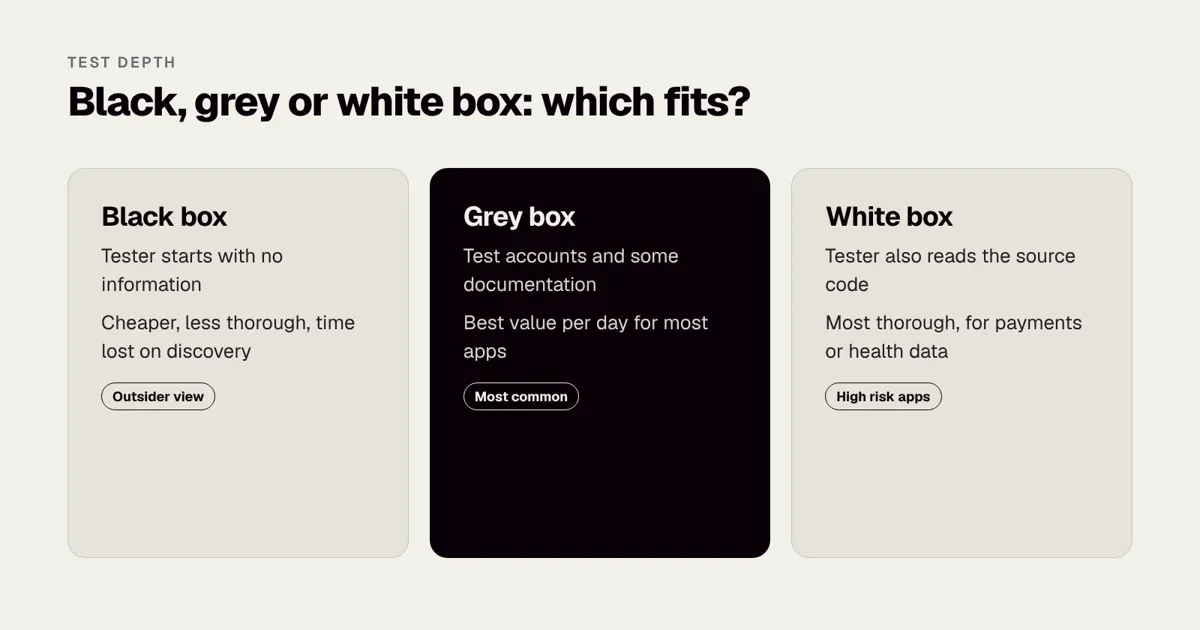
- Black box. The tester starts with no information, like an outsider. Cheaper, but less thorough, because time goes on discovery.
- Grey box. The tester gets test accounts and some documentation. This is the most common choice for apps and gives the best value per day.
- White box. The tester also sees the source code. The most thorough, and best for high-risk products such as payments or health data.
For most founders, grey box on the mobile app and its API is the right starting point.
Choosing the depth: a decision table
| Your situation | Suggested type | Reason |
|---|---|---|
| Simple app, little personal data, no payments | Scanning and code review first, then black or grey box if budget allows | Risk is modest |
| Typical business app with accounts and an API | Grey box on the app and the API | Best value for time |
| Payments, financial data or health data | Grey box at minimum, white box where the budget allows | Impact of failure is high |
| A customer or regulator requires evidence | Whatever the requirement states, performed by an independent firm | The report must satisfy a third party |
| App built by an outside supplier you do not know | Grey or white box | You cannot assume the build is sound |
What can be in scope
Scope is where cost and value are decided. A typical app has several parts, and each can be included or left out.
| Component | Usually in scope? | Notes |
|---|---|---|
| iOS app | Yes | Testing the installed build on a real device |
| Android app | Yes | A separate test, since the platforms behave differently |
| The API behind the app | Yes | Where most serious findings are found |
| Web admin panel | Yes, if it exists | Often the most privileged part of the system |
| Cloud configuration | Often | Storage, databases, access policies |
| Third-party services you use | Rarely | Usually the supplier’s responsibility, and may need their permission |
| Social engineering of staff | Rarely | A separate service with its own rules |
| Denial of service | Almost never | Risky for live systems and normally excluded |
Scope that is too narrow leaves the weakest part untested. Scope that is too wide spreads the days thin. The test should follow the data: wherever customer information or money moves, include it.
What does it cost?
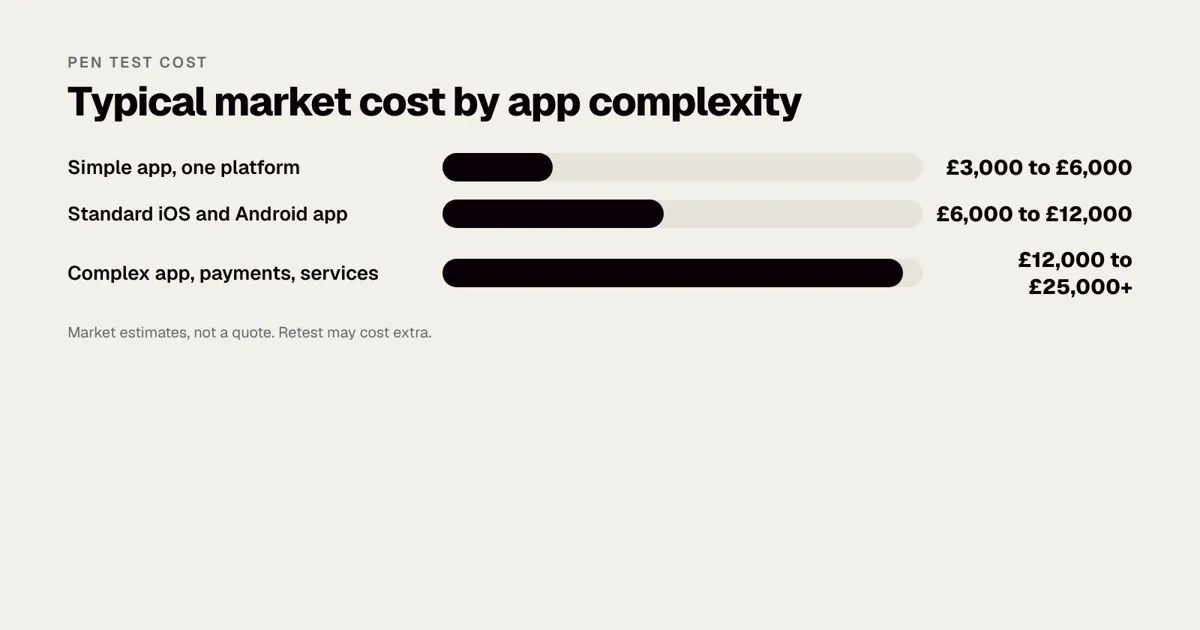
Prices vary by supplier and by region, so treat these as market estimates rather than quotes.
| App type | Typical effort | Market cost (approx.) |
|---|---|---|
| Simple app, one platform, small API | 3 to 5 days | £3,000 to £6,000 |
| Standard app on iOS and Android with an API | 5 to 10 days | £6,000 to £12,000 |
| Complex app with payments, integrations or several services | 10 to 20 days | £12,000 to £25,000+ |
Re-testing after you fix the findings is sometimes included and sometimes charged separately, so ask before you sign. If you are comparing total security spend, our pricing page explains how a fixed-price build is structured and where security work sits inside it.
Not sure what your app needs tested? A short conversation usually settles the scope and budget. Book a 30-minute call with a co-founder and we will tell you what we would test first.
What drives the price up or down
| Factor | Effect on cost | What you can do |
|---|---|---|
| Number of platforms | Each platform needs its own testing | Test the platform with most users first if budget is tight |
| Size of the API | More endpoints mean more days | Provide an up-to-date API description |
| Test depth | White box costs more per day but finds more | Match depth to risk |
| Quality of preparation | Delays and broken test accounts waste paid days | Prepare the environment before day one |
| Reporting detail | Executive summaries and compliance-style reports take longer | State up front who will read the report |
| Retest included | Adds cost, but is needed | Ask for a quoted retest allowance |
| Urgency | Short notice usually costs more and may not be available | Book 2 to 6 weeks ahead |
Costs people forget
The tester’s fee is not the whole spend.
- Fixing time. A report with ten findings may need a week or more of developer time. This is often larger than the test fee on a weak codebase.
- Retest fee, if it was not included.
- Environment cost. A separate test environment needs hosting and test data.
- Project time. Someone on your team will spend a few days answering questions and supporting the test.
- Customer evidence. Some customers want an attestation letter as well as a report, which may cost extra.
A realistic planning figure is a test fee plus an equal amount again for fixing and retesting, for a first test of an app that has not been tested before. Apps built with security in mind from the start tend to need less, which is why we plan it from the first sprint. For a wider cost view see The hidden costs of building an app: store fees, hosting and APIs.
Market rates and what they buy
At the cheap end, a very low price usually means a scanner run with a templated report. At the middle, you get a named person doing manual testing across the app and API. At the upper end, you get depth, a senior team, a more detailed report and often a stronger name behind the letter that customers see. For a founder, the middle is usually the right place. Pay more only when a customer, regulator or partner requires a specific kind of provider.
When should you schedule a test?
The best time is after the app is feature complete but before public launch, while there is still room to fix things without delaying a release. A realistic order of events:
- During build. Automated scanning and code review as part of normal quality work. See App testing explained: QA, UAT and beta testing.
- Two to four weeks before launch. The pen test itself, on a stable build.
- Launch week. Fix critical and high findings, then ask the tester to confirm the fixes.
- Every year after, and after major changes such as a new payment provider, a new login method or a large new feature.
Events that should trigger a new test
| Event | Why it matters |
|---|---|
| New login method or identity provider | Authentication flaws are among the most serious |
| Adding payments or changing the payment provider | Money moves, and so does the risk |
| A new third-party integration with access to user data | A new route in |
| Moving to a new cloud provider or restructuring the back end | Configuration errors appear after a move |
| A major redesign or rebuild | New code means new flaws. See How to plan an app redesign |
| An incident or near miss | Check that the root cause is closed |
| A customer or regulator asks for a current report | Many want one from the last 12 months |
A worked example
Imagine a founder launching a fintech app with a budget of £80,000. They book a grey box test for week 14 of a 16-week plan. The tester finds one high-severity issue (users can view other users’ transaction history by editing a request) and four medium issues. The team fixes them in a week and pays for a re-test. Because the test happened before launch, the fix cost a few days of work. Found after launch, the same flaw would have been a data breach to report to the regulator and to customers.
A second example: a business app for field staff
A company with 200 field engineers commissions an internal app that stores job records, photos and customer addresses. The app has no public store listing, so the founder assumes testing is optional. A grey box test in the last month finds that the photo upload address can be guessed, so anyone with a login can view photos from other engineers’ jobs, including customers’ homes. The fix is a day of work. The lesson is that an internal app holding customer data deserves the same checks as a public one, and that “only our staff use it” is not a security control. See Internal staff apps: replacing spreadsheets and paper for how these apps are usually built.
How do you choose a tester?
The market ranges from solo specialists to large consultancies, and the quality varies. Look at five things.
- Accreditation and track record. Look for recognised schemes. In the UK, bodies such as CREST accredit penetration testing firms, and the National Cyber Security Centre publishes guidance for buyers. Check each scheme’s own site for the current requirements and member list.
- Mobile experience. Mobile testing is a specialism. Ask which mobile apps they have tested, and with what tools and standards. A good answer mentions the OWASP mobile standard by name.
- Independence. The firm that built the app should not mark its own work. An independent view is the point.
- A sample report. Ask for a redacted example. It should show clear steps to reproduce, severity ratings, screenshots and practical fixes, not only a list of tool output.
- Communication. A good tester tells you straight away about a critical finding, rather than saving it for the final report.
Questions to ask before you sign
- Who will do the testing, and what is their experience on apps like ours?
- Which standards and guides will you test against?
- What exactly is in scope, and what is not?
- Is the retest included, and for how long after the report?
- What do you need from us, and by when?
- How do you handle our data during and after the test?
- What insurance do you hold?
- Can you provide a letter or summary we can show customers?
- How will you tell us about a critical finding during the test?
Red flags
- A fixed price quoted without asking what the app does.
- A promise to “find everything” or to certify the app as “secure”.
- A sample report that is only scanner output.
- No named tester and no description of experience.
- No mention of retest.
- Pressure to start immediately with no written scope or authorisation.
If you are comparing suppliers more broadly, 20 questions to ask an app developer before you sign and Red flags when hiring app developers share the same habit of asking for evidence, not promises.
How do you prepare for a test?
Preparation decides whether the paid days are spent testing or waiting. Work through this list in the week before the test.
- Freeze the build. Test a stable version, and tell the tester the exact build number. Changes mid-test waste time.
- Use a test environment, not live data. It should match production closely, with realistic but fake data. Testing against production can be done, but it carries risk and needs extra care.
- Create test accounts for each user type: an ordinary user, a second ordinary user (so the tester can try to reach the first one’s data), an administrator and a user with limited permissions.
- Supply documentation: an API description, architecture diagram, list of third-party services and a note of known issues.
- Check permission for third parties. Cloud and service providers publish their own rules for security testing. Read those for each service in scope, and request permission where required.
- Agree a contact and a channel for questions and urgent findings during the test.
- Back up the test environment so you can restore it if testing damages data.
- Sign the authorisation. A written agreement that names the tester, dates, scope and rules of engagement protects both sides.
- Warn the right people. Your hosting team and any monitoring or security service should know that test traffic is expected, so it does not trigger an incident response.
What the tester will ask you
Expect questions about where the app stores data, which accounts hold special powers, what your most sensitive actions are (such as paying, deleting or exporting) and what a successful attack would look like for you. The more precisely you answer, the better the tester can aim their days.
What happens during an eight-day test?
Every test differs, but a typical eight-day engagement on a grey box mobile app with an API looks like this.
| Day | Activity |
|---|---|
| 1 | Kick-off, access checks, mapping the app and API |
| 2 | Inspecting the app build, local storage, configuration and network behaviour |
| 3 | Authentication, registration, password reset and session handling |
| 4 | Authorisation: trying to reach other users’ data and admin functions |
| 5 | Business logic: prices, limits, discount codes, order states, abuse cases |
| 6 | Input handling, file uploads, injection and error handling |
| 7 | Cloud and back-end configuration, third-party services, outdated components |
| 8 | Confirming findings, gathering evidence, starting the report |
Two or three more days usually follow for the report. A good tester raises anything critical straight away, which means you may need a developer on hand during the test, not only after it.
What does the report look like, and how do you read it?
A good report has an executive summary for non-technical readers, a description of scope and method, and a list of findings. Each finding gives a title, a severity, the affected area, steps to reproduce, evidence, the risk if exploited and a recommended fix.
| Severity | Meaning | Typical response |
|---|---|---|
| Critical | Easy to exploit and with severe impact, such as full access to all customer data | Fix before launch or take the feature offline |
| High | Serious impact or fairly easy to exploit | Fix before launch |
| Medium | Real weakness with some conditions needed to exploit it | Fix soon, within the next release cycle |
| Low | Limited impact or hard to exploit | Fix when convenient, or accept with a reason |
| Informational | Good practice advice, no direct risk | Consider |
An example finding, in plain English
Title: Customers can read other customers’ invoices.
Severity: High.
What the tester did: Logged in as a normal user, opened an invoice, and changed the invoice number in the request. The server returned another customer’s invoice without checking who owned it.
Risk: Any logged-in user could read every invoice in the system by counting upwards, exposing names, addresses and amounts.
Fix: The server should check that the invoice belongs to the person asking, on every request, and should use identifiers that cannot be guessed.
Effort: A few hours to fix, plus tests to prove it.
You do not need to understand the code to read this. You need to know what was exposed, how easy it was and how long the fix will take.
Common findings and what they cost to fix
| Finding | How common | Typical fix | Typical effort |
|---|---|---|---|
| Broken access control (reaching other users’ data) | Very common | Check ownership on the server for every request | Hours to days |
| Sensitive data stored insecurely on the phone | Common | Use the platform’s secure storage | Hours to a day |
| Weak session handling (tokens that never expire) | Common | Short-lived tokens, proper sign-out | A day or two |
| Missing rate limits on login or reset | Common | Limit attempts and add lockouts | A day |
| Secrets or keys in the app code | Common | Move to the server, rotate the keys | Hours to a day |
| Outdated libraries with known flaws | Very common | Update and retest | Hours to days |
| Verbose error messages | Common | Return plain errors, log details privately | Hours |
| Misconfigured cloud storage | Occasional but serious | Restrict access, review policies | Hours |
| Insecure deep links | Occasional | Require login and validate input | Hours to a day |
| Weak transport security | Less common in modern builds | Enforce current standards, check certificates | Hours |
Most findings are fixable in a day or two each. The issues that take longer are structural: a permissions model that cannot express who owns what, or an API that was never designed with access control. That is why security planning from the first sprint is cheaper than a retrofit.
What should you do after the report?
A good report ranks findings as critical, high, medium, low or informational, with steps to reproduce each one and a suggested fix. Your job is to:
- Fix critical and high findings first. These are usually quick for a developer who has the report in front of them.
- Decide on the rest. Some medium and low items are accepted risks. Write down why.
- Get a re-test of the fixed items so you have a clean letter or report to show customers.
- Feed lessons back into how you build. If the same type of flaw appears twice, change the process, not just the code.
Remember that a report with few findings does not mean a perfect app. It means the tester did not find more in the time available.
Keep a risk register
For findings you choose not to fix immediately, keep a short register.
| Finding | Severity | Decision | Reason | Owner | Review date |
|---|---|---|---|---|---|
| Verbose error on legacy endpoint | Low | Accept | Endpoint retires next quarter | Tech lead | End of next quarter |
| Missing certificate checks on staging build | Medium | Fix | Quick change, in next release | Mobile developer | Next sprint |
A register shows customers and auditors that you know your risks and manage them, which is worth more than a claim that you have none.
Sharing the report
Reports contain a map of your weaknesses, so treat them as confidential. Share the full report only with people who need it, and give customers a summary or an attestation letter. Many testers will write a short letter for this purpose.
Which rules and customers require it?
No single law says “every app must be pen tested”, but several frameworks expect regular security testing:
- PCI DSS requires regular penetration testing for systems that handle card data. The PCI Security Standards Council publishes the standard and its guidance.
- SOC 2 audits look for evidence of security testing, and buyers often ask for the report. See SOC 2 for startups.
- GDPR requires appropriate technical measures to protect personal data, and testing is a recognised way to show it. See GDPR for US companies launching an app in Europe, UK GDPR for mobile apps and US state privacy laws and your app. The UK regulator’s guidance is at the Information Commissioner’s Office.
- EU Cyber Resilience Act adds security duties for products with digital elements. See The EU Cyber Resilience Act and your app.
- NIS2 and DORA place security duties on certain organisations and their suppliers, which often flow down to software providers. See NIS2 for software suppliers and DORA for fintech apps and their suppliers.
- Health data rules, such as HIPAA in the US, expect risk assessment and technical safeguards. See How to build a HIPAA-compliant app.
This is general information, not legal advice. Check the current requirements for your sector and ask your compliance adviser which ones apply to you. At the time of writing, the details and dates of several of these measures are still being phased in or interpreted, so rely on the official source rather than a summary.
What happens if there is a breach
If personal data is exposed, data protection law in the UK and EU generally requires organisations to report certain breaches to the regulator within a short deadline, at the time of writing 72 hours from becoming aware where feasible, and to tell affected people where the risk to them is high. Check the current rules with your regulator. The point for planning is that a pen test is far cheaper than a breach response, which brings legal, communication, forensic and customer costs on top of the technical fix.
What customers and partners ask for
Enterprise customers often send a security questionnaire before they buy. The questions commonly cover encryption, access control, incident handling, backups, testing and sub-processors. Having a recent test report, a short summary and a risk register turns a two-week scramble into an afternoon of copying answers. If you sell to businesses, SaaS development cost in Europe explains how security features fit the wider budget.
How does security fit into the whole build?
A pen test is a checkpoint, not a substitute for building carefully. The cheapest security work happens in design and development.
| Stage | Security activity |
|---|---|
| Design | Decide who can see and do what. Map sensitive data. Choose proven login and payment services |
| Build | Code review, dependency checks, secrets kept out of code, automated scanning on every change |
| Test | Security cases in quality assurance, followed by an independent pen test |
| Release | Automated pipeline with checks. See What is CI/CD for apps? |
| Operate | Monitoring, patching, access reviews, incident plan, yearly pen test |
Choices made early matter. Using an established identity service rather than writing your own login removes a large class of flaws, and a managed backend can reduce the amount of configuration to get wrong. Our comparison Firebase, Supabase or a custom backend? covers the trade-offs, and Mobile app security checklist: OWASP MASVS in plain English gives a checklist you can use during build. If you are weighing how much technical debt you carry, What is technical debt? explains why old shortcuts make security harder.
Does your kind of app change the answer?
| App type | Extra security focus | Related reading |
|---|---|---|
| Banking and fintech | Strong authentication, transaction integrity, device binding, regulatory evidence | Building a banking app in the UK, How much does a fintech app cost in the UK? |
| Healthcare | Special category data, access logs, consent | Healthcare apps in the UK: NHS DTAC and compliance |
| Marketplaces | Two sets of users, payouts, fraud | How much does a marketplace app cost to build in the UK? |
| SaaS for business | Tenant separation, SSO, audit logs | SaaS development cost in Europe |
| AI features | Prompt injection, data leakage, model abuse | Making AI features safe: hallucinations, privacy and security |
| Children’s apps | Strict data limits and consent | COPPA and apps used by children |
| Retail and ecommerce | Payments, accounts, promotions abuse | Retail app features that drive sales |
For a regulated product such as MoBank, security is a design constraint from the first conversation. We have worked on commerce at scale too: the Superdry app serves a brand with 768 locations in over 100 countries, and the pattern is the same. Accounts, payments and personal data are where testing effort belongs.
Do you need a pen test for an MVP, and how can you test on a budget?
A minimum viable product that holds little personal data and has no payments does not always need a formal test on day one. What it needs is sensible defaults and basic checks. Money and sensitive data change that. If you handle either, test before launch.
A staged approach can spread cost without leaving gaps.
| Stage | Activity | Indicative cost (market estimate) |
|---|---|---|
| Stage 1 | Automated scanning, dependency checks and a developer self-review against the OWASP mobile checklist | Low, mostly staff time |
| Stage 2 | Focused grey box test on the API and login only | £3,000 to £6,000 |
| Stage 3 | Full test of app, API and admin before scaling or before a major customer deal | £6,000 to £12,000 |
| Stage 4 | Yearly retest and a test after major changes | £4,000 to £15,000 a year |
A narrow test of the riskiest parts is much better than no test and often cheaper than a full one. Be clear in writing about what was and was not tested, so nobody mistakes a partial test for a clean bill of health. Our guide to what an MVP is and How much does an MVP cost in the US? explain how scope decisions like this are made.
What mistakes do people make with pen testing?
- Testing too late. A test in the final week leaves no time to fix findings without moving the launch.
- Testing too early. A test on an unstable build produces a report that is out of date a week later.
- Treating the report as a certificate. It describes what was found in the time and scope available. It does not prove the absence of flaws.
- Narrowing the scope to get a lower price, and then leaving the API out.
- Letting the build team choose the tester, with no independence.
- Fixing only the critical items and ignoring patterns that point to a process problem.
- Skipping the retest, so nobody knows whether fixes work.
- Testing once and forgetting. New code brings new flaws. A yearly test and a test after major changes keeps the report relevant.
- Sharing the report widely, which spreads a map of your weaknesses.
- Ignoring third parties. A secure app that depends on an insecure plug-in is only as strong as the plug-in.
If problems surface late in a project, How to rescue a failing app project and Legacy App Rescue Assessment options can help you decide what to fix first. Our Legacy App Rescue Assessment is £6,500 fixed and examines the state of an existing app, which helps when you inherit code and do not know what you have.
What should you do next?
- List what your app holds that would hurt customers if exposed: personal data, payments, location, health, images.
- Decide the earliest date you could launch, and work back two to four weeks for the test.
- Ask two or three accredited firms for a written scope and quote, including retest.
- Prepare the environment, test accounts and documentation.
- Plan developer time for fixes in the week after the report.
- Keep a risk register and book next year’s test.
- If you need a review of how your app is built before you test, ask about our fixed-price assessments on the pricing page.
If you would like to talk it through, book a call with a co-founder and we will explain how security planning fits into our fixed-price projects, which typically run from £30,000 to £250,000+.
Frequently asked questions
How long does a penetration test take?
Most app tests take 5 to 15 working days of testing, plus a few days for the report. Booking a reputable firm often needs 2 to 6 weeks of notice, so plan ahead of your launch date.
Do I need a pen test for an MVP?
Not always. If your MVP holds little personal data and has no payments, scanning and a code review may be enough at first. Once you handle money, health data or enterprise customer data, book a test.
Can my own developers do the testing?
They should run automated checks and review each other’s code, but an independent tester is better for a formal test. The people who built the app tend to test the paths they expect, and customers will trust an outside report more.
Is it legal to test an app?
Yes, with written permission. Always agree scope and dates in a signed document, and check that any third-party services, such as your cloud host, allow testing under their terms. Testing a system you do not own or have permission to test can be a criminal offence, so never ask a tester to go beyond the signed scope.
Will a pen test slow down my launch?
Only if you leave it too late. Booked a few weeks before launch, it fits into a normal plan and usually saves time compared with fixing problems after release.
How often should I test?
At least once a year and after major changes such as a new login method, payment provider or large feature. Some customers and standards expect a report from the last 12 months. Run automated scans on every release in between.
What is the difference between a pen test and a security audit?
A pen test attacks the running system to see what an attacker could do. An audit checks whether you follow a set of controls, policies and processes, and is often tied to a standard such as SOC 2 or ISO 27001. Many businesses need both, and the pen test report is often evidence for the audit.
Official sources and further reading
Talk it through with one of our co-founders. 30 minutes, no pressure.