

To add login and sign-up to an app, choose a sign-in method (email and password, a one-time code, a passkey or a social account), connect it to an identity service such as Firebase Authentication, Auth0 or Amazon Cognito, and build the screens, password reset and account deletion around it. A standard setup usually takes 1 to 3 weeks of build time, and buying the identity layer is almost always cheaper than writing your own.
We built MoBank, the UK’s first mobile banking app, and the Dabbl trading app for first-time investors, so we have seen how much a sign-in screen shapes first impressions, security and support costs. This guide covers the options, build versus buy, what Apple and Google require, the security basics and what it costs. It is part of our mobile app development guidance, and prices and timings here are market estimates.
Login looks like a solved problem, and in one sense it is: mature services exist that handle the hard parts. The difficulty is in the decisions around them. Which methods should you offer, in what order, and what happens when someone loses their phone, changes their email or signs up twice with different providers? Those decisions shape your conversion rate, your support queue and your exposure to account takeover. This guide walks through them in the order you will meet them, with decision tables, a worked example and a checklist you can hand to a developer.
Key facts
- Login proves who a user is; sign-up creates the account. Most apps need both, plus password reset and account deletion.
- Buying an identity service is normally better than building one, because storing passwords safely is a specialist job.
- Apple requires apps that offer account creation to let users delete the account from inside the app, and Google Play has a similar rule.
- If you offer third-party social login, Apple’s rules require an equivalent privacy-focused option, so plan for it early.
- Every extra sign-up field costs conversions, so ask only for what the first session needs.
- Our projects are fixed price agreed before development starts, typically £30,000 to £250,000+; login work is a line item inside that, see the pricing page.
- Decide account recovery, account merging and deletion before you build, because these cause most of the support requests.
What are the ways to let users log in?
You can offer one method or several. The right mix depends on who your users are and how sensitive the data is.
| Method | How it works | Best for | Watch out for |
|---|---|---|---|
| Email and password | User sets a password | Familiar, works everywhere | Weak and reused passwords, reset support |
| Email magic link or one-time code | A link or 6 digit code is sent | Low-frequency apps, simple onboarding | Email delays, code interception |
| Passkeys | Device biometrics replace the password | Consumer apps wanting speed and safety | Needs a fallback for older devices |
| Social login | Sign in with Apple, Google and others | Fast sign-up for consumers | Dependence on a third party, see how to add social login |
| Single sign-on (SSO) | Company identity system such as Microsoft Entra ID | Business and staff apps | Setup per customer |
Many apps start with email plus Sign in with Apple and Google, then add passkeys later. Business-to-business products often need SSO as soon as a larger customer asks.
How does each method feel to the user?
The technical differences matter less than the experience, so it is worth walking through each one from the user’s side.
Email and password asks the user to invent a password, remember it and type it on a small keyboard. It is familiar, but every step is a chance to quit. Password managers on phones have reduced the pain, provided your fields are labelled correctly so the manager can fill them. Developers often forget this, and the result is a sign-up screen where autofill does not work.
One-time codes and magic links remove the password altogether. The user types an email address, receives a six digit code and types it back. It is fast when email arrives quickly and frustrating when it does not. Codes should expire within minutes and work once. Magic links need care on mobile: the link must open your app, not a web page, which means setting up universal links on iOS and app links on Android.
Passkeys replace the password with a cryptographic key stored on the device and unlocked with a fingerprint, face or device PIN. The user taps, approves and is in. Passkeys are built on the FIDO and WebAuthn standards, resist phishing by design, and sync across a user’s devices through their platform account. The weak point is not the technology but the fallback: users on older devices, shared devices or a new phone still need a way in.
Social login lets users reuse an account they already have. It saves typing and gives you a verified email in most cases, but you depend on a third party, and some users do not want to link an app to a social account. How to add social login to your app covers the build in detail.
Single sign-on connects your app to a customer’s identity system so staff use the same login as for their email. It is expected in larger business deals and is a feature that is cheap to promise and expensive to retrofit.
What about phone number login?
Phone number login using an SMS code is common in markets where phone numbers are more stable than email addresses. It is convenient, but SMS delivery has a cost per message, can be delayed or blocked, and phone numbers are recycled by carriers, which creates a risk that a new owner of a number gains access to an old account. For sensitive apps, treat SMS as a convenience and a weak second factor rather than as a strong one. How to add two-factor authentication to your app discusses the options.
What about biometric unlock?
Face and fingerprint unlock are not a login method in themselves. They unlock a credential already stored on the device, usually a token or a passkey. That distinction matters. A user still needs a real account, a way to recover it and a way to sign in on a new device. How to add biometric login to your app shows how to layer it on top. If you handle biometric data directly in the US, check the state rules: BIPA and biometric data in apps explains the Illinois law, which is often cited.
Which login methods should your app offer?
Choose by audience first, then by risk. The following table gives a starting point, not a rule.
| Type of app | Sensible starting set | Add later |
|---|---|---|
| Consumer app with light data (content, games, utilities) | Sign in with Apple and Google, email code | Passkeys, email and password |
| Consumer app with money or health data | Email and password or passkey, plus second factor on risky actions | Biometric unlock, device management |
| Marketplace or booking app | Email, Apple and Google | Phone number verification for sellers |
| Staff or field app | SSO with the company directory | Offline PIN for low connectivity |
| B2B product sold to larger customers | Email and password, then SAML or OpenID Connect SSO on request | SCIM provisioning for user lists |
| Children’s app | Parent-managed accounts, minimal data | Age assurance, see UK age assurance rules for apps |
If your audience includes children in the UK, the ICO’s code applies, and ICO children’s code for apps explains what it asks of you. In the US, COPPA and apps used by children covers parental consent.
How do you decide whether to let people in without an account?
The simplest sign-up form is no form. Many apps ask for an account before the user has seen any value, and lose a large share of visitors at the wall. A better pattern is to let people look around first. A shopping app can let people browse and add to a basket as a guest. A content app can let people read a few items. A tool can let people try the core action once. Ask for an account at the moment it is clearly useful: to save something, to pay, to message someone. What is an MVP? argues the same point more generally: build what proves the value first, then add the account layer where it earns its place.
This design has a cost. You need to think about how guest data is attached to an account later, so a basket or a draft is not lost on sign-up. Plan for that merge from the start.
Should you build login yourself or use a service?
Use a service unless you have a strong reason not to. Safe password storage, brute-force protection, session handling and breach monitoring are all areas where small mistakes become incidents.
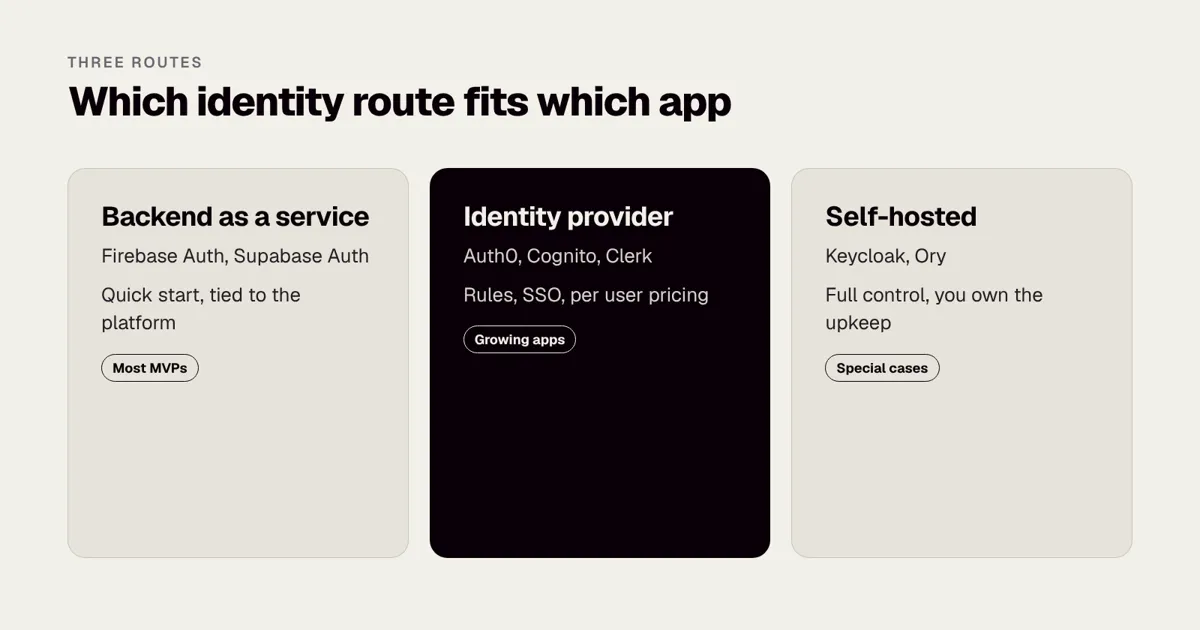
| Option | Typical examples | Cost pattern | Trade-off |
|---|---|---|---|
| Backend as a service | Firebase Authentication, Supabase Auth | Free tier, then per active user | Quick, tied to that platform |
| Dedicated identity provider | Auth0, Amazon Cognito, Clerk | Per monthly active user, rising with features | More control, SSO and rules |
| Self-hosted open source | Keycloak, Ory | Hosting plus maintenance time | Full control, you carry the security burden |
| Fully custom | Written in-house | Highest build and upkeep | Rarely justified |
The choice often follows the backend decision, so read Firebase, Supabase or a custom backend? and What is a backend as a service? first. Vendor pricing changes often, so check each provider’s current price list before you commit, for example at Firebase, Auth0 and Amazon Cognito.
What do you give up when you buy?
Buying is not free of trade-offs, and it helps to name them honestly.
- Lock-in. Your users’ identities live with the provider. Password hashes are often not portable between providers, so a move may force a mass password reset. Keep your own internal user ID in your database and treat the provider’s ID as an attribute.
- Pricing that scales with success. Many providers charge by monthly active user, and enterprise features such as SSO can move you into a higher tier. Model the cost at the user numbers you hope to reach, not only at launch.
- Limits on customisation. Hosted login pages are quick but may not match your brand. Embedded screens give you more control and more work.
- Dependence on uptime. If the identity provider has an outage, nobody can log in. Check the provider’s status history and what its commitments cover.
- Data location. Where the provider stores user data matters under UK and EU GDPR. UK GDPR for mobile apps and UK GDPR lawful bases for apps explain what to document.
When is self-hosting or a custom build justified?
Rarely, but there are real cases. Some organisations must keep identity data inside their own infrastructure for regulatory or contractual reasons. Some products have unusual rules, such as shared devices in a hospital, which off-the-shelf flows handle badly. Some businesses reach a scale where per-user pricing outweighs the cost of an in-house team. In each case, be honest about the ongoing burden: someone must apply security patches, monitor attacks, handle incidents and keep up with changing standards. Our advice is to start with a managed service and move only when you have a documented reason.
Does your backend choice limit your options?
Somewhat. If you use Firebase for data and notifications, Firebase Authentication fits naturally. If your back end is on AWS, Cognito integrates with the rest. If you run your own API, any provider that issues standard tokens (OpenID Connect and OAuth 2.0) will work, and that standards-based approach is the best protection against lock-in. When you compare providers, ask whether they support standard protocols for both sign-in and token verification, whether you can export users, and how they handle custom claims such as roles.
What does a good sign-up flow include?
The screens are where most apps lose users. A solid flow covers:
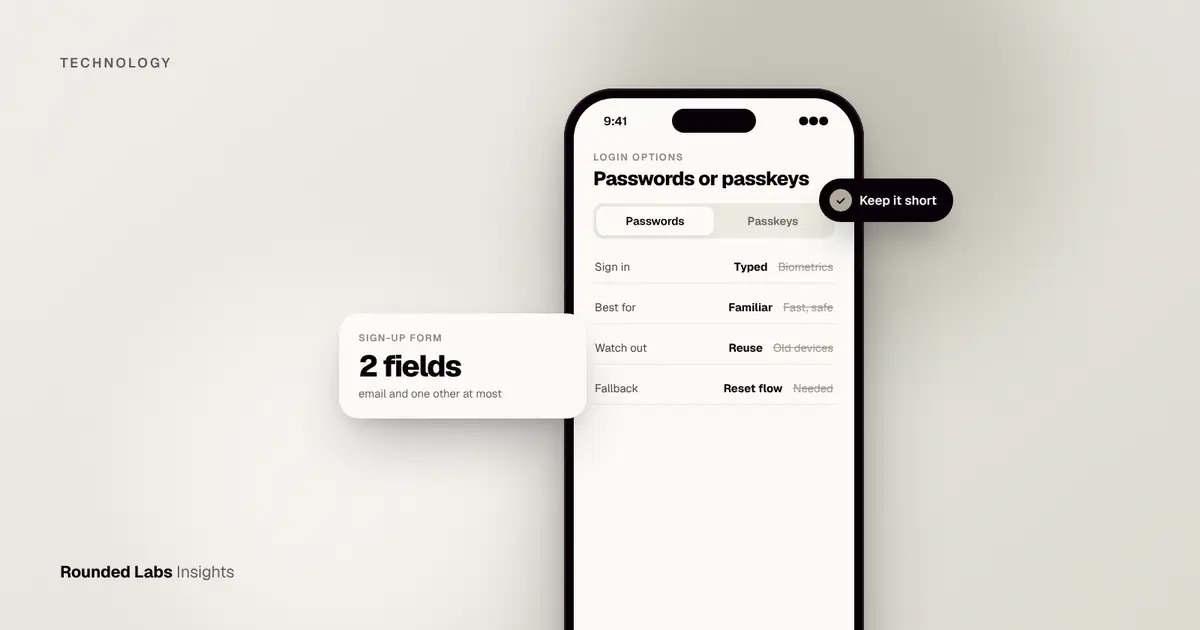
- A short sign-up form. Email and one other field at most. Collect name, phone and preferences later, when the app can explain why it needs them.
- Clear password rules. Current guidance from NIST favours length over complexity, allows pasted passwords and checks against lists of known breached passwords, rather than forcing symbols and frequent changes.
- Email or phone verification where fake accounts would cause harm.
- Password reset that works on a phone, including deep links that open the app, not a web page.
- Stay signed in using secure tokens stored in the device’s secure storage (iOS Keychain, Android Keystore), with biometric unlock for sensitive apps.
- Account deletion inside the app, not by emailing support.
- Helpful errors that do not reveal whether an email address has an account.
How should each screen be designed?
Walk the flow screen by screen and ask what the user needs to do, and what could go wrong.
| Screen | What it needs | Common mistake |
|---|---|---|
| Welcome | One clear action, a way to browse if possible, a sign-in link for returning users | A wall of options with no hierarchy |
| Sign-up | Email, password (with show toggle) or social buttons | Asking for name, phone, birthday and address at once |
| Verification | Auto-detect the code from the message where the platform allows, a resend button with a timer | Codes that expire in seconds, no resend |
| Sign-in | Autofill support, show password toggle, forgot password link | Fields not labelled for password managers |
| Reset | Request screen, email, deep link into the app, new password screen | Link opens a mobile web page that cannot return to the app |
| Account | Change email, change password, devices, delete account | Delete hidden or missing |
| Errors | Clear, kind, actionable messages | “Error 401” or reveal of whether an account exists |
What do the form fields need to get right?
Small details decide whether autofill and password managers work. Use the correct input types and autocomplete hints for email, new password and one-time code. Make the keyboard match the field: an email keyboard for email, a numeric keyboard for codes. Show a password-visibility toggle, because mistyped passwords on small screens are a leading cause of failed sign-ups. Allow paste in password fields. Avoid disabling the back button or clearing the form after an error, which forces the user to start again.
What about the very first session?
The first session is the most fragile moment in an app’s life. If sign-up takes more than a minute, many users will leave. Test the flow on a real phone, on a slow connection, with a person who has never seen the app. Count taps. Watch where they hesitate. How to run a usability test on a budget shows how to do this with five people in an afternoon.
How do you handle people who sign up twice?
It will happen. A user signs up with email, forgets, and later taps Sign in with Google using the same address. You must decide whether those are one account or two. The safe pattern is to link accounts only when the identity provider has verified the email address, and to ask the user to prove ownership of the existing account before merging. Merging on an unverified email is a known route to account takeover. Write the rule down, test it, and make sure your support team understands it.
How do passwords, passkeys and codes compare on security and support cost?
Security is part of the decision, but so is the cost of support. A method that is secure and cheap to run beats one that is secure and generates constant tickets.
| Method | Phishing resistance | Typical support load | Main weakness |
|---|---|---|---|
| Password alone | Low | High: resets, lockouts | Reuse and weak choices |
| Password plus second factor | Medium to high | Medium | Lost second factor, SMS interception |
| One-time email code | Medium | Medium: delivery delays | Compromised email account |
| Passkey | High | Low once working | Device changes, older devices |
| Social login | Depends on provider | Low | Provider account lost or closed |
| SSO | Depends on customer setup | Medium: customer configuration | Per-customer onboarding |
The pattern we see most often in consumer apps is “social and email first, passkeys when you can”. For finance, health and other sensitive data, a second factor is expected, and you should plan it from the start rather than add it after an incident. How to add two-factor authentication to your app covers the options and their trade-offs.
What do NIST guidelines say about passwords?
NIST’s digital identity guidelines are the most widely cited source, and their direction in recent years is clear: favour length, allow all characters and pasting, screen new passwords against lists of known compromised ones, and avoid forced regular changes or composition rules that push people toward predictable patterns. The practical consequence for a developer is that your password rules should be simple to explain and your system should block the worst choices. Check the current text at NIST, because standards are revised.
What do Apple and Google require?
- Account deletion. If your app lets people create an account, Apple requires that they can start deleting it from within the app, and Google Play requires an in-app path plus a web link for deletion requests. See Apple’s App Review Guidelines and the Google Play Console help centre.
- Sign in with Apple and equivalents. If you use a third-party or social login to set up the primary account, Apple’s guidelines require an additional login option with certain privacy features. Check the current wording of guideline 4.8 before you design the screen.
- Demo access. Reviewers need a working test account, or a demo mode, to get past your login wall. Missing credentials is a common reason for a first rejection.
- Privacy disclosures. Both stores ask what data you collect, and an email address counts.
These rules change, so treat the above as the position at the time of writing and read the current guidelines before submission. Why Apple rejects apps lists the reasons we see most often, and the App launch checklist puts store requirements in a working order.
How should account deletion actually work?
The store rule is simple to state and surprisingly fiddly to build. Deletion must be available from within the app, it should be easy to find, and it should do what it says. Think through what happens to related data.
- Confirm identity. Ask the user to re-authenticate before deleting.
- Explain the consequences. Say what will be removed, what is kept for legal reasons (such as financial records) and for how long.
- Handle dependencies. If the user has an active subscription, an open order or money in an account, explain what must happen first. Cancelling a store subscription is separate from deleting an account, and users often confuse the two.
- Delete across systems. The identity provider, your database, analytics, backups and any third-party tools. Backups can follow a retention schedule, but document it.
- Confirm. Send a confirmation and stop all further messages.
UK GDPR for mobile apps and US state privacy laws and your app explain the legal background for deletion rights.
What do reviewers need to get past your login?
Give App Review and Google Play reviewers a working account with realistic data, or a demo mode that does not need one. If your sign-up needs a one-time code to a phone number, reviewers cannot receive it, so provide a bypass path for the test account. Keep the credentials current. A surprising number of rejections come from an expired test password or a test account that has been locked by a previous review round.
What if you offer Sign in with Apple?
If you offer it, it must work for people who choose to hide their email address. Apple may give your app a private relay address, so your email system must be able to send to it, and you should not insist on a “real” email. Users can also revoke the connection from their Apple account settings, so handle the revocation notices Apple sends. Make sure the button follows Apple’s design requirements.
How secure does login need to be?
Match the effort to the risk. A recipe app and a banking app are not the same. The OWASP Application Security Verification Standard is the usual benchmark for authentication requirements, and our mobile app security checklist translates it into plain English.
Core measures for almost every app:
- Send credentials only over HTTPS and never log them.
- Rate limit login attempts and lock or slow repeated failures.
- Use short-lived access tokens with refresh tokens that can be revoked.
- Offer a second step for anything involving money, health or private messages, see how to add two-factor authentication.
- Run an independent test before launch, see What is penetration testing for apps?.
Not sure which login approach fits your users and risk level? We will walk through the options and give you a fixed price for the work. Book a 30-minute call with a co-founder.
How should tokens and sessions be handled?
After a successful login your app holds a token that proves who the user is. Treat that token like a key.
- Store it in the platform’s secure storage: the Keychain on iOS and the Keystore or encrypted preferences on Android, never in plain preferences or a file.
- Keep access tokens short-lived (minutes to an hour) and use refresh tokens to renew them. Refresh tokens should be revocable, and ideally rotate each time they are used.
- Let users see and end sessions. A list of devices with a “sign out everywhere” button is cheap to build and valuable after a lost phone.
- Revoke on password change and on account deletion.
- Verify tokens on the server for every request. Never trust the app to say who the user is.
- Pin down expiry for sensitive actions. Ask for a fresh check before a payment, a change of email or a change of password.
How do you defend against account takeover?
Most account takeovers are not clever attacks. They are credential stuffing, where passwords leaked from another service are tried against yours at scale. Defences are well understood: rate limiting per account and per network address, breached password checks, alerts when a login comes from a new device or place, and a second factor for sensitive actions. Monitoring matters as much as prevention. If you cannot see a spike in failed logins, you will learn about an attack from your customers. Role-based permissions limit the damage of any single account, and How to add role-based access to your app and How to add audit logs to your app cover those layers.
How should account recovery work?
Recovery is the weakest link in many login systems, because an attacker who can trigger recovery does not need the password. Design it deliberately.
| Situation | Reasonable recovery path | Risk to manage |
|---|---|---|
| Forgot password | Email link or code with short expiry | Compromised email, link reuse |
| Lost phone with passkey | Sign in on another device, or fall back to email code | Weak fallback undermines the passkey |
| Lost second factor | Backup codes saved at set-up, then identity checks | Social engineering of support |
| Lost email access | Verified phone, backup code, or support process with identity checks | Takeover by convincing a support agent |
| Account of a deceased or incapacitated person | A documented process with legal checks | Privacy and legal exposure |
Whatever you choose, write the support script. A recovery path that depends on the goodwill of a support agent will be abused. Decide what evidence is enough, what is never acceptable, and who can approve exceptions.
What should you log, and what should you never log?
Log events that help you spot abuse: login success and failure, password changes, new devices, recovery requests. Include time, account identifier, device and approximate location. Never log passwords, codes or tokens, even in error messages or crash reports, and check that your analytics and crash tools do not capture form contents. Retain logs for a defined period and protect them as personal data.
What does login and sign-up cost?
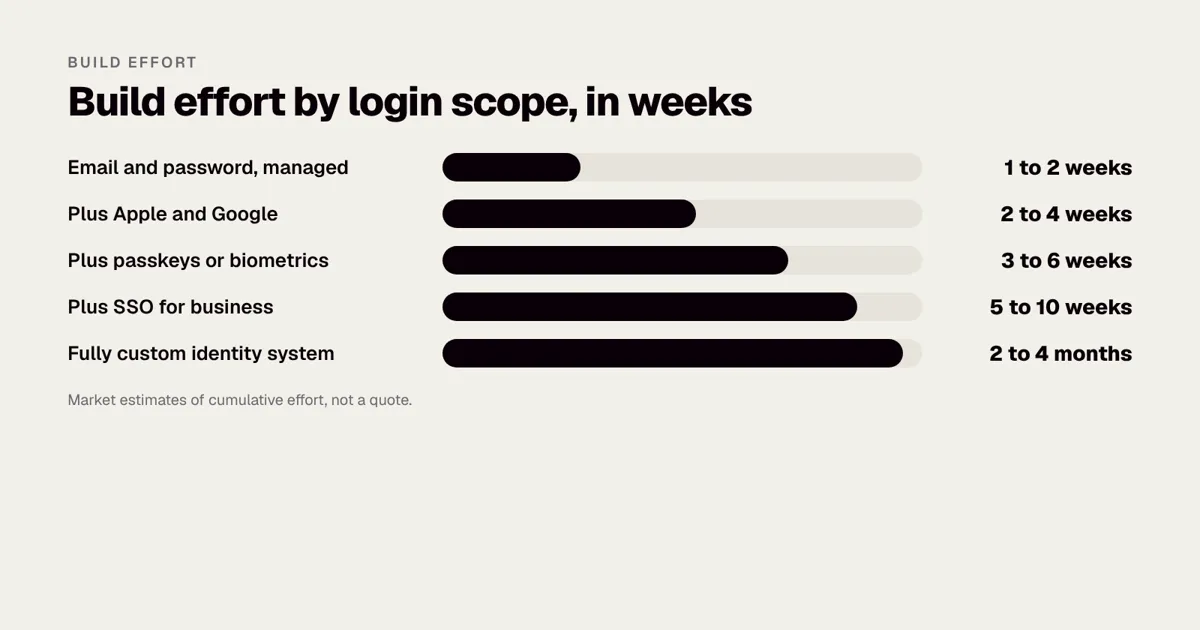
These are market estimates for the identity work alone, not the whole app, and they vary with the number of platforms and methods.
| Scope | Typical build effort | Notes |
|---|---|---|
| Email and password with reset, using a managed service | 1 to 2 weeks | Both iOS and Android, basic screens |
| Adds Sign in with Apple and Google | 1 to 2 extra weeks | Store setup and testing per provider |
| Adds passkeys or biometric unlock | 1 to 2 extra weeks | Fallbacks matter |
| Adds SSO for business customers | 2 to 4 extra weeks | Often per customer configuration |
| Fully custom identity system | 2 to 4 months | Not recommended for most apps |
On top of the build sit running costs. Most identity services are free at small scale and charge by monthly active user as you grow, so model the cost at your target user numbers, not just at launch. A fixed-price quote should list login as its own line, and you can see how that works on our pricing page. Login cost is also one line in a bigger budget; App feature costs puts it beside other common features, and The total cost of owning an app over five years shows how running costs accumulate.
What are the hidden costs of login?
- SMS and email delivery. Codes sent by SMS cost money per message, and email needs a sending service with a good reputation so codes do not land in spam.
- Support. Password resets and lockouts are among the most frequent support requests. Good flows reduce them, and passkeys reduce them further.
- Testing on real devices. Login touches keyboards, password managers, biometrics and deep links, which behave differently across devices. App testing explained shows how to plan it.
- Store set-up for each provider. Each social provider needs its own developer account, app registration, review and keys.
- Compliance. Privacy notices, consent, data processing terms and records add legal time.
- Migration. Changing provider later has a real cost. Plan for it by keeping your own user ID.
How does identity cost grow with users?
An illustrative model helps you see the shape, but check real prices. Imagine an identity service that is free up to a threshold of monthly active users, then charges a small amount per user above it, with higher tiers for SSO and advanced security. An app with a few thousand active users may pay nothing. An app with a few hundred thousand may pay a meaningful monthly sum, and enterprise features may cost more again. The way to avoid surprise is to build a simple spreadsheet: expected monthly active users at 6, 12 and 24 months, the provider’s price at each level, and the cost of any add-ons you will need. Repeat for two or three providers. The cheapest at launch is not always the cheapest at scale.
A worked example: login for an investing app
Imagine a trading app for first-time investors, similar in spirit to our Dabbl work. Users are new to finance and the data is sensitive, so a sensible design would be:
- Sign-up with email, Sign in with Apple and Google, asking only for an email at first.
- Identity verification (know your customer checks) as a separate step only when the user wants to fund an account, so browsing is not blocked.
- Biometric unlock for returning sessions, with a full re-login after a set period or on a new device.
- A second factor required before any withdrawal or bank detail change.
- In-app account deletion that explains what must be closed first, such as open positions.
That separation of “light account” from “verified account” keeps sign-up quick while meeting the stricter checks that regulated products need. The same pattern suits marketplaces and health apps.
How would the build break down?
For an app like this, the identity work might break down as follows. These are illustrative market estimates for planning, and the real figures depend on the final scope.
| Work item | Effort | Notes |
|---|---|---|
| Identity service set-up and token handling | 3 to 5 days | Environments, keys, server verification |
| Email sign-up, verification, reset | 5 to 8 days | Screens, deep links, error states |
| Sign in with Apple and Google | 4 to 6 days | Registration, review, edge cases |
| Biometric unlock and secure storage | 3 to 5 days | Fallbacks, device changes |
| Second factor for sensitive actions | 4 to 7 days | Enrolment, recovery codes |
| Account deletion and data handling | 3 to 5 days | Dependencies, confirmations |
| Testing on devices, security review | 5 to 8 days | Real devices, penetration test inputs |
That adds up to roughly 5 to 8 weeks of effort for one engineer, or 3 to 4 calendar weeks with a small team working in parallel. It is more than the “1 to 3 weeks” for a simple app, because regulated finance adds the second factor, verification and extra testing.
What would a business app do differently?
Consider a field service app used by a company’s staff. Users do not create accounts; the company does. Login is by single sign-on with the company directory. Roles decide what each person sees. Devices may be shared, so a short PIN protects the app between uses, and the app signs people out after inactivity. Offboarding matters: when someone leaves the company, access should end the same day, which SSO handles automatically if configured well. The sign-up flow in this case is an invitation flow, and the effort sits in SSO configuration, roles and audit logs rather than in screen design. How to add an admin dashboard to your app and How to add role-based access to your app cover the surrounding pieces.
What mistakes should you avoid?
The same errors turn up on many projects. Most are cheap to avoid if you know about them early.
- Building your own password storage. If you are writing code to hash passwords, stop and use a service.
- Forcing sign-up before value. Let people see the product first where you can.
- Asking for too much. Every field costs conversions. Ask later, with a reason.
- Ignoring account deletion. It is a store requirement and a legal right in many places.
- Merging accounts on unverified email. This is a takeover route.
- No plan for lost devices or lost emails. Support will find you.
- Forgetting reviewers. No test account means a rejected build.
- Revealing whether an email exists. “No account with that email” helps attackers. Use a neutral message.
- Hard-coding provider keys in the app. Keep secrets on the server where possible.
- Skipping real-device testing. Autofill, biometrics and deep links fail in ways emulators do not show.
- Treating SMS as strong security. Use it as a convenience, not as protection for high-value accounts.
- Leaving it until the end. Login touches almost every part of the app. Design it early.
How do you test login properly?
Login deserves a test plan of its own. A short checklist for each release:
- New sign-up with each method, on iOS and Android, on a fresh install.
- Sign-in with each method after a restart, an update and a reinstall.
- Password reset, from request to new login, with the app closed and open.
- Expired and reused codes and links.
- Incorrect passwords, rate limits and lockout messages.
- Account linking: same email through two methods, verified and unverified.
- Sign out, sign out on all devices, and session expiry.
- Biometric enrolment changed on the device (new fingerprint added or removed).
- Account deletion with an active subscription or order.
- Poor network and airplane mode at each step; see How to make your app work offline.
- Screen readers, large text and keyboard navigation; see How to add accessibility features to your app.
- A fresh test account for App Review.
Automate what you can, and check the rest by hand on real devices before every store submission. An independent security test before launch should include the login and recovery paths specifically.
How do you measure whether login is working?
Track the funnel: visits to the welcome screen, sign-up starts, completions, time to complete, failure reasons, resets requested and completed, support tickets tagged “login”. A drop between two steps shows where to look. Compare methods: if most users choose Sign in with Apple, put it first. If code emails take too long to arrive, you will see abandonment at the verification step. App analytics: what to track from day one explains how to set this up without collecting more data than you need.
How does login affect privacy law?
Login creates personal data from day one. In the UK and EU, you need a lawful basis, a clear privacy notice and a way to delete data; see UK GDPR for mobile apps. Collect the minimum, set retention rules and check where your identity provider stores data. In the US, state laws such as California’s give residents rights to access and delete data, and California Consumer Privacy Act for app owners explains how those work. This is general information, not legal advice, and laws and fees change, so check the official source, such as the Information Commissioner’s Office, at the time you build.
A few practical privacy points apply to nearly every login system:
- Data minimisation. Do not collect a phone number or birthday “just in case”.
- Processor agreements. Your identity provider handles personal data for you, so you usually need a data processing agreement with them.
- International transfers. If the provider stores data outside the UK or EU, check the transfer mechanism; see UK and EU data transfers for app projects.
- Retention. Decide how long deleted-account records and logs are kept and why.
- Consent for marketing. Creating an account is not consent to marketing. Ask separately.
How should you plan the work step by step?
A sensible sequence for a typical project:
- Decide the audience and risk level. This sets the methods and the second factor.
- Pick the identity service based on your back end, expected scale and need for SSO.
- Write the account rules: what is required, what is optional, how accounts merge, how recovery works, what deletion removes.
- Design the screens with real devices and autofill in mind.
- Build the sign-up and sign-in flows with the managed service, starting with one method and adding others.
- Add reset, recovery and deletion before launch, not after.
- Test on devices and run a security review.
- Prepare store materials, including the test account and privacy disclosures.
- Launch, monitor the funnel and the logs, and fix the biggest drop first.
Login is a small part of the interface and a large part of the risk. If you are writing a specification, How to write an app specification gives a template where login and recovery can be set out clearly, and How to choose features for version one helps you decide what to leave for later. If you would like a fixed price for the login and account work in your app, book a call with a co-founder and we will walk through the options for your users.
Frequently asked questions
How long does it take to add login to an app?
For a standard email and social login using a managed service, plan 1 to 3 weeks including testing on both iOS and Android. SSO, passkeys and custom rules add time, and a regulated product with a second factor and identity verification may take five weeks or more of effort.
Should I use passwords at all?
Many consumer apps now lead with passkeys or one-time codes and keep passwords as a fallback. Passwords are still the most familiar option, so offering them alongside others is a practical choice. If you do offer them, favour length, block known breached passwords and add a second factor for sensitive actions.
Do I need login in an MVP?
Only if the core value needs it, such as saved data, payments or messaging. A first version that works without an account removes a barrier, and you can add login once users have a reason to return. See What is an MVP?.
Can I switch identity providers later?
Yes, but it is a migration project. Password hashes may not transfer between providers, so users might need to reset passwords. Choose with the future in mind and keep your own user ID in your database.
What happens if a user loses access to their email?
You need an account recovery path, such as a verified phone number, a backup code or a support process with identity checks. Decide this before launch, because it is one of the most common support requests.
Is Sign in with Apple always required?
Not always. At the time of writing, Apple’s guidelines require an equivalent privacy-focused option when you offer certain third-party or social logins as the primary way to sign in, with some exceptions. Read the current wording of the guideline before you design the screen, because the rules change.
How much does an identity service cost?
Many services are free at small scale and charge by monthly active user as you grow, with higher prices for features such as SSO. Prices change, so check each provider’s pricing page and model your costs at your expected user numbers rather than only at launch.
Official sources and further reading
Talk it through with one of our co-founders. 30 minutes, no pressure.