

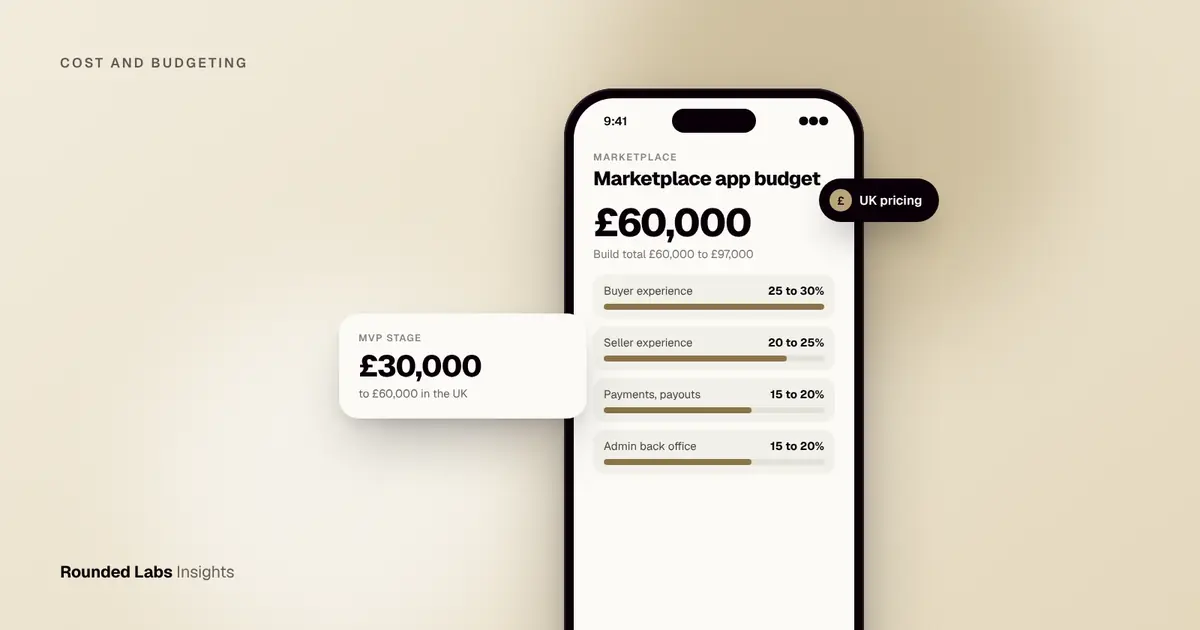
A UK marketplace app typically costs £30,000 to £60,000 for a focused MVP, £60,000 to £150,000 for a full two-sided product, and £150,000 or more once you add vetting, escrow-style payments and an operations back office. These are market estimates. The main cost drivers are that you are building two apps in one, buyers and sellers, plus a payments flow that splits money between them.
A marketplace is one of the harder app types to price because the work is mostly invisible: onboarding, payouts, disputes and admin tools. We modernised the Superdry app for a brand with 768 locations in over 100 countries, and we have built payments, accounts and catalogue systems for UK retail since 2007. This guide covers what drives the price, what UK rules add, and how to avoid overspending. Our projects are fixed price, agreed before development starts, and typically run £30,000 to £250,000+; see the pricing page. Regulatory points here are general information, not legal advice.
Key facts
- Focused MVP: about £30,000 to £60,000. Full two-sided product: about £60,000 to £150,000. Complex or regulated: £150,000 and up.
- Payments are the biggest hidden cost. Splitting a customer payment between you and a seller needs a marketplace payments provider, not a basic checkout.
- Holding sellers’ money yourself can bring you into FCA payment services rules, so most UK marketplaces use a regulated provider to do it.
- Apple and Google take a cut of digital goods, but not of physical goods or real-world services sold through your app.
- Expect running costs of roughly 15 to 20% of the build per year for hosting, support and updates.
What does a UK marketplace app cost by stage?
| Stage | What you get | Typical UK cost |
|---|---|---|
| Validation sprint | Prototype, user testing, a costed plan | £7,000 to £12,000 |
| MVP | One buyer app, one seller flow, payments, basic admin | £30,000 to £60,000 |
| Full product | iOS and Android, ratings, chat, search, payouts, analytics | £60,000 to £150,000 |
| Scaled platform | Vetting, disputes, multiple regions, recommendations | £150,000 to £300,000+ |
Our Mobile Product Discovery Sprint costs £9,500 fixed and sits in the validation row. It is the cheapest way to find out whether your marketplace idea needs the MVP row or the full row. For a wider look at quotes see App development quotes compared.
Where does the money go in a marketplace?
Unlike a single-sided app, a marketplace has three user groups: buyers, sellers and you, the operator. Each needs its own screens.
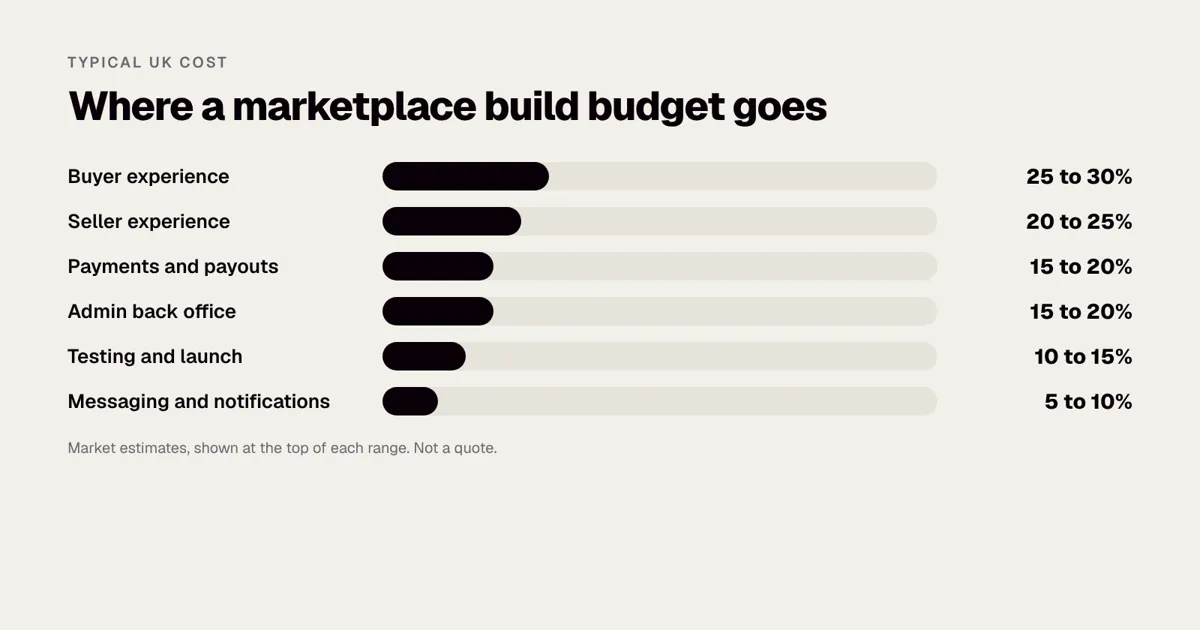
| Feature area | Why it costs more than it looks | Share of build |
|---|---|---|
| Buyer experience | Search, filters, listings, checkout, reviews | 25 to 30% |
| Seller experience | Onboarding, listings, calendar or stock, earnings view | 20 to 25% |
| Payments and payouts | Split payments, refunds, payout schedules, VAT records | 15 to 20% |
| Admin back office | Moderation, disputes, user management, reports | 15 to 20% |
| Messaging and notifications | In-app chat, push, email | 5 to 10% |
| Testing and launch | Device testing, security checks, store submission | 10 to 15% |
The back office is the line most first-time founders leave out of the budget. Without it, you cannot resolve a dispute or remove a fraudulent seller without asking a developer to edit the database.
How do payments work, and what do UK rules add?
A marketplace takes a customer’s money, keeps a commission and passes the rest to the seller. In the UK, the Payment Services Regulations 2017 regulate this kind of money handling. If your platform holds funds on behalf of others, you may need FCA authorisation or an exemption, and the so-called commercial agent exemption is narrow. Most founders avoid the problem by using a provider that is itself regulated, such as Stripe Connect, Adyen for Platforms or Mangopay. Check the current rules and take legal advice on your model before launch.
Using a provider costs money in two ways: per-transaction fees, which you should compare directly on each provider’s current pricing page, and build time, since onboarding sellers through a provider includes identity and bank checks. Allow £5,000 to £15,000 of the build for a robust payout flow. Our related guide on fintech app costs in the UK covers what changes if you want to hold funds yourself.
Unsure whether your model needs FCA permissions? A short scoping call can map your payment flow to the right provider before you spend on build. Book a 30-minute call with a co-founder.
Which other UK rules add cost?
- UK GDPR and the Data Protection Act 2018. You handle two sets of personal data, buyers’ and sellers’, so you need clear privacy notices and a lawful basis for sharing buyer details with sellers. See UK GDPR for mobile apps and, for recent changes, The UK Data (Use and Access) Act 2025.
- Consumer law. The Consumer Rights Act 2015 and the Digital Markets, Competition and Consumers Act 2024 matter for how you show prices, handle reviews and treat fake reviews, which are now banned. Be clear on who the consumer is contracting with.
- Online Safety Act. If users can post content or message each other, Ofcom’s duties may apply. Check the current guidance for platforms with user-to-user features.
- Tax reporting. Platform operators in the UK have duties to collect and report seller information to HMRC under the digital platform reporting rules. Build the data fields in from the start.
- VAT. Commission charged to sellers is a taxable supply. If you pass on seller prices, VAT treatment depends on who is the seller of record. An accountant should confirm yours.
Legal and accounting advice is usually £2,000 to £8,000 for a marketplace at launch, separate from the build.
What does a worked example look like?
Imagine a marketplace connecting UK homeowners with local tradespeople for small jobs. It has an iOS and Android buyer app, a seller app for tradespeople, a web admin panel and card payments with a 12% commission.
| Item | Estimated cost |
|---|---|
| Discovery and design | £8,000 to £12,000 |
| Buyer app, both platforms | £18,000 to £28,000 |
| Seller app and onboarding with ID checks | £14,000 to £22,000 |
| Payments, payouts and receipts | £7,000 to £12,000 |
| Admin panel and dispute tools | £8,000 to £14,000 |
| Testing and launch | £5,000 to £9,000 |
| Total build | £60,000 to £97,000 |
On top of that, allow £2,000 to £5,000 for legal review and about £9,000 to £19,000 a year for running costs. This is the low end of the “full product” row, and it is reachable only because we keep the first version to one trade category and one region.
How can you spend less at the start?
- Launch to one side first. Many marketplaces seed supply by hand and build the seller app later. Sellers can use a simple web form and a shared inbox for the first 50 listings.
- Pick one city or one category. Local liquidity beats national spread.
- Use a ready payments provider and avoid building ledgers yourself.
- Keep chat simple. Use pre-built messaging components, not a custom system.
- Cut phase two features such as recommendations and loyalty schemes until you have repeat use.
Our guide to what an MVP is shows how to draw the line, and How to cut app development costs without cutting quality has further savings.
What do Apple and Google charge?
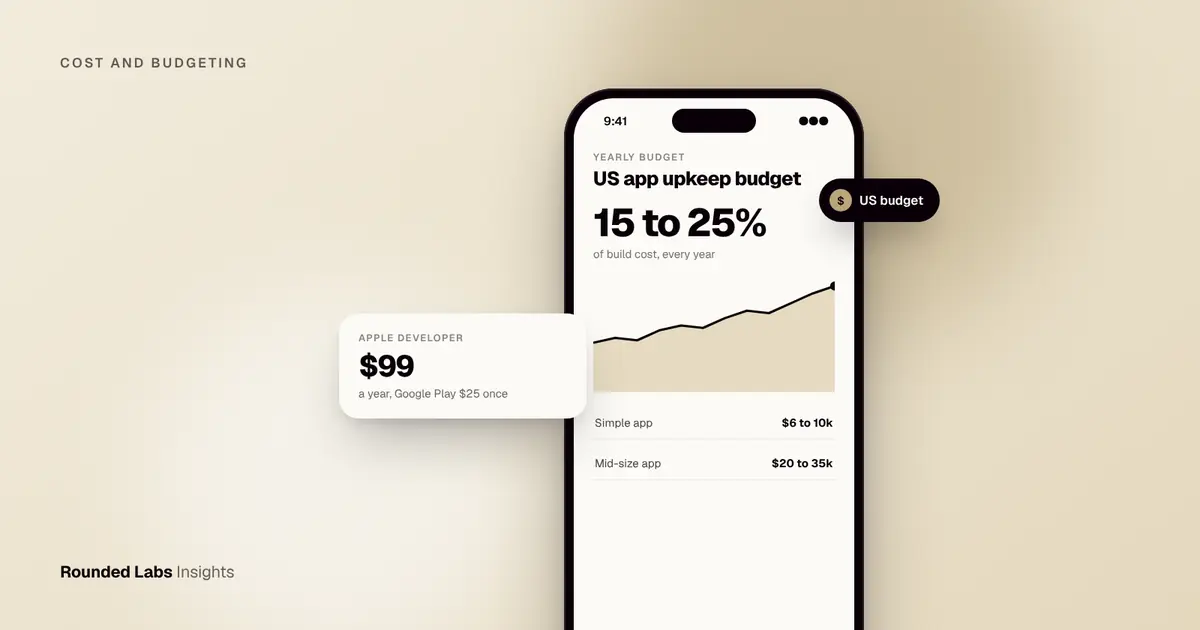
At the time of writing, developer accounts cost $99 a year for Apple and a one-off $25 for Google. Apple’s standard commission on digital goods is 30%, falling to 15% for small developers in its Small Business Program, but commission applies only to digital goods and services bought in the app. Physical goods and real-world services, such as a plumber’s visit, are normally outside it. Check the current store terms before you decide how to take payment. For more on this and other recurring costs, see the hidden costs of building an app.
How do you get a reliable price?
Write down your buyer and seller journeys, your commission model and the countries you will serve, then ask suppliers to quote against the same list. A fixed price is only meaningful if the scope is defined. See Fixed price vs time and materials for why we only work on a fixed price. You can also test the idea cheaply first with How to validate an app idea.
If you would like a number for your idea, talk to a co-founder and we will tell you honestly which row of the table you sit in.
How is a marketplace different from a normal app?
Most apps have one kind of user. A marketplace has at least three, and they want different things. Buyers want to find the right seller quickly and feel safe paying. Sellers want to be found, paid on time and left alone to run their business. You, the operator, want healthy supply and demand, a steady commission and as few disputes as possible. Each of these groups needs its own screens, rules and notifications, and the work to connect them is where most of the cost sits.
It helps to think of a marketplace as a small economy with rules. Someone has to decide who is allowed to sell, what a listing must contain, how a price is shown, when money moves, what happens when a job goes wrong and who pays for a refund. These decisions are mostly business decisions, but each one becomes screens, database tables, emails and tests. A founder who settles the rules before development starts pays noticeably less than one who discovers them halfway through.
There is also the matter of timing. A normal app can launch with a useful product on day one. A marketplace cannot, because a buyer who finds no sellers leaves, and a seller who finds no buyers leaves too. This is the “chicken and egg” problem, and it shapes the budget. Part of your money has to go on getting the first group of sellers onto the platform, either through manual onboarding, a simple web tool or a small launch offer, and not only on software.
The three apps hiding inside one
When a UK founder asks for a quote for “a marketplace app”, a good supplier will ask which of these parts you actually need at launch.
- The buyer app. Search, filters, listings, a basket or booking flow, checkout, order history, reviews and support.
- The seller tools. Sign-up and identity checks, creating and editing listings, availability or stock, accepting and declining work, earnings and payout views, and a way to talk to buyers.
- The operator back office. Approving sellers, moderating listings and reviews, handling disputes and refunds, reporting, and settings such as commission rates.
A focused MVP often builds the buyer app properly, gives sellers a simplified tool, and runs the back office as a basic web panel. A full product builds all three to a high standard. The difference between the two is where the price range in this guide comes from.
What is the real cost of getting from idea to launch?
Build cost is only one line. A realistic first-year budget for a UK marketplace includes six groups of costs. The ranges below are market estimates, not quotes, and they assume a focused MVP or a lower-end full product.
| Cost group | What it covers | Typical range |
|---|---|---|
| Discovery and design | Journeys for three user types, wireframes, prototype, scope | £7,000 to £15,000 |
| Build | Buyer app, seller tools, payments, admin | £30,000 to £97,000 |
| Legal and compliance | Terms, privacy notices, payments structure review, tax advice | £2,000 to £8,000 |
| Launch and supply | Seeding sellers, onboarding support, launch offer, early marketing | £5,000 to £30,000 |
| Running costs, year one | Hosting, support, updates, payment provider and ID-check fees | 15 to 20% of the build |
| Contingency | Changes found in testing and early use | 10 to 15% of the build |
Two of these are routinely left out of founders’ budgets: the launch and supply line, and contingency. A marketplace with a polished app and no sellers is the most common failure we see described in the market. Treat supply as a cost of the product, not an afterthought.
Why contingency matters more here
In a single-sided app, you learn about edge cases from user feedback. In a marketplace, you also learn from money. A seller who is paid late, a buyer who is charged twice, or a refund that lands in the wrong place becomes a support case within hours. Setting aside 10 to 15% for changes after testing is sensible. It is cheaper than paying for emergency fixes during your launch week.
Which features should be in the first version?
The most useful way to plan a first version is to separate what must exist for money to change hands safely from what makes the experience nicer. The table below shows how we would usually divide features for a UK marketplace. It is a starting point, not a rule.
| Feature | First version? | Reason |
|---|---|---|
| Buyer sign-up and login | Yes | Needed for orders and trust. See How to add user login and sign-up to your app. |
| Seller onboarding with identity checks | Yes | Required by most payment providers. |
| Listings with photos, price and description | Yes | The core of the product. |
| Search and basic filters | Yes | Buyers must find sellers quickly. |
| Card payments with split payouts | Yes | The defining feature of a marketplace. |
| Ratings and reviews | Yes, simple | Trust, but start with a basic star rating and comment. |
| In-app chat | Maybe | Many teams start with masked email or call forwarding. |
| Push notifications | Yes | Booking and payment status. |
| Admin dashboard | Yes, basic | Disputes and moderation from day one. |
| Recommendations and personalisation | No | Needs data you do not have yet. |
| Loyalty and referral schemes | No | Add once you see repeat use. |
| Multi-language and multi-currency | No | Unless you launch outside the UK at once. |
| Advanced analytics | Basic only | A simple report on orders, revenue and active sellers is enough. |
Each “No” is an invitation to save money. A feature that waits for version two costs you nothing now and can be added when real usage shows you what people want.
Search and discovery
Search deserves more attention than it usually gets in a first quote. For a few hundred listings, a straightforward database search with filters for category, location and price is enough. For tens of thousands of listings, you will want a dedicated search service, which adds both build effort and monthly running cost. Ask your supplier how much of this is in the quote and when it would need to change.
If your marketplace depends on location, such as local services, decide early how location will work. Searching by postcode, by distance from the buyer and by service area are all different problems. Maps and geocoding services charge by usage, so they belong in your running-cost estimate.
Ratings, reviews and trust
Trust is the product in a marketplace. A buyer will only book a stranger if they can see evidence the stranger is reliable. The first version should include a clear review flow, a way to report a problem and visible signs of verification such as a “verified” tick after an identity check. Under the Digital Markets, Competition and Consumers Act 2024, fake reviews are banned and platforms are expected to take reasonable steps to prevent them, so build a simple moderation route into the admin panel from the start and take legal advice on your review policy.
How do you choose the payments model?
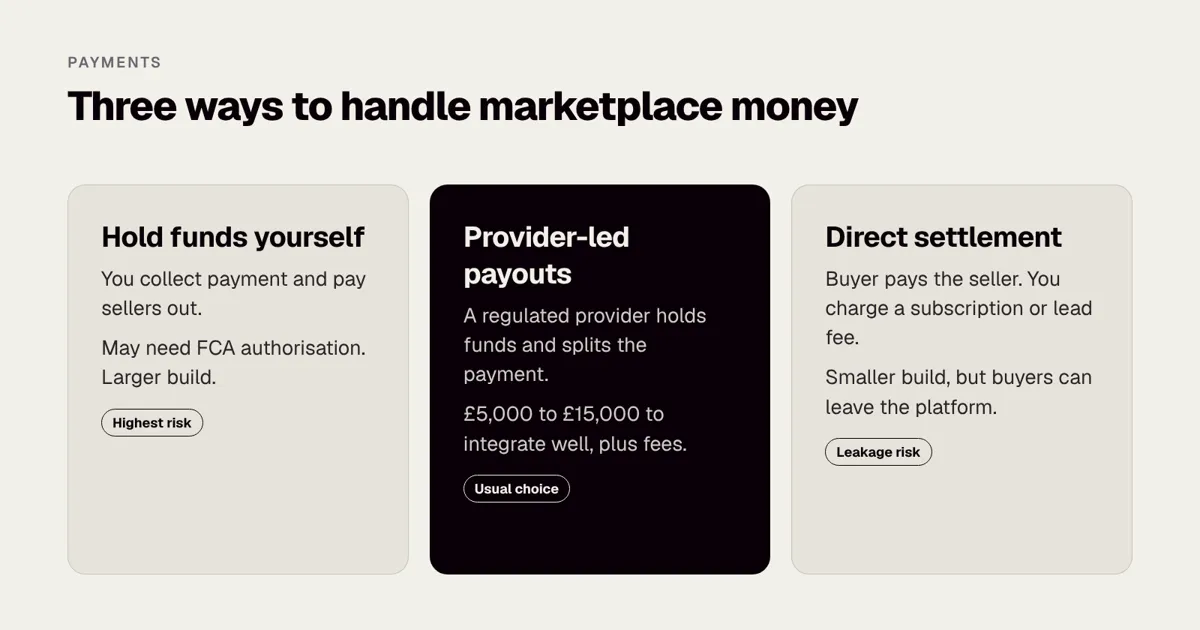
Payments are the part of a marketplace most likely to go wrong, so this section is longer than the others. There are three broad models, and the right one for you depends on how you want to handle the money.
Model 1: Take payment in your own account and pay sellers out
This looks simple. The buyer pays you, you keep your commission, and you transfer the rest to the seller. The problem is that in the UK you may then be holding other people’s money, which is regulated activity under the Payment Services Regulations 2017 unless an exemption applies. The commercial agent exemption is narrow, and many marketplaces do not qualify. We advise taking legal advice before choosing this route.
Model 2: Use a marketplace payments provider
Providers such as Stripe Connect, Adyen for Platforms and Mangopay are built for this. The buyer pays, the provider holds the money in a regulated structure, takes your commission and pays the seller. The provider also runs sellers’ identity and bank checks. This is the model most UK marketplaces use, and it is the one we would usually recommend for a first version. You can read about the providers on their own sites, for example Stripe Connect, Adyen and Mangopay, and compare current fees on their pricing pages.
The trade-off is cost and control. You pay per-transaction fees, and you must follow the provider’s onboarding flow for sellers. In exchange, you avoid building your own ledger and you reduce the regulatory burden.
Model 3: Let buyer and seller settle directly
For some services, such as large jobs with deposits, the buyer pays the seller directly and your platform charges a separate subscription or lead fee. This avoids handling money, and it keeps the build smaller. The downside is leakage: buyers and sellers can take the relationship off your platform after the first job. It suits businesses where the value is in the introduction rather than in the transaction.
What this means for the build
| Decision | Impact on cost |
|---|---|
| Provider-led payouts | £5,000 to £15,000 to integrate well, plus per-transaction fees |
| Holding funds yourself | Legal advice, possible FCA authorisation and a much larger build |
| Direct settlement with a subscription | Lower build cost, higher risk of leakage |
| Deposits and escrow-style holding | Extra states, refunds and dispute logic |
Whichever you choose, write the payment flow down as a sequence before you ask for a quote: who pays whom, when, what is held back, how a refund works and who pays the provider’s fees. Our guide to fintech app costs in the UK goes further on the regulated side.
Refunds, disputes and chargebacks
Every marketplace needs a plan for the day something goes wrong. A refund policy sounds like a business matter, but it changes the build. If a buyer cancels before the job, who pays the provider’s fee? If the seller is paid and the buyer then disputes the work, can you claw the money back? How long do you hold funds after completion? A marketplace without an answer to these questions ends up solving each case by hand, and the admin team grows faster than the revenue.
A sensible default is to hold payment until the job is complete or a set number of days have passed, release it automatically, and give buyers a short window to raise a problem. The admin panel needs a queue of open disputes with the order history, the messages and the payment status in one place. Budget for this early. It is one of the main reasons the back office takes 15 to 20% of the build.
What do the UK rules add in more detail?
Rules are the second most common source of surprise cost. They rarely change the app’s design much, but they change what you collect, what you store and what you tell users.
Data protection
You are a controller for the personal data of buyers and sellers. That means a clear privacy notice, a lawful basis for each use of the data, a retention policy and a process for access and deletion requests. Because sellers will see some buyer details, such as a name and address for a job, you need to explain this at the point of booking. The Information Commissioner’s Office publishes practical guidance for organisations on its site. Our own guides, UK GDPR for mobile apps and The UK Data (Use and Access) Act 2025, cover the app-specific points.
Consumer law
The Consumer Rights Act 2015 and the Digital Markets, Competition and Consumers Act 2024 affect how prices are displayed, how cancellations work and how reviews are handled. They also affect who a buyer is contracting with. If the buyer is contracting with the seller, your platform terms should say so, and your interface should not suggest otherwise. If you are the seller of record, you take on more responsibility. This is a legal question for your solicitor, but it has a design consequence, because the checkout wording and the receipt both depend on it.
Online safety
If users can post content or message one another, the Online Safety Act 2023 may apply to you. Ofcom’s guidance for services with user-to-user features explains the duties, including risk assessments and tools for reporting illegal content. The scale of the duties depends on your size and risk, so check the current guidance on Ofcom’s site and take advice if your marketplace includes open messaging or user-generated content.
Tax and reporting
Platform operators in the UK have a duty to collect and report information about sellers to HMRC under the digital platform reporting rules. In practice, this means your seller onboarding must collect specific details, and your database must store them in a form you can export. Add these fields in the first build, because adding them later means contacting every seller again. VAT on your commission and on sellers’ sales depends on the structure, so ask an accountant to confirm yours. HMRC’s guidance is on GOV.UK.
Accessibility
Buyers and sellers include people with access needs, and an inaccessible app loses customers. Build to the Web Content Accessibility Guidelines from the start, test with a screen reader, and make sure colour contrast, text size and touch targets meet the standard. This costs far less when planned from the first design than when retrofitted.
How long does a marketplace take to build?
Timelines depend on scope, but a rough guide for a UK marketplace is shown below. These are market estimates and assume a team working full time on one project.
| Phase | Typical length | What happens |
|---|---|---|
| Discovery and design | 3 to 6 weeks | Journeys, prototype, scope, plan |
| Build of the first release | 12 to 20 weeks | Buyer app, seller tools, payments, admin |
| Testing and fixes | 3 to 5 weeks | Device testing, security checks, payment tests |
| Store review and launch | 1 to 2 weeks | App Store and Google Play review, soft launch |
| Seed and learn | 4 to 12 weeks | Onboard sellers, watch usage, fix issues |
A focused MVP can come in near the lower end of these. A full product with iOS, Android and a web admin panel is closer to the upper end. Be wary of any supplier who promises a complete two-sided marketplace in four weeks. The work is possible only if the scope is very small, such as a prototype or a no-code version.
What speeds things up
Three things shorten a project more than anything else: a clear, written scope; one person on your side who can make decisions within a day; and early sign-off of the payment structure. Delays most often come from waiting for decisions, not from the building. If you want to see how we handle changes to scope once a project is under way, read How to manage scope changes without blowing the budget.
How do you tell a good quote from a poor one?
Quotes for marketplaces vary widely because the scope is so easy to read in different ways. When you compare them, use the questions below.
- Does the quote name all three parts? Buyer app, seller tools and admin. A quote that lists only the buyer app is a quote for a third of the product.
- Is the payment provider named, and is payout logic included? “Payments” on its own can mean a basic checkout.
- Which platforms are included? iOS, Android, web, or a cross-platform build. The cost differs, and our guide on what a cross-platform app is explains the options.
- What is excluded? A good quote says so in writing.
- Is it a fixed price? A fixed price is only useful if the scope is defined. Time-and-materials quotes can be fine, but they move the risk to you. See Fixed price vs time and materials.
- What happens after launch? Look for warranty, bug-fix terms and a support plan.
- Who owns the code? You should own it. Ask about repositories, documentation and handover.
If two quotes differ by 40% or more, do not pick the cheaper one by default. Ask both suppliers to walk you through the lines that differ. Often the cheaper one has left out something you will pay for later. For a broader look at this, see App development quotes compared, and if a project has already gone wrong, How to rescue a failing app project and How to take over an app built by someone else explain your options.
Warning signs
- A price given in the first call, before anyone has asked about your payment model.
- No mention of an admin panel or dispute handling.
- “Unlimited changes” with no definition of scope.
- No named provider for payments and identity checks.
- A team that has never shipped a two-sided product.
Case study: what a marketplace team should learn from large retail apps
We have worked on commerce at a scale where small mistakes become expensive. For Superdry, we modernised an app for a brand with 768 locations in over 100 countries. For Waterstones, we built an app, a mobile site and an eBooks API in 12 weeks. Neither is a marketplace, but both show the same lessons that apply to one: payments, accounts and catalogues are where reliability matters most, performance affects conversion, and the back office determines how well the business can run day to day. A marketplace takes these lessons and multiplies them by two sets of users.
The practical takeaway is to put effort where the money and the trust are: checkout and payouts, seller onboarding and dispute tools. A smoother carousel or a clever animation can wait.
How do you grow after launch?
Launching is the start of a different job. After the first release, three questions decide where your next pounds go.
Is supply growing? Track the number of active sellers, not just sign-ups. A seller who has not accepted a job in 30 days is not supply.
Is demand repeating? Look at the share of buyers who book a second time. A marketplace with strong repeat use can spend more on acquisition because each customer is worth more.
Is the take rate healthy? Commission is only worth having if the product is worth paying for. Many UK marketplaces begin with a lower commission, or a free period for early sellers, and raise it as they prove value.
Once you can answer these, you can decide whether to invest in the features we left out of version one. Recommendations, loyalty schemes, advanced search and a second platform are all reasonable next steps, but only when the data says they matter. Our article on how to plan an app redesign is useful when the time comes to reshape the product, and How to audit an existing app’s code helps if you inherit or outgrow the first build.
Running costs in the years after launch
Plan for yearly costs of roughly 15 to 20% of the original build for hosting, bug fixes, updates for new iOS and Android versions, security patches and support. Add payment fees, which scale with your sales, and the costs of identity checks, maps, messaging and email. These are market estimates, and your own figures will depend on volume. If you want a closer view of the likely figure, see App maintenance costs in the UK.
What does a sensible budget look like for three different founders?
Numbers are easier to use when they sit against a real situation. The three examples below are illustrative, not quotes.
Founder one: a local services marketplace with a small budget. Budget of about £40,000. The right plan is a Discovery Sprint, a buyer app with a simple seller web tool, a payments provider, and a basic admin panel. Supply is seeded by hand in one city. The founder keeps back about £6,000 for contingency and £4,000 for legal review.
Founder two: a rental marketplace with a funded start. Budget of about £120,000. The right plan is iOS and Android apps for both sides, ratings, chat, search with distance filters, a deposit flow and a proper dispute queue. The team builds in phases, with the buyer journey first and the seller tools second, then adds analytics after launch.
Founder three: a specialist B2B marketplace. Budget of about £200,000 or more. The right plan includes vetting, contracts, invoicing, multiple user roles per company, reporting and integrations with the buyers’ systems. Some of this will touch compliance rules in the buyer’s sector. A structured API integration approach matters here.
In all three cases, the founder who plans for supply, legal review and contingency as part of the budget has a better chance of reaching launch without a funding gap.
What should you do next?
If you are deciding whether to build a marketplace, work through this list.
- Write one sentence describing who buys, who sells and why each side would join.
- Choose one city, one category or one customer type for the first release.
- Decide how money will move, and which regulated provider will handle it.
- List the features that must exist for a first transaction to complete safely.
- Put legal advice, seller seeding and contingency in the budget.
- Ask at least two suppliers to quote against the same written scope.
- Test demand before you build, with a prototype or a manual version.
Following this list will give you a firmer number than any online calculator. If you would like us to look at your scope, our Mobile Product Discovery Sprint is a fixed-price way to turn an idea into a costed plan, and you can book a call with a co-founder to talk it through first.
Frequently asked questions
How much does a simple marketplace app cost in the UK?
A simple MVP with one buyer flow, one seller flow and card payments usually costs £30,000 to £60,000 with a UK studio. Cheaper quotes often leave out the admin panel or the payout logic, which you will then pay for later.
Can I build a marketplace app for under £10,000?
You can build a clickable prototype or a simple version on a no-code tool for that amount, which is useful for testing demand. A production app with secure payments, two user types and moderation is rarely possible at that price.
Do I need an FCA licence to run a marketplace?
Not always. If you use a regulated payments provider to hold and pay out funds, you usually do not need your own authorisation, but the details depend on your model. Take legal advice before launch.
What are the ongoing costs of a marketplace app?
Budget around 15 to 20% of the build cost per year for hosting, bug fixes, OS updates and support, plus payment fees and any seller identity-check costs. See App maintenance costs in the UK.
Is it cheaper to use a template or white-label platform?
It is cheaper to start, usually from a few thousand pounds, but customisation, scaling and ownership of the code are limited. It is a reasonable way to test demand before commissioning a custom build.
Official sources and further reading
Talk it through with one of our co-founders. 30 minutes, no pressure.