

To take over an app built by someone else, secure ownership first: the code repository, Apple and Google developer accounts, cloud hosting, domains and signing keys. Then get an independent code audit, usually 1 to 3 weeks, and a written handover before choosing to keep, fix or rebuild the app.
Rounded Labs has been taking over and modernising other people’s apps since 2007, including the Superdry app, which we modernised in 2014 for a brand trading in 768 locations across more than 100 countries. Inherited apps are rarely as bad as the previous supplier’s critics say, or as good as the supplier claimed. This guide covers what to secure on day one, what to ask for in a handover, how to audit what you have, and how to decide what happens next. If you want help, see our services page.
People inherit apps in many ways. A founder falls out with an agency. A freelancer takes a full-time job. A company is acquired and its product comes with it. A supplier closes down. A manager leaves and nobody knows where the accounts are. The details differ, but the first month follows the same logic: get control, find out what you really have, decide with evidence, and then plan the work. This guide follows that order, and each section includes checklists and tables you can use directly.
Key facts
- Control comes before quality. Until you hold the code, store accounts, hosting and signing keys, you cannot safely change anything.
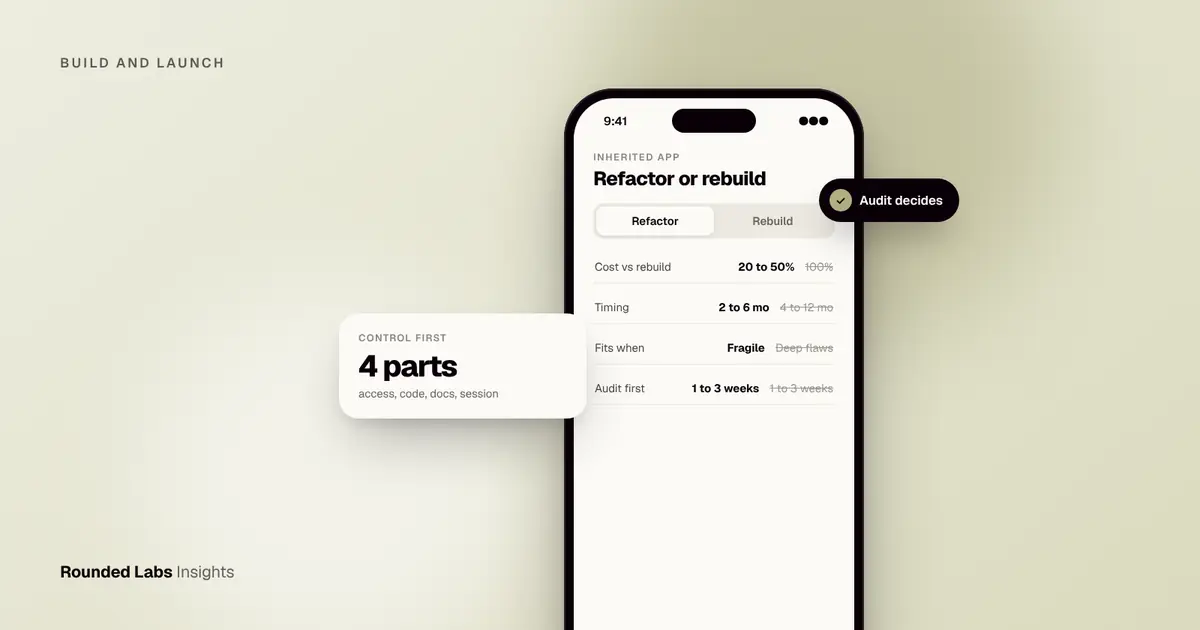
- A proper handover has four parts: access, source code, documentation and a live knowledge session with the previous developers.
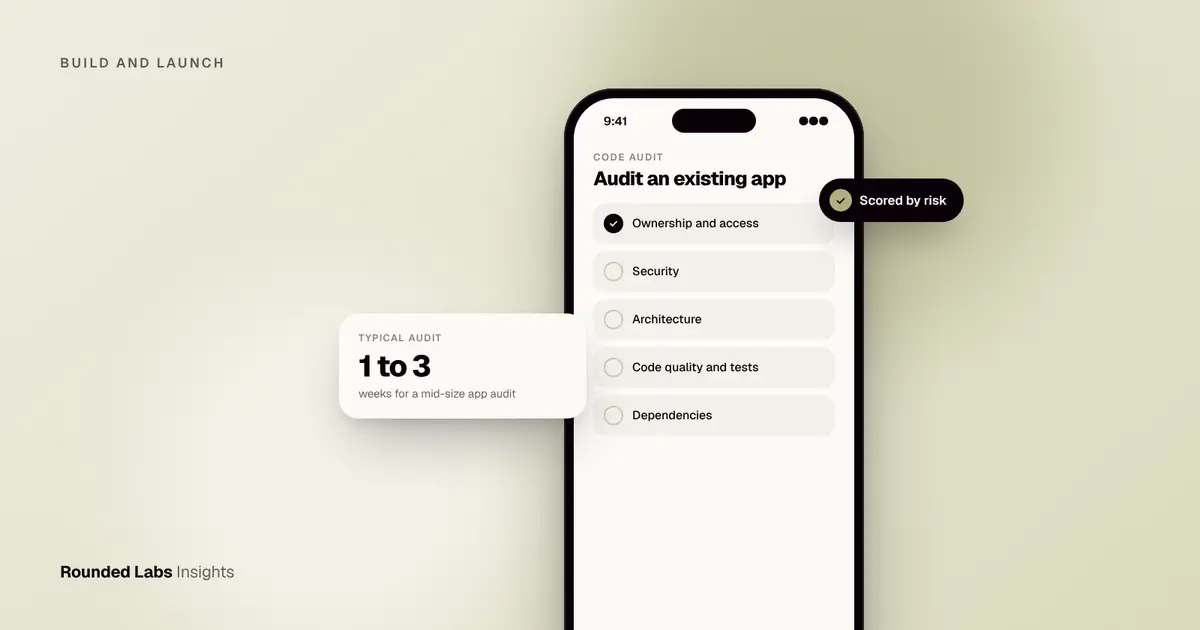
- An independent audit of the code, security and infrastructure typically takes 1 to 3 weeks; market estimates for a paid assessment run from £5,000 to £10,000.
- Most inherited apps fall into one of three outcomes: stabilise and continue, refactor in stages, or rebuild. The audit decides which.
- Rounded Labs prices every project at a fixed price agreed before development starts, and offers a Legacy App Rescue Assessment at £6,500.
- Rotate every password and key once the handover is complete, and prove the handover by shipping a small update under your own accounts.
What should you secure before anything else?
Do this before you discuss quality, blame or a new roadmap. A supplier who feels judged may become slow to respond, so get access while the relationship is still cooperative. Check that your name or your company’s name sits on each of these, not the previous supplier’s:
| Asset | What to check |
|---|---|
| Code repository | You are an owner or admin, not just a guest, and the full history is included |
| Apple Developer account | Registered to your legal entity, with you as Account Holder |
| Google Play Console | You hold owner rights, and the developer account is in your company name |
| Signing keys and certificates | Android upload and signing keys, iOS certificates and push notification keys are stored safely and recoverable |
| Cloud hosting | Billing is in your name, and you have root or admin access, not a shared login |
| Domains and DNS | The registrar account is yours |
| Third-party services | Analytics, crash reporting, email, payments, maps and push services are on your accounts |
| Backups | You know where database backups live, and someone has tested a restore |
If the app is already in the stores under the previous supplier’s account, an app transfer is possible, but it has rules. Both Apple and Google document how to move an app between accounts, and the receiving account must be set up and verified first. Your contract decides who legally owns the code; see Who owns the code? for what to look for.
Why is the order of access so important?
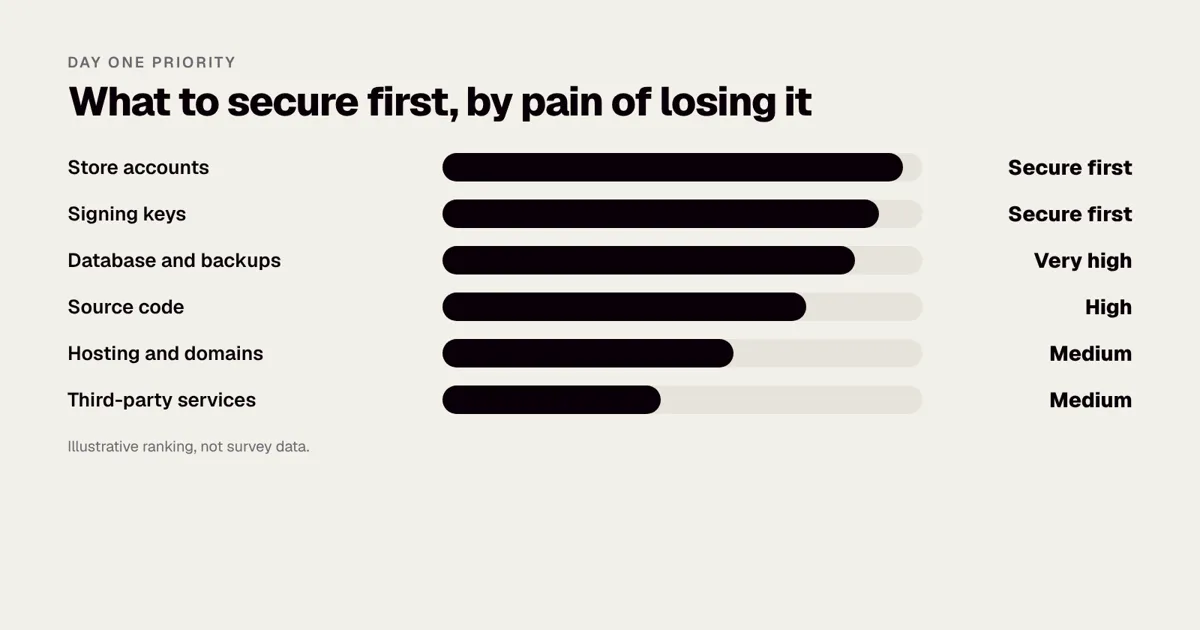
Some assets are easy to replace and some are not. A password can be changed. A domain can be recovered with effort. But a lost Android signing key, an app held in someone else’s store account or a database without backups can turn into weeks of lost work. Rank the assets by how painful their loss would be, and secure the painful ones first.
- The store accounts. Without them, you cannot update the app or respond to a review problem.
- The signing keys. Some can be reset through the stores, but the process is slow and has conditions.
- The production database and backups. This is your customers’ data and your business history.
- The source code. Even a single recent copy is better than none.
- Hosting and domains. These keep the app online and reachable.
- Third-party services. Payments, email and push services all matter, and some hold your data.
How do you set up the Apple and Google accounts you need?
If the previous supplier ran the store accounts, you have two paths: transfer the app, or create your own accounts and publish a fresh listing. Transfer is better because it keeps ratings, reviews and the existing user base. It requires your own organisation account first. For Apple, a company needs a legal entity, usually a D-U-N-S number and a verification process that takes days or weeks; How to set up an Apple Developer account for a company and How to get a D-U-N-S number for the App Store cover the steps. How to move an app to a new developer account, How to transfer an app between App Store accounts and How to transfer an app on Google Play go through the transfer itself. Start this early, because verification times are outside your control. At the time of writing, both stores publish transfer requirements and conditions on their developer help pages, such as Apple Developer and the Google Play Console Help, so check the current rules before you start.
What about things that are invisible?
Not every dependency appears on a list. Scheduled jobs that send emails every night, an old cloud function that still handles payments, a shared mailbox that receives password reset replies, a certificate that expires in three months: these are the items that break an app weeks after a handover. Ask the previous team for an inventory, and then verify it. Check the cloud console for running services and scheduled tasks. Search the code for external hostnames and API keys. Look at the domain’s DNS records for services you did not know about. An unexplained record is a question for the previous supplier.
What if the previous developer will not cooperate?
Sometimes the handover is hostile, or the previous developer has disappeared. You can still make progress, and the order matters.
- Read your contract. It decides who owns the code and what the supplier must deliver. Take legal advice before you threaten action. This guide is general information, not legal advice.
- List what you already control. The published app, any accounts in your name, billing records, and any copy of the code you hold.
- Ask in writing, with a deadline and a specific list. A short, factual request with dates is harder to ignore than a long complaint.
- Check for backups and partial copies. Team members, earlier agencies or your own cloud account may hold a copy of the repository or a build.
- Protect the running service. Keep a copy of the database, take over billing for hosting where possible and monitor the app’s availability.
- Decide whether to rebuild from the app’s behaviour. If the source code is truly lost, the published app and its data can act as a specification for a new build. It is slower and more expensive than taking over working code, but it is possible.
How to switch app agencies without losing your app covers the contract and negotiation side in more detail. Resist the temptation to make threats before you know your legal position, because it can end the cooperation you still need.
What does a fair exit look like?
A fair exit means that the outgoing supplier hands over what the contract requires, within a reasonable time, and that you pay what is owed for work delivered. It is usually better to agree a short written handover plan, with dates and a named contact on each side, than to argue about the past. Settle disputes separately from the handover where you can. The aim is to protect the product and your users first.
What does a good handover include?
A handover is more than a zip file. Ask the previous supplier for the following, and put it in writing with dates:
- The complete source code for the app, the back end and any admin tools, with commit history.
- Build and release instructions that a new developer can follow without calling anyone.
- Environment details: how test, staging and production differ, plus the configuration each one needs.
- Secrets, handed over safely: API keys and passwords in a password manager, then rotated once the handover is finished.
- Documentation: architecture notes, API descriptions, database structure and a list of third-party services.
- Open issues: bug lists, known problems and half-finished features.
- A live walkthrough of two to four hours with the developers who wrote the code, recorded.
If the relationship has broken down, read How to switch app agencies without losing your app for the contract and negotiation side. Where documentation does not exist, the audit stage below has to recreate it, which adds time.
What should the handover meeting cover?
The live walkthrough is the part most often skipped, and the most valuable. Written documents describe what was intended. A developer talking through the system tells you what is fragile, what was a quick fix and what is expected to break. Record the session, with permission, and structure it so nothing is missed.
| Topic | Questions to ask |
|---|---|
| Architecture | What are the main parts? How do they talk to each other? Where is the data? |
| Build and release | How do you build, sign and submit? What breaks? Who holds the keys? |
| Environments | How do test, staging and production differ? How is configuration set? |
| Integrations | Which third-party services are used? Which are paid? Which keys expire? |
| Known problems | What are the three things you would fix first? What do users complain about? |
| Operations | What jobs run on a schedule? What do you check when something fails? |
| Security | Where are secrets? What was never done properly? What was never tested? |
| History | Why was it built this way? Which decisions were forced by time or budget? |
Ask also what the developers would not touch. Every system has a corner like that, and knowing where it is saves a great deal of risk.
How do you hand over secrets safely?
Never send passwords or keys by email or chat. Use a password manager with shared vaults, hand over by a secure channel and record who received what. Once the handover is finished, rotate every credential: hosting, database, API keys, signing credentials where possible, third-party service passwords and any shared accounts. Remove the previous supplier’s access to repositories, cloud consoles and tools. This is not an accusation. It is standard practice, and a good supplier will expect it. The UK’s National Cyber Security Centre publishes practical guidance on managing access and credentials that applies to any country.
What if there is no documentation at all?
That is common. Plan for the audit to create it. A competent engineer can read the code, run the app and map the main parts in a few days. The result should be a short architecture note, a list of services and their owners, and a set of build instructions that are tested on a clean machine. Treat the cost of writing this as part of the cost of taking over. It will pay for itself the first time someone new joins the project.
How do you audit an app you did not build?
Resist the urge to read the code yourself, and resist letting a new supplier quote for a rebuild without looking first. An independent audit answers five questions: does it build, is it secure, can it scale, can others maintain it, and what will it cost to change?
An audit normally covers:
- Can we build and run it? A clean machine should produce a working app from the repository in under a day.
- Code quality. Structure, test coverage, outdated libraries and areas nobody dares to touch. See What is technical debt?.
- Security. Hard-coded secrets, weak authentication, unencrypted data, and old dependencies with known vulnerabilities. The OWASP Mobile Application Security project provides a standard checklist.
- Infrastructure. Hosting cost, uptime, monitoring, backup and what happens if one server fails.
- Store health. Crash rates, review ratings, and whether the app meets the current Apple and Google requirements, including target operating system versions. Check the current store rules, as they change each year.
For a step by step method, see How to audit an existing app’s code. Rounded Labs runs this as a fixed-price Legacy App Rescue Assessment at £6,500, and a broader Tech Architecture Audit at £7,500.
Not sure what you have inherited? A short conversation usually shows whether you need an audit, a repair or a rebuild. Book a 30-minute call with a co-founder and we will tell you what we would check first.
What happens in each week of an audit?
A typical one to three week audit runs in stages. The exact shape depends on the size of the app.
| Stage | What happens | What you receive |
|---|---|---|
| Setup (days 1 to 2) | Access to code, builds, backends and stores. Clean build attempt | A first view of whether the app builds and runs |
| Review (days 3 to 8) | Reading code, running static analysis, checking dependencies and infrastructure | Notes on structure, quality and risks |
| Testing (days 5 to 10) | Running the app on devices, probing security, checking performance and store health | A list of defects and weaknesses with evidence |
| Reporting (days 9 to 15) | Prioritising findings and estimating the cost of fixing each | A written report, ranked recommendations and options with cost bands |
| Readout | A call to talk through the findings and answer questions | Shared understanding, and a decision paper for your board or investors |
The output should be a document you can take to any supplier. It should name specific findings, show evidence, rank them by severity and give a range of costs. An audit that says only “the code is messy” is not worth paying for.
How do you rate what the audit finds?
Use a simple severity scale so that findings are comparable and a decision is possible.
| Severity | Meaning | Example | Typical response |
|---|---|---|---|
| Critical | A serious risk of data loss, breach or outage now | Hard-coded production database password in the app, no backups | Fix within days, before other work |
| High | Likely to cause failure or block releases soon | Target operating system version about to be rejected by a store, payment library with a known flaw | Fix in the first month |
| Medium | Slows change or raises cost, but not an immediate threat | No automated tests, tangled modules | Plan into the roadmap |
| Low | Cosmetic or minor | Naming inconsistencies, outdated comments | Fix when nearby code is touched |
Count findings by severity and by area. If the critical and high findings cluster in one module, a targeted rewrite of that module may be enough. If they are spread across everything, the case for a rebuild gets stronger.
What tools and evidence should an audit use?
You do not need to know the tools, but you should expect a mix. Automated scans check dependencies for known vulnerabilities, search for secrets and measure complexity. Manual review looks at architecture, authentication, data storage and the way the app talks to the server. Device testing shows crashes, slow screens and layout problems. For security, an independent penetration test may be justified if the app handles money or personal data; What is penetration testing for apps? explains what it involves and Mobile app security checklist sets out the baseline. The report should say what was tested, what was not, and how confident the auditor is.
Should the audit be done by the company that wants to win the work?
It is better to have the audit done by someone independent, or to pay for the assessment separately, so you can take the report to any supplier. A free audit tied to a rebuild quote tends to favour a rebuild. If you do use a supplier who may also quote for the work, ask them to separate the findings from the proposal and to hand over the full report even if you do not hire them.
Should you keep, fix or rebuild?
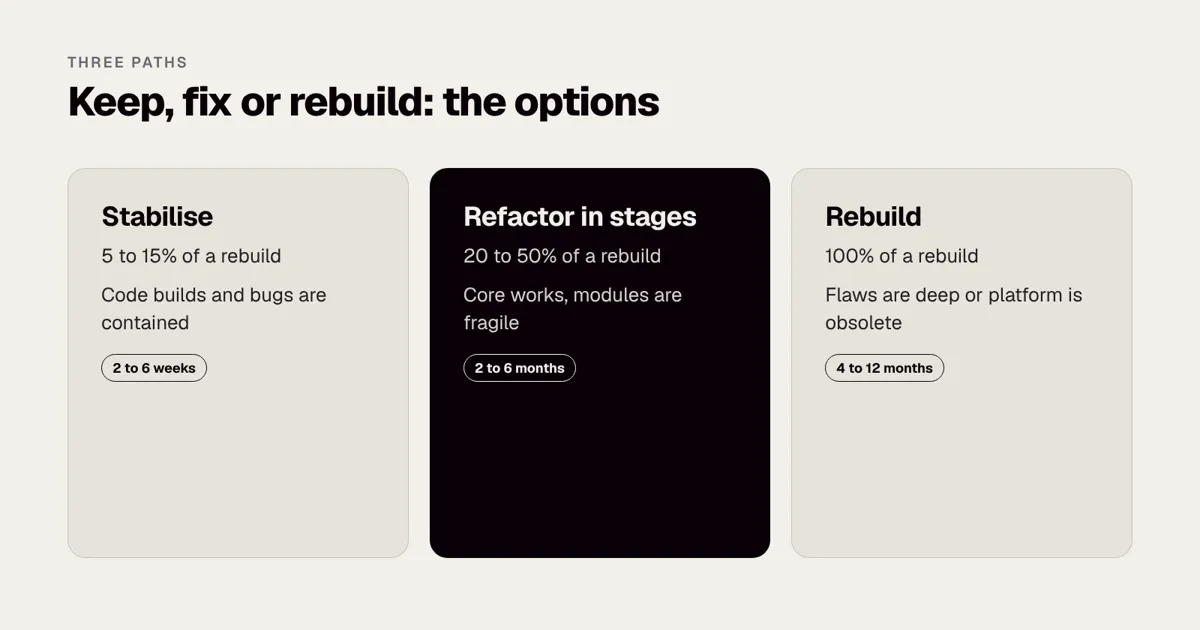
The audit result should point to one of three paths. These figures are market estimates and vary by app size, so use them as a rough guide only.
| Path | When it fits | Typical cost against a full rebuild | Typical timing |
|---|---|---|---|
| Stabilise and continue | Code builds, is reasonably tidy, and bugs are contained | 5 to 15% | 2 to 6 weeks, then normal development |
| Refactor in stages | Core works but modules are fragile or outdated | 20 to 50% | 2 to 6 months |
| Rebuild | Security flaws are deep, the platform is obsolete, or the architecture blocks every change | 100% | 4 to 12 months |
A worked example. A founder inherits a booking app built by a freelancer who has left. The build runs, but the payment code is copied from a 2019 tutorial, there are no tests, and the Android target version is two years behind, so Google Play warns that updates may stop. The audit finds the screens and the back end sound, but the payment module and the login flow unsafe. The sensible path is a staged refactor: replace payments and login first, update the Android target, add automated tests around the booking flow, and leave the rest alone. That costs a fraction of a rebuild and keeps the existing users on the app.
The opposite mistake is also common: a new supplier recommending a rebuild because they would rather not work on someone else’s code. Ask any supplier to show you the specific findings that justify a rebuild. See How to rescue a failing app project if the app is also late or over budget.
What questions decide between the three paths?
Work through these questions with the audit report in front of you. Each answer pushes you toward one option.
| Question | If the answer is yes | If the answer is no |
|---|---|---|
| Does the app build from a clean machine and ship an update? | Stabilise or refactor are open | Fix this first; rebuild becomes more likely |
| Are the core features working for users today? | Keep what works | Rebuild may be cheaper than repair |
| Are there critical security flaws spread across the code? | Rebuild or deep refactor | Targeted fixes may do |
| Is the platform or framework obsolete or unsupported? | Plan a migration or rebuild | Continue on the current stack |
| Can a new developer understand the structure within a week or two? | Continue with the codebase | Refactor or rebuild |
| Is the data model sound? | Keep the data and replace the app layer if needed | Data migration will be a major part of any plan |
| Is there a clear business need to change big parts soon? | A rebuild may fit a planned redesign, see How to plan an app redesign | Do the minimum that keeps it safe |
What is the cost of waiting?
Doing nothing is also a decision, and it has a cost. Store requirements move every year. Operating system updates break old code. Libraries lose support. An app left alone for a year or two can fall behind to the point where it cannot be updated at all. How to prepare your business app for each new iOS release and App maintenance costs in the UK explain the ongoing work. Even if you decide not to change features, budget for keeping the app current.
When is a rebuild the right answer?
A rebuild is right more rarely than suppliers suggest, and more often than owners hope. It makes sense when security flaws are fundamental, when the technology is dead or unsupported, when the code cannot be changed without breaking something else, or when the business has changed so much that the old design no longer fits. If you choose it, protect what has value: the data, the user base, the store listing and the learning from the old product. Rebuild or refactor: what it costs to fix an old app goes into the economics in more detail, and Turning legacy software into SaaS covers a related path for older business systems.
How do you change supplier without users noticing?
Users should not notice a change of supplier. They should see the same app, the same icon and, apart from improvements, the same behaviour. A few steps help.
- Keep the same bundle identifier and package name. Changing them makes a new app in the eyes of the stores.
- Move the app through the official transfer routes rather than uploading a new listing.
- Keep the same back end addresses until you have a planned migration, or put a stable alias in front of them.
- Release a small update first to prove the pipeline, before any large change.
- Plan any account move for a quiet period. Avoid sales peaks and marketing campaigns.
- Communicate only if something changes for users. If privacy policies, data controllers or support contacts change, update them and tell people where the law or good practice requires.
What about the privacy policy and data controller?
A change of supplier can change who handles user data. If the old supplier was a processor, your organisation remains the controller, and you need to check that data is returned or deleted by the old supplier, and that new agreements are in place with the new one. Update privacy notices if names, locations or purposes change. This is general information, not legal advice; in the UK see the Information Commissioner’s Office for guidance and ask your lawyer about your own situation. UK GDPR for mobile apps covers the basics for app owners.
How do you migrate users to a new app version or a new codebase?
If the new version replaces the old one, the safest route is a gradual release: a small share of users first, then more as confidence grows. Store tools allow phased releases. Keep the old API working for a time so older app versions do not break, and use a forced-update message only when you must. How to migrate users to a new app version goes through the options. If the old app must be retired, How to sunset an old app covers it.
How should you run the first 90 days?
A sensible order, once access is secure and the audit is done:
- Weeks 1 to 2: secure access, rotate every password and key, start the audit, and set up monitoring so you can see crashes and downtime.
- Weeks 3 to 4: agree the decision (keep, fix or rebuild), write down the top ten risks, and fix any security holes immediately.
- Months 2 to 3: deliver the first agreed improvements, add automated tests around the most important flows, and release an update to the stores, which proves the build and release process works end to end.
Treat the first store release as the real acceptance test of the handover. If you cannot ship a small update under your own accounts, the handover is not finished. Working with an app agency: the first 90 days explains how to keep a new supplier accountable during this period.
What should you put in place in the first month?
| Area | Action | Why |
|---|---|---|
| Monitoring | Crash reporting, uptime checks, alerts to a shared channel | You will see problems before users complain |
| Backups | Automated database backups and one tested restore | Recovery is a practice, not a hope |
| Access | Named accounts, multi-factor authentication, no shared logins | You know who did what |
| Release pipeline | A repeatable build and release process; see What is CI/CD for apps? | Releases become routine |
| Documentation | Architecture note, runbook, list of services | New people can start quickly |
| Support | A single route for user issues and a triage rule | Users know where to go |
| Risk register | Top ten risks with owners and dates | Nothing important is forgotten |
How should you manage the relationship with the new supplier?
Ask for a plan with milestones and a weekly report that shows progress, risks and decisions. Agree acceptance criteria for each piece of work. Request demos of working software every two weeks. Keep the repository and accounts in your organisation, with the supplier as a collaborator. How to read an agency’s weekly report and How to tell if an app project is off track show what to watch for. Do not repeat the mistake that brought you here: a supplier holding everything, with no visibility for you.
Who should look after the app in the long term?
Taking over is the moment to decide who will own the app’s future. The options each have strengths.
| Option | Strengths | Weaknesses | Often suits |
|---|---|---|---|
| In-house developer or team | Deep product knowledge, close to the business | Hiring cost, key person risk, narrow skills | Products at the centre of the business |
| Agency or studio | Broad skills, flexible capacity, process | Needs oversight, can change team | Projects with defined work |
| Freelancer | Low cost, direct contact | Continuity risk, limited cover | Small apps, light change |
| Fractional technical lead plus supplier | Independent technical judgment, supplier delivers | Needs coordination | Founders without a technical background |
App agency vs freelancer vs in-house team and Fractional CTO vs app agency for early-stage startups go through these choices, and the right one depends on your budget and how central the app is. Whichever you choose, keep the structure that caused trouble out of the new arrangement: the accounts, repository and documentation belong to you.
What does taking over an app cost?
For a typical small to mid-sized app, market estimates are:
- Handover and access work: a few days of effort, often included in an assessment.
- Independent audit: £5,000 to £10,000 (about $6,350 to $12,700, or €5,800 to €11,600).
- Stabilisation work: from a few thousand pounds for a small fix list.
- Refactor or partial rebuild: often tens of thousands of pounds, scaling with app size.
Rounded Labs projects are fixed price, agreed before development starts, and typically run from £30,000 to £250,000+. See the pricing page for how we quote, and App agency vs freelancer vs in-house team if you are deciding who should look after the app long term.
What are the costs people forget?
Besides audit and development, allow for costs that rarely appear in the first budget.
- Developer accounts and renewals. Both stores charge for developer accounts, at the time of writing, and organisation accounts need verification.
- Hosting and third-party services. They continue to bill, and some may be underpriced or overpriced because of old contracts.
- Legal review. A short review of the old contract and the new one is sensible.
- Internal time. Someone on your team must answer questions, test releases and decide.
- Data migration. Moving data between systems or providers can be a project in its own right.
- Catch-up work. Operating system updates and store requirement changes that were skipped.
- Running costs afterwards. The total cost of owning an app over five years shows how these accumulate.
How can you keep the cost down?
Keep the work focused. Fix security and stability first, and defer redesigns and new features until the foundation is safe. Ask for fixed-price work against clear scope, so surprises do not drift into your budget. Use the audit report to compare quotes on the same facts; App development quotes compared helps you read them. And keep what works: it is common for an inherited app to have sound parts that cost more to replace than to keep.
What mistakes do people make when taking over an app?
- Starting the redesign before securing access. If you do not control the accounts, you do not control the app.
- Believing either story about the previous supplier. Neither the supplier’s account of success nor the critic’s account of failure replaces a code audit.
- Skipping the audit to save money. It costs a small share of a rebuild and prevents the wrong decision.
- Accepting a rebuild quote with no findings. Ask for the evidence.
- Leaving old credentials active. Rotate everything once the handover is done.
- Forgetting the signing keys. Losing these causes weeks of pain.
- Not testing a restore from backup. A backup you have never restored is an assumption.
- Changing too much at once. Fix the foundations, release small updates, learn how the system behaves.
- Ignoring store health. A falling rating or an expiring target version can end the app’s life.
- Letting the new supplier hold everything. Keep ownership of accounts and code in your organisation.
How do you know the handover is complete?
A short acceptance test settles it. Can you build the app from the repository on a clean machine? Can you sign and submit a release under your own accounts? Can you deploy the back end from your own cloud account? Can you restore a database backup? Do you have a current list of every service and who pays for it? Have all old credentials been rotated, and has the previous supplier’s access been removed? If the answer to every question is yes, the handover is done. If not, the unanswered ones are your next tasks.
What should you do next?
- Inventory every account and asset, and mark whose name each one is in.
- Ask the previous supplier for the handover list above, with dates.
- Start Apple and Google account set-up in your organisation’s name.
- Commission an independent audit with a written report you own.
- Decide between stabilise, refactor and rebuild using the evidence.
- Put monitoring and backups in place within the first month.
- Ship a small update under your own accounts to prove control.
If you would like help, our Legacy App Rescue Assessment is a fixed-price £6,500, and you receive a report you can take to any supplier. Book a call with a co-founder and tell us what you have inherited. We will say honestly whether you need an audit, a repair or a rebuild, and what to ask the previous supplier for first.
Frequently asked questions
Can I take over an app if the previous developer will not cooperate?
Yes, if you own the accounts and hold the code, you can start with what you have. If they hold the only copy of the code or the store account, your contract decides your rights, so get legal advice before acting. Rebuilding from the published app’s behaviour is possible but slower and more expensive.
How long does a handover take?
A cooperative handover usually takes 1 to 3 weeks, including the walkthrough sessions. An uncooperative one can take months, so start the access checklist as early as possible.
Do I need the previous developers' documentation to audit the app?
No, but it makes the audit faster and cheaper. Without it, the auditor works from the code and the running app, and writes the missing architecture notes as part of the report.
Will users notice when the supplier changes?
They should not. Keep the same bundle identifier and store listing, move the app under your own accounts through an official transfer, and release a normal update. Plan any account move for a quiet period.
Should the audit be done by the company that wants to win the work?
It is better to have the audit done by someone independent, or to pay for the assessment separately, so you can take the report to any supplier. A free audit tied to a rebuild quote tends to favour a rebuild.
What should I do first if I find a serious security flaw?
Fix or contain it before anything else, and record what you found. If personal data may have been exposed, take advice quickly, because breach reporting duties can have short deadlines in some places. Check the current rules with your regulator, such as the Information Commissioner’s Office in the UK, and with a lawyer.
Is it ever right to keep the previous supplier?
Sometimes. If the supplier is competent and the problem was communication or scope, a reset with clearer terms, shared ownership of accounts and regular demos can work. Treat it as a new engagement: fix ownership first, audit independently and agree a fixed price for defined work.
Official sources and further reading
Talk it through with one of our co-founders. 30 minutes, no pressure.