

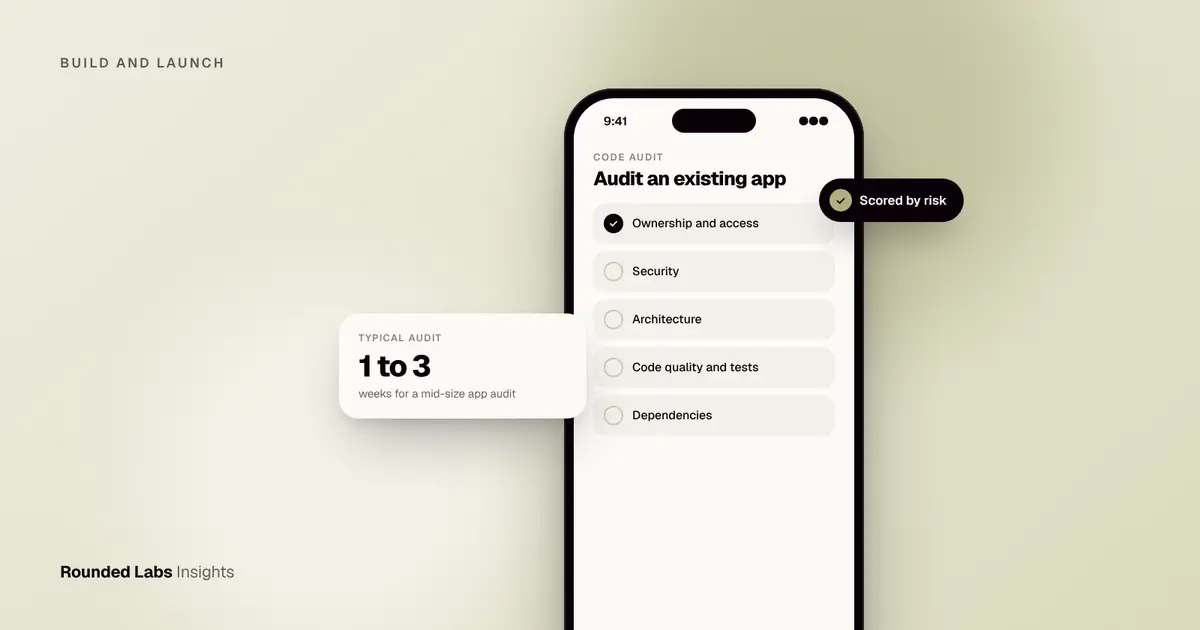
To audit an existing app’s code, check six areas in order: ownership and access, security, architecture, code quality and tests, dependencies, and release process, then score each red, amber or green. A focused audit of a mid-size app usually takes 1 to 3 weeks and costs roughly £5,000 to £15,000 from an independent supplier (market estimates, not quotes). The output should be a ranked list of risks with costs attached.
We have spent 19 years inheriting and improving other people’s software, including the Superdry app, which we modernised for a brand with 768 locations in over 100 countries. This guide shows a non-technical founder or product owner what a code audit looks for, how to run one, how to read the result and how to turn the findings into a decision. Our services page lists how we help with audits and rescue work.
Key facts
- A code audit answers one question: is this app safe to keep building on, and what will it cost to get it there?
- Start with ownership. If you cannot get the source code, the build keys and the store accounts, nothing else matters.
- Automated tools find roughly the easy half of the problems. A human reading the code finds the structural ones.
- Output a short report with a red, amber or green rating per area and a cost estimate per fix.
- Our Tech Architecture Audit is a fixed price of £7,500, and our Legacy App Rescue Assessment is a fixed price of £6,500.
Why audit an existing app at all?
You audit when a decision depends on what is inside the code. The usual triggers are:
- You are changing development suppliers and need to know what you are inheriting (see How to take over an app built by someone else).
- Releases have become slow and every fix breaks something else.
- An investor, buyer or enterprise customer has asked for technical due diligence (see How to prepare an app for due diligence).
- You suspect the app carries heavy technical debt and want a number before you commit to a rewrite.
- A security incident or a failed penetration test has shaken confidence.
- The person who built the app has left, and nobody on your side can explain how it works.
- Costs are rising and you cannot tell whether that is normal growth or a sign of a problem. The total cost of owning an app over five years shows what normal looks like.
Without an audit, the choice between fixing and rebuilding is a guess, and guesses on software are expensive. A rebuild you did not need can cost six figures. A rebuild you needed but delayed can cost you customers.
What does an audit not do?
It is worth being clear about the limits, so you ask for the right thing.
- It does not test the live app from outside. That is a penetration test, covered in What is penetration testing for apps?.
- It does not review your product strategy. An audit tells you about the code, not whether the features are right. For that, see How to validate an app idea before you spend £50k.
- It does not fix anything. A good audit stops at findings and costed recommendations, so the reviewer has no reason to inflate the work.
- It is not a guarantee. A reviewer samples. A clean audit means no major problems were found in the time available, not that none exist.
What should you check first?
Before anyone reads a line of code, confirm you control the assets. This takes a day and has killed more projects than bad code has.
| Asset | What to confirm |
|---|---|
| Source code | You hold a full copy in a repository you own, with the complete history |
| Apple and Google developer accounts | Your company is the account holder, not a freelancer or former agency |
| Cloud hosting and databases | You own the accounts and can see the bills |
| Signing keys and certificates | Stored somewhere you can reach, with a recovery route |
| Third-party services | Payment, push, analytics and email accounts are in your name |
| Domain names and DNS | Registered to your company, with more than one named administrator |
| Licences and contracts | Intellectual property is assigned to you in writing |
If any row fails, fix it before spending on the rest of the audit.
What if the asset check fails?
Failure is common, especially with apps built by freelancers or small agencies years ago. Work through the likely cases in order.
- The code is held by the developer, not you. Ask for a full export of the repository, including history, and check your contract for intellectual property terms. If the contract is silent or unclear, take legal advice before you escalate. Laws and contract terms differ by country, and this guide is general information, not legal advice. See Who owns the code? for what a good contract says.
- The store account belongs to someone else. Apple and Google both have routes to transfer an app between accounts when the details are right. Our guides How to move an app to a new developer account, How to transfer an app between App Store accounts and How to transfer an app on Google Play walk through them. Check the official documentation on Apple’s developer site and Android Developers because the steps and conditions change.
- Signing keys are lost. On Android, losing the upload key can often be recovered through Play App Signing, depending on how the app was set up. On iOS, certificates can usually be reissued by the account holder. Both are painful if you do not hold the account.
- Hosting is in a former supplier’s name. Move it into your own account before you do anything else, and record who has access.
Our guide How to switch app agencies without losing your app is the longer version of this checklist.
How do you prepare for the audit?
A good audit starts with a short preparation week. The more complete the access and documentation, the faster and cheaper the audit, and the less the reviewer has to guess.
What should you give the reviewer?
- Read-only access to the repository, including history, branches and issue tracker. Read-only is enough and keeps risk low.
- A non-disclosure agreement signed before access is granted.
- A walkthrough call with whoever knows the system best, even if that is only an hour with a former developer.
- Architecture notes, if any exist, including diagrams, deployment notes and a list of third-party services.
- Your last six months of incidents and support tickets, because they show where the app actually hurts.
- Your roadmap for the next 12 months. The reviewer needs it to judge fit, not just quality. An app that is fine for today’s features may not support next year’s.
- Store listings and release history, including any rejections.
- Monitoring and crash reports, if you have them.
What does a typical audit timeline look like?
| Day | Activity | Output |
|---|---|---|
| 1 | Access, kick-off call, asset check | List of missing access and assets |
| 2 to 3 | Run automated scans, build the app from a clean machine | Raw tool output, build notes |
| 3 to 7 | Read the code in the areas that matter most | Draft findings by area |
| 8 to 9 | Interview the team, test the release process | Process notes |
| 10 | Score, cost and rank findings | Draft report |
| 11 to 12 | Walk through the report with you, correct misunderstandings | Final report and decision options |
A smaller app can compress this to one week. A large system with several services may take longer. If a reviewer cannot say how long the audit will take, ask for a written plan before signing.
How do you audit the code itself?
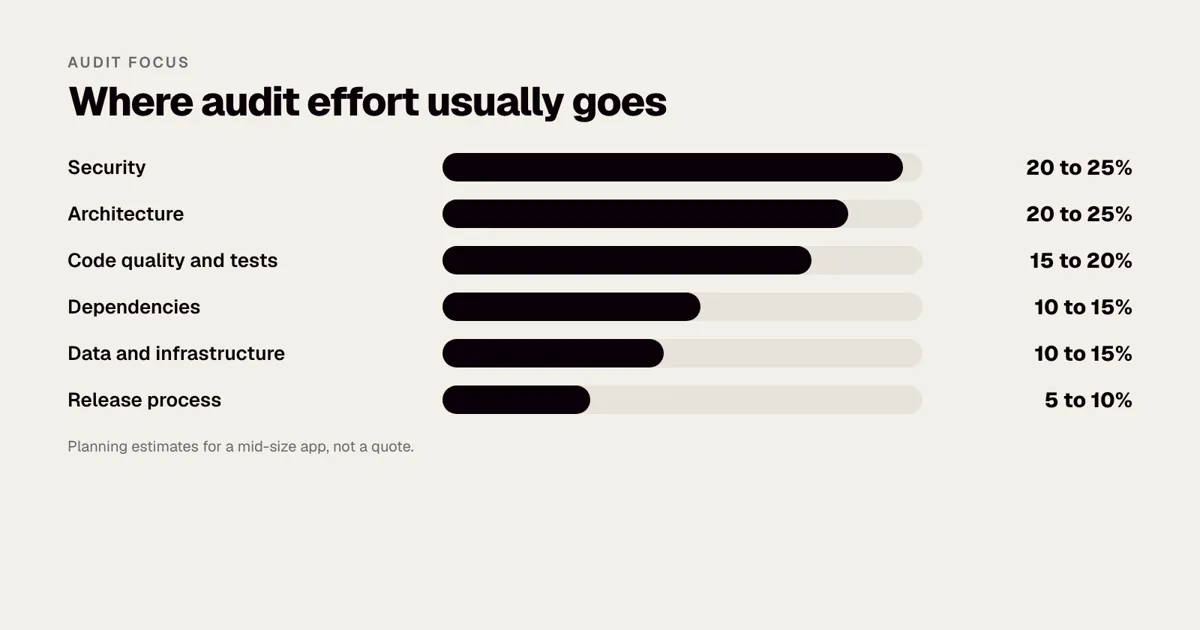
Work through six areas. Each can be scored on its own, and each answers a question a founder can understand.
1. Security
Check how the app stores passwords and tokens, how it talks to the server, and whether secrets such as API keys are committed into the code. For mobile apps, the OWASP Mobile Application Security Verification Standard is the usual yardstick, and our Mobile app security checklist puts it in plain English. The OWASP Mobile Application Security project publishes the standard and testing guide.
Things a reviewer will look at:
- Whether credentials and tokens are stored in secure device storage rather than plain files.
- Whether all network traffic uses encrypted connections and the app validates certificates.
- Whether API keys, passwords or certificates appear in the code or its history. Run a secret scanner over the whole repository history, not just the latest version, because a key deleted last year may still be in an old commit.
- Whether the server checks permissions on every request, rather than trusting the app.
- Whether personal data is collected, stored and deleted in line with your privacy duties. For UK apps, see UK GDPR for mobile apps.
- Whether logs contain personal data or tokens.
The UK National Cyber Security Centre publishes practical guidance at ncsc.gov.uk, and it is a good place to check the current recommendations for any control the reviewer flags. For lessons from real incidents, read App security incidents: common causes and the lessons for your app.
2. Architecture
Ask whether the app is organised so that one change stays in one place. Warning signs include one giant file that does everything, screens that talk straight to the database, and business rules copied into several places. A good architecture lets a new developer find where a feature lives within an hour.
A reviewer will usually map the system in a single page: the mobile app, the backend, the database, the third-party services and how they connect. Then they ask:
- Is there one clear source of truth for each type of data?
- Can the backend serve a second client, such as a web app, without being rewritten?
- Are the app and backend separated by a defined interface, so each can change independently?
- Is the choice of backend still sensible? For comparison, see Firebase, Supabase or a custom backend? and What is a backend as a service?.
- Does the hosting choice still fit? AWS vs Azure vs Google Cloud for app backends compares the main options.
A good test is to pick a feature you want next year and ask the reviewer how many places in the code would need to change. If the answer is “most of them”, that is a finding.
3. Code quality and tests
Look at automated test coverage, how readable the code is, and how many warnings the tools report. A low test count is not fatal on its own, but with no tests every release is a gamble. Ask for the last three bug fixes and read how big they were. A small fix that touched 40 files is a sign that the structure is working against you.
Quality indicators worth asking for:
| Indicator | Healthy sign | Worrying sign |
|---|---|---|
| Automated tests | Tests on login, payments and core flows, run on every change | No tests, or tests that have been failing for months |
| Code review | Every change reviewed by a second person | Direct changes to the main branch |
| Consistency | One style, clear names, short functions | Several styles, copied blocks, very long files |
| Documentation | A readme that lets a new developer run the app | Knowledge only in one person’s head |
| Warnings | Few and tracked | Hundreds, ignored |
| Bug history | Small, targeted fixes | Large fixes with side effects |
Our guide App testing explained: QA, UAT and beta testing describes what good testing looks like from the founder’s side.
4. Dependencies
Mobile and web apps rely on dozens or hundreds of open-source libraries. List which are outdated, abandoned or carry known vulnerabilities. The GitHub Advisory Database and the OWASP Dependency-Check tool can produce this list in minutes. Also check the age of the operating system and framework versions: an app stuck on a framework version that no longer receives security patches is a risk even if the code is tidy.
Three questions turn a long list into a useful finding:
- Which dependencies carry known vulnerabilities that can actually be reached in your app? A vulnerable library that your code never calls is lower priority than one on the login path.
- Which are abandoned? A library with no updates for years is a risk if it breaks with the next operating system release. See How to prepare your business app for each new iOS release.
- How far behind are the main frameworks? Two major versions behind is usually a quick fix. Five behind may be a project.
Platform requirements change every year, so also check that the app meets current store rules. Two examples are Google Play target API level requirements and Apple privacy manifests and required-reason APIs. An app that cannot be updated in the stores soon will not be updated at all.
5. Data and infrastructure
Review the database design, backups, and whether you have ever tested a restore. Check hosting regions against your privacy duties, such as UK GDPR or EU GDPR, and look for logging and monitoring that would tell you when something fails.
A short list of questions for this area:
- Where is data stored, and is that where your privacy notice says it is?
- How often are backups taken, where do they go, and when was a restore last tested?
- Who has access to the production database, and is that access logged?
- Is there a staging environment that mirrors production?
- Do alerts reach a person when the app or server fails, or does a customer have to tell you?
- Does the app work when the network is slow or missing? See How to make your app work offline.
- What does the infrastructure cost each month, and does anyone review it?
6. Release process
Can a developer build and ship the app from a clean machine using written steps? Is there a staging environment? How long does a release take, and how often does one roll back? A fragile release process predicts outages. Our guide What is CI/CD for apps? explains the automation that makes releases routine.
Typical findings here include a single developer who holds the only signing keys, release steps that live in someone’s head and a process that skips testing when time is short. These are cheap to fix and expensive to ignore.
Want a second pair of eyes on your code? We audit apps we did not build and give you a plain-English report with a fixed price to act on it. Book a 30-minute call with a co-founder.
How do you score what you find?
Use a simple traffic-light system and attach a cost to every red and amber item. Agree the meaning of the colours before the audit starts, so nobody argues about them afterwards.
| Rating | Meaning | Typical response |
|---|---|---|
| Green | Sound. Normal maintenance is enough | No action beyond routine |
| Amber | Works today but creates risk or cost within 6 to 12 months | Plan and budget the fix |
| Red | Serious risk to security, legal compliance, revenue or the ability to ship | Fix now or before the next major release |
A sample result for an imaginary retail app built five years ago:
| Area | Rating | Finding | Fix estimate |
|---|---|---|---|
| Ownership | Green | Code and accounts held by the company | None |
| Security | Red | API key for the payment provider stored in the app bundle | £2,000 to £4,000 |
| Architecture | Amber | Checkout logic duplicated across three screens | £8,000 to £15,000 |
| Quality and tests | Red | No automated tests on payments or login | £6,000 to £12,000 |
| Dependencies | Amber | 14 libraries two major versions behind | £3,000 to £6,000 |
| Release process | Amber | Only one developer can publish a build | £1,500 to £3,000 |
Total remediation: roughly £20,500 to £40,000. If a full rebuild would cost £120,000, the audit has just shown that fixing is the better route. If the fixes total more than about half a rebuild, the balance tips the other way. See Rebuild or refactor for how to compare them. These figures are illustrative market estimates, not a quote.
How do you rank findings that compete for budget?
Not every finding deserves the same urgency. A useful ranking uses two questions: how bad is the harm if it happens, and how likely is it? Multiply a score of 1 to 3 for each.
| Finding | Harm (1 to 3) | Likelihood (1 to 3) | Priority score |
|---|---|---|---|
| Payment key in the app bundle | 3 | 3 | 9 |
| No tests on login | 3 | 2 | 6 |
| Checkout logic duplicated | 2 | 2 | 4 |
| Only one person can release | 2 | 2 | 4 |
| Old but unreachable library | 1 | 1 | 1 |
Fix the 9s now, plan the 6s into the next release and revisit the low scores when you next touch that code. Add the cost column and you have a budget in priority order.
What tools help, and what can’t they do?
Automated tools are useful for speed and consistency. Common ones include static analysis such as SonarQube, dependency scanners such as OWASP Dependency-Check, and secret scanners. Many are free or have a free tier, and your hosting platform may already run some of them.
| Tool type | What it finds | What it misses |
|---|---|---|
| Static analysis | Code smells, likely bugs, duplicated code | Whether the design fits your business |
| Dependency scanning | Known vulnerabilities in libraries | Flaws in your own code |
| Secret scanning | Keys and passwords in code and history | Secrets stored elsewhere, such as chat tools |
| Mobile security scanners | Common insecure settings in the built app | Logic flaws in your backend |
| Test coverage reports | Which lines tests touch | Whether the tests check anything useful |
| Performance profiling | Slow screens and memory use | Why the design makes them slow |
What tools cannot do is judge fit. A tool will not tell you that the app was designed for 1,000 users and now has 100,000, or that the data model cannot support the feature on your roadmap. That takes someone reading the code with your business plan in hand, which is why an independent reviewer who has no stake in the previous work is worth paying for. Our guide Why apps feel slow, and how to fix it shows how performance problems trace back to design choices.
Who should carry out the audit?
Not the team that wrote the code, and not a supplier hoping to win the rebuild. Look for an independent developer or small firm that will quote a fixed price for the audit and then hand you the report with no obligation to hire them. Ask for a sample report, and check that the reviewer has shipped apps in your stack.
| Option | Typical market cost | Strengths | Watch for |
|---|---|---|---|
| Freelance reviewer | £2,000 to £5,000 | Fast and flexible | Narrow stack knowledge, no cover if they are ill |
| Small independent studio | £5,000 to £15,000 | Broad skills, written report | Make sure the report is independent of any sales aim |
| Large consultancy | £15,000 or more | Formal process, brand weight | Cost, and a generic report |
| Your own in-house lead | Staff time | Knows the context | May be too close to the code |
| The incumbent developer | Free or cheap | Knows everything | Conflict of interest |
These are market estimates, not quotes. Our own audits are fixed price, agreed before work starts. Larger projects that follow typically run £30,000 to £250,000+, see our pricing page.
What should the report contain?
Ask for a written report in plain English with these parts.
- Executive summary. One page: the verdict, the top three risks and the recommended route.
- Scorecard. The six areas with a red, amber or green rating.
- Findings. Each with evidence, such as a file name or a screenshot, an explanation in plain words, the risk and a fix estimate.
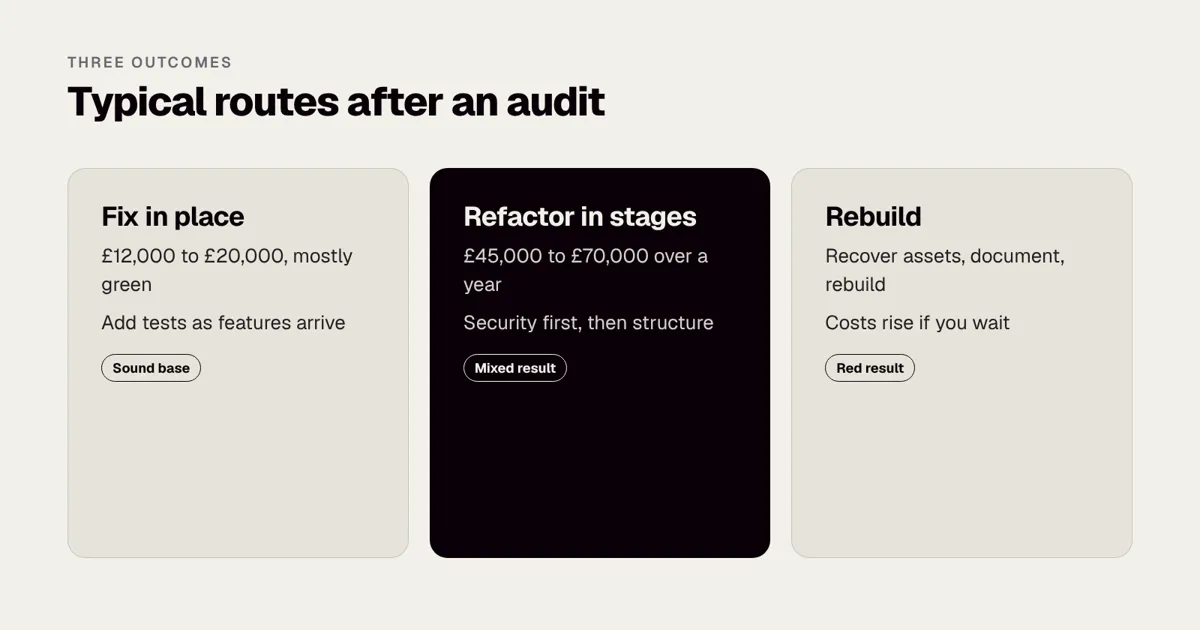
- Options. Fix in place, refactor in stages or rebuild, each with a cost range and a timeline.
- Priorities. A sequenced plan for the first 90 days.
- Limits. What was not reviewed and why.
If a report is mostly tool output pasted into a document, ask for a rewrite. Tool output is evidence, not analysis.
How do you decide between fixing and rebuilding?
The decision follows from the findings, your roadmap and the remaining life of the app. This table gives a starting framework.
| Situation | Usual route | Why |
|---|---|---|
| Mostly green, a few reds that are cheap to fix | Fix in place | The foundation is sound |
| Architecture amber, tests missing, features still needed | Refactor in stages | Improve the structure while delivering features |
| Architecture red, data model cannot support the roadmap | Rebuild, possibly in parts | Fixing costs more than replacing |
| Frameworks unsupported, no tests, original team gone | Rebuild, after documenting behaviour | Risk grows every month |
| Security red with a clear fix | Fix now, then reassess | Do not let a rebuild debate delay a security fix |
| App near the end of its commercial life | Maintain, then plan the exit | See How to sunset an old app |
A common middle path is the strangler approach: replace one part of the system at a time, running old and new side by side. It reduces risk, because each step can be tested with real users, and it spreads cost across quarters. It needs a sound plan for how data moves between old and new, and the audit should say whether that is realistic. For more on legacy decisions, read What is a legacy system?.
A worked example: three apps, three answers
These are illustrative scenarios built from common patterns. They are not client projects, and the figures are market estimates.
App one: a booking app, four years old. The audit finds green ownership, an amber release process, outdated libraries and a handful of missing tests. Fix estimates add up to £12,000 to £20,000. A rebuild would cost £90,000 or more. The answer is to fix in place and add tests as new features arrive.
App two: a retail app, six years old. Ownership is green, but security is red (secrets in the app), architecture is amber and the framework is two years out of support. Fixes sum to £45,000 to £70,000, and a rebuild is £110,000. The answer is to fix the security issue immediately, then refactor in stages over a year, because the roadmap needs new features that the current structure makes slow.
App three: a field service app, eight years old. Ownership is red because the original freelancer holds the store account and the code. The framework is end of life and there is no documentation. The answer is first to recover the assets, then to document how the live app behaves, then to rebuild on current technology. Our Legacy App Rescue Assessment at £6,500 fixed is designed for exactly this kind of question.
What do you do with the results?
- Fix the reds that carry security or legal risk first. Exposed keys and unpatched libraries should not wait for the next quarter.
- Decide: fix, refactor in stages, or rebuild. The comparison of cost and remaining life of the app drives this.
- Write the findings into the next supplier brief, so every bidder prices the same facts. How to brief an app development agency shows how.
- Ask for fixed prices on each option. A supplier that has read the audit can price the work with less contingency, and the saving is yours. See Fixed price vs time and materials for app projects.
- Re-audit after the work. A short follow-up check confirms the fixes held.
- Put maintenance on a plan. Many findings come from years of unplanned maintenance. App maintenance costs in the UK and How to choose a maintenance plan help you set one up.
If the audit shows the project is already in trouble, read How to rescue a failing app project. If you are only now worried about drift, How to tell if an app project is off track lists the early signs.
How do you handle the handover to a new team?
If the audit leads to a change of supplier, plan a clean handover. Our Handover checklist template covers the documents and access to collect. The usual steps are:
- A kick-off session where the old team explains deployments, hidden knowledge and known problems.
- A parallel period in which the new team ships a small change under supervision.
- A written record of accounts, keys, services and who holds each.
- A freeze on risky changes while access moves.
How does the audit change for different technology stacks?
The six areas stay the same, but the specific checks shift with how the app was built. Tell the reviewer your stack early so they can plan the right tools.
| Stack | Extra checks | Common findings |
|---|---|---|
| Native iOS (Swift or Objective-C) | Use of deprecated frameworks, privacy manifest status, UI approach | Large view controllers, old Objective-C that nobody wants to touch. See SwiftUI vs UIKit for new iOS apps |
| Native Android (Kotlin or Java) | Target API level, permissions, background work rules | Outdated target level, heavy use of removed APIs |
| Flutter or React Native | Framework version, native module health, upgrade path | Abandoned plug-ins, long gaps between framework upgrades. See Flutter vs React Native in 2026 |
| Hybrid or web wrapper | Offline behaviour, performance, store rule compliance | Slow screens, rejected updates. See PWA vs native app |
| Backend as a service | Security rules, cost growth, lock-in | Open database rules, bills that grow faster than usage |
| Custom backend | Scaling, queueing, monitoring, database design | One server, no failover, slow queries |
If your app has several of these layers, ask the reviewer to score each layer on its own. A sound mobile app on a failing backend needs a different plan from the reverse.
What do common fixes typically cost?
Once an audit lists findings, founders usually ask what each costs to put right. The ranges below are market estimates for a mid-size app and will vary with the size and state of your code. They are for budgeting, not quoting, and each should be confirmed by the supplier who does the work against your own findings.
| Finding | Typical fix | Market estimate |
|---|---|---|
| Secrets in code or history | Rotate keys, move to a secrets store, clean history | £1,500 to £4,000 |
| Missing tests on critical flows | Add automated tests for login, payments, core journeys | £6,000 to £15,000 |
| Outdated libraries | Upgrade and retest | £3,000 to £10,000 |
| Framework two or more versions behind | Staged upgrade | £8,000 to £25,000 |
| Duplicated business logic | Consolidate behind one module | £8,000 to £20,000 |
| No staging environment | Set up and document | £2,000 to £5,000 |
| No monitoring or alerts | Set up crash reporting and uptime checks | £1,500 to £4,000 |
| Single point of failure in releases | Automate builds, share access | £2,000 to £6,000 |
| Untested backups | Document and test a restore | £1,000 to £3,000 |
Notice that the security and process items are the cheapest and the structural items are the dearest. That is why the traffic-light method pays off: it points you to the cheap wins first and gives you time to plan the expensive changes. For the longer-term picture of what it costs to keep an app healthy, see App maintenance costs in the UK.
How do you keep the findings from gathering dust?
Many audit reports are read once and filed. These steps make sure yours changes something.
- Name an owner for each red and amber item, with a date. Items without owners do not get done.
- Turn the top five findings into a funded plan within two weeks of receiving the report, while the context is fresh.
- Bring the supplier into the audit discussion. Whoever will do the work should read the report and challenge any estimate that looks wrong.
- Add the findings to your backlog, ranked with feature work. Our guide How to manage scope changes without blowing the budget helps balance new features against repair work.
- Schedule a re-check in three to six months to confirm the ratings have moved.
- Keep the report. It is useful evidence for investors, insurers and future suppliers. How to prepare an app for due diligence shows how it fits into that process.
What mistakes do founders make with code audits?
- Auditing too late. The best time is before you sign a long contract or a funding round, not after something breaks.
- Asking the incumbent to mark their own homework. It is fine for them to answer questions, but not to score themselves.
- Treating tool output as the audit. A scanner report with 2,000 warnings is noise until someone ranks it.
- Skipping the roadmap. A code base can be sound for last year’s features and wrong for next year’s.
- Ignoring non-code risks. Ownership, contracts, accounts and key people are as likely to hurt you as bad code.
- Acting on everything. Some findings are low priority. A short, ranked list gets done. A long one does not.
- Skipping the follow-up. Fixes can introduce new problems. A short re-check closes the loop.
What can a non-technical founder check in an hour?
You do not need to read code to learn a great deal. This one-hour checklist exposes the biggest risks before you spend anything.
- Open your Apple and Google developer accounts and confirm who the account holder is.
- Ask your developer to show you the repository and who has access. Check you are an owner.
- Ask when the last release went out and how long it took. A release that takes days of effort is a signal.
- Ask what happens if the lead developer is unavailable for a month.
- Look at your crash reports and support tickets from the last quarter. Rising numbers are a signal.
- Check your hosting and service bills for items nobody can explain.
- Ask for the last three fixes and how long each took.
- Ask the team to rebuild the app from scratch on a clean machine while you watch, or at least to describe the steps.
- Ask for a list of third-party services and who pays for each.
- Read your supplier contract for intellectual property, warranty and exit terms.
If three or more of these produce vague answers, an audit is worth the money. For a longer list of questions to ask a supplier, read 20 questions to ask an app developer before you sign and Red flags when hiring app developers. Our Vendor due diligence checklist is a free download that structures the same checks.
How does an audit fit with our own services?
Rounded Labs works to a fixed price agreed before development starts. Projects typically run from £30,000 to £250,000+, and we offer productised services at published fixed prices, shown on the pricing page.
| Service | Fixed price | Use it when |
|---|---|---|
| Tech Architecture Audit | £7,500 | You need an independent review of how a system is built and whether it can scale |
| Legacy App Rescue Assessment | £6,500 | You have an old app and need a fix, refactor or rebuild recommendation |
| Digital Transformation Prep | £7,000 | You are planning a larger change and need to sequence it |
| Mobile Product Discovery Sprint | £9,500 | You need a priced plan for a new or rebuilt product |
Both audit-type services produce a written report you can use with any supplier. You are under no obligation to hire us for the follow-on work. If you would like to talk it through, book a call with a co-founder and we will tell you honestly which option fits and whether you need an audit at all.
General information on security and data protection in this guide is not legal or security advice for your specific system. Check the official sources for current requirements, and take advice before acting on legal findings.
Frequently asked questions
How long does a code audit take?
For a mid-size mobile or web app, 1 to 3 weeks from access to final report. Very large systems with several services can take longer. Delays are usually caused by missing access, so prepare it in advance.
Do I need to give an auditor my whole codebase?
Yes, read-only access to the repository, plus a walkthrough of how it is built and deployed. Sign a non-disclosure agreement first. A reviewer who asks for write access to production systems at the start is asking for more than an audit needs.
Is an audit the same as a penetration test?
No. An audit reads the code and design. A penetration test attacks the running app from outside. They find different problems, and high-risk apps benefit from both.
Can I audit the app without any technical knowledge?
You can check ownership and ask for the six-area report, but you need a technical reviewer to judge the code. The questions in this guide help you brief them and understand the answers. The one-hour checklist above is a good place to start.
What if the original developers will not hand over the code?
Check your contract for intellectual property terms and get legal advice. Without the source code, a rebuild from the behaviour of the live app may be the only route. See Who owns the code? for what to look for in future contracts.
How much does a code audit cost?
An independent audit of a mid-size app typically costs £5,000 to £15,000 as a market estimate, with freelancers lower and large consultancies higher. Our Tech Architecture Audit is £7,500 fixed, and the Legacy App Rescue Assessment is £6,500 fixed. Whatever the supplier, ask for a fixed price and a sample report.
Should I audit before or after a funding round?
Before is usually better. Investors and acquirers often run technical due diligence, and fixing red findings first avoids surprises. See How to prepare an app for due diligence.
Official sources and further reading
Talk it through with one of our co-founders. 30 minutes, no pressure.