

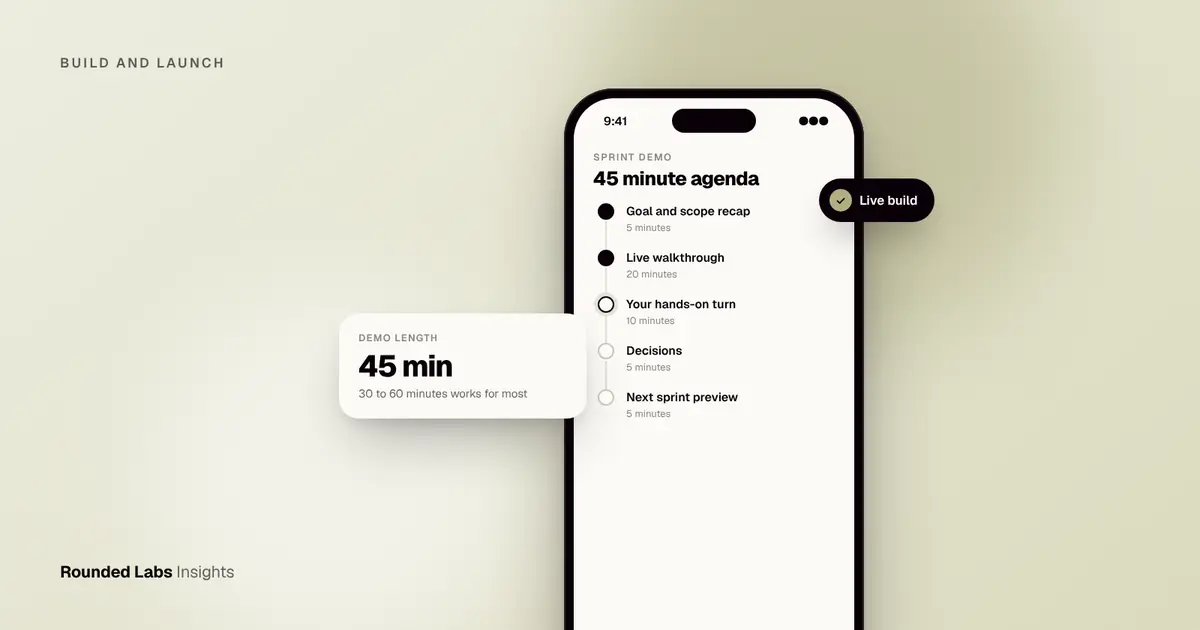
A sprint demo is a live session of 30 to 60 minutes at the end of each sprint, where the team shows working software on a real device and you decide whether each story is done. Use a fixed agenda, insist on finished features rather than slides, and leave with a written list of accepted items, change requests and next priorities.
We have run hundreds of these sessions over 19 years, including for Superdry, whose app serves 768 locations in over 100 countries, and for Dabbl, a trading app for first-time investors. The demos that worked best were the ones where the client arrived prepared and the team showed the real build, not a polished story. This guide covers who should attend, how to prepare, a tested agenda, how to react to what you see, and how to turn a demo into decisions. Our services page shows where demos sit in a typical project.
Key facts
- A demo shows working software on a real phone or a live test build, not mock-ups or slide decks.
- Keep it to 30 to 60 minutes. Longer sessions drift into debate and lose the people who matter.
- One named person decides what counts as accepted. Everyone else advises.
- Anything not finished is not demoed. Say so openly rather than faking it.
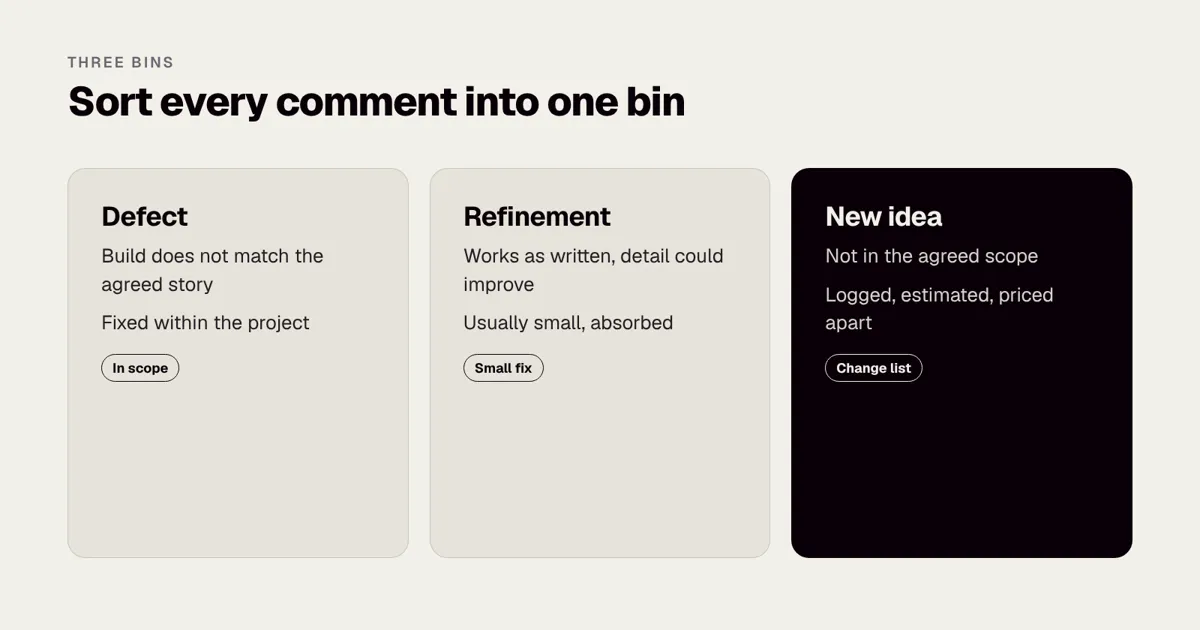
- Sort every comment into one of three bins: defect, refinement or new idea. The bin decides what happens next.
- Rounded Labs works to a fixed price agreed before development starts, so demos are where you confirm that the agreed scope is being delivered. See the pricing page.
What is a sprint demo and why does it matter?
A sprint is a fixed block of work, normally one or two weeks, in which the team builds a small set of features. The demo, often called a sprint review, is the moment those features are shown to you. It is the cheapest point in the whole project to change direction, because a wrong turn costs days, not months. If you want the basics of the sprint itself first, read what a sprint is.
For a non-technical founder it is also the best view of real progress. A weekly report tells you what the team says it did. A demo lets you tap the thing yourself. If you read reports as well, see How to read an agency’s weekly report, and for the warning signs a demo can reveal, see How to tell if an app project is off track.
Demo, review, retrospective: what is the difference?
People use these words loosely, and the confusion causes real problems, because each meeting has a different audience and a different purpose. The table below separates them.
| Meeting | Purpose | Who attends | What it produces |
|---|---|---|---|
| Sprint planning | Choose what the next sprint will build | Product owner, team | A sprint goal and a list of stories |
| Sprint demo or review | Inspect finished work and decide on it | Product owner, team, one or two stakeholders | Accepted, fixed or rejected stories; new ideas logged |
| Retrospective | Improve how the team works | Mostly the team | A short list of process changes |
| Weekly report | Summarise status in writing | Whoever reads it | A written record, not a decision |
The demo is the only one of these where you hold the final say on the product. Planning is shared, the retrospective is mostly internal, and a report is a one-way message. That is why skipping the demo is the most expensive meeting to miss.
Why demos protect your budget
On a fixed-price project the scope is agreed before development starts, so the question at each demo is simple: is the thing we agreed now built? Because the price is fixed, the team has every reason to finish stories properly, and you have every reason to check them carefully and early. A defect found at demo 3 is a short fix. The same defect found at launch can touch half a dozen other screens. Our article on fixed price versus time and materials explains why we only work to a fixed price, and the pricing page shows typical project ranges, from £30,000 to £250,000+.
A demo also keeps the team honest in a healthy way. Developers who know that a real person will tap through the work every fortnight tend to test it first. That one habit removes a large share of the embarrassing bugs before they reach you.
Who should attend a sprint demo?
Keep the room small. Every extra person adds opinions and subtracts time.
| Role | Why they attend | What they must bring |
|---|---|---|
| Product owner (you or your delegate) | Makes the accept or reject decision | Authority to decide on the day |
| Delivery lead or project manager | Runs the session and records decisions | The sprint goal, the story list and a note-taker |
| Developer or two who built the work | Show the features and answer technical questions | A working build on a real device |
| Designer | Confirms the build matches the approved design | The signed-off design files |
| One stakeholder, optional | Sees progress, for example a finance lead or operations head | An open mind and a short list of questions |
If three people in your business each want a say, agree beforehand who speaks for you. Mixed instructions from a group are the most common reason a demo runs long and nothing is decided.
What does the product owner actually do?
The product owner is the single person who can say “this story is accepted”. That sounds obvious, yet many demos fail because the person in the room cannot decide and has to “take it back to the team”. Then a week passes, the next sprint starts, and the unresolved item becomes a quiet argument. If you cannot attend, name a delegate in writing and tell the delivery lead exactly what that person may decide. If you are a founder with a board or investors, agree which decisions you can make alone (accept a story, log a change) and which need approval (a change that moves the budget).
Should the whole company see the demo?
Sometimes, but not in the working session. A common pattern is to hold the working demo with the small group, then record it or hold a 15-minute show-and-tell later for a wider audience, with no decisions on the table. This protects the decision session from drive-by comments and still builds support inside your business. If you need internal support for the project, How to get board approval for an app project shows how to use progress like this to keep sponsors on side.
Who should not be in the room?
Anyone who will attend once, form a strong view and not be there for the next one. Anyone who has not read the user stories. Anyone who will compare the app to a finished product from a company with a team of hundreds. Invite them to the show-and-tell, not the working demo.
How should you prepare before the demo?
Ten minutes of preparation on each side doubles the value of the session. Here is what each side should do.
What should the team send in advance?
- The sprint goal and story list, in plain language, at least a day before.
- A test build you can install, so you can follow along on your own phone. On iPhone this usually means TestFlight, Apple’s beta distribution tool, and on Android a Google Play internal testing track. Our short note on what TestFlight is explains the mechanics.
- Known gaps, listed honestly: what was planned and not finished, and why.
- A demo script, even a rough one: the order in which stories will be shown and the test account details.
What should you do in advance?
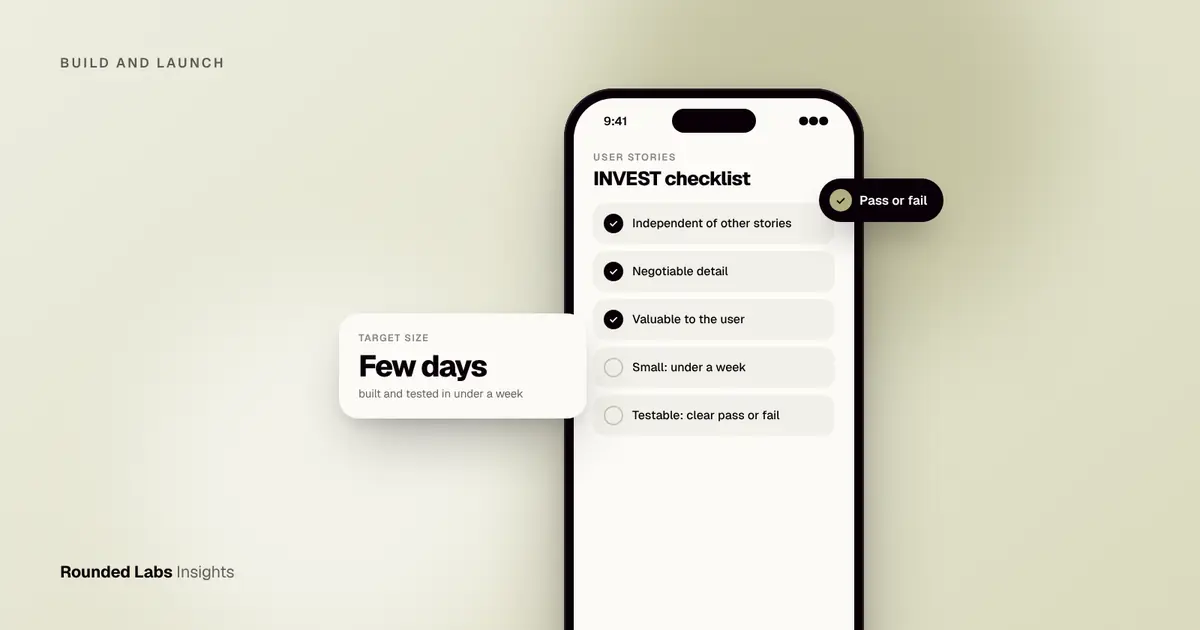
- Re-read the stories. Our guide to writing user stories developers understand shows the format. You are judging against what was agreed, not against memory.
- Install the build and open it once. If the install fails, you want to know before the call, not during it.
- Write down your three biggest questions. Demos drift into the interesting but unimportant. A short list keeps you on track.
- Check the designs. If you have a signed-off design, have it open for reference. How to sign off a design before build and How to review app designs as a non-designer explain how to read one.
- Decide your delegate if you will be absent, and tell the lead.
What does a good pre-demo checklist look like?
| Item | Owner | When |
|---|---|---|
| Sprint goal and story list sent | Delivery lead | 1 day before |
| Test build available on a real device | Developers | Morning of the demo |
| Test accounts and sample data ready | Developers | Morning of the demo |
| Stories re-read, questions written | Product owner | Evening before |
| Designs open for comparison | Designer | Start of session |
| Decision authority confirmed | Product owner | Before the session |
What is a good agenda for a 45-minute demo?
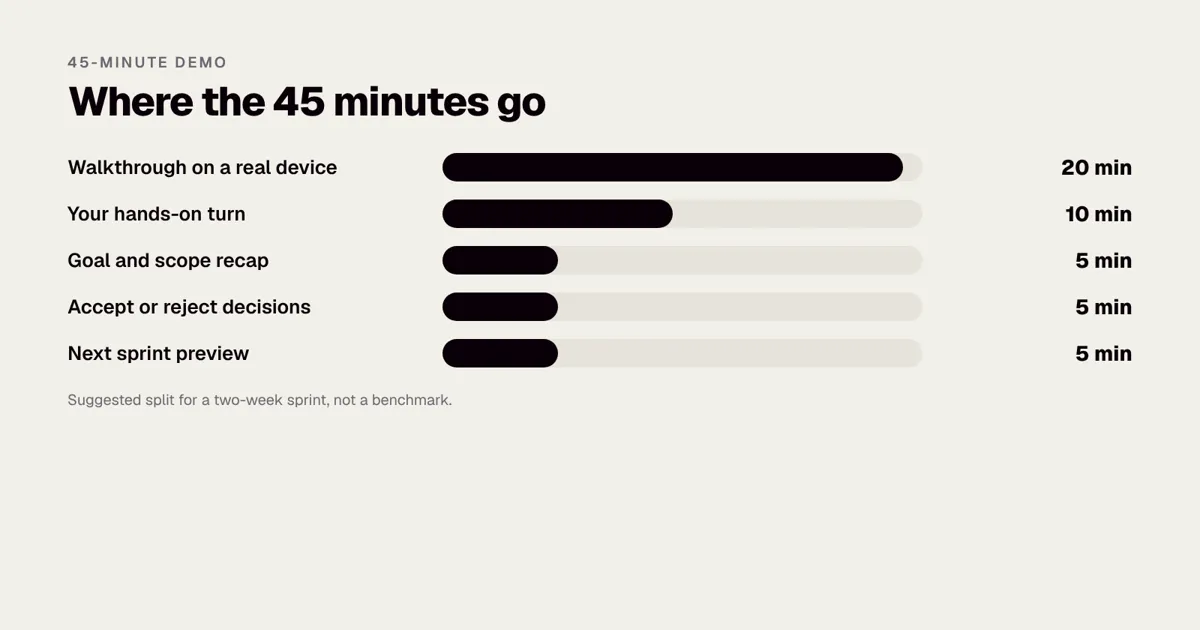
This structure works for most app projects. Adjust the minutes, not the order.
- Goal and scope recap (5 minutes). The lead restates what the sprint set out to deliver, using the user stories agreed at the start.
- Live walkthrough (20 minutes). Developers show each finished story on a real device, following the path a user would take. Include one unhappy path, such as a failed login or a declined card.
- Your hands-on turn (10 minutes). You use the build yourself. This is where real problems appear, because you do not click in the order the developer expects.
- Decisions (5 minutes). For each story: accepted, accepted with small fixes, or not accepted with a reason.
- Next sprint preview (5 minutes). Confirm what comes next and flag any decision the team needs from you.
Not sure your current demos are giving you real control? A short conversation can tell you quickly whether the rhythm is working. Book a 30-minute call with a co-founder and we will review how your project is being shown to you.
How should the agenda change for different sprint lengths?
| Sprint length | Session length | Walkthrough | Hands-on | Notes |
|---|---|---|---|---|
| One week | 30 minutes | 12 minutes | 8 minutes | Fewer stories; keep decisions to 5 minutes |
| Two weeks | 45 minutes | 20 minutes | 10 minutes | The most common pattern |
| Two weeks, large feature | 60 minutes | 25 minutes | 15 minutes | Add a short break if remote |
| Release candidate | 60 minutes | 20 minutes | 25 minutes | Spend extra time on your own testing |
How does the first demo differ from later ones?
The first demo is often the least impressive visually, because early sprints build foundations such as navigation, login and the data layer. Do not judge it by polish. Judge it by whether the skeleton matches the plan: can you move around, sign in and see real content, even if the styling is rough? The first demo is also when you learn how the team communicates. A team that shows you a working build, admits what was missed and asks you sharp questions is a team you can trust. A team that shows slides in sprint one is a warning sign.
Later demos should feel more like using a product. By the middle of a project, you should be completing real journeys. In the last sprints, the demo turns into a pre-release check, which connects to the planning in App testing explained and the launch checklist.
How do you handle a demo that is going off the rails?
Three moves help. First, the delivery lead should hold a “parking lot” list: any topic that is not on the agenda goes there, with a promise of follow-up. Second, if a debate starts about a design decision, ask a single question: does the build match the signed-off design? If yes, the discussion is a change, not a defect, and goes on the change list. Third, if a technical problem breaks the live demo, switch to a recording rather than burning ten minutes. Teams that record a short backup video of each story rarely lose a session to a failed Wi-Fi connection.
What should the team show, and what should they not?
Show features that meet the agreed definition of done: built, tested, merged and running in a test environment. Do not show work in progress “to give you a feel”. Half-built screens invite feedback on things that are about to change, and they blur the line between finished and not finished.
| Show | Do not show |
|---|---|
| Stories that meet the definition of done | Screens that are half built |
| A real phone or tablet running the test build | Only a simulator on a laptop |
| Realistic sample data | Empty screens or a single “test test” record |
| One unhappy path per story | Only the perfect path |
| Honest gaps and reasons | Slides about what is coming |
| A live test environment | A copy of production customer data |
Ask the team to demo on the same kind of device your users have. A feature that works on a developer’s newest phone may stall on a three-year-old Android handset. If the demo uses a simulator on a laptop, ask to see a physical device before you accept anything important.
Equally, expect honesty about gaps. A good team will say “we planned five stories and finished four, and here is why”. A team that always finishes everything, every sprint, is either padding its estimates or hiding problems.
What is a definition of done, and why should you agree it?
A definition of done is a short written list of conditions that every story must meet before it is shown. A typical one for a mobile project might say: the code is reviewed, automated tests pass, the story works on at least one iPhone and one Android device, it matches the signed-off design, and it has been checked against the acceptance criteria. If you do not yet have one, ask the delivery lead to share theirs, and add to it. Our guide on acceptance criteria shows how to write the conditions for a single story.
Without it, “done” means different things to different people. To a developer, done may mean “the code works on my machine”. To you, it means “my customer can do this without help”. The definition closes that gap.
Why use real data and a real device?
Demos with empty screens hide the cases that cause trouble: long names, missing images, very large lists, dates in different time zones. Ask the team to load realistic data before the demo. Equally, ask them not to use real customer data in a test environment, because it creates privacy duties you do not need. Anonymised or invented data does the job.
How do you take your hands-on turn?
Watching is not testing. The hands-on turn is where you find the problems the developers cannot see, because you do not know the “right” order. Treat these ten minutes as a short, focused test.
- Start from a clean state. Ask for a brand-new test account, or sign out and begin again as a first-time user.
- Do the task a customer would do. Do not follow the demo path. Pick your own: book the slot, buy the product, change the setting.
- Make one mistake on purpose. Enter a wrong password, leave a field empty or go back halfway through a payment.
- Switch away and return. Lock the phone, take a call or open another app, then come back.
- Read every word. Labels, errors and confirmation messages are part of the product, not decoration.
- Try big text. Raise the system font size and see if the screen still works. This is also a quick accessibility check, and the Web Content Accessibility Guidelines from the W3C explain the wider standard.
- Say what you are doing aloud. The developers learn from your path, and the note-taker can record it.
Should you record the session?
Yes, with everyone’s agreement. Record the screen of the device during your hands-on turn if you can, and record the call if it is remote. A short clip of a failure is worth a page of description. It also helps people who could not attend, and it gives you a record when a decision is questioned later.
What if you are not confident using the build?
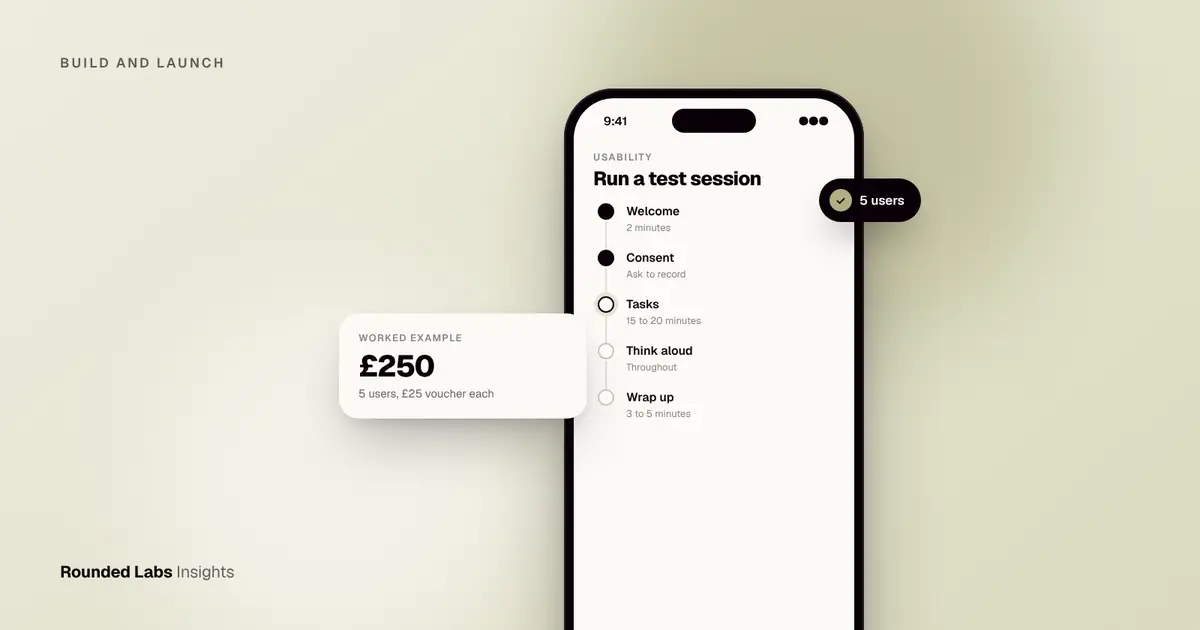
That is normal, and it is a good reason to do it anyway. If you are unsure, ask the developer to sit alongside you, but not to touch the phone. Having them watch is the point: they will see where you hesitate, and hesitation is data. A founder who says “I did not know what to tap” has found a usability problem, even if nothing is technically broken. For a more structured approach with real users, see How to run a usability test on a budget.
How do you give feedback during a demo?
Be specific, and separate three kinds of comment:
- Defects. The feature does not do what the story said. These are fixed within the project at no extra cost under a fixed price.
- Refinements. It works as written but a detail could be better, such as button wording. These are usually small and can be absorbed.
- New ideas. Something that was not in the agreed scope. These go on a list and are priced separately.
Mixing these up is where budgets slip. If every new idea is treated as a defect, the team ends up building more than was agreed, and trust erodes on both sides. How to manage scope changes without blowing the budget covers the change process in detail, What is a change request? gives the basics, and How to give useful feedback on a test build explains how to write comments developers can act on.
Avoid vague reactions such as “it feels off”. Say what you tapped, what you expected and what happened. Screen recordings made on your own phone are even better.
Which phrases help, and which cause trouble?
| Instead of | Try | Why it works |
|---|---|---|
| “I don’t like it.” | “When I tapped Pay, I expected a receipt screen and saw the home screen.” | Gives the team something to reproduce |
| “Can we just add one thing?” | “That is a new idea. Please log it and estimate it.” | Keeps the scope clean |
| “That is obviously a bug.” | “The story says the slot is released after cancelling. It was not.” | Points to the agreed line |
| “It should be more modern.” | “Which screen, and compared with what?” | Turns taste into a specific request |
| “Fine, accepted.” (with doubts) | “Accepted once the spacing on the summary is fixed.” | Stops doubts being lost |
What is the right tone?
Direct and kind. The team has spent two weeks on this, and a harsh reaction teaches them to show you less, not more. Praise what works, specifically, then be exact about what does not. Developers remember a precise, calm bug report far longer than a vague complaint. A relationship in which both sides can say “that is not finished yet” in the demo is worth more than any process document.
How do you decide quickly in the room?
For each story, ask yourself three questions: does it do what the story says, does it match the design, and would I be content for a customer to use it today? If all three are yes, accept it. If one is no, say which and give the fix a name. If the answer is “I need to think”, say so and give a deadline, such as “by end of day tomorrow”. Never leave a story in limbo.
Worked example: a booking app demo
Imagine a service business building a booking app, with a sprint planned to deliver three stories: choose a time slot, pay a deposit and receive a confirmation message.
The developers show the slot picker on a physical phone. Choosing a time works. The product owner then taps the back button mid-payment, which the developer had not tried, and the slot stays locked for ten minutes with no way to release it. That is a defect and is accepted as not done.
The deposit story passes. The confirmation message works, but the owner wants the business logo added to the email. That is a refinement, noted and slotted into the next sprint. Then the owner asks whether customers could also rebook with one tap. That is a new idea: it is written on the change list and sized separately.
Result of a 45-minute session: one story accepted, one rejected with a clear reason, one accepted with a small fix, and one new idea logged. Nobody is left guessing, and the next sprint starts with a clear list.
The same session as a decision record
| Story | Decision | Reason or fix | Owner | Due |
|---|---|---|---|---|
| Choose a time slot | Not accepted | Slot stays locked after back button during payment | Developers | Next sprint, first item |
| Pay a deposit | Accepted | None | None | None |
| Confirmation message | Accepted with fix | Add logo to email | Designer | Next sprint |
| One-tap rebooking | New idea | Logged on change list, estimate requested | Delivery lead | Within 2 working days |
Worked example: an internal staff app
A different situation shows another side of demos. A logistics firm is building an internal app for drivers to confirm deliveries. The sprint covers a proof-of-delivery screen with a photo and a signature. The team demos on a simulator, and everything looks fine.
The product owner asks to see it on a real phone. On a mid-range Android device, the camera opens slowly and the signature pad lags. On a phone with a cracked screen, which is common in the field, the signature is hard to draw. Nothing is wrong with the code in the narrow sense, but the story is not done, because the drivers will use these phones in cold weather, with gloves and poor signal.
The fix is partly technical, such as compressing the photo before upload, and partly a design decision, such as a larger signature area. The team also adds an offline mode to the next sprint, which links to How to make your app work offline. The lesson is that a real device and a real context change the definition of done. If your app is for staff, read How to roll out an app to frontline workers too.
What should happen after the demo?
Within a day, the delivery lead should send a short written note with four parts: stories accepted, stories not accepted and why, changes requested, and decisions you owe the team. Reply to confirm it. That email is your record if anyone later disputes what was agreed.
Then check that rejected items are visible in the next sprint plan, and that any new ideas have a priced option attached. Keep a running view of the whole project too. How long does it take to build an app? gives typical timelines, which helps you judge whether the sprint pace you are seeing is healthy. Before the final sprints, plan the testing stage described in App testing explained, because accepted features still need release-level testing.
What should the follow-up note contain?
| Section | Content | Example |
|---|---|---|
| Accepted | Stories closed | “Deposit payment: accepted” |
| Accepted with fixes | Stories closed once a named change is made | “Confirmation email: add logo” |
| Not accepted | Stories reopened, with the reason | “Slot picker: locks after back button” |
| New ideas | Items for estimate, not yet in scope | “One-tap rebooking” |
| Your decisions owed | What the team is waiting for from you | “Choose the cancellation window by Friday” |
| Next demo | Date, time and attendees | “Thursday, 10:00, same group” |
How do you track decisions across sprints?
Keep one shared page or spreadsheet listing every story, its status and the demo at which it was accepted. After five or six sprints, this becomes your evidence of progress. It also shows patterns: if the same type of defect keeps returning, such as time zones or error messages, ask the team to add a check for it to their definition of done. For tooling, How to set up shared Slack and Jira with an agency covers the practical setup.
How do demos work when the team is remote or in another time zone?
Remote demos work well if you set them up properly. Ask the developer to mirror a real phone to the shared screen, rather than showing a simulator, and have the team send you the build so you can follow along on your own device during the call. Use a video tool you both trust, such as Zoom or any equivalent, and keep cameras on if bandwidth allows, because faces tell you where someone is unsure.
Time zones add one more rule: write more down. A live demo is hard to run when half the group is at the end of their day, so pick a time that is reasonable for both. If that is impossible, record the demo, send the recording and agree a written reply within a set number of hours. Our guides on How to run sprint reviews across time zones and Running a remote app team across time zones go deeper.
What if some stakeholders cannot attend live?
Send a short recording and a one-page summary, and ask them to send comments to one person within a day. Do not let comments arrive during the live session through a side channel such as chat. They fragment attention and leave the room guessing.
How do demos change across the life of a project?
| Project stage | What the demo shows | Your focus |
|---|---|---|
| Early sprints | Navigation, login, data structure, first screens | Does the skeleton match the plan? |
| Middle sprints | Complete user journeys, key integrations | Can a new user finish the main task? |
| Later sprints | Edge cases, performance, polish, admin tools | Does it feel finished and robust? |
| Release candidate | The full app on real devices | Is it good enough for customers today? |
| After launch | Fixes and new features | Is usage data guiding what comes next? |
Early sprints
Expect plain screens. Your job is to confirm the structure: are the right screens in the right order, does the navigation make sense and are the main data items present? If you see something odd here, it is cheap to change. Changing a menu structure in sprint two costs very little; changing it in sprint ten may cost a week.
Middle sprints
This is where you finish journeys. Insist on seeing a user complete a task from beginning to end, including payment, confirmation and the email or notification that follows. Integrations with other systems, such as payments or a CRM, should be shown with a real test connection and not a mock. If your project depends on an external system, see How to connect an app to your ERP and API integration for what can go wrong.
Later sprints
Edge cases, error handling and performance take over. Ask what happens with no signal, a very slow connection and a very large amount of data. This is also the time to check accessibility, review how the app behaves on older phones and look at crash reporting. The guide on how to fix a high crash rate is useful if early numbers look poor.
Release candidate
The last demos before launch should be run as a rehearsal. The team shows the full app on release-quality devices, and you run through a complete test of your own. Review the App launch checklist and read Why Apple rejects apps, and how to avoid it before submission, because store review is a separate gate that a demo cannot replace.
What do the demos reveal about project health?
A demo is a diagnostic as well as an approval. Patterns across several sessions matter more than any single one.
| What you see | What it may mean | What to do |
|---|---|---|
| Every sprint finishes everything | Estimates padded, or problems hidden | Ask how stories were sized and tested |
| The same defect type keeps returning | A missing check in the team’s process | Ask for a checklist item or test |
| The demo is always on a simulator | Real-device problems are being deferred | Require a physical device |
| Stories are “nearly done” for several sprints | Hidden complexity or scope drift | Ask for a written re-plan |
| Demos keep getting cancelled | Delivery is behind or the team is stretched | Escalate in writing, ask for the recovery plan |
| The team cannot say what will be shown | Weak planning | Request a goal and story list a day before |
If you see two or three of these across consecutive sprints, read How to tell if an app project is off track and How to rescue a failing app project. If you need an independent view, our Tech Architecture Audit is £7,500 fixed and our Legacy App Rescue Assessment is £6,500 fixed; both are listed on the pricing page.
Can a demo reveal quality problems you cannot see yourself?
Partly. You cannot judge code quality from a screen, but you can notice signs that point to it: slow transitions, screens that flicker, features that break when you do something unexpected, or a team that is nervous about tapping certain buttons. These are prompts to ask for an independent technical review. How to audit an existing app’s code explains what such a review covers.
What mistakes make sprint demos fail?
- Skipping the hands-on turn. If you only watch, you only see the happy path.
- Letting the demo become a design debate. Design choices were signed off earlier. Revisit them only if the build differs from the approved designs.
- Inviting too many people. Five opinions about button colour will eat the session.
- Accepting out of politeness. Accepting a feature you have doubts about makes it harder to raise later.
- Missing sessions. If you cannot attend, send a delegate with authority to decide, or ask for a recording and reply in writing within a day.
- Treating every comment as urgent. Not all feedback has the same weight. Rank it: blockers first, refinements next, ideas last.
- Not recording decisions. A verbal “that is fine” is forgotten in a week.
- Demoing on the developer’s own phone only. The newest handset hides the problems that your customers will meet.
- Rescheduling repeatedly. Two missed demos in a row is how projects drift.
- Using the demo to introduce large changes. Big new requirements belong in a separate scoping conversation, with an estimate.
How do you fix a demo habit that is not working?
Change one thing at a time. If sessions run long, shorten the agenda and use the parking lot. If feedback is vague, introduce the three-bin rule. If decisions are lost, send the written follow-up within a day. If you are never ready, ask for the story list two days ahead instead of one. After two or three sprints, the rhythm usually settles and the sessions become short and calm.
How do you run a demo on a fixed-price project?
Fixed price changes the dynamics of a demo in useful ways. The scope is agreed, the price is agreed, and the question at each session is whether the agreed work is being delivered. That makes the three-bin rule especially important:
- A defect is the team’s to fix, because it was in scope.
- A refinement is usually small enough to absorb, and a good team will do so without argument.
- A new idea is priced separately, and you decide whether it is worth it.
This clarity protects both sides. You are not billed by surprise for work you thought was included, and the team is not asked to build more than was agreed. Our guide to scope creep explains what happens when the lines blur, and How to prioritise a product backlog with MoSCoW helps you decide which new ideas deserve a place.
What if a new idea is truly important?
Say so, and ask for an estimate quickly. Good teams will tell you what it costs and what it displaces. You can then choose to add it, swap it for something else or park it. Do this within a few days, while the context is fresh, and keep a record of the decision. If you are unsure how to weigh the options, How to decide between new features and fixes offers a simple method.
How do demos help you control cost?
Each accepted story is a checkpoint. By the end of the project, you will have approved dozens of pieces of work, so there are no large surprises at the end. If a project runs late, the demos show where and why. If you need to trim scope to meet a date, the accepted list tells you what is safe to cut. For a wider look at saving money without losing quality, see How to cut app development costs without cutting quality.
What lessons come from long-running projects?
Our experience since 2007 includes very different kinds of work. For Waterstones, we delivered an app, a mobile site and an eBooks API in 12 weeks. On a timetable like that, a defect found in the last fortnight leaves almost no time to fix it, so frequent, honest demos are the main protection. For Superdry, the app serves 768 locations in over 100 countries, which means a story that works on one phone and one market is not yet done: edge cases such as currencies, languages and store data matter. For Dabbl, a trading app for first-time investors, wording and onboarding mattered as much as function, so demos had to test whether a nervous newcomer would understand each step, not only whether the code worked.
The common thread is simple. A demo is only valuable if it tests what customers will face. Pick the devices, the data and the journeys that match real use, and the session earns its time.
A one-page demo checklist
Before
- Story list and sprint goal received
- Build installed and opened on your own phone
- Three questions written
- Decision authority confirmed or delegate named
During
- Goal recap, walkthrough, hands-on turn, decisions, preview
- One unhappy path shown per story
- Each comment sorted as defect, refinement or idea
- Parking lot used for anything off agenda
- Recording on, with consent
After
- Written note received within a day and confirmed by you
- Rejected stories visible in the next plan
- New ideas have an estimate request
- Next demo booked
What should you do next?
If you have a demo coming up, do three things this week. First, ask for the story list and a build in advance. Second, write down the three questions you most want answered. Third, agree the three-bin rule with the delivery lead, so that everyone sorts comments the same way. If your current project has no regular demos at all, ask for them to start with the next sprint.
If you would like an experienced view on how your project is being shown to you, talk to a co-founder and we will tell you honestly whether your rhythm is healthy. If you are still planning a project and want to understand the stages before you commit, What happens in a discovery phase and Working with an app agency: the first 90 days are good places to start.
Frequently asked questions
How long should a sprint demo be?
Between 30 and 60 minutes for most teams. Plan about 45 minutes for a two-week sprint, and shorter for a one-week sprint with fewer stories. Longer sessions tend to drift into debate, and the people who matter stop paying attention.
Do I need to attend every demo?
You, or someone you trust to decide for you, should attend every one. The demo is your main chance to steer the product, and gaps in attendance usually lead to surprises near launch. If you must miss one, name a delegate in writing and reply to the follow-up note within a day.
What if the team has nothing to show?
Ask why, in writing, the same day. Occasionally a sprint is spent on invisible work such as infrastructure, but the team should still show something concrete, such as a working build pipeline or a test report. Repeated empty demos are a warning sign, and How to tell if an app project is off track explains what to do next.
Can a demo be held remotely?
Yes. Ask the developer to share a screen mirroring a real phone, then have the team send you the test build so you can try it yourself during the session. Recording the call helps people who could not join, and a written follow-up gives you a record of decisions.
Is a demo the same as user acceptance testing?
No. A demo checks one sprint’s work as it is built. User acceptance testing happens near the end and checks the whole product against real scenarios. Both matter, and frequent demos make the final testing much calmer because most problems have already been found.
What is the difference between a defect and a change in a demo?
A defect is where the build does not match what was agreed in the scope, the stories or the designs. A change is where the build matches what was agreed but you now want something different. Defects are fixed within the project, and changes are estimated and agreed separately.
Should clients see unfinished work?
Generally not in the working demo, because half-built screens invite feedback on things that are about to change. If a risky area needs early feedback, the team can show it in a short, clearly labelled preview, separate from the acceptance decisions.
Official sources and further reading
Talk it through with one of our co-founders. 30 minutes, no pressure.