

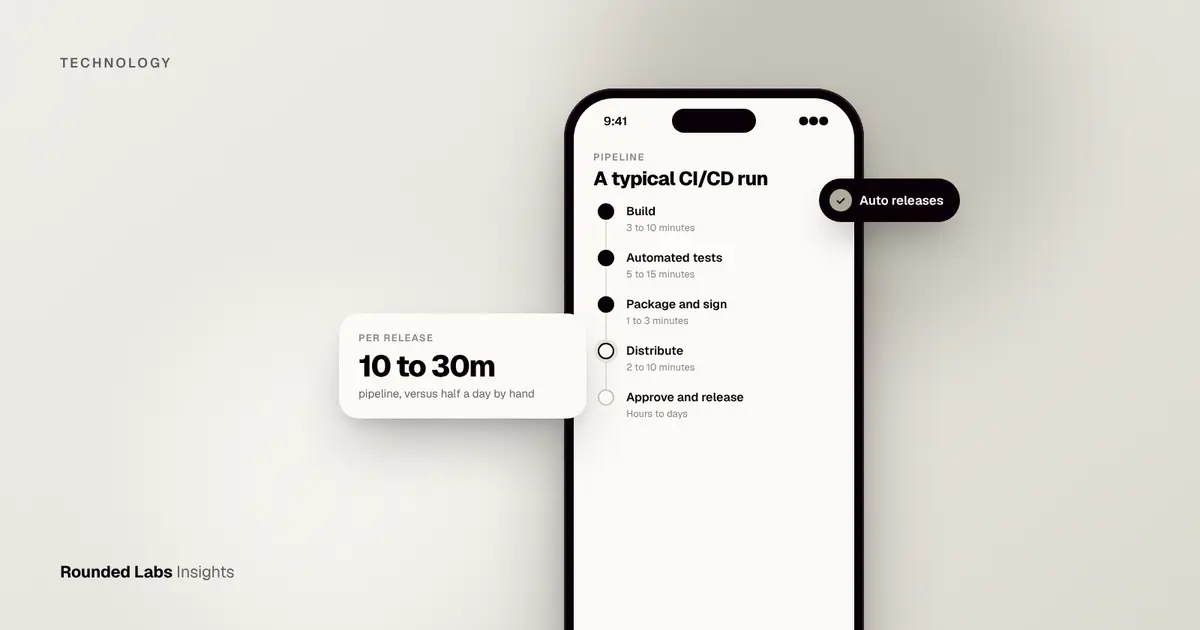
CI/CD stands for continuous integration and continuous delivery: automated steps that build your app, run its tests and prepare a release every time a developer submits a change. Instead of a person spending half a day building and uploading by hand, a pipeline does the same job in roughly 10 to 30 minutes, identically each time.
We have shipped apps for retailers and banks since 2007, including the modernised Superdry app for a brand with 768 locations in over 100 countries, and automated releases are one of the first things we set up on a mobile app development project. This guide is written for founders and product owners, not engineers. It explains what a pipeline does, what to ask for, what it costs, and what it will and will not change about your launch dates. Our projects are fixed price, agreed before development starts, so pipeline setup is part of the quote and not a surprise on an invoice.
Key facts
- Continuous integration (CI) means every code change is automatically built and tested, so problems surface within minutes rather than weeks.
- Continuous delivery (CD) means the tested build is automatically packaged and sent to testers or to the app stores, ready for a person to approve.
- A basic pipeline for one app usually takes a few days of engineering to set up and is a small share of the build budget. Treat all cost figures here as market estimates, not quotes.
- Apple and Google still review every public release, so CI/CD speeds up your side of the process but cannot skip store review.
- The goal is boring releases: fewer late-night fixes, fewer broken launches and no dependence on one developer’s laptop.
- The pipeline, signing certificates and store accounts should belong to your company, not your supplier.
What does CI/CD actually mean?
The two halves solve different problems, and it helps to keep them apart.
Continuous integration is about catching mistakes early. Several developers work on the same app at once, and each of them changes files the others also depend on. Every time someone submits a change, a server fetches the latest code, builds the app from scratch and runs a set of automated tests. If anything fails, the team knows within minutes, while the change is still fresh in the developer’s mind. The older habit was to combine everyone’s work every few weeks, which is when the nasty surprises arrived.
Continuous delivery is about getting the result into people’s hands. When the checks pass, the pipeline signs the app, uploads it to a testing channel such as TestFlight for iOS or an internal testing track on Google Play, and tells the team it is ready. A person still decides when it goes to customers.
Continuous deployment is the next step beyond that: the release goes to users with no manual approval at all. It suits some web services. Most business apps avoid it, because a person should decide when customers see a change, and because store review sits in the middle anyway.
| Term | What is automated | Who decides to release | Typical fit |
|---|---|---|---|
| Continuous integration | Build and test on every change | Not applicable | Every app with more than one developer |
| Continuous delivery | Build, test, sign and upload to testers or a store track | A person approves | Most business and consumer apps |
| Continuous deployment | All of the above plus release to users | The pipeline, if checks pass | Backends and tightly controlled products |
In practice, when a supplier says “we do CI/CD”, ask which of the three rows they mean. Many teams have the first row only, a server that compiles the code, and still upload releases by hand.
Why does a mobile app need it more than a website?
A website can be fixed in minutes: you change the code and it is live. A mobile app is different. Once a release is on customers’ phones you cannot reach in and repair it. A bad release means a new build, a new store review and a wait while users update, and some users will not update for weeks.
| Question | Website | Mobile app |
|---|---|---|
| How fast can a fix reach users? | Minutes | Hours to days, plus user updates |
| Can you roll back? | Usually yes, by redeploying | Not on devices that have updated |
| Who controls the release timing? | You | You, then the store reviewers, then the user |
| Where does it run? | One server environment | Many device models and OS versions |
| What signs the release? | Not applicable | Certificates and keys you must protect |
That makes the checks before release more valuable. A pipeline gives you four things.
- Repeatability. Signing certificates, version numbers and build settings are handled by scripts, not memory.
- Speed. A release candidate can be ready the same day a fix is finished.
- Evidence. Every build has a record of what was tested, by what and when.
- Less key-person risk. Releasing does not depend on one developer’s laptop or on the one person who remembers the steps.
If your app has already shipped slowly or broken after updates, our guide to technical debt explains why manual processes make that worse over time.
What happens in a typical mobile pipeline?
A pipeline is a sequence of stages. Each stage must pass before the next begins, and a failure stops the line and tells the team.
| Stage | What happens | Typical time |
|---|---|---|
| Trigger | A developer submits a change for review | Instant |
| Build | The app is compiled for iOS and Android | 3 to 10 minutes |
| Automated tests | Unit tests and key user journeys run | 5 to 15 minutes |
| Code checks | Style, security and dependency scans | 1 to 5 minutes |
| Package and sign | The app is signed with your certificates | 1 to 3 minutes |
| Distribute | The build goes to testers or a store track | 2 to 10 minutes |
| Approve and release | A person approves; the store reviews | Hours to days |
These are typical ranges, not promises, and depend on app size. The last row is outside your control: store review times vary, so build the wait into your plan. Our guide to how long an app takes to build shows where review time sits in a whole project.
What triggers a pipeline run?
Not every run does the same amount of work. Sensible teams use different triggers for different jobs.
- On every proposed change. The pipeline builds the app and runs fast tests. This is the safety net. It should finish in under 15 minutes, otherwise developers stop waiting for it.
- On every merge to the main branch. The pipeline runs the full test set and produces a build for internal testers.
- On a release tag. A person marks a version as a release candidate. The pipeline builds it, signs it for the stores and uploads it to TestFlight or a Play testing track.
- On a schedule. A nightly run builds the app and runs slower tests, such as tests on real device types. It catches problems caused by changes in the outside world, such as a new library version or an operating system beta.
What is different about iOS and Android?
Both platforms follow the same shape, but there are practical differences worth knowing, because they affect cost and set-up time.
| Topic | iOS | Android |
|---|---|---|
| Build machine | Needs macOS, so a pipeline must use Apple hardware, hosted or owned | Runs on Linux, Windows or macOS |
| Signing | Certificates and provisioning profiles tied to your Apple Developer account | A keystore, or Play App Signing managed with Google |
| Tester channel | TestFlight | Internal, closed and open testing tracks on Google Play |
| Review | App Review before public release | Google Play review before public release |
| Common pitfall | Expired certificates and profiles | Lost upload keys |
If you have a cross-platform app, one codebase produces both, but you still need two signing set-ups and two store routes. A native app usually has two codebases and so two build paths. That is one reason the native versus cross-platform decision changes the pipeline budget.
What do automated tests actually check?
Automated tests are the engine of a pipeline. Without them, CI is just a server that confirms the code compiles, which is useful but weak. A healthy test set has layers, from fast and cheap to slow and thorough.
| Layer | What it checks | Speed | Cost to maintain |
|---|---|---|---|
| Unit tests | Small pieces of logic, such as a discount calculation | Seconds | Low |
| Integration tests | Parts working together, such as the app talking to your API | Minutes | Medium |
| User journey tests | A scripted run through screens, such as log in, add to basket, pay | 5 to 20 minutes | Higher |
| Device tests | The same journeys on several real or simulated phones | 10 to 40 minutes | Highest |
| Manual testing | A person looks for what scripts cannot see | Hours | People time |
The mistake we see most often is the opposite of the sensible shape: lots of slow journey tests and very few unit tests. Journey tests break when a button moves, so teams stop trusting them, then stop running them. A better ratio is many unit tests, a moderate number of integration tests and a small, carefully chosen set of journey tests covering the paths that make or lose money.
What should be tested first?
If you are starting from nothing, do not try to test everything. Rank by what hurts most when it breaks.
- Sign-in and account creation. See how to add user login and sign-up to your app for what sits behind it.
- Anything involving payment or a total. See how to add in-app payments.
- Anything that handles personal data or permissions.
- The three or four screens most customers use every day.
- Features that depend on third-party services, where an API integration can change without warning.
Automated tests do not replace human testing. Our guide, App testing explained, covers how automated checks, QA, user acceptance testing and beta testing fit together.
How do signing certificates and secrets fit in?
This is the least glamorous and most valuable part of a pipeline. Every iOS and Android release must be cryptographically signed so the stores and phones know it came from you. The keys and certificates that do this are powerful: whoever holds them can publish an update to your app.
Without a pipeline, signing keys tend to live on one developer’s computer. That creates three risks. If the laptop dies or the developer leaves, you may not be able to release. If the key leaks, someone else could sign an app as you. And if a certificate quietly expires, a routine update fails at the worst moment.
A good pipeline handles this in four ways:
- Keys and certificates are stored in the pipeline’s encrypted secret store, or in a managed signing service, never in the code repository.
- Access is limited to named people and to the pipeline itself.
- Expiry dates are tracked, with a calendar reminder or an automated check, well before they arrive.
- The company, not the supplier, owns the Apple Developer and Google Play accounts that the keys belong to.
The security side connects to wider app hygiene. Our mobile app security checklist covers how secrets, storage and network settings should be handled in the app itself, and the Open Worldwide Application Security Project publishes mobile guidance at OWASP that many security reviewers use as a baseline.
How do environments and version numbers work?
Teams rarely release straight from a developer’s work to customers. They use environments, which are separate copies of the app and its backend for different purposes.
| Environment | Purpose | Who uses it |
|---|---|---|
| Development | Day-to-day work, may be broken | Developers |
| Staging or test | A stable copy that mirrors production, with fake data | Testers, product owner |
| Production | The live app and live data | Customers |
A pipeline should build the same app for each environment from the same code, changing only configuration such as which server it talks to. If the team builds a different thing for production than the one that was tested, the testing proves little.
Version numbers matter more than they seem. Each store build needs a unique build number, and each public release a visible version. Pipelines assign these automatically, so nobody uploads a build that the store rejects because the number was reused. Ask your team how version numbers map to releases and whether you can see which commit produced which build. That traceability is how you answer the question “what exactly is on my customers’ phones?” in seconds.
What are feature flags and why do they help?
A feature flag is a switch in the app or its backend that turns a feature on or off without a new release. It lets a team ship code that is finished but hidden, then reveal it when you are ready, for example on launch day or for 5% of users first. Because store review stops you from fixing a mobile release instantly, flags are the closest thing to an undo button. They do need care: old flags should be removed, and every flag adds a path to test.
Which tools do teams use?
You do not need to pick the tools yourself, but you should recognise the names so you can ask good questions. Tools change, so check each vendor’s own site for current features and pricing.
| Tool | What it is | Notes for a founder |
|---|---|---|
| GitHub Actions | Pipelines built into GitHub | Convenient if your code is already on GitHub |
| GitLab CI/CD | Pipelines built into GitLab | Common where teams self-host or want one platform |
| Bitrise | A hosted service built for mobile apps | Ready-made steps for signing and store upload |
| CircleCI | A general-purpose hosted service | Flexible, supports mobile |
| Jenkins | An open-source server you run yourself | Powerful, but you maintain it |
| Fastlane | An open-source toolkit for signing, uploading and store listings | Often used inside any of the above |
How do you choose?
For most projects the choice matters less than three practical points.
- Where does your code already live? The pipeline tool closest to it is usually the least friction.
- Do you need iOS builds? They need macOS machines, which hosted services provide at a different price from Linux machines. Check how the vendor charges for them at the time of writing.
- Who will run it after launch? A self-run server needs someone to patch and monitor it. A hosted service moves that work to the vendor in exchange for a fee.
A small team with a single app is usually well served by a hosted service and a short set of scripts. A larger organisation with many apps, strict data rules or an existing platform team may choose to run its own. Either way, the scripts that define the pipeline should live in your code repository, so they are versioned, reviewable and portable if you ever move tools.
What about test and crash tools around the pipeline?
Two other groups of tools sit alongside. Test services run your app on many real phone models in the cloud, which is useful because Android in particular comes in a very wide range of devices. Crash reporting services, such as Firebase Crashlytics, tell you quickly whether a release has a problem. Both are optional at the start, but crash reporting should be in place before the first public release. Our guide to app analytics covers what else to track from day one.
How does a build reach customers?
The path from a finished fix to a customer’s phone has more steps than people expect, and only some of them can be automated.
- Merge and build. The pipeline builds the release candidate and runs the full test set.
- Internal testing. The build lands on TestFlight or a Google Play internal track within minutes. Your team and testers install it.
- Wider beta. Optional. A larger group tries it through TestFlight external testing or a Google Play closed track. Note that Apple requires a light review for external TestFlight builds, and builds there expire after a set period, so check the current rules on Apple’s TestFlight page.
- Store submission. Someone submits the build with release notes and, where needed, updated screenshots and privacy answers.
- Store review. Apple and Google check the release. Plan for it taking from hours to a few days, and longer around busy periods. Reasons for rejection are covered in Why Apple rejects apps, and the App Store Review Guidelines are the primary reference.
- Phased or staged release. Both stores let you release gradually to a share of users, then widen it if crash reports stay healthy.
- Monitoring. The team watches crash and error reports, user reviews and key metrics for the first days.
Our app launch checklist shows how these steps fit into a first release. The pipeline automates steps 1, 2 and much of 4, and supports step 7. It cannot shorten step 5.
What happens if a bad release gets through?
Be realistic: you cannot recall an app from phones. What you can do is limit the damage, and a pipeline helps with each option.
| Option | How it works | Speed |
|---|---|---|
| Halt a phased rollout | Pause the staged release so no more users receive it | Minutes |
| Turn off a feature flag | Hide the broken feature without a new build | Minutes |
| Server-side fix | If the fault is in the backend, fix it there | Minutes to hours |
| Hotfix release | Build, test and submit a corrected version, asking for expedited review where the store allows | Hours to days |
| Force-update prompt | Ask users on the broken version to update | After the fix is live |
The speed of the hotfix row is where a pipeline earns its keep. A team with automation can have a tested hotfix ready within hours of finding the fault. A team without it spends that time finding the right laptop, the right certificate and the right steps.
What does it cost to set up?
CI/CD is a one-off setup plus a small running cost for build capacity. As a market estimate, setting up a pipeline for a single native or cross-platform app takes a few days of engineering time, and hosted build services have commonly charged from nothing for light use to a few hundred pounds a month for busy teams. Prices and free allowances change, so check each vendor’s pricing page at the time of writing.
At Rounded Labs the setup is included in the fixed price we agree before development starts, so it is not a separate surprise. Projects typically run from £30,000 to £250,000+; see our pricing page. For general guidance on what else to budget, see the hidden costs of building an app and app maintenance costs in the UK.
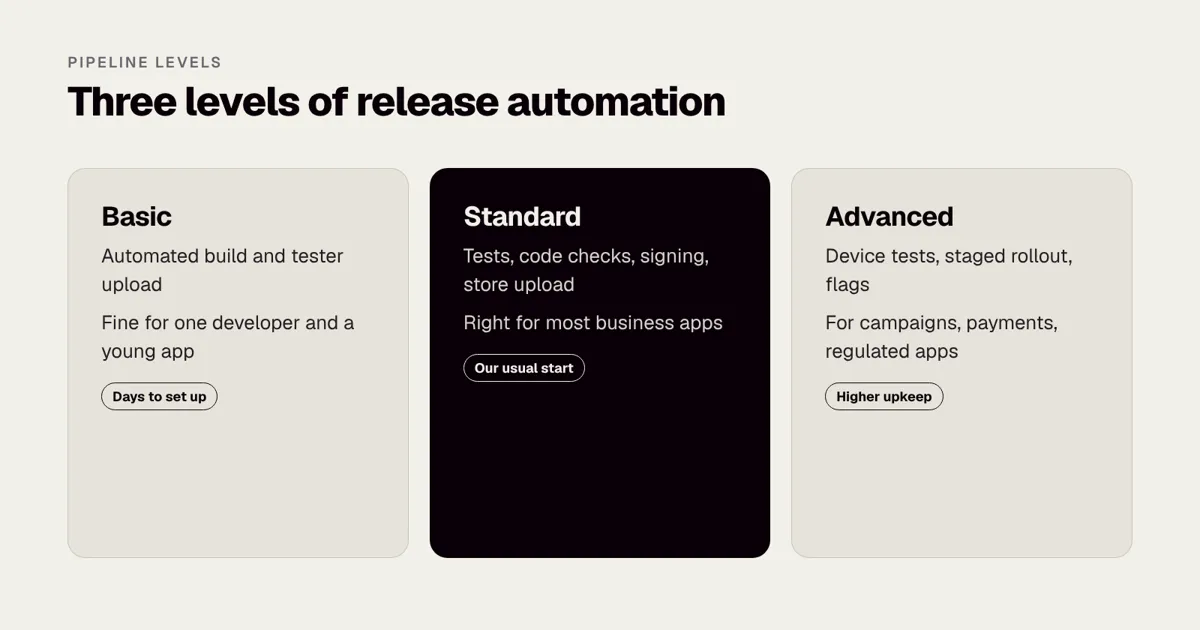
| Pipeline level | What you get | Setup effort (market estimate) | Running cost (market estimate) |
|---|---|---|---|
| Basic | Automated build and distribution to testers | 2 to 4 days | Often free to low |
| Standard | Basic plus unit and integration tests, code checks, signing and store upload | 4 to 8 days | Low to moderate |
| Advanced | Standard plus device tests, staged rollouts, environment promotion and reports | 8 to 15 days, then ongoing | Moderate to higher |
The main cost driver is how much automated testing you want. A pipeline that only builds the app is cheap. A pipeline that also runs tests across real device types costs more to build and to maintain, but catches far more. Tests are code, and they need updating as the app changes, so a test suite is something you look after, not something you buy once.
Is it worth it for a small app?
A very small app with one developer can manage without much automation, but a basic pipeline is cheap and pays back the first time it prevents a bad release or a missed certificate renewal. It matters more the moment a second person touches the code. If you are weighing where to spend a tight budget, our guide on how to cut app development costs without cutting quality is a useful companion, and the answer is almost never to skip the pipeline and spend more on manual checking.
A worked example: a bug found before customers see it
Imagine a retail app with a basket screen. A developer changes how discounts are calculated and accidentally breaks the total for orders over a certain size.
Without a pipeline, the bug may only appear when a tester happens to check a large order, or after release when a customer complains. With a pipeline, an automated test that adds a large order to the basket fails within 15 minutes of the change. The developer fixes it the same afternoon, and the faulty build never reaches testers.
That is the real value. The problem costs a short fix instead of an emergency release, a store review wait and a flurry of support tickets. For apps with offline features, similar automated checks protect data syncing; see how to make your app work offline.
A second example: a release day, with and without automation
The following timeline is illustrative, not a client result. A team of four ships an update with six small changes.
| Step | Manual process | Automated pipeline |
|---|---|---|
| Prepare the release build | 60 to 90 minutes, one developer, checking settings by hand | Starts on a tag, no one waiting |
| Run tests | Partly by hand, 60 to 120 minutes | 10 to 20 minutes, same every time |
| Sign and upload | 30 to 60 minutes, repeated for iOS and Android | 5 to 10 minutes, in parallel |
| Notify testers | A message written by hand | Automatic, with notes from the changes |
| Record what shipped | Often forgotten | Stored with the build |
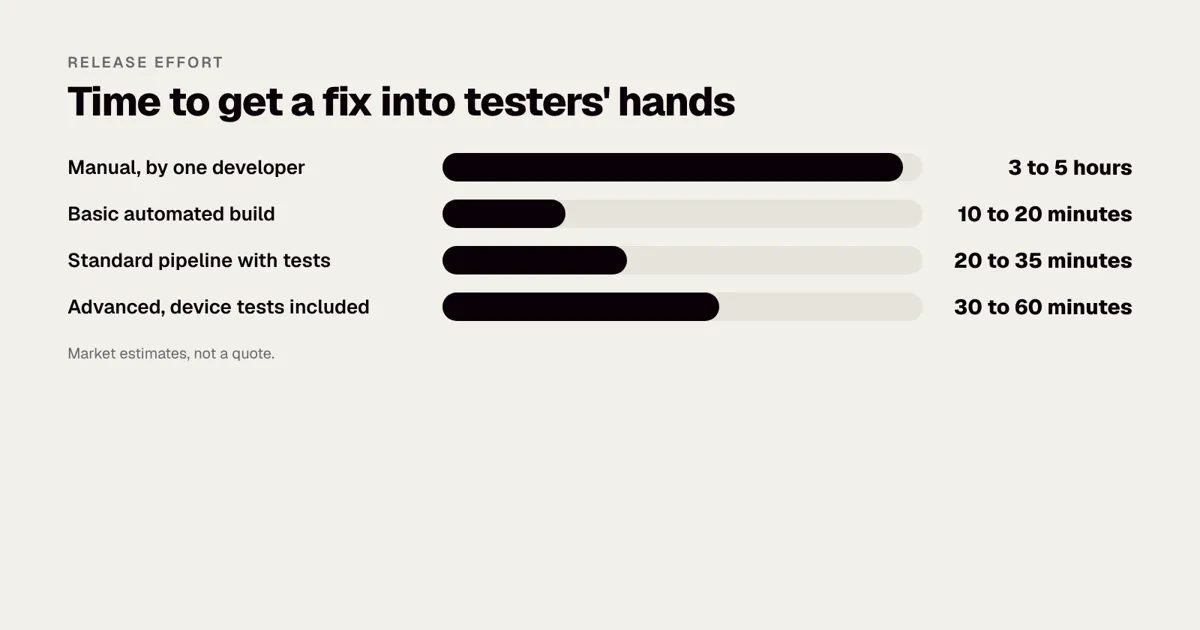
| Total working time | About 3 to 5 hours | About 30 minutes of attention |
Over a year of fortnightly releases that is 26 releases. The manual route costs roughly 80 to 130 hours of skilled time, which is why it tends to be the quiet reason that “small updates” end up expensive. The point is not to claim a precise saving, since every team differs, but to show where the hours go. The less visible gain is that automated steps do not get skipped when people are tired or in a hurry.
A third example: the expired certificate
An app has been live for a year. A routine update is needed to meet a new operating system requirement, with a deadline approaching. The developer who set up the app left six months ago. On the day, the team discovers the distribution certificate expired two weeks earlier and the only person with the original request files is the former developer, who is not answering messages.
None of this is a coding problem. It is a process problem, and a pipeline that stores signing assets properly, tracks expiry and is owned by your company removes it. Re-issuing certificates is usually possible, but doing it under pressure, on a platform you do not control, is how a one-day job becomes a week. If you are taking over an app and fear this, our guide to how to take over an app built by someone else covers the first checks.
What are the most common mistakes?
Founders rarely build pipelines themselves, but they sign off on them. These are the failures we see in other teams’ set-ups.
- A pipeline that only builds. It tells you the code compiles, not that it works. Ask what tests run.
- Slow pipelines. If a run takes 45 minutes, developers batch up changes and the benefit of early feedback disappears. Split fast checks from slow ones.
- Flaky tests ignored. A test that fails at random teaches the team to ignore red results. Fix or remove flaky tests quickly.
- Secrets in the code. Keys, passwords and certificates committed to a repository are a security incident waiting to happen.
- Supplier-owned accounts. If the pipeline and store accounts belong to the agency, leaving them costs you the ability to release.
- No monitoring after release. A pipeline that ships and then goes quiet misses the signal that matters: whether real users are crashing.
- Manual steps hiding in the middle. One step done by hand, such as renaming a file, means the process is still key-person dependent.
- No documentation. The pipeline should be described in a short document a new engineer can follow.
- Treating green as safe. A green pipeline means the checks you wrote passed. It does not prove the app is good. Keep human testing and user feedback in the loop.
What should you ask a development team about CI/CD?
Use these questions when you compare suppliers. Our broader list in 20 questions to ask an app developer before you sign covers the rest of the relationship.
- Is every build made by an automated pipeline, or by a person on a laptop?
- Which tests run automatically, and what do they cover?
- Who owns the signing certificates, pipeline accounts and store accounts?
- How long does it take from a finished fix to a build in testers’ hands?
- How do you release a quick fix if a problem gets through, and have you done it before?
- Do you use staged rollouts and feature flags?
- Do you watch crash reports after each release, and who is alerted?
- Where are the pipeline scripts stored, and will we receive them at handover?
- What does it cost to run each month, and who pays?
A confident team answers these in plain language. Vague answers suggest releases depend on individuals. That is a risk if you later need to hand the app between teams, as happens in switching agencies, and it is on our list of red flags when hiring app developers. It also bears on who owns the code, since pipeline scripts are part of what you should own.
How does this look for different kinds of business?
The right amount of automation depends on the product and the risk. Three illustrative situations show the range.
A start-up with one app and two developers. A standard pipeline is enough: build on each change, unit and integration tests, automatic upload to TestFlight and Google Play internal testing, and crash reporting. Run slower journey tests nightly. Resist the urge to build an advanced setup before the product has users.
A retailer with frequent promotions. Release timing matters, because a campaign date is fixed. Staged rollouts, feature flags and a hotfix path are worth the extra effort, since a failed update on a sale weekend is expensive. Our work on Waterstones, where we delivered an app, a mobile site and an eBooks API in 12 weeks, depended on a disciplined build and release routine to hold that timescale.
A bank or regulated business. Evidence and control matter as much as speed. Pipelines can enforce approvals, record who released what and keep an audit trail, and they can run security scans on every build. Regulators generally care that you control change, and a documented, automated process is easier to evidence than a series of manual steps. We have built regulated products since MoBank, the UK’s first mobile banking app, and see building a banking app in the UK for the wider picture.
How do you add CI/CD to an app that already exists?
Many founders reading this have an app that already ships by hand. You do not have to rebuild anything to improve it. A staged approach works well.
Weeks 1 to 2: make the build repeatable
- Move the code into a repository your company owns, if it is not already.
- Write down the build steps as they are done today, then script them.
- Set up a pipeline that builds both platforms on every change.
- Move signing assets into a secret store and note their expiry dates.
Weeks 3 to 4: add the safety net
- Add unit tests for the highest-risk logic: totals, permissions and data handling.
- Add code and dependency checks to the pipeline.
- Send successful builds to testers automatically.
- Add crash reporting, if it is missing.
Month 2 and beyond: widen coverage and control
- Add a few user journey tests for sign-in and payment.
- Introduce staged rollouts and, where it makes sense, feature flags.
- Run slower tests on a nightly schedule.
- Review the pipeline every quarter, as part of app maintenance.
If you inherit a codebase with no tests at all, do not try to retrofit complete coverage. Test what you change, and the safety net grows with the product. A review of the existing code first can tell you what is realistic; see how to audit an existing app’s code. We offer a fixed price Tech Architecture Audit at £7,500 and a Legacy App Rescue Assessment at £6,500, each of which includes a view of how releases work today.
Not sure whether your current app has a safe release process? We can review how your builds, tests and store releases work today. Book a 30-minute call with a co-founder.
How does CI/CD relate to security and quality?
A pipeline is a convenient place to run checks that people forget. Typical automated security steps include scanning dependencies for known vulnerabilities, checking for secrets accidentally committed to the code, and running static analysis, which reads the code for risky patterns. These are not a replacement for a human security review. Our guide to penetration testing for apps explains what a human tester finds that scripts do not.
The UK National Cyber Security Centre publishes practical guidance for organisations at ncsc.gov.uk, including advice on supply chain risk, which is relevant because modern apps are built from many third-party libraries. A pipeline that flags a risky library before it ships is cheaper than discovering it afterwards.
On quality, a pipeline gives you data you can use: how many builds failed, how long the pipeline takes, and how often releases need a hotfix. Three simple measures are worth asking your team about.
| Measure | What it tells you | Healthy direction |
|---|---|---|
| Time from merged change to test build | How quickly feedback arrives | Shorter |
| Share of builds that fail | Stability of the codebase and tests | Lower, but not zero |
| Releases needing a hotfix | Quality of what passes testing | Fewer |
Do not chase these numbers for their own sake. A team that never fails a build may simply not be testing much. The aim is a steady rhythm of small, safe releases.
What does CI/CD mean for your launch dates?
It is worth being direct about this, because pipelines are sometimes sold as a way to ship faster. They help in specific ways and not in others.
What it speeds up: the time between finishing a change and having a testable build; the time to produce a hotfix; the number of delays caused by broken builds or manual mistakes; and the effort of regular, small releases.
What it does not speed up: design and decision-making, the building of the features themselves, store review, and the time real users take to update. A pipeline will not rescue a project with unclear scope. Our guides on writing an app specification and how to manage scope changes deal with that cause directly.
For planning, allow time in the first sprints for pipeline setup, and treat it as part of the foundation rather than an optional extra. A common pattern in a well-run project is a working pipeline, however basic, in the first fortnight, so that every feature is built and tested the same way from the start. If your project is off track and you are not sure why, see how to tell if an app project is off track and the way a regular sprint demo keeps everyone honest.
What should be in your handover pack?
If you ever change supplier, or bring development in house, the pipeline is part of what you need to take with you. Ask for these items at the start of a project, and check them at each milestone.
- Admin access to the code repository, owned by your company.
- Admin access to the pipeline service, with your company as the account owner.
- The pipeline scripts, stored in the repository.
- A list of signing certificates and keys, where they are held and when they expire.
- Apple Developer, App Store Connect and Google Play Console accounts in your company name.
- A short document describing how to make a release from start to finish.
- Access to crash reporting and analytics tools.
- A list of third-party services and who pays for each.
This also protects you if a supplier relationship ends badly. Our guides on how to switch app agencies without losing your app and what a good proposal looks like explain how to write these points into the contract at the start.
What should you do next?
If you are commissioning a new app, add three lines to your brief: a working pipeline within the first two weeks, accounts and keys owned by your company, and crash reporting live before the first public release. If you already have an app, ask your team the nine questions above and listen to how they answer.
If you would like an independent view, our team can look at your current set-up and tell you plainly what to fix first. Projects with us are fixed price, agreed before development starts, and the same applies to our productised services, so you will know the cost before any work begins. You can book a call with a co-founder or look at the pricing page to see how we work.
Frequently asked questions
Is CI/CD the same as DevOps?
No. DevOps is a wider way of working that brings development and operations together. CI/CD is one of its main practices, focused on automated building, testing and releasing. A team can use CI/CD without adopting the rest of DevOps.
Can CI/CD release my app straight to the App Store?
It can upload and submit the build, but Apple and Google still review it before customers can download it. Most teams keep a manual approval step so a person decides when the release goes live, which also lets you line it up with marketing.
Do small apps need CI/CD?
A very small app can manage without, but a basic pipeline is cheap and pays back the first time it prevents a bad release or a missed certificate renewal. It matters more as soon as two or more people work on the code, or when the app handles payments or personal data.
Does CI/CD remove the need for testers?
No. Automated tests are good at repeating the same checks quickly, while people find usability problems and odd real-world behaviour. The two work together, and a pipeline frees testers to spend time on the work only people can do.
Will CI/CD make my app launch faster?
It shortens the time between finishing a change and having a testable build, but it does not shorten store review or design work. The biggest gain is fewer delays caused by broken builds and manual mistakes, and a much quicker hotfix if something goes wrong.
Who should pay for the build tools?
The costs should be visible to you and agreed up front. The accounts should be in your company name even if the supplier manages them during the project. With a fixed price project, the setup should be inside the quote, and any ongoing hosted service fees should be listed separately and explained.
How do I know my pipeline is any good?
Ask to see a recent run. You should be able to see which stages ran, which tests passed, how long it took and which build it produced. Then ask how long it takes to get a fix from finished code to a tester’s phone. If the answer is under an hour, and the team can show you, the basics are in place.
Official sources and further reading
Talk it through with one of our co-founders. 30 minutes, no pressure.