

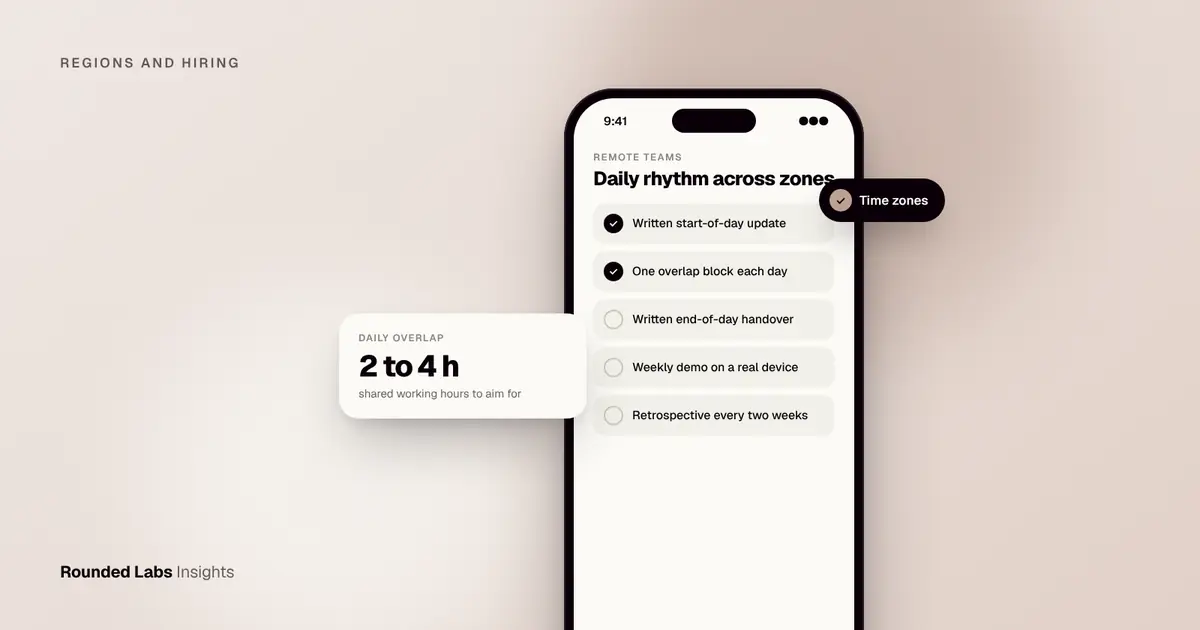
A remote app team works across time zones when it has at least 2 to 4 hours of daily overlap, written handovers, a single source of truth for decisions, and a demo every week. Most delays come from waiting for answers, not from distance itself. Fix the waiting with clear ownership, async-first habits and a short, fixed overlap window, and a team spread across 8 hours of time difference can ship as fast as one in a single room.
We have built apps for clients on several continents, including Superdry, with 768 locations in over 100 countries, and Cubeware, whose SaaS move served 4,000+ enterprise customers across the DACH region. Both depended on clear working rules rather than shared office hours. This guide goes well beyond a checklist. It covers how to set up a remote mobile app development team that works across time zones: how much overlap you need, how to run each day and each week, how to write handovers people can act on, which meetings are worth holding, how to deal with clock changes and holidays, how to keep the whole thing secure, and the mistakes that slow projects down. It is written for founders, product owners and heads of digital who will be on one side of a time zone gap, whichever side that is.
Key facts
- Aim for 2 to 4 hours of shared working time each day; beyond 8 hours of difference, expect to rely heavily on written handovers.
- Most delay comes from blocked questions, so decisions and ownership matter more than hours.
- Daylight saving changes shift overlap by an hour for a few weeks a year; plan for it.
- A weekly demo of working software is the best single check that remote work is on track.
- A written start-of-day and end-of-day note costs each person about 10 minutes and saves far more than that in avoided calls.
- A fixed price agreed before development starts removes hourly billing as a reason to worry about idle time.
Does a time zone gap slow an app project down?
It can, but less than most founders fear. A day of build work does not need constant conversation. A developer building a login screen, a settings page or an API integration spends most of the day with the code, the design file and the specification. What slows a project is a developer who cannot continue because a design question, an API key or a sign-off is stuck in someone else’s night.
That distinction matters because it tells you where to put your effort. You cannot change the sun. You can change how many questions arise, how quickly they are answered, and how much a person can do while waiting for an answer. Remote teams that struggle usually have a waiting problem dressed up as a distance problem.
A simple example: a London team working with a founder in New York has about 3 to 4 hours of overlap, from roughly 2pm to 5 or 6pm UK time. If the team posts questions at the end of its day, the founder answers during their morning, and the team picks up the answers on arrival. Done well, this can feel like a relay, where progress continues around the clock. Done badly, every question costs a full day, and a feature that needs five rounds of clarification takes a week instead of an afternoon.
Where the time actually goes
Across distributed projects, the same four sources of delay appear again and again. None of them is caused by distance, though distance makes each one more expensive.
- Unanswered questions. A developer asks whether a button should save immediately or ask for confirmation. Nobody replies for a day.
- Unclear ownership. Two people on the client side give different answers, and the team waits for them to agree.
- Missing access. A test account, a certificate, a payment sandbox key or a store login is needed and the person who holds it is offline.
- Late feedback. A finished screen sits for a week before anyone reviews it, by which time the team has built three more on top of it.
Each of these has a cheap fix, and the rest of this guide is mostly about those fixes. For a view specific to a US client working with a UK studio, see Hiring a UK app development company from the US, and for a wider look at where to build, see Onshore, nearshore or offshore: where US companies get apps built.
A quick test of whether your set-up is healthy
Before reading further, check these five signals on your current project. If more than two are true, the process needs attention before the time zones do.
- Questions from the team regularly wait more than one working day for an answer.
- You are not sure who on your side can say “yes, ship it”.
- You have not seen the app running on a real phone in the last two weeks.
- The team has asked for the same access or asset twice.
- Decisions made on a call are not written down anywhere you can find them.
How much overlap do you actually need?
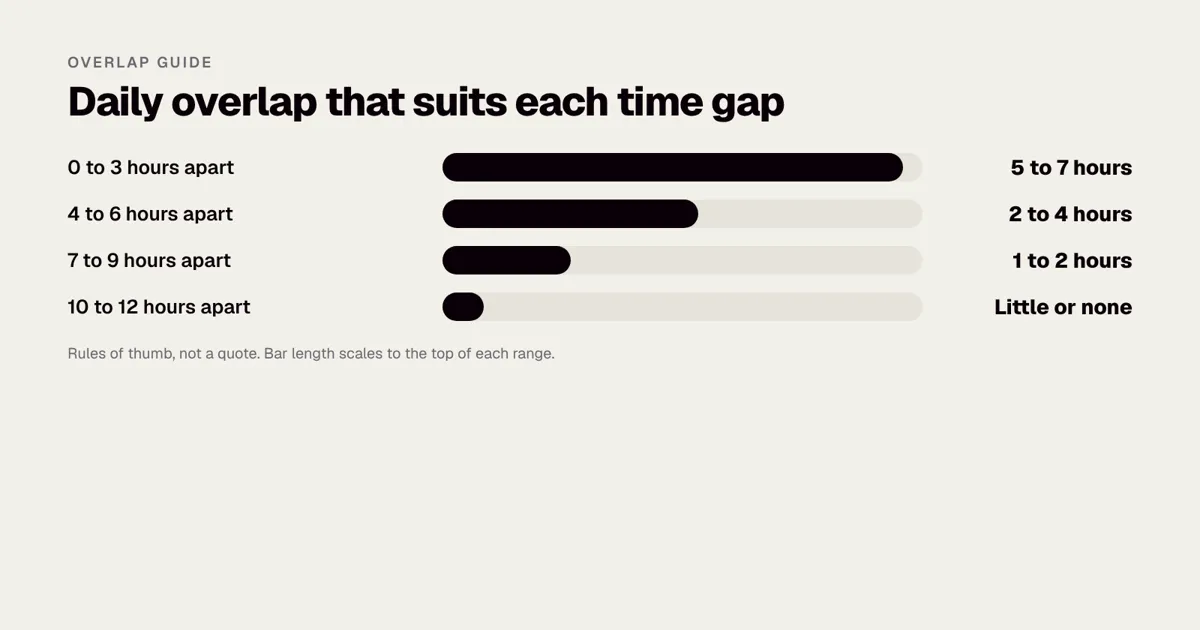
It depends on how much of the work needs real-time conversation, and that changes over the life of the project. Use this table as a rough guide.
| Time difference | Typical overlap | Works best for |
|---|---|---|
| 0 to 3 hours | 5 to 7 hours | Discovery, design workshops, complex integrations |
| 4 to 6 hours | 2 to 4 hours | Most app builds, with a daily overlap block |
| 7 to 9 hours | 1 to 2 hours, or one side shifts | Well-specified builds, with strong written handovers |
| 10 to 12 hours | Little or none without shifting | Stable maintenance, async-friendly tasks |
These are rules of thumb, not fixed limits. The early weeks of a project need more overlap than the middle, because the team is still learning the product and each other. Late in a project, overlap rises again, because testing, store submission and launch involve many small, urgent decisions.
Overlap needs by project phase
| Phase | Overlap needed | Why |
|---|---|---|
| Kickoff and discovery | High, 3 to 5 hours on key days | Workshops, user flows, trade-offs and trust building |
| Design | Medium, 2 to 3 hours | Review sessions with quick yes or no decisions |
| Build | Low to medium, 1 to 2 hours | Questions, pairing on hard problems, weekly demo |
| Testing and fixes | Medium, 2 to 3 hours | Triage of bugs, fast decisions on what blocks release |
| Store submission and launch | High, 3 to 4 hours for a few days | Rejections and last-minute questions need quick turnaround |
| Maintenance | Low, 0 to 1 hour | Planned work, async reports |
Working out your own overlap
Do not rely on mental arithmetic. List the working hours of each person who must be reachable, convert them to one reference time, and mark the hours where all of them are available.
- Ask each key person for their genuine working hours, including any days they work from home or have school runs.
- Convert everything to UTC or to one agreed city. Keep one shared calendar that shows both zones.
- Mark the shared window. If it is under 2 hours, decide which side will shift.
- Decide who shifts and how often. A common pattern is that one side starts early on Tuesdays and Thursdays, and the other stays late on Mondays and Wednesdays, which spreads the cost fairly.
- Write the result into the project plan so that new people see it.
Who should shift?
Fairness matters, because resentment builds quickly when one side always works unsocial hours. A few principles help.
- Shift the smallest number of people. Only those who need live conversation need to move.
- Rotate where practical. Rotating the awkward slot keeps goodwill.
- Shift for specific events, such as the weekly demo and design reviews, not every day.
- Never rely on one person staying late every evening. That is a path to burnout and a single point of failure.
Not sure whether a remote set-up suits your project? We will tell you honestly what overlap your plan needs and how we would run it. Book a 30-minute call with a co-founder.
What are the real options for structuring a distributed team?
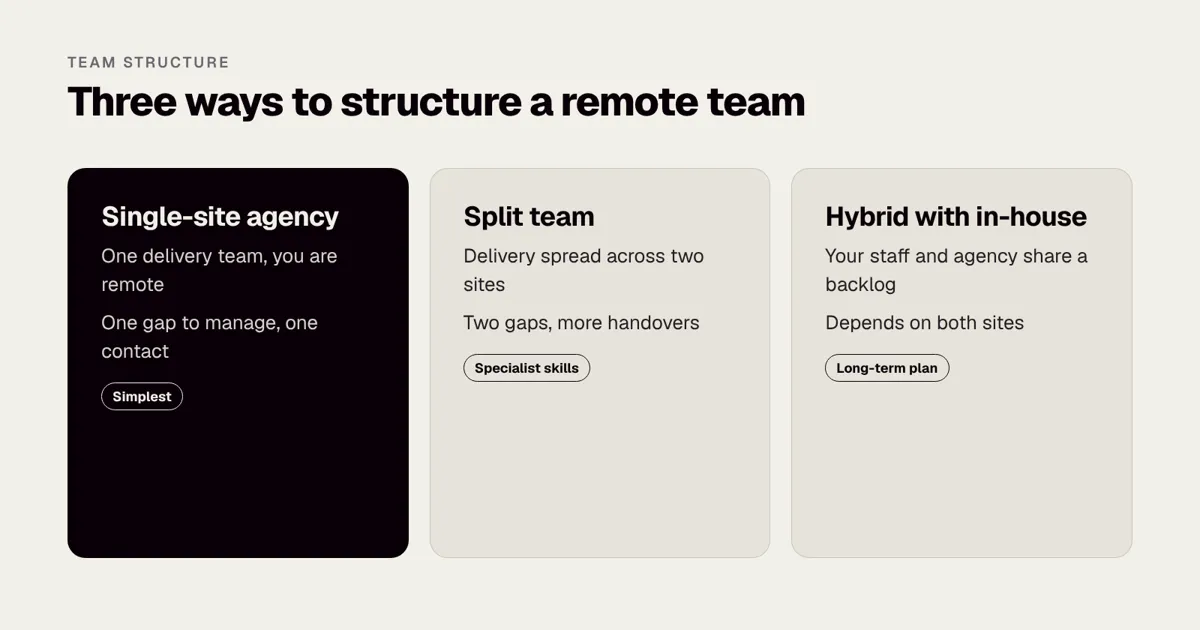
Not every distributed team is the same, and the right structure changes how much the time zone matters. There are four common set-ups.
| Set-up | How it works | Overlap profile | Best when |
|---|---|---|---|
| Single-site agency, remote client | The whole delivery team sits in one place; you are elsewhere | One gap to manage | You want one cohesive team and one point of contact |
| Split team, two sites | Delivery team spread across two locations | Two gaps, internal and client facing | A specialist skill sits in another country |
| Follow-the-sun | Work is passed between sites to cover long hours | Long coverage, thin overlap | Support, monitoring and urgent operations |
| Hybrid with your in-house team | Your staff and the agency share one backlog | Depends on both sites | You plan to take the product in-house later |
For most app builds, a single-site team with a clear daily overlap is simplest. Every extra location adds handover points, and each handover is a place where context leaks. Follow-the-sun sounds attractive because the work never stops, but it works only for tasks that are well defined and easy to pass on, such as monitoring or support queues. Building a new product is mostly judgement and learning, which does not hand over as neatly. If you are considering a hybrid, How to build a hybrid in-house and agency team goes into the practical detail, and Dedicated team model explained describes how that model compares with a project team.
Questions to ask before you choose a structure
- How many handover points does this structure create between idea and release?
- Who is the single person I speak to when something is unclear?
- Will the same people work on my project from start to finish?
- What happens when someone is ill or on leave?
- Where will the code, design files and accounts live, and in whose name?
What should a good daily rhythm look like?
Keep it light and predictable. A rhythm that works for most distributed teams:
- Written start-of-day update from each person: what is done, what is next, what is blocked. Two minutes to read.
- One overlap block (30 to 60 minutes) for questions, decisions and pairing, held at the same time every day.
- Written end-of-day handover that says where the work stands, what to pick up and any open questions, so the next person can start without asking.
- A weekly demo of working software on a real device, with the client present or watching a recording.
- A short retrospective every two weeks to fix what is slowing the team.
The Scrum Guide describes the standard events (planning, daily scrum, review and retrospective) that many teams adapt for remote work (Scrum Guide). You do not need all of them in full, but the demo and retrospective should always survive.
A sample day for a London team and a New York client
| UK time | New York time | What happens |
|---|---|---|
| 08:30 | 03:30 | Team reads the client’s overnight notes and starts work |
| 09:00 | 04:00 | Written start-of-day updates posted |
| 09:30 to 13:00 | 04:30 to 08:00 | Focused build work, no meetings |
| 14:00 to 14:45 | 09:00 to 09:45 | Daily overlap block: questions, decisions, quick demos |
| 14:45 to 17:00 | 09:45 to 12:00 | Team acts on answers while the client is online for follow-ups |
| 17:00 | 12:00 | End-of-day handover written and posted |
| Overnight | Afternoon and evening | Client reviews builds and replies; nothing is blocked on the team |
This is an illustration, not a fixed pattern. Notice what it protects: a long block of uninterrupted build time in the morning, one predictable conversation window, and a written close to the day.
The overlap block: how to use 45 minutes well
The overlap block is the most valuable time you have, so do not spend it on status updates that could have been written. A useful agenda:
- Decisions needed (15 minutes). The team lists questions it posted in writing. The product owner answers each yes, no or “I will decide by Thursday, here is why”.
- Show and tell (15 minutes). One person shows something working on a device. Short, informal and frequent beats long and formal.
- Risks and next day (10 minutes). Anything that could block tomorrow’s work, and who will remove it.
- Slack (5 minutes). Overruns happen, and it is better to plan for them.
If a topic needs more than five minutes of discussion, move it to a separate session with only the people who need to be there. The overlap block should not become a meeting that everybody dreads.
The weekly rhythm
| Day | Typical activity |
|---|---|
| Monday | Planning: agree the week’s goals and confirm what the client must provide |
| Tuesday to Wednesday | Build, with the daily overlap block |
| Thursday | Design or technical reviews, which need the longest overlap |
| Friday | Weekly demo of working software, plus a written report |
Many teams like to hold the demo on a Thursday rather than a Friday, so that feedback arrives before the weekend and can be acted on the following Monday. The point is to pick a day and hold it. For more on structuring those sessions, see How to run sprint reviews across time zones, How to run a sprint demo and How to give useful feedback on a test build.
How do you hand work over without losing context?
A handover is a note someone else can act on without a call. A good one has four parts:
- Status: what was finished, with a link to the code change or the build.
- Next step: the exact thing to do first, in one or two sentences.
- Blockers: who owns each, and when an answer is needed.
- Decisions made: what was agreed and why, so nobody reopens it.
Keep decisions in one place, such as a shared project board or document, not scattered across chat threads. Chat is for quick questions; the record is for everything you will need in three months. The first 90 days of working with an app agency covers how that record builds up from kickoff.
A handover template you can copy
Paste this into your project tool and ask everyone to fill it in at the end of their day.
| Field | Example |
|---|---|
| Done | Password reset email flow works on iOS test build 0.7.3 |
| Evidence | Link to build, short screen recording, link to code change |
| Next | Add the same flow on Android, starting with the deep link handler |
| Blocked | Need the production email sender domain; owner: client IT; needed by Thursday |
| Decisions | Reset links expire after 60 minutes; agreed in Tuesday overlap |
| Risks | Email provider rate limits may affect a large launch; will test next week |
What makes a handover bad
- It describes effort, not outcome. “Worked on notifications” says nothing. “Push notifications arrive on iOS; Android pending” can be checked.
- It relies on memory. “As we discussed” means nothing to the person who was not in the room.
- It hides the blocker. A question buried in the fourth paragraph is read late or not at all.
- It has no owner. A question without a name beside it belongs to nobody.
Written first, spoken second
A habit that pays off quickly: when a decision is made on a call, the person who asked the question writes it down within an hour and posts it where the whole team can see it. Over a few weeks you build a record that answers most questions without a meeting. It also protects you when staff change on either side.
A good decision note has three lines: the question, the answer, and the reason. For example: “Question: should guest users be able to check out? Answer: no, account required for launch. Reason: simplifies order history and reduces fraud checks; revisit after launch.” The reason matters because it stops the same question being reopened by someone who was not present.
Documentation that earns its place
Remote teams do need more written context than co-located ones, but that does not mean writing everything. Document these, and be relaxed about the rest:
- The product goal and the three or four things that define success for the first release.
- The agreed scope, with a list of what is out of scope for now.
- Acceptance criteria for each feature, in plain language.
- Key technical decisions and why they were taken.
- How to run, test and release the app, so a new developer can start in a day.
- Contacts and escalation routes on both sides.
How to write user stories developers understand and How to write an app specification give formats for the first few items.
Which meetings and tools make remote work easier?
Fewer meetings, with a clear purpose for each. Hold live sessions for things that benefit from conversation: kickoff, design reviews, tricky technical choices and the weekly demo. Move status updates and routine approvals to writing.
A meeting audit
| Meeting | Keep live? | Notes |
|---|---|---|
| Kickoff | Yes | Builds trust; record it |
| Daily overlap block | Yes, short | Decisions and show and tell only |
| Status update | No | Written report instead |
| Design review | Yes | Use shared design files with comments |
| Technical decision | Yes, small group | Write the outcome as a decision note |
| Weekly demo | Yes, or recorded | Always on a real device |
| Retrospective | Yes, every two weeks | Short, with named actions |
| Approvals | No | A written yes in the project tool is enough |
On tools, the exact products matter less than using each for one job:
- A project board for tasks and priorities.
- Chat for quick questions, with a rule that anything that becomes a decision is copied to the board.
- Shared design files with comments tied to the screen in question.
- Recorded demos for stakeholders who cannot attend live. A 5 minute recording often beats a 30 minute meeting.
- A shared calendar that shows time zones, so nobody has to calculate offsets.
If you are choosing tools, vendors such as Atlassian, Slack and Figma all publish their own current feature and pricing information on their sites, so compare plans there rather than relying on a third-party summary. If the agency already uses a set-up, it is usually better to join it than to ask for everything to be moved into yours. How to set up shared Slack and Jira with an agency covers how to agree channels, permissions and naming.
Rules for chat that stop it becoming a trap
- One topic per thread. Replies stay attached to the question.
- Say who must answer and by when. “@Priya, can you confirm by 4pm UK time?” beats an open question.
- Do not use chat as storage. If something matters in a month, copy it to the board or the decision log.
- Respect quiet hours. Agree that messages outside working hours are not expected to be answered, and use scheduled sending where available.
- Keep urgent for urgent. Define what counts as an emergency, such as production down or a security issue, and how to reach someone for it.
Recorded video: the quiet hero of remote work
A short recording does three things at once. It shows working software, which is what you actually want to see. It lets people in other time zones watch at their own pace. And it leaves a record to look back on when you wonder what was agreed. Keep recordings short, under 10 minutes, focus on one feature, and show it on a real device. If a stakeholder cannot give feedback in writing, ask for a reply by voice or a short video of their own.
The Agile Manifesto’s preference for working software over comprehensive documentation still applies here, though remote teams need slightly more written context than co-located ones (Agile Manifesto).
How do you run workshops and design reviews across a time gap?
Workshops are the hardest part of remote work, because they depend on energy and shared attention. The answer is not to avoid them but to design them for the medium.
Before the workshop
- Send materials at least two working days ahead: the goal, the questions to settle and any designs or data.
- Ask each person to add comments in the design file or document beforehand, so the session starts from real points rather than first impressions.
- Agree who decides. A workshop with no decision maker produces a list of options and a follow-up meeting.
During the workshop
- Keep sessions to 2 to 3 hours with a break, and split longer workshops over several days.
- Use a shared whiteboard or design file so everyone sees the same thing.
- Name a facilitator and a note taker. They should not be the same person.
- End with a clear list of decisions, open questions and owners.
After the workshop
- Post the notes within the same working day, while memories are fresh.
- Record the session so those who could not attend can catch up.
- Give people 24 hours to challenge a decision in writing before treating it as final.
If a discovery phase is part of your plan, What happens in a discovery phase, and why it saves money explains how those workshops fit into a fixed-scope plan, and our Mobile Product Discovery Sprint is a fixed price of £9,500.
What about daylight saving, holidays and public holidays?
These cause more surprises than distance does. The UK and EU change their clocks on the last Sunday of March and October, while the US changes on different dates, in March and November. At the time of writing, GOV.UK publishes the UK dates each year (GOV.UK). For a few weeks a year, the gap between a London and a US team is an hour different from usual. Check the current dates for each country and move the overlap block to match.
Clock-change calendar to check each year
| Event | Effect on a London to New York gap | What to do |
|---|---|---|
| US clocks go forward in March, UK still on winter time | Gap shrinks to 4 hours for about three weeks | Overlap block moves one hour earlier in UK time |
| UK clocks go forward in late March | Gap returns to 5 hours | Move the block back |
| UK clocks go back in late October, US still on summer time | Gap grows to 5 hours for the period before the US change | Check the block still falls in working hours |
| US clocks go back in early November | Gap returns to 5 hours | Reset the calendar |
Dates vary each year and across countries, and some countries do not change their clocks at all, so check the official source for each location rather than relying on this table. The practical rule is simple: put clock change dates in the shared calendar as events at kickoff, with a note about which meeting times will move.
Public holidays, school holidays and leave
Put all public holidays, school holidays and planned leave into a shared calendar at kickoff. Plan releases away from holidays in either location, and avoid scheduling a launch for a day when one side of the team is off. Remember that holiday patterns differ: a bank holiday Monday in the UK is a working day in the US, and US holidays such as Thanksgiving fall on days when the UK team is at work. Weekends also differ in some regions, with working weeks that run from Sunday to Thursday in parts of the Middle East.
| Check | When to do it |
|---|---|
| Public holidays for every location involved | At kickoff, then each quarter |
| Planned leave for key people | Monthly, and before any milestone |
| Store review times around holidays | Two weeks before a planned launch |
| Third-party support cover, for example payment providers | Before launch week |
Apple and Google review times vary, and holiday periods can be slower, so build in slack. App launch checklist: 30 steps before you publish gives you a fuller list for launch week.
How should you give feedback so a remote team can act on it?
Feedback is where remote work most often goes wrong. A comment such as “this feels off” can be cleared up in five seconds in a room. Across time zones it can cost a full day and still miss the point.
Make feedback specific and testable
| Weak feedback | Better feedback |
|---|---|
| “The checkout is confusing” | “On the payment screen, I could not tell whether tapping Pay would charge me. Add the total on the button.” |
| “Looks wrong on my phone” | “On iPhone 13, the Save button is hidden behind the keyboard on the address screen. Screenshot attached.” |
| “Can we make it faster?” | “The product list takes about four seconds to appear on mobile data. Target is under two.” |
| “I do not like the colours” | “The grey text on the white background is hard to read. Can we check it against accessibility contrast guidelines?” |
A feedback routine that works
- Test on a real device. Use the build link supplied with the report.
- Write each point separately with a screenshot or short recording.
- Label severity. Blocks launch, should fix, nice to have.
- Send in one batch at an agreed time, not as a trickle across the day.
- Expect a reply within one working day, which says what will be done and when.
Batching matters because it lets the team plan its work. Twenty small messages across a week interrupt the same developer twenty times. One list of twenty points does not.
Approval rules
Decide up front what counts as approval. A good rule is that a written “approved” in the project tool, from the named decision maker, is final for that item, and changes after approval go through the normal change process. How to manage scope changes without blowing the budget explains that process, and How to sign off a design before build covers design approvals specifically.
How do you keep a remote team secure?
Security does not depend on time zones, but remote work raises the stakes for access control. Basic habits help:
- Give each person the minimum access they need, and remove it when they leave.
- Use single sign-on or multi-factor authentication on code hosting, cloud accounts and the app stores.
- Keep secrets such as API keys in a secrets manager, never in chat or code.
- Use separate test data, not real customer records, for development.
- Keep a log of who has access to production systems.
The UK National Cyber Security Centre publishes practical guidance for organisations on remote working and access (NCSC). For a security checklist focused on the app itself, the OWASP project maintains widely used application security standards (OWASP), and our plain English guide, Mobile app security checklist: OWASP MASVS in plain English, translates them for non-specialists.
Access control checklist for a distributed project
| Item | Good practice |
|---|---|
| Accounts owner | Your company owns the Apple Developer, Google Play, cloud and domain accounts |
| Team access | Named individual logins, never shared passwords |
| Authentication | Multi-factor on every account that can publish or deploy |
| Code hosting | Repository in your organisation, agency staff invited as members |
| Secrets | Stored in a secrets manager; rotated if a person leaves |
| Production data | Limited to named people, with access reviewed monthly |
| Test data | Synthetic or anonymised, never copied from live |
| Offboarding | Same-day removal of access when someone leaves the project |
Data protection across borders
If the team and the users are in different countries, personal data may cross borders. At the time of writing, UK and EU rules put conditions on transfers, and the ICO publishes guidance on international transfers (ICO). The contract should say what data the team can see, where it is stored and what safeguards apply. Our guides UK and EU data transfers for app projects, explained and How to build a GDPR-compliant app go through the practical steps. This is general information, not legal advice, so check the official sources and take advice on your own circumstances.
Working from home and untrusted networks
Remote staff work from homes, cafes and trains. Good agencies deal with this through device policies: encrypted laptops, automatic screen lock, up-to-date operating systems and a rule against using personal devices for production access. Ask your supplier how they handle this. It is a reasonable question, and a confident answer is a good sign. For wider supplier checks, Due diligence checklist for US companies hiring abroad lists questions worth asking before you sign.
How do you measure whether remote work is going well?
You do not need a dashboard of vanity metrics. A handful of simple signals tells you most of what you need.
| Signal | Healthy | Worrying |
|---|---|---|
| Question turnaround | Most answered within one working day | Regularly two days or more |
| Demo cadence | Weekly, on a real device | Skipped or only slides |
| Features accepted per week | Steady, even if small | Long gaps, then a rush |
| Blocked items | Few, each with an owner and a date | Growing list with no owners |
| Decision log | Up to date and used | Empty or stale |
| Surprise rate | Rare | Frequent late discoveries |
| Team stability | Same people week to week | Frequent changes |
Pair these signals with a good weekly report. How to read an agency’s weekly report shows what a useful one contains, How to tell if an app project is off track lists early warning signs, and How to measure an outsourced team’s performance goes into more detail on outcomes.
Run a short retrospective every two weeks
A retrospective takes 30 to 45 minutes and asks three questions: what went well, what slowed us down, and what will we change? In distributed teams the answers often include things nobody would raise otherwise, such as “I never know if my message was seen”. Choose one or two changes, give each an owner and review them at the next session. Small adjustments, repeated, are how a remote team gets steadily better.
What are the common mistakes in distributed teams?
- No named decision maker. Questions wait because nobody is sure who can answer. Name one person on your side who can say yes or no.
- Vague requirements. Gaps in a spec cost a day each when the person who knows the answer is asleep. Write acceptance criteria for each feature.
- Skipping demos. Without regular demos, problems show up at the end, when they cost the most.
- Treating the team as a ticket queue. The best results come when the team understands the user and the goal, not just the task list.
- Choosing on price alone. Cost matters, but a team you can talk to at sensible hours is worth more than a cheaper one you cannot reach. See How to choose an app development company and 20 questions to ask an app developer before you sign.
- Too many meetings, too little writing. If every question needs a call, the time zone gap becomes the bottleneck. If nothing is discussed live, trust never forms.
- Missing the first week. The first week sets the pattern. Teams that start with a clear overlap block, access to everything they need and a shared decision log rarely lose that discipline later.
- Leaving access until later. Waiting for store accounts, certificates, payment sandbox keys or analytics logins can stall a project for days.
- Assuming silence is agreement. In a remote setting, no reply can mean busy, away, confused or disagreeing. Ask for an explicit yes.
- Ignoring culture. Directness, formality and attitudes to deadlines differ by country. Spend time on this early. Cultural differences in UK and US project communication has examples.
Three realistic scenarios
Scenario 1: A founder in Sydney and a team in London. The gap is about 9 to 11 hours depending on clock changes, so overlap is thin. The team works to a detailed written specification, the founder joins one live call at the start of their day, which falls in the UK evening, and the weekly demo is recorded. Decisions are posted in writing within an hour. What would break this set-up is vague requirements: every unanswered question costs a day, so the first month focuses on getting the specification and designs tight. See Hiring a UK studio from Australia for more on this pairing.
Scenario 2: A retailer in Dublin and a team in London. There is no gap, or at most an hour. The challenge here is not time but discipline: because everyone is available, questions fly across chat all day and the developers never get a clear block to work. The fix is a defined overlap block, a written decision log and a rule that chat is for quick questions only.
Scenario 3: A US start-up with a team spread across three cities. Here the agency, the client product owner and the client’s own engineer are in three different time zones. The solution is to name a single decision maker, choose the one hour that suits all three and keep everything else asynchronous. A central board and short recorded demos stop information splitting into private threads. Hiring a UK app development company from the US describes a similar US to UK pattern.
Should you use a dedicated team or a project team?
Many remote teams are set up as either a project team, scoped to deliver a defined piece of work, or a dedicated team, which works on your product over a longer period. The structure shapes how you manage time zones.
| Question | Project team | Dedicated team |
|---|---|---|
| What is the scope? | Defined up front | Evolves over time |
| How is it priced? | Fixed price for defined scope | Depends on the supplier’s model |
| Who owns planning? | Agency plans against the agreed scope | You and the team plan together |
| Best for | Launches, rebuilds and defined phases | Long-running products with a changing backlog |
| Time zone risk | Lower: scope is written down | Higher: more day-to-day questions |
Rounded Labs works to a fixed price agreed before development starts. If your product needs constant adjustment after launch, plan a defined next phase with its own agreed scope rather than leaving the work open-ended. Staff augmentation vs project agency explains the differences between the models, and When to bring app development in-house helps you decide whether your long-term answer is your own team.
How does fixed pricing help a distributed project?
With billing by the clock, a founder in another time zone cannot see how the hours are spent, and trust becomes an issue. Rounded Labs works on a fixed price agreed before development starts, so there is no clock to watch and no reason for either side to worry about idle time while the team waits for an answer. Projects typically run from £30,000 to £250,000+; see our pricing page for how this works. For earlier planning, our productised services are also fixed price: the Tech Architecture Audit is £7,500, Digital Transformation Prep is £7,000, the Mobile Product Discovery Sprint is £9,500 and the Legacy App Rescue Assessment is £6,500.
Fixed price changes the conversation in a time zone gap. When the price is agreed against a written scope, the questions that matter are about the scope itself: what is in, what is out, and how changes are handled. A good change process keeps this honest. Anything outside the agreed scope is described, priced and approved in writing before work starts, so nobody has to argue about it across a 9 hour gap. If you are weighing structures, App agency vs freelancer vs in-house team compares the options, Fixed price vs time and materials for app projects goes into the pricing models, and App maintenance costs in the UK covers what to budget after launch. Cost figures for the wider market are estimates, not quotes, so ask each supplier for a written price against the same brief.
Evidence that distance is manageable
We have worked with a range of clients over 19 years in business, since 2007. Waterstones took an app, a mobile site and an eBooks API through to delivery in 12 weeks, and Superdry involved a footprint of 768 locations in over 100 countries. Projects at that scale depend on written decisions, a clear owner on the client side and regular demos. Those habits matter more than the number of time zones involved. If you are comparing a distributed supplier with a local one, UK vs US app development agencies: cost, quality and risk and Contracts, IP and payment when you hire an overseas app agency cover the contract and cost side in depth.
A kickoff checklist for any remote project
Use this in the first week.
- Agree the overlap block and put it in everyone’s calendar, with clock change dates marked.
- Name the decision maker and a deputy on your side, and the delivery lead on the agency side.
- Set up the project board, decision log, shared design files and chat channels.
- Hand over the access the team needs: store accounts, cloud, analytics, test accounts, payment sandboxes.
- Agree what a weekly report contains and the day it arrives. How to read an agency’s weekly report has a model.
- Schedule the first four weekly demos so they happen even if the schedule moves.
- Share public holidays and planned leave for the next quarter.
- Agree how emergencies are raised and who answers them.
- Confirm where code, accounts and documentation live, and that they sit in your company’s name.
- Hold a short retrospective after the first two weeks.
Our guide to briefing an app development agency lists what to prepare before kickoff, and How to hand over an app between agencies explains what a clean handover looks like if you later change supplier.
What does this look like in the first 30 days?
A realistic plan for the first month of a remote project helps you see where effort goes.
| Week | Focus | What you should see |
|---|---|---|
| 1 | Set-up: access, rhythm, decision log, kickoff workshop | Calendar blocks, a board with the first tasks, a shared glossary |
| 2 | Design and first build tasks | First screens reviewed, first handover notes, first retrospective |
| 3 | Core flow building | First working build on a real device, recorded demo |
| 4 | Feedback and adjustment | Batched feedback answered, one decision log review, a report that matches what you can test |
By the end of week 4, you should be able to say three things with confidence: the team answers quickly enough, you can see working software, and you know who decides what. If any of these is false, fix it now, not at month three.
How you can help the team move faster
Clients often wonder what they can do on their side. These habits have the biggest effect.
- Answer questions inside the overlap block, or by the end of the next working day.
- Give feedback in one batch, with specifics and severity.
- Join the weekly demo and try the build yourself.
- Name a deputy for holidays and illness.
- Say early when priorities change; the cost of a change rises with every week it is delayed.
- Keep stakeholders aligned before they reach the team, so the team does not receive conflicting instructions.
Frequently asked questions
What is the minimum overlap for a remote development team?
For most app builds, 2 hours a day is workable and 3 to 4 is comfortable. Below that, the team needs strong written handovers and a clear decision maker on your side. Overlap should rise during kickoff, design reviews and launch week.
Should the team work my hours or theirs?
Usually a mix. The agency keeps its normal hours and shifts a few hours on certain days, or the client holds the overlap block early or late. Agree this at kickoff and put the overlap time in a shared calendar, along with the dates when clock changes will move it.
How do you run a design workshop across time zones?
Hold it in the overlap window, keep it to 2 to 3 hours, and split longer workshops over several days. Share the materials beforehand, name a facilitator and a note taker, and record the session so absent people can catch up. Post decisions in writing the same day.
Can a remote team be as fast as an in-house one?
Yes, if the process is good. Fast teams share a few traits: clear priorities, short feedback loops and quick answers to blocking questions. Time zones matter less than these. A well-run remote team with a decision maker who answers promptly will often beat an in-house team that has unclear ownership.
Who should be on my side of the project?
One product owner with authority to decide, and ideally a backup. They should be reachable in the overlap window and able to review work every week. If you also have technical staff, name one person for technical questions so that the team does not get two answers.
How do I know a remote team is actually progressing?
Look for working software, not activity. You should be able to open a build and try the features listed in the report every week. If you cannot, ask for a demo that day and read the next report with care.
Is it safe to work with a team in a different country?
It can be, if access, data and accounts are managed properly. Keep the app store, cloud and code accounts in your company’s name, use multi-factor authentication, limit production access and agree in the contract how personal data is handled. This is general information, not legal advice, so check official sources such as the ICO and take professional advice for your situation.
Official sources and further reading
Talk it through with one of our co-founders. 30 minutes, no pressure.