

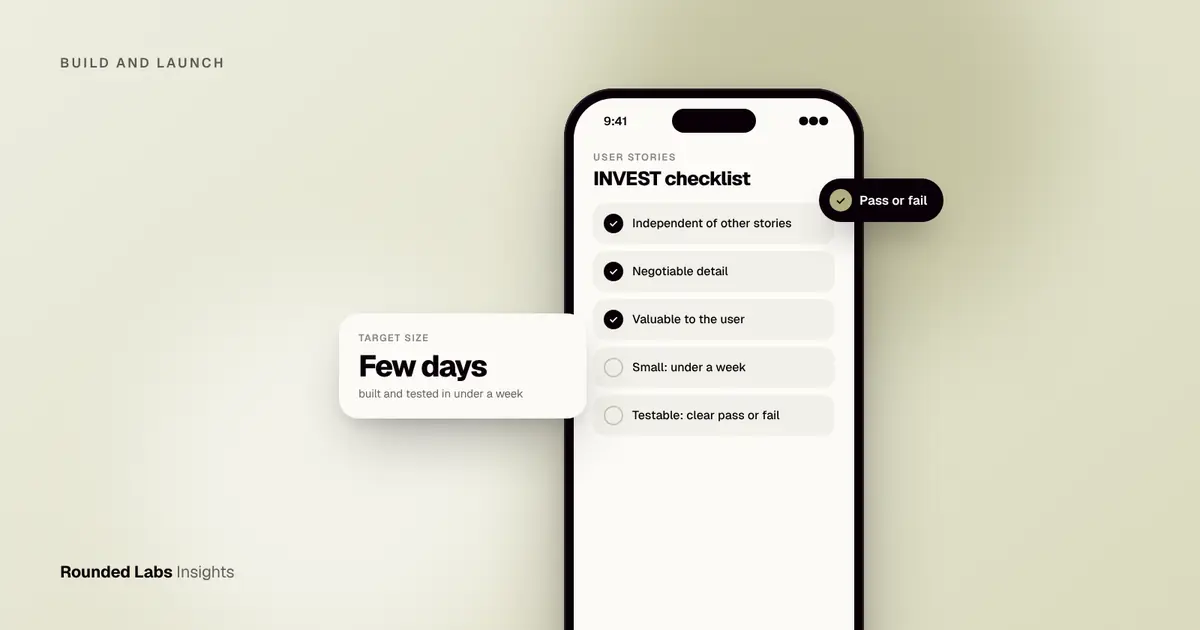
A good user story names who wants something, what they want and why, in one or two sentences, then adds three to six acceptance criteria that a developer can test. The classic format is “As a [user], I want [action], so that [benefit]”. Stories that fit inside a few days of work, with clear pass or fail conditions, are the ones developers actually understand and build correctly the first time.
We have worked from written requirements on projects such as Dabbl, a trading app for first-time investors, where plain wording mattered because the users were beginners and the rules around money were strict. This guide shows how to write stories your developers can build without guessing. It covers the format, acceptance criteria, splitting, estimating, three worked examples, a workshop you can run this week, a checklist and the mistakes we see most often. It sits alongside our wider app development services.
Key facts
- A story describes one outcome for one type of user, not a feature list or a technical task.
- Acceptance criteria turn a story into something testable: each one should be clearly pass or fail, and most stories need three to six.
- Most teams aim for stories that one or two developers can finish in under a week, including testing.
- Stories start a conversation. They do not replace talking to the team or showing designs.
- Unclear stories are a common cause of rework, which is why fixed-price projects pin scope down before development starts.
- A small set of standing rules, such as accessibility and performance, belongs in a shared “definition of done” rather than being repeated in every story.
What is a user story, and what is it for?
A user story is a short description of something a person needs from your product, written from that person’s point of view. It is a planning tool, not a contract. The aim is to make sure everyone, from founder to designer to developer to tester, shares the same picture of the outcome before anyone writes code.
The idea comes from agile software development, whose principles put working software, close collaboration and responding to change ahead of heavy documentation. Stories are one way to keep documentation light while still being precise where it matters.
A story has three parts, often called the “three Cs”:
- Card. The short written statement, small enough to fit on an index card.
- Conversation. The discussion between the person who wants the feature and the people who will build and test it. This is where detail comes from.
- Confirmation. The acceptance criteria that prove the story works.
If you skip the conversation, the story is just a vague wish. If you skip the confirmation, nobody can tell when it is finished. Many failed briefs are cards with no conversation and no confirmation.
What stories are not
- Not a specification of the screen. Layout, colour and spacing belong in the design.
- Not a technical task. “Migrate the database” is a task. It may be needed to deliver a story, but it is not a story.
- Not the whole plan. Stories sit inside a wider set of documents, covered later in this guide.
- Not fixed forever. A story can be rewritten when you learn something, as long as the change is visible and agreed.
What is the standard format?
The most common template is:
As a [type of user], I want to [do something], so that [I get this benefit].
Each part earns its place.
- The user forces you to say who. “As a user” is almost always too vague. “As a first-time investor” or “As a shop manager” tells the developer and designer who will be on the screen, what they already know and how much help they need.
- The action says what they do, not how the screen is built. “I want to filter my orders by date” is an action. “I want a dropdown menu in the top right” is a design decision.
- The benefit explains why it matters, which helps developers suggest simpler ways to reach the same goal. If the benefit is “so that I can see how I am doing”, a developer may suggest a summary figure rather than a full chart.
Alternative formats
Some teams prefer other wording. All of these work if the team uses one consistently.
| Format | Template | Best for |
|---|---|---|
| Classic story | As a [user], I want [action], so that [benefit] | Most apps and web products |
| Job story | When [situation], I want to [motivation], so I can [outcome] | Cases where context matters more than the person |
| Feature-driven | In order to [benefit], as a [user], I want [action] | Teams that want the benefit up front |
| Plain sentence | “A shop manager can approve a refund from the order screen” | Simple, short backlogs |
A job story is useful when the same person behaves differently in different situations. “When I am in a shop with poor signal, I want to scan a barcode, so I can still check stock” tells the team something that “As a shop assistant, I want to scan a barcode” does not.
Who are your users?
Before writing, list your user types. A small app often has three to six. Each should be a role with a distinct need, not a demographic.
| User type | What they need | Typical stories |
|---|---|---|
| New customer | To understand the offer and sign up fast | Sign up, verify email, view onboarding |
| Returning customer | To do the main task quickly | Re-order, check status, update details |
| Support agent | To help people without asking developers | Look up an account, issue a refund |
| Administrator | To control content and access | Add products, manage staff, view reports |
| System or integration | To act without a person | Receive a webhook, send an overnight export |
The last row is worth noting. Some behaviour has no human user, such as a scheduled job. Write those as “As the system” only when needed, and prefer attaching them to a human story they serve.
What makes a story good? The INVEST checklist
A widely used checklist is INVEST, from agile practitioner Bill Wake. Use it to review each story before it goes to the team.
| Letter | Meaning | Question to ask |
|---|---|---|
| Independent | Can be built without waiting for many others | Could we do this one first or last? |
| Negotiable | Detail can be discussed | Have we described the outcome, not the solution? |
| Valuable | Matters to a user or the business | What changes for the user when it ships? |
| Estimable | The team can size it | Does the team know enough to give an estimate? |
| Small | Fits within a sprint, ideally a few days | Can it be built and tested in under a week? |
| Testable | Clear pass or fail | Could a tester say yes or no? |
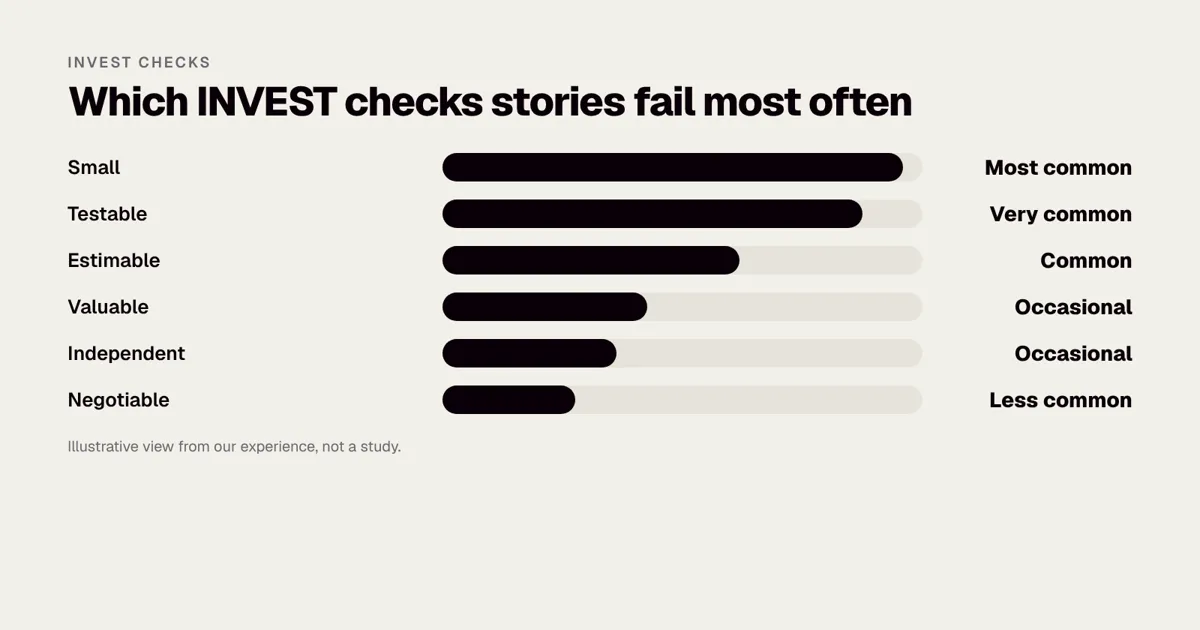
If a story fails one of these, rewrite or split it before development starts. In practice the two that fail most often are Small and Testable. Large stories hide decisions, and vague stories hide disagreements.
How do you write acceptance criteria?
Acceptance criteria are the conditions that must be true for the story to count as done. Write them as plain statements a tester could check. Two common styles work well.
- A short checklist. “Password must be at least 12 characters. An error appears under the field if it is too short.”
- Given, when, then. “Given I have entered a wrong password three times, when I try again, then my account is locked for 15 minutes and I see a reset link.” This style, known as Gherkin, is also used for automated tests. The Gherkin reference explains the syntax.
Cover the happy path first, then the cases people forget. Aim for three to six criteria. If you need fifteen, the story is probably two or three stories.
The edge cases people forget
Use this list as a prompt for every story that involves data or a screen.
| Situation | Question to ask |
|---|---|
| Empty state | What does the person see when there is nothing yet? |
| Loading | What shows while data is on its way? |
| Error | What happens when the server fails, and what can the person do? |
| No connection | What works offline, and what message appears? |
| Permissions | What if the person is not allowed to do this? |
| Limits | What is the maximum length, size, number or value? |
| Duplicates | What if they do it twice, or press the button twice? |
| Interruptions | What if the phone locks, a call arrives or the app is closed midway? |
| Different devices | Does it work on small phones, large phones and tablets? |
| Accessibility | Can it be used with a screen reader, large text and without colour cues? |
Rule-based criteria for business logic
When a story contains business rules, write them as a short table. It is easier to read than a paragraph and easier to test.
| Order total | Delivery fee |
|---|---|
| Under £30 | £3.95 |
| £30 to £59.99 | £1.95 |
| £60 or more | Free |
A tester can check every row. A developer can build it without a conversation. If the rules change, you change one table.
Criteria that cannot be tested
Words such as “fast”, “easy”, “intuitive”, “modern” and “secure” are not criteria. Replace them with something observable.
| Vague | Testable |
|---|---|
| The list loads fast | The list shows its first ten items within two seconds on a normal mobile connection |
| The form is easy to use | A new user can complete it unaided in under three minutes in a usability test |
| The app is secure | Sessions expire after 30 minutes of inactivity and passwords are never shown in plain text |
| It looks good | It matches the approved design for the home screen on the three agreed test devices |
Not sure your requirements are ready for a developer? We turn rough ideas into a clear, prioritised backlog before any build starts. Book a 30-minute call with a co-founder and we will tell you what is missing.
What does a worked example look like?
Here is a weak story and a better one, for a savings app.
Weak: “As a user, I want a dashboard.”
A developer cannot build this. What data? For whom? What is “done”?
Better:
As a saver with one or more goals, I want to see how far I am towards each goal on my home screen, so that I know whether I am on track.
Acceptance criteria:
- The home screen lists each active goal with its name, target amount and amount saved so far.
- A progress bar shows the percentage saved, rounded to the nearest whole number.
- Given I have no goals, when I open the home screen, then I see a message and a button to create my first goal.
- Given I have no connection, when I open the app, then I see the last saved figures with a note showing when they were updated.
- Amounts display in the currency set on my profile.
Notice what is absent: no mention of database tables, colours or screen sizes. Those belong to the designer and developer. The story fixes the outcome and the edge cases, and leaves the solution open.
A second example: a booking flow
A salon wants clients to book appointments. A common first attempt is “As a client, I want to book an appointment.” That is an epic, not a story. Split it.
| Story | Acceptance criteria summary |
|---|---|
| Choose a service | List shows each service with name, duration and price; selecting one moves to the next step |
| Choose a time | Only slots that fit the service duration and the stylist’s availability are shown; past slots are hidden |
| Confirm and pay a deposit | Summary screen shows service, time, price and deposit; card payment succeeds or shows a clear error |
| Receive confirmation | Email and in-app confirmation sent within one minute; calendar file attached |
| Cancel or move a booking | Allowed up to 24 hours before; inside that window the person sees the cancellation policy and a contact option |
Each of these can be built, tested and shown on its own. The first four make a thin but working path from choosing a service to holding a booking. The fifth can come in the next release if needed. Booking and scheduling apps for service businesses goes into the wider design.
A third example: a story with rules attached
Stories that touch money, health, children or personal data often come with rules that are not obvious from the story text. Here is how to keep them visible without turning the story into a legal document.
As a first-time investor, I want to see a plain-English summary of what I am about to buy and what it could cost me, so that I can decide with confidence.
Acceptance criteria:
- The summary shows the product name, the amount, any fees and the total in the user’s currency.
- A short risk statement, approved by the compliance owner, appears before the confirm button.
- The confirm button is disabled until the person has scrolled to the end of the summary.
- Given the price changes while the summary is open, when the person taps confirm, then they see the new price and must confirm again.
- Every confirmation is recorded with the time, the amounts shown and the version of the risk statement.
Criteria 2 and 5 are not about the user interface. They exist because the rules around money are strict. Written down, they give the developer, tester and compliance owner the same checklist. The exact wording and rules belong to your own legal and compliance advisers, so name an owner for them in the story. Our work with Dabbl is a good example of why this matters when users are beginners.
How do you split big stories?
A story that is too large is often called an epic. “Users can manage their account” is an epic. It hides a dozen decisions. Split it by one of these routes.
- By workflow step. Sign up, verify email, set a profile photo.
- By user type. A customer cancels an order; an admin cancels on their behalf.
- By rule or variation. Pay by card first, add bank transfer later.
- By simple then complex. A basic version first, richer options later.
- By data type. Handle one file format first, then others.
- By happy path then exceptions. The normal flow first, then error recovery and edge cases.
Avoid splitting by technical layer, such as “build the database” and “build the screen”. Neither gives the user anything on its own. Each slice should be a thin, working path from screen to data.
A splitting example
Epic: “As a shop manager, I want to manage my products.”
| Slice | Story | Why it is a good slice |
|---|---|---|
| 1 | Add a product with name, price and one photo | Smallest end-to-end path |
| 2 | Edit a product | Reuses the form from slice 1 |
| 3 | Mark a product as out of stock | Small rule, high value |
| 4 | Add several photos | Extra complexity deferred |
| 5 | Import products from a spreadsheet | Large, can wait |
| 6 | Bulk edit prices | Nice to have |
Splitting also helps with prioritisation. Once stories are small, you can rank them with a method such as MoSCoW and decide what belongs in your MVP. How to choose features for version one covers the same decision from the product side.
How do you organise stories into a backlog?
A pile of stories is not a plan. Give it structure.
- Themes. Broad areas of value, such as “Getting started”, “Booking”, “Payments” and “Admin”.
- Epics. Large pieces of work inside a theme, such as “Booking”.
- Stories. Small, buildable pieces inside each epic.
- Tasks. Technical steps the developers write themselves under a story. You do not need to manage these.
Story mapping
A story map is a simple way to see the whole product at once. Write the main steps of the user’s journey across the top, from left to right: discover, sign up, choose, pay, receive, get help. Under each step, list the stories, with the most important at the top. Then draw horizontal lines to group stories into releases. The first line is your first release, a thin slice across the whole journey. This shows quickly whether your first version actually works from start to finish, which a flat list never does.
| Journey step | Release 1 | Release 2 | Later |
|---|---|---|---|
| Sign up | Email sign up | Social sign in | Biometric login |
| Choose | Browse list | Search and filters | Recommendations |
| Pay | Card payment | Saved cards | Wallet payments |
| Receive | Email receipt | In-app history | Downloadable invoices |
| Get help | Contact form | In-app chat | Help centre search |
Ready and done
Two short checklists keep the backlog healthy. A story is ready when:
- It names a user, an action and a benefit.
- It has three to six clear acceptance criteria.
- The design for it is agreed, or the story says no design is needed.
- Dependencies are known and the questions are answered.
- The team has seen it and can size it.
A story is done when:
- It meets every acceptance criterion.
- It has been tested on the agreed devices and operating system versions.
- It meets the shared standards, such as accessibility, analytics events and security checks.
- The product owner has seen it working and accepted it.
- Any documentation or help text is updated.
Put shared standards in the definition of done instead of repeating them in every story. For example: “all text can be enlarged without losing function”, “every screen sends the agreed analytics events” and “no secrets are stored in the app”. The W3C Web Accessibility Initiative is the official source for accessibility guidance, and How to review app designs as a non-designer shows how to check designs against your own standards.
How do stories work with designs?
Stories say what and why. Designs say how it looks. Keep them linked.
- Attach the design to the story. A link to the screen in your design tool, with the version number, removes arguments about which version is current.
- Do not describe the design in the story. If the story says “a blue button at the bottom”, the story and the design will disagree one day.
- Use designs to find missing stories. Walk through the prototype and ask what happens when each button is tapped. Each answer is a story or a criterion.
- Sign off before build. How to sign off a design before build explains how to do this without slowing the project.
For platform-specific behaviour, such as gestures or navigation, the official guides from Apple and Google are the shared reference. Your designers and developers will know them, and you can point to them in disagreements, such as Apple’s Human Interface Guidelines and Google’s Material Design.
How do you run a story-writing workshop?
You can write a first batch of stories in a single session of 90 minutes to three hours. This format works for most small teams.
- Prepare (before). Bring a one-page goal, a list of user types and any sketches or competitor screens. Invite a product owner, a designer, a developer and, if possible, someone who talks to customers or users.
- Agree the goal (10 minutes). One sentence: what must a person be able to do at the end of release one?
- Map the journey (20 minutes). Write the main steps on sticky notes or a shared board, left to right.
- Write stories (30 minutes). Under each step, write stories in pairs. Aim for quantity. Do not argue yet.
- Add criteria to the top stories (30 minutes). Take the most important ten and write three to five criteria each, covering the edge cases in the table above.
- Mark questions (10 minutes). Anything nobody can answer goes on a “questions” list with an owner and date.
- Draw the first release line (10 minutes). Decide what is in and out. Be strict.
- Write up (after). Tidy the output and share it the same day while it is fresh.
A discovery workshop does the same with a wider agenda. If you have not yet written down your product idea, begin with How to write an app specification (free template) and the app requirements template. The user research behind your stories matters too: How to run user interviews before building shows how to collect it.
What mistakes make stories hard to build?
| Mistake | Why it hurts | Fix |
|---|---|---|
| Writing the solution as the story | Hides the real need and blocks better options | Describe what the user must be able to do |
| Technical tasks dressed as stories | No user, no value, no test | Capture as a task under a story that needs it |
| Missing the “so that” | Developers cannot suggest a cheaper way | Always state the benefit |
| No error or empty states | Bugs and arguments start there | Use the edge case table |
| Vague words | Cannot be tested | Replace with numbers and observable behaviour |
| Writing alone | Gaps go unnoticed | Draft with a developer and designer |
| One giant story | Cannot be estimated or tested | Split by workflow, rule or user type |
| Too many criteria | Story is really several | Split when you pass six |
| Copying competitor features | Stories that nobody asked for | Tie each story to a real user need |
| Stories that never change | The plan drifts from reality | Review the top of the backlog every sprint |
Before and after: four rewrites
| Before | After |
|---|---|
| “As a user, I want notifications.” | “As a client with a booking tomorrow, I want a reminder the evening before, so that I do not forget.” |
| “Add search.” | “As a shopper, I want to search products by name and see matches as I type, so that I find items quickly.” |
| “Admin panel.” | “As a support agent, I want to look up a customer by email and see their last five orders, so that I can answer questions without asking a developer.” |
| “The app must be fast.” | “Given a normal mobile connection, when I open the product list, then the first ten products appear within two seconds.” |
Each rewrite names a person, an outcome and, where it matters, a measurable condition.
How big should a story be, and how do you estimate it?
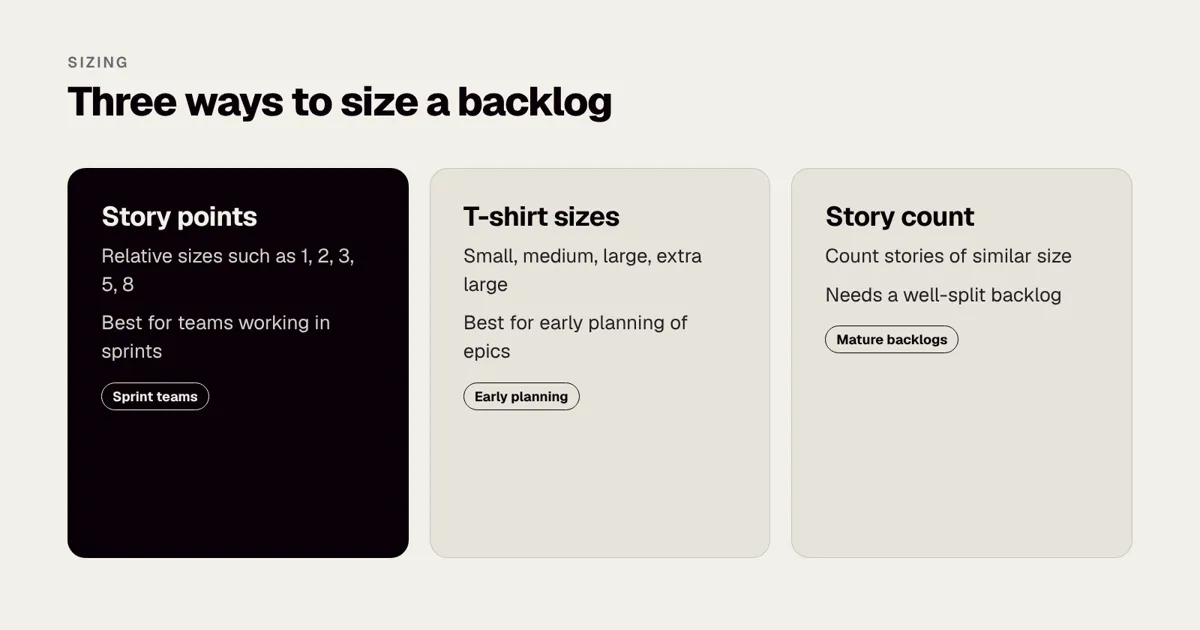
Most teams aim for stories that can be finished, tested and accepted within a few days. If a story takes longer than a week for one or two developers, split it. Teams use three common ways to estimate.
| Method | How it works | Good for |
|---|---|---|
| Story points | A relative number such as 1, 2, 3, 5, 8, based on effort, complexity and uncertainty | Teams working in sprints |
| T-shirt sizes | Small, medium, large, extra large | Early planning of epics |
| Count of stories | Assume most stories are similar in size and count them | Mature, well-split backlogs |
Points are relative, not a measure of time. A team’s speed, often called velocity, is the number of points it completes in a sprint, and it settles after a few sprints. The Scrum Guide is the official description of the framework many teams use, including its terms for backlog and sprint, and Scrum.org publishes further guidance.
If you work with a supplier on a fixed price, the estimate matters less to you than the agreed scope and acceptance criteria. Rounded Labs works to a fixed price agreed before development starts, with projects typically £30,000 to £250,000+; see our pricing page. The stories and criteria are what make a fixed price meaningful: they define what is included.
How do stories protect your budget?
Unclear requirements are one of the most common reasons projects run late or over budget. Clear stories help in four ways.
- They expose the questions early. Writing criteria forces you to decide things now, when changing your mind costs nothing.
- They make estimates more reliable. A supplier can price a story with clear criteria far more accurately than a paragraph of intent.
- They create a shared definition of done. Fewer disputes about whether something is finished.
- They make change visible. A new idea becomes a new story with a price, not a quiet addition.
When the team agrees detail early, there are fewer surprises, and any later change can be discussed openly. See how to manage scope changes without blowing the budget. A sensible rule: if a change touches a story already built, say so and price it; if it is a brand new story, add it to the backlog and rank it against the others. How to tell if an app project is off track lists the early signs when scope is slipping.
Our Mobile Product Discovery Sprint at £9,500 fixed produces a prioritised, story-level backlog you can use with any supplier. If you already have an app that needs a view on its state, the Legacy App Rescue Assessment costs £6,500 fixed. You can see the kind of detail we work to in the Dabbl case study, or talk to a co-founder about what your own backlog needs.
Which tools should you use?
You do not need special software to write good stories. A shared document is enough for a first release. As the backlog grows, a tracker helps.
| Tool type | Examples | Good for |
|---|---|---|
| Shared document or spreadsheet | Any office suite | First drafts and small backlogs |
| Issue tracker | Jira, Linear | Ongoing work, sprints, reporting |
| Visual board | Any whiteboard tool | Workshops and story maps |
| Design tool | Any prototyping tool | Linking stories to screens |
Whatever you choose, give every story a unique ID, an owner, a status and a link to its design. Pricing for these tools changes, so check each vendor’s own page before you commit.
How do stories differ for different kinds of product?
The format stays the same, but the emphasis shifts.
| Product type | What to emphasise | Typical trap |
|---|---|---|
| Consumer app | First-time experience, speed, delight, store requirements | Too many features before the core path works |
| Internal staff app | Replacing a real process, permissions, data quality | Copying the old spreadsheet instead of fixing the process |
| Marketplace | Two or three user types, payments, trust and disputes | Writing only the buyer side |
| Regulated product | Evidence, audit trails, wording approved by a named owner | Treating compliance as a final-week task |
| Data-heavy product | Import, validation, reporting and error handling | Ignoring bad or missing data |
For an internal tool, interview the people who do the job today and write stories from what they actually do, including the workarounds. Internal staff apps: replacing spreadsheets and paper shows how much of the value is in the small details. For a marketplace, write separate stories for buyers, sellers and the operator, since each has distinct needs; How much does a marketplace app cost to build in the UK? explains why the operator side is so often forgotten.
How do you write the “non-functional” requirements?
Some needs are not about a single action: speed, security, accessibility, reliability and privacy. Teams often call these non-functional requirements. There are three good places to put them.
- In the definition of done. For standards that apply to every story, such as “works with larger text sizes” or “no personal data in logs”.
- As a story with its own criteria. When a need is specific and testable, such as “As an account holder, I want to be signed out after 30 minutes of inactivity, so that no one else can use my phone to see my balance.”
- As a short list of constraints beside the backlog. For things like supported operating system versions, hosting region and browser support.
Be specific. “The app must be secure” tells a developer nothing. “Passwords are stored using a recognised hashing method, API calls use encrypted connections, and the app passes the agreed security test before release” is checkable. For a practical list, our Mobile app security checklist puts the main checks in plain English, and UK GDPR for mobile apps covers personal data. If your product will be used by people with disabilities, add accessibility to the definition of done from the start; App accessibility: the European Accessibility Act and UK guidance explains the expectations.
How do testers use your stories?
A good story is also a test plan. Ask a tester to read your stories before the team starts, because they will see gaps a product owner cannot.
Take the delivery fee table from earlier. A tester can turn it into a short set of test cases in a few minutes.
| Test | Input | Expected result |
|---|---|---|
| Lowest band | Basket of £29.99 | Fee is £3.95 |
| Boundary | Basket of £30.00 | Fee is £1.95 |
| Upper boundary | Basket of £59.99 | Fee is £1.95 |
| Free delivery | Basket of £60.00 | Fee is £0.00 |
| Basket changes | Remove an item that moves the basket below £60 | Fee updates immediately |
The boundary cases are where bugs hide, and a story that lists the rules in a table makes them obvious. If your criteria cannot be turned into a test, they are not finished. App testing explained: QA, devices and automation describes how the work is done, and How to give useful feedback on a test build shows how to report what you find in a way that developers can act on.
How do you keep stories alive after the first release?
Stories are not written once. After launch, real behaviour should change your backlog.
- Review the top of the backlog every sprint. Retire stories nobody wants and rewrite those that no longer fit.
- Turn feedback into stories. A support request such as “I cannot find my old orders” becomes “As a returning customer, I want to see my past orders, so that I can re-order.”
- Link stories to measures. If a story is meant to improve sign-up completion, name the figure to watch. App analytics: what to track from day one and App retention: the metrics that matter after launch help you choose.
- Keep a short history. When you change a story, note why. It saves long arguments later.
How do you work with a remote supplier on stories?
When the supplier is in another time zone, written clarity matters even more, because a missing detail can cost a full day. Three habits help. First, make every story self-contained: a person who has never seen the project should be able to read it and understand the user, the action and the criteria. Second, link each story to the exact design version, so nobody builds from an old screen. Third, agree a written route for questions, with an owner and a response time, so a question raised on Monday does not sit until Thursday. Our guide to how to brief an app development agency lists what a supplier needs from you at the start, and How to read an agency’s weekly report shows how to check progress against your stories.
A checklist to use before you send stories to developers
- Every story names one user type, one action and one benefit.
- No story is longer than two sentences.
- Every story has three to six acceptance criteria.
- Empty, loading, error and offline states are covered where relevant.
- Business rules are written as tables, not buried in paragraphs.
- Vague words have been replaced with something observable.
- Each story links to a design or says none is needed.
- Questions have owners and due dates.
- Big stories are split, and the first release is clearly marked.
- Shared standards are in the definition of done, not repeated.
- A developer and a designer have read the stories and signed off.
What should you do next?
Pick the ten most important stories for your first release, rewrite them using the format and the edge case table, and show them to a developer. Ask one question: “Could you build and test this without asking me anything?” Every question they ask is a missing criterion. After one round, most founders find their backlog is half the size and twice as clear. If you would like a second pair of eyes, our team can run the workshop with you, or you can book a call with a co-founder to talk it through.
Frequently asked questions
How detailed should a user story be?
Detailed enough that a developer can estimate it and a tester can check it, but no more. The story itself is one or two sentences. The detail lives in the acceptance criteria, the designs and the conversation.
Who should write user stories?
Usually the product owner, who might be you as the founder, but with input from designers and developers. Stories written in isolation tend to miss technical limits and edge cases. A short workshop with the whole team is the quickest way to write a good first batch.
How many stories does an app need?
A simple first release often has 30 to 80 stories, and a larger product can have several hundred over time. The number matters less than keeping the top of the list small, clear and ready to build. Detail the next few weeks of work and leave the rest as rough epics.
What is the difference between a user story and a requirement?
A requirement states what the system must do. A user story frames the same need around a person and an outcome, and invites discussion on how to meet it. Many teams use both: stories for planning, and formal requirements where regulation or contracts demand them.
Should I use story points or hours?
Many teams use story points, a relative size, because they reflect effort and uncertainty better than time estimates. If you work with a supplier on a fixed price, the estimate matters less to you than the agreed scope and acceptance criteria.
Do user stories work for fixed-price projects?
Yes, and they work well. The stories and acceptance criteria define exactly what is included in the agreed price, and any new idea becomes a priced change rather than an argument. That is why we agree a detailed backlog before development starts.
How do I write stories for technical work such as integrations?
Attach the technical work to the user outcome that needs it. For example, “As a customer, I want my order status to update automatically” may need an integration with a courier. The story stays about the customer, and the developers add tasks for the integration underneath.
Official sources and further reading
Talk it through with one of our co-founders. 30 minutes, no pressure.