

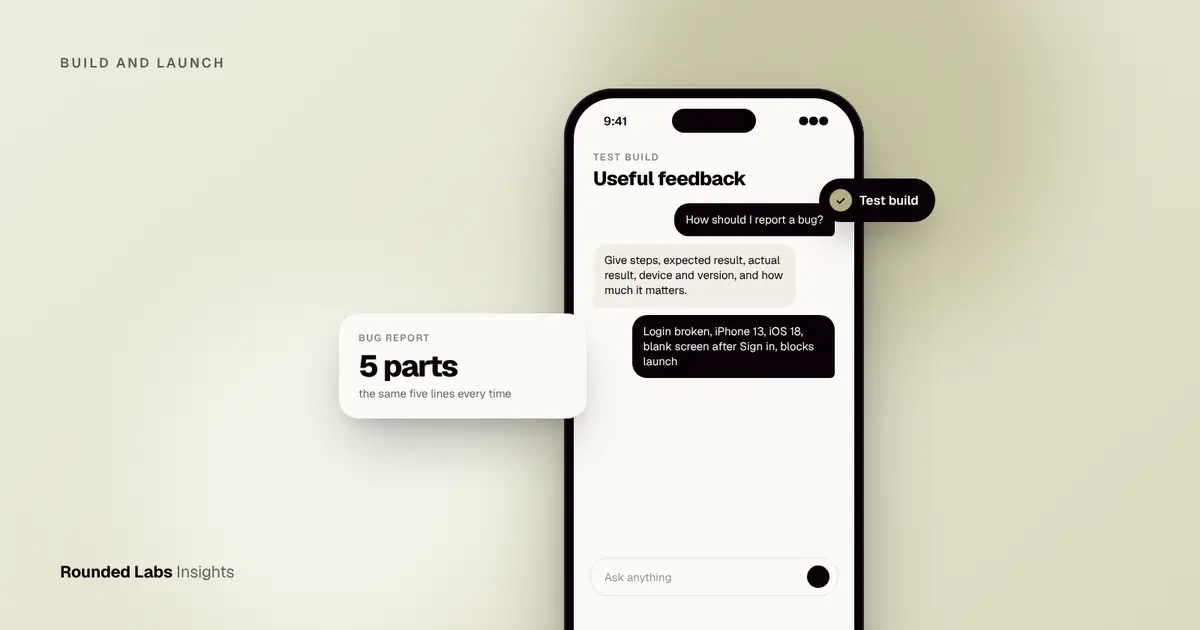
Useful feedback on a test build is specific, reproducible and ranked. Say what you did, what you expected, what happened instead, on which device and software version, and how much it matters to launch. “Login fails on iPhone 13, iOS 18, blank screen after Sign in, blocks launch” can be fixed in minutes. “The app feels off” cannot.
We have run test builds with clients on projects such as MoBank, the UK’s first mobile banking app, and Dabbl, a trading app for first-time investors, where testers had to judge both whether the app worked and whether a nervous newcomer would understand it. This guide covers how to prepare, what to test, how to write a report, how to tell a bug from a change request, and how to run several rounds without losing control. It sits alongside our wider services approach, where every project is fixed price and agreed before development starts.
Key facts
- A test build is software that is feature-complete for a slice of the plan but not yet released. Bugs are expected, so your job is to find them early.
- Good feedback has five parts: steps, expected result, actual result, device and software version, and severity.
- Test on real phones you own, not only on the developer’s demo device, and include one older handset.
- Separate defects (the build does not match the agreed spec) from changes (you now want something different). They are handled differently in a fixed-price project.
- Send one consolidated, ranked list per round rather than a stream of messages.
- Do not test with real customer data. Invented or anonymised data avoids privacy problems you do not need.
What is a test build and what should you expect from it?
A test build is a version of the app delivered to you through a distribution channel for review before public release. On iPhone this is usually Apple’s TestFlight, and on Android it is a Google Play internal or closed testing track, or a direct install file. If you want a plain explanation of the iPhone route, see what TestFlight is. Your team should receive a short release note with each build saying what is new, what is known to be unfinished and what you are asked to focus on.
Expect rough edges. Placeholder text, missing screens and slow responses on a test server are normal. Judge a build against the stage it is at: a first build should prove the core journey works, while a release candidate should be close to what customers will see. If you are unsure of the stage, ask. For a refresher on how builds fit into the plan, see What is an MVP?.
What does a good release note say?
A release note is the contract between the team and you for that build. It should answer five questions, and if it does not, ask for it to be added.
| Question | Example answer |
|---|---|
| What is new in this build? | “Checkout with card payment; order confirmation email” |
| What is known to be unfinished? | “Apple Pay not yet connected; admin screens placeholder” |
| What should you focus on? | “Complete a purchase as a new user and as a returning user” |
| What changed since last time? | “Fixed the login blank screen reported in build 3” |
| Which version number is this? | “Build 4, version 0.4.0” |
The version number matters more than people expect. Every report you send must name the build, otherwise nobody knows whether you found a new problem or an old one that has already been fixed.
How do test builds differ by stage?
| Stage | What the build should do | What to judge | What to leave alone |
|---|---|---|---|
| First build | Prove the core journey end to end | Can I sign in and do the main task? | Styling polish, small copy errors |
| Mid-project builds | Add features per the plan | Does each story match the agreed text? | Features planned for later sprints |
| Feature-complete build | Contain everything in scope | Edge cases, errors, speed, accessibility | New ideas (log them as changes) |
| Release candidate | Be what customers will see | Everything, as if you were a customer | Nothing; this is the last chance |
| Post-launch build | Fix issues and add small improvements | Regression: did a fix break something? | Large new features |
How should you prepare before you open the app?
Ten minutes of preparation doubles the value of your feedback.
- Read the release note and the spec. Reread the agreed user stories for the features in this build so you test against what was promised, not against memory.
- Gather your devices. Use your own phone plus one other, ideally an older model or a different operating system version.
- Reset your state. Test once as a brand-new user and once as a returning one, because the first-run experience and the logged-in experience break in different ways.
- Turn on screen recording. Both iPhone and Android can record the screen, which makes a bug obvious in seconds.
- Set aside quiet time. Testing between meetings produces vague notes.
Which devices should you use?
You do not need a drawer full of phones. You need a sensible spread, and the agency covers the rest with its own testing.
| Device | Why it matters | Who should supply it |
|---|---|---|
| Your own current iPhone or Android phone | It is what you and many customers use | You |
| An older phone, two or three years old | Reveals slow screens and memory problems | A colleague or a spare |
| A small-screen phone | Reveals overlapping buttons and cut-off text | A colleague or a spare |
| A tablet, if the app supports one | Layouts often break on larger screens | The agency or you |
| A phone on the oldest operating system version you agreed to support | Catches features that need newer software | The agency |
Our guide on how to support older phones without slowing down explains how the oldest supported version is chosen and why it affects both cost and quality.
How do you set up accounts and test data?
Ask the team for at least three test accounts: a brand-new user, a user with a history (orders, bookings, messages) and, if the app has roles, an administrator or staff account. Ask what test payment cards or sandbox details to use, because a real card should never be used on a test build. If the app sends emails or text messages, ask where those go, so that you do not accidentally message real customers.
Do not load real customer data into a test build. It creates privacy duties you do not need, and test servers are often less protected than production. Invented records do the job, and you can ask for realistic ones, such as long names, accented characters and large basket sizes. This is general information, not legal advice; if you handle personal data, read UK GDPR for mobile apps and How to write an app privacy policy, and check the regulator’s current guidance at the Information Commissioner’s Office.
How do you record your screen?
On an iPhone, add Screen Recording to Control Centre in Settings, then swipe to open Control Centre and tap the record button. On most Android phones, the screen recorder sits in the Quick Settings panel. Both let you add a voice track. Say what you are doing as you do it, and stop the recording as soon as the problem appears so the file stays short. A 20-second clip is worth more than a paragraph of description.
What should you actually test?
Work through journeys rather than screens. A journey is a task a real customer would do from start to finish.
| Area | Questions to ask |
|---|---|
| Core journey | Can a new user complete the main task (sign up, book, pay, trade) without help? |
| Edge cases | What happens with no signal, a wrong password, an empty list, a very long name? |
| Interruptions | Does it recover after a phone call, a notification, switching apps or locking the phone? |
| Content and wording | Are labels, error messages and emails clear, correct and consistent in tone? |
| Accessibility | Does text scale when you raise the system font size? Can you read it in bright light? |
| Performance | Does anything feel slow, and on which screen? |
| Data and money | Do totals, dates, currencies and VAT match what you expect? |
Try to break things on purpose. Rotate the phone, tap a button twice, go back mid-payment. Real users will do all of this in the first week.
What should you try on the first run?
The first run is where most customers are lost, so test it as if you had never seen the app. Delete the app, reinstall it and go through the welcome screens. Check that permission requests, such as notifications or location, appear at a sensible moment and explain why they are needed. Check that you can skip anything that is not essential. Our guides on designing a good onboarding flow and push notifications people do not turn off explain what good looks like.
What should you try around login and accounts?
Sign up with a real-looking email address, then try the same address again. Try a wrong password, a very short password and a very long one. Use the forgotten password route end to end, including opening the email on the phone. Sign out and in again. If the app offers sign in with Apple or Google, test that too. See How to add user login and sign-up to your app for the full list of behaviours a good login flow should have.
What should you try with forms and typed input?
Type unusual things on purpose: a name with an apostrophe, an accented letter, an emoji, a very long address, spaces at the start of an email. Leave required fields empty and see if the error tells you which one. Paste text in. Check that the keyboard type is right, so that a phone number field shows a number pad. Check that the error message is polite and specific, such as “Enter a postcode like SW1A 1AA”, and not “Invalid input”.
What should you try around payments and money?
If the app takes payments, use the sandbox cards the team gives you. Try a successful payment, a declined card, a card needing extra authentication and an abandoned payment. Go back midway. Check the receipt, the totals, the currency, any VAT line, and the confirmation email. If a refund is possible, try one. Payments are the area where a small defect costs real money, so mark anything odd as a potential blocker until the team explains it.
What should you try with poor connectivity?
Switch on aeroplane mode partway through a task. Switch off Wi-Fi so the phone falls back to a weak mobile signal. Check what the app says. A good app explains the problem and recovers when the connection returns. A poor one freezes, loses your input or shows a blank screen. How to make your app work offline explains which behaviours are reasonable to ask for and what they cost.
What about accessibility?
You do not need to be an expert to run a first check. Raise the system text size to a large setting and confirm that nothing is cut off. Turn on the screen reader, VoiceOver on iPhone or TalkBack on Android, and try to move through one screen to see whether buttons have meaningful names. Check the contrast of grey text on white backgrounds in bright light. The W3C’s Web Content Accessibility Guidelines are the reference for the standard, and our notes on app accessibility and keeping an app accessible after launch explain how this plays out in practice.
What can you check on privacy and permissions?
Look at what the app asks permission for. Does a recipe app need your location, or a game need your contacts? Check that the privacy notice is reachable from inside the app and says what you expect. Check that the app deletes an account if asked, and that the deletion route is easy to find. These are quick, non-technical checks. Deeper security testing is for specialists, and Mobile app security checklist: OWASP MASVS in plain English explains what a professional review covers, using the standards from the OWASP Foundation.
How long should a test session take and how do you plan it?
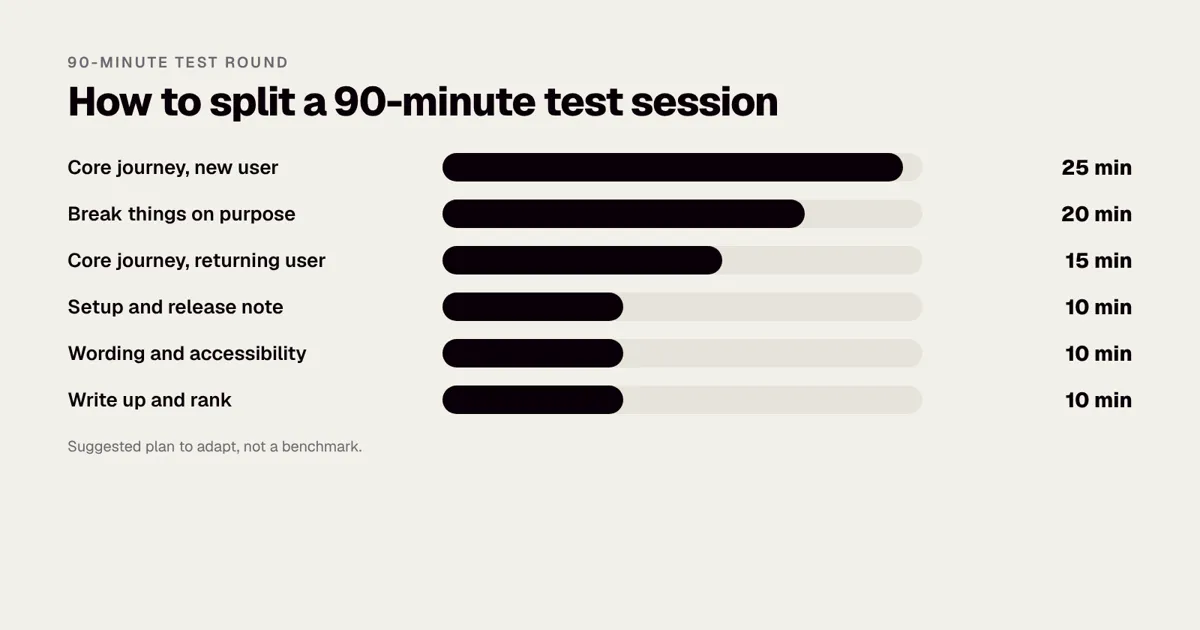
A focused session of 60 to 90 minutes finds more than a distracted afternoon. Here is a plan you can adapt, which is also the basis of the chart above.
| Block | Minutes | What you do |
|---|---|---|
| Read the release note and set up | 10 | Install, open, check the version number |
| Core journey as a new user | 25 | Do the main task start to finish, with recording on |
| Core journey as a returning user | 15 | Sign in, repeat with history |
| Break things on purpose | 20 | Wrong input, interruptions, poor signal |
| Content, accessibility and wording | 10 | Read every word, try large text |
| Write up and rank | 10 | Turn notes into one ranked list |
Write short notes as you go, with the time and the screen name. Do not stop to polish them. The write-up block at the end is where you add the five fields and sort by severity.
How do you write a bug report developers can act on?
Use the same five lines every time.
- Title: one short sentence, such as “Basket total ignores discount code”.
- Steps: the exact taps, in order, starting from a known place.
- Expected: what should have happened according to the spec.
- Actual: what did happen, with a screenshot or recording.
- Environment: device model, operating system version and the build number shown in the app or in TestFlight.
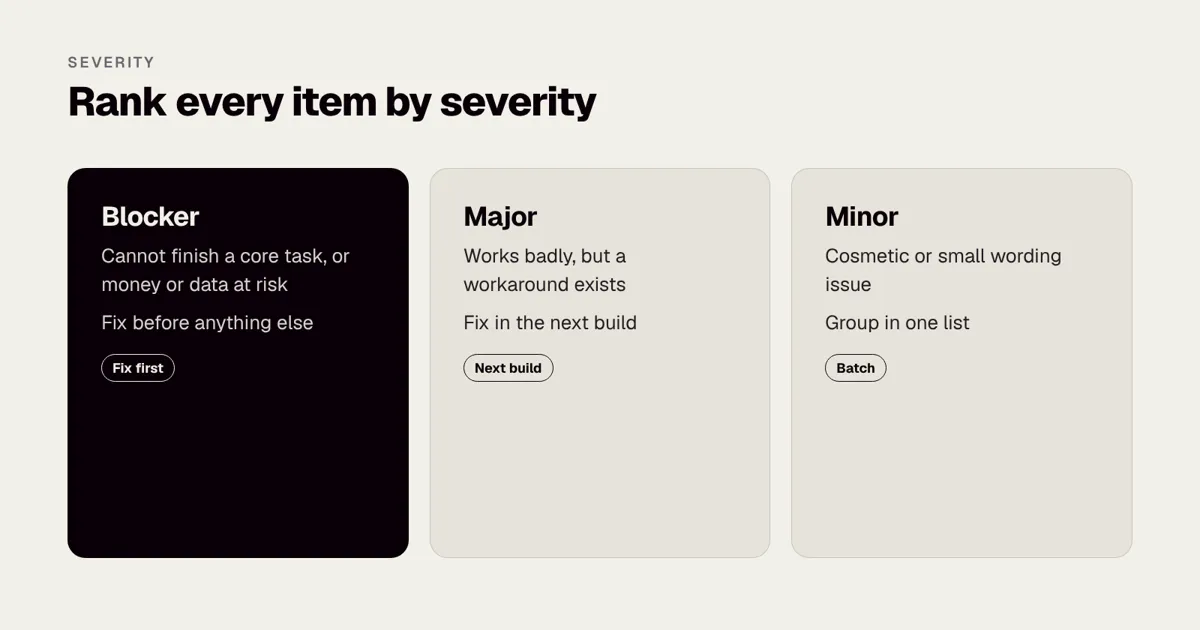
Then add a severity. Keep it simple: blocker (cannot complete a core task or risks money or data), major (works but badly, with a workaround), minor (cosmetic or small). Marking everything urgent hides the real blockers.
Not sure what is worth raising on your next build? We will walk you through a test round on your own project and show you how to rank what you find. Book a 30-minute call with a co-founder.
What does a weak report look like compared with a strong one?
| Weak report | Strong report |
|---|---|
| “Payment doesn’t work.” | “Title: Card payment freezes after decline. Steps: Basket, Checkout, enter the test decline card, tap Pay. Expected: error message and a way to retry. Actual: spinner for 30 seconds then blank screen. Environment: iPhone 13, iOS 18, build 4. Severity: blocker.” |
| “The text is too small.” | “Title: Order summary text cut off at large font size. Steps: Settings, Display, set text to largest, open Orders. Expected: text wraps. Actual: last line hidden. Environment: Pixel 6a, Android 14, build 4. Severity: minor.” |
| “It’s slow.” | “Title: Product list takes about 6 seconds to load on mobile data. Steps: Switch off Wi-Fi, open Shop. Expected: under 2 seconds. Actual: spinner. Environment: older Android phone, build 4. Severity: major.” |
What is the difference between severity and priority?
Severity describes how bad the problem is for a customer. Priority describes how soon it should be fixed. They usually move together, but not always. A spelling mistake on the home screen is minor in severity but may be high in priority if the launch is tomorrow and the screen is the first thing every customer sees. A crash in an admin screen that only two staff use may be major in severity but lower in priority. Give the severity, and if you have a view on priority, add it in a separate column with a reason.
How do you describe a bug that happens only sometimes?
Intermittent bugs are common and frustrating. Write down what you were doing just before, the time it happened to the nearest minute, and whether it has happened more than once. If you can, keep a screen recording running during a longer session so you can trim the part that shows it. The time helps developers search their logs, which is often the quickest route to the cause. Do not say “cannot reproduce” and drop it; say “seen twice in 30 minutes, here is the clip”.
Is it a bug or a change request?
This is the question that causes the most friction, so settle it early.
A defect is where the build does not do what the agreed scope, designs or user stories say. Defects are fixed as part of the project. A change is where the build matches the scope but you now want something different, for example a new filter, a different flow or extra fields. Changes are real and often good, but they need to be estimated and agreed. The test is simple: point to the line in the agreed documents. If it is there and the build differs, it is a defect. If it is not there, it is a change.
Label each item as you go and your agency can respond quickly, with no argument about who pays. Our guide to managing scope changes explains how this works on a fixed-price project, and signing off designs properly beforehand, as covered in How to sign off a design before build, cuts the number of disputed items sharply. For definitions, see what a change request is and what scope creep is.
How do you classify an item quickly?
| Question | If yes | If no |
|---|---|---|
| Is it written in the agreed stories, designs or spec? | Go to the next question | It is a change or a new idea |
| Does the build differ from what is written? | It is a defect | It is working as agreed; consider whether it is a refinement |
| Is the difference tiny, such as spacing or wording? | Minor defect or refinement | Standard defect, rank by severity |
| Is the agreed text unclear or silent on this point? | Discuss and record the decision | Not applicable |
What about items where the documents are silent?
Some items sit in a grey area: the story said “user can reset their password” but did not say how long the reset link lasts. Neither side was wrong. Raise it as a question, not an accusation, and ask the team to propose a sensible default. Record what is decided and add it to the spec so the question does not return. The cost of a grey-area item is usually small, and a good team will absorb a reasonable default. Large grey areas, though, are a sign that the specification was too thin, which is why How to write an app specification and what a technical specification is matter early in a project.
Where do content, copy and design opinions fit?
Wording and visual taste are the most common source of friction. Treat them in three groups. If the wording or design was signed off, and the build differs, it is a defect. If it was not signed off, it is a refinement and can usually be handled quickly. If you now want a different tone or look across the whole app, it is a change and should be priced as one. Our guide on reviewing designs as a non-designer helps you spot these before build, when changing them is cheap.
What does a good feedback round look like? A worked example
Imagine you are the product owner of a bookings app for a chain of nine fitness studios. Build 4 lands on Tuesday. You set aside 90 minutes on your own phone and an older one a colleague lends you.
You find 14 items. After sorting them, the list sent back on Wednesday morning looks like this:
| Item | Type | Severity |
|---|---|---|
| Payment screen freezes after a declined card | Defect | Blocker |
| Class times show in the wrong time zone for one studio | Defect | Major |
| Cancel button overlaps text on small screens | Defect | Minor |
| Add a “bring a friend” option to booking | Change | Needs estimate |
| Confirmation email wording sounds stiff | Content | Minor |
Five clear items at the top of the list get fixed first, and the change request goes into a separate conversation about scope, not into the bug queue. One list, ranked, with evidence, took 90 minutes to produce and probably saved a week of back and forth.
What happens to the other nine items?
In this example, the other nine are small: three more minor layout issues on the older phone, two wording suggestions, two questions about behaviour that the spec does not cover, one missing loading indicator and one duplicate of an item already on the team’s list. The team triages them into the next two builds. The questions are answered by phone in ten minutes and the answers are written into the spec. Nothing is lost, because everything is on one list with an owner.
How would you handle a trickier case?
Now imagine a first-time investor app, in the style of Dabbl. A tester notices that the screen explaining a risk warning is technically correct, but a nervous newcomer would not understand the second paragraph. There is no bug here, since the text matches what was agreed. It is also not a pure change, because the intent of the story was that newcomers understand the warning. The right route is to raise it as a content refinement with an example of what confused you, and to ask your compliance adviser to approve any new wording, because the text may be a regulatory requirement. Do not rewrite regulated text yourself. Test builds are the right moment to find such issues, because changing a paragraph now costs minutes, while changing it after launch means a store update.
How do you involve other people without creating noise?
Your colleagues and friendly customers will see things you miss, but ten people sending ten messages overwhelms a team. Nominate one person, usually you, to collect, remove duplicates and rank. Give other testers a short form or shared sheet with the five fields above. If you plan a wider group, see How to recruit beta testers, and for a structured session with real users, How to run a usability test on a budget.
Invite one non-technical person who has never seen the app. If they cannot finish the main task without asking you, that is valuable feedback even when nothing is technically broken.
What columns should a shared feedback sheet have?
| Column | Purpose |
|---|---|
| ID | A running number so everyone can refer to the same item |
| Reported by | Who found it, in case the team needs more detail |
| Build and device | Version number, phone model and operating system |
| Steps | The exact taps, in order |
| Expected and actual | One line each |
| Evidence | Link to the screenshot or recording |
| Type | Defect, refinement, change, question |
| Severity | Blocker, major, minor |
| Status | Open, in progress, fixed in build N, retested |
How do you deal with conflicting feedback?
Two testers will disagree, such as one wanting a green button and one wanting orange. Conflicting taste is not a bug. Collect it, note how many people raised each view and let the product owner decide against the project’s goals. Where users disagree on something functional, such as whether a step is confusing, it is a signal to run a small usability test, not to vote.
What should the agency do with your feedback?
You should expect four things back: an acknowledgement, a triage of each item, a plan for which fixes go into the next build, and a release note that lists what was fixed. A good team will also challenge you politely when it believes an item is working as agreed, and show you where in the spec it is written.
| Stage | What you should see | By when (agree a rhythm) |
|---|---|---|
| Acknowledgement | A reply confirming the list is received | Same working day |
| Triage | Each item marked defect, change or question | Within 1 to 2 working days |
| Plan | Which fixes go in the next build and when | Before the next build |
| New build | A release note listing the fixed items | As agreed in the plan |
| Retest | You confirm each fix on the new build | Within 1 to 2 working days |
Agree the rhythm at the start of the project, not in the middle of an argument. The GOV.UK Service Manual is a free, public example of how iterative delivery and regular testing are expected to work. If your agency is slow to acknowledge or triage, ask why, and read How to read an agency’s weekly report and How to tell if an app project is off track.
What is regression and why should you retest?
Regression means that a fix has broken something that used to work. It is common, because code is connected in ways that are not obvious from the screen. After each build, retest the exact items you raised, then repeat the main journey you tested before. If something that worked in build 3 fails in build 5, tell the team and name both builds. Good teams keep automated tests to catch these, but a human retest remains the final check.
How do the rounds fit into the project?
Most projects run several rounds, and each has a different purpose. Your plan should say how many are included, and when.
| Round | Purpose | Who tests | Typical focus |
|---|---|---|---|
| Round 1 | Prove the core journey | You and the delivery lead | Can I sign in and do the main task? |
| Middle rounds | Check each batch of stories | You, plus one or two colleagues | Match to the agreed stories |
| Feature-complete round | Find edge cases and gaps | You, colleagues, a small outside group | Errors, speed, accessibility, content |
| Release candidate | Confirm launch readiness | You and a handful of trusted users | Everything, with fresh eyes |
For the final round, pair this with the launch checklist so nothing slips between testing and release. Why Apple rejects apps, and how to avoid it and the notes on app review explain the store checks that follow your own testing, and what a phased release is shows how to roll out gradually once approved.
Can you rely on your own testing alone?
No. Your testing is the customer’s-eye view, and it is essential, but the agency should also run its own quality assurance, including automated tests, a wider device range and checks that a non-specialist would not think of. Our overview, App testing explained: QA, UAT and beta testing, shows how the layers fit together. If you are unsure whether your agency is testing enough, ask for a summary of what was tested on which devices before each release candidate.
How do feedback and the fixed price work together?
On a fixed-price project, the scope and price are agreed before development starts, so the way you classify feedback has a direct effect on how smoothly the project runs. Defects are the team’s to fix, because they were part of the agreed scope. Refinements are small and are normally absorbed. Changes are priced separately and you choose whether to proceed. This is the reason we ask clients to label feedback, and why we write the scope in detail first. See Fixed price vs time and materials for the thinking, and the pricing page for typical project ranges of £30,000 to £250,000+.
If your project has no clear scope at all, or you suspect the build has drifted a long way from what was agreed, an independent look can help. Our Tech Architecture Audit is £7,500 fixed, and our Legacy App Rescue Assessment is £6,500 fixed. Both are on the pricing page. You can also read How to take over an app built by someone else and How to rescue a failing app project if the test builds are showing deeper problems.
What if the number of bugs is overwhelming?
A high bug count in early builds is normal. A high count in late builds, or one that does not fall from round to round, is a warning. Watch the trend: blockers should vanish first, then majors, and the late rounds should be mostly minor items. If blockers keep returning, ask for a written plan from the team and consider an independent review. How to fix a high crash rate is useful if the app crashes often.
How do you give feedback on usability, not just bugs?
A build can be free of defects and still be hard to use. Usability feedback is about whether a person understands what to do next, and it needs a different kind of note. Instead of “expected and actual”, describe the moment of hesitation: where you paused, what you thought a button would do and what you looked for and could not find.
| Signal you notice | How to write it down | Why it helps |
|---|---|---|
| You hesitate before tapping | “On the checkout screen I did not know whether Continue would charge my card” | Shows where wording or layout creates doubt |
| You tap the wrong thing | “I tapped the logo expecting to go home; nothing happened” | Reveals a convention users expect |
| You cannot find a feature | “I looked for order history under Profile and Settings before finding it under Account” | Points to a navigation problem |
| You read something twice | “The delivery message was unclear: does ‘by Friday’ mean dispatched or delivered?” | Flags confusing copy |
| You feel anxious | “Entering my bank details, I wanted a sign that this was secure” | Flags a trust gap |
Ask a friend or colleague who has never seen the app to do the same task while you watch in silence. Do not help. Write down every pause. Three people who stumble in the same place are telling you something that no bug report would. If the task matters commercially, such as signing up or paying, it is worth a small, structured session; How to run a usability test on a budget shows how to do it in an afternoon.
Usability notes are normally refinements rather than defects, unless the agreed story said something specific, for example that a first-time user must be able to complete sign-up in under two minutes. Label them as refinements and let the delivery lead propose options. Do not prescribe the design fix yourself unless you are certain; describing the problem usually gets a better answer than describing your solution.
What mistakes make feedback less useful?
- Reporting by memory. Write notes as you go, with the screen name and time.
- Combining several problems in one message. One item per report makes tracking easy.
- Testing only on your own phone. Add at least one older device.
- Marking everything urgent. Rank honestly, or the real blockers are lost.
- Mixing changes into the bug list. Log new ideas separately so they can be priced.
- Sending messages in many channels. One list, in one place, once per round.
- Skipping the retest. An unverified fix is not a fix.
- Testing a feature that is not meant to be ready. Read the release note first.
- Using real customer data. It adds privacy risk and no benefit.
- Ignoring wording. Labels, errors and emails are part of the product.
What do you do after the last round?
When the final round is clean, there is still a short list of tasks before release. Confirm that every blocker and major item raised has been retested and closed. Confirm that remaining minor items are either fixed or knowingly accepted, in writing. Check that store listings, screenshots and privacy answers are ready, using How to prepare App Store screenshots and App store privacy labels as guides. Plan the release: whether to roll out to everyone at once or in stages, who watches crash reports and who answers customer messages in the first week.
What should you watch in the first week after launch?
Track crashes, sign-ups completed, the main task completion rate and reviews. Set up analytics from the first day; see App analytics: what to track from day one. A small number of early users will find things your testing missed, and a fast, polite fix teaches them that you listen. If reviews turn negative, How to respond to negative app reviews shows a calm approach.
What lessons come from long projects?
Since 2007 we have shipped apps for very different clients, and the pattern repeats. On MoBank, the UK’s first mobile banking app, trust was the product: a single wrong balance or confusing message would have cost customers’ confidence, so every build was tested against money and wording as carefully as against function. On Superdry, an app serving 768 locations in over 100 countries, testing had to consider many markets and languages. On Waterstones, an app, a mobile site and an eBooks API in 12 weeks left little room for late surprises, so early and frequent test rounds mattered. The tools differ, but the discipline is the same: test the journeys a real customer will take, write down what you see, and rank it honestly.
What should you do next?
Before your next build arrives, do four things. Ask for the release note and the build’s known gaps. Decide who will collect and rank feedback. Copy the five-line report format and the shared sheet columns above. Block out 90 minutes with your phone charged and a second device ready. If you want a second pair of eyes on your first test round, talk to a co-founder. For planning the whole path to launch, What happens in a discovery phase, How long does it take to build an app? and Working with an app agency: the first 90 days set the context.
Frequently asked questions
How many test rounds should a project have?
Most projects run several rounds, with the number depending on size and risk. Early rounds focus on the core journey, and the last one is a release candidate check. Your agreed plan should say how many rounds are included and how long the team has to fix items between them.
Should I report every small visual issue?
Yes, but mark them minor and group them in one list. Do not let a pile of small items distract from blockers. Reviewing the designs closely, as in How to review app designs as a non-designer, helps you spot them faster.
What if I cannot reproduce a bug?
Say so, and include what you remember, the time it happened and a screen recording if you have one. Intermittent bugs are common, and a rough timestamp helps developers search their logs.
Do I need to test on every phone model?
No. Test on at least one iPhone and one Android phone, ideally including an older one. Your agency should cover a wider device range with its own testing, and you cover the real-world view.
Who decides whether an item is a defect or a change?
Compare it to the agreed scope and designs. Where the documents are silent or unclear, discuss it openly and agree the outcome before work starts. Disagreements are easier to resolve when you raise them in the first round.
How do I give feedback if I am not technical?
You do not need technical words. Describe what you tapped, what you expected and what happened, and attach a screen recording. The five-line format works for anyone, and developers can find the technical cause from a clear description.
Can I send feedback by phone call instead of writing?
A call is useful to explain a complex issue, but always follow it with a written list. The written list is the record, it avoids misunderstandings and it lets the team track each item to completion.
Official sources and further reading
Talk it through with one of our co-founders. 30 minutes, no pressure.