

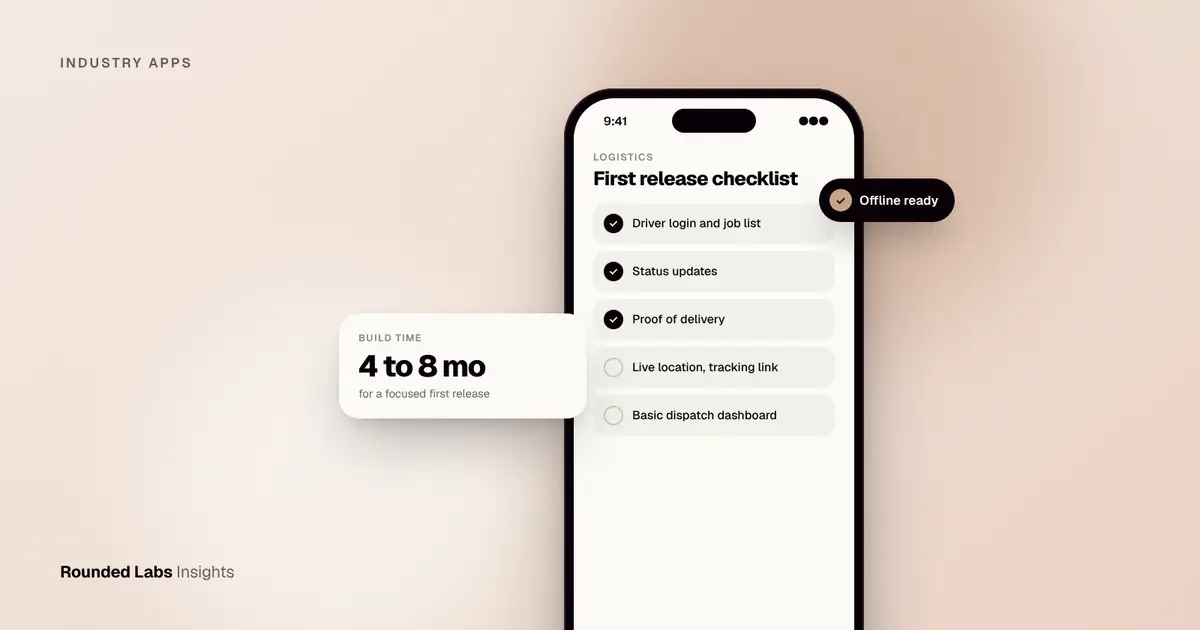
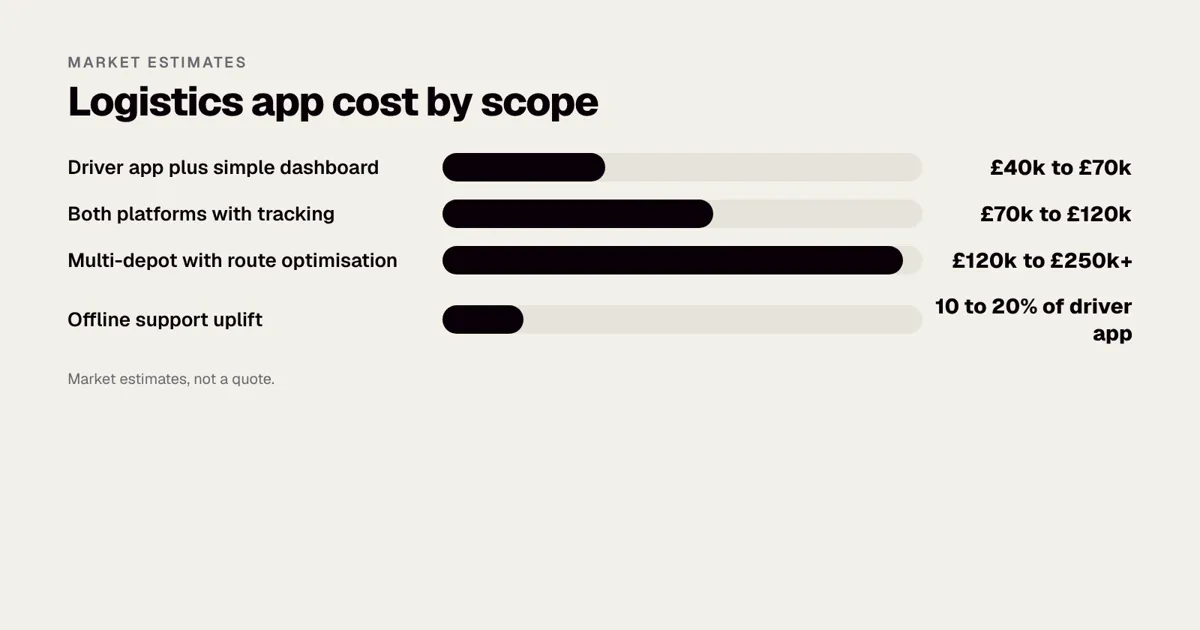
A logistics or delivery app is usually three products in one: a driver app, a customer tracking experience and a dispatch dashboard for your office. As a market estimate, a focused first release typically costs £40,000 to £120,000 and takes 4 to 8 months, while platforms with route optimisation, multiple depots and heavy integrations run well beyond £150,000. The biggest cost drivers are real-time tracking, offline working and links to your existing systems.
We have built apps for operations at scale, including the Superdry app, which supports a brand with 768 locations in over 100 countries, and field-facing tools where patchy signal is the norm. This guide covers what a logistics app needs, how to scope a first release, what drives the price and where projects go wrong. Our mobile app development service is priced as a fixed price agreed before development starts, so you know the total before work begins. Figures here are market estimates, not quotes.
Key facts
- Most logistics apps have three parts: driver app, customer-facing tracking and an admin or dispatch dashboard.
- Live location, proof of delivery and status updates are the core of a first release. Route optimisation can often wait.
- Drivers lose signal in depots, rural roads and car parks, so offline working is a requirement, not a nice-to-have.
- Integrations with your order, warehouse or accounting systems often cost as much as the app screens.
- Cost ranges in this guide are market estimates. Rounded Labs projects typically run from £30,000 to £250,000+ at a fixed price, see the pricing page.
- Driver location and customer addresses are personal data, so privacy design belongs in the first release, not the last.
What does a logistics app actually need to do?
Strip away the buzzwords and a delivery operation has four questions: what needs to go where, who is taking it, where is it now, and did it arrive? An app answers each one.
| User | What they need | Core features |
|---|---|---|
| Driver | A clear list of jobs and an easy way to report progress | Job list, navigation hand-off, status updates, photo and signature capture, notes |
| Customer | Confidence about when the parcel or service will arrive | Tracking page or in-app map, delivery window, notifications, rescheduling |
| Dispatcher | Control of the day and quick fixes | Live map, job assignment, exceptions list, reports |
| Finance or ops | Clean data afterwards | Delivery records, proof of delivery, exports, invoicing links |
The mistake we see most often is designing only for the customer because that is the most visible screen. The driver app decides whether the whole thing works. If it takes six taps to mark a delivery complete, drivers will find shortcuts and your data will go wrong.
Three common types of logistics operation
The word “logistics” covers very different businesses, and the right app depends on which one you run.
| Operation | Typical jobs | What matters most in the app |
|---|---|---|
| Parcel and courier | Many small drops per route | Speed per stop, proof of delivery, failed delivery reasons |
| Trade and freight | Fewer, larger jobs, often with paperwork | Documents, signatures, load details, exceptions |
| Field and on-demand services | Jobs with a time window and a person at the door | Arrival windows, customer contact, job notes and photos |
A courier with 60 stops a day needs an app that is fast and forgiving. A freight business with ten large deliveries needs better document capture and checklists. A service business, such as a delivery plus installation firm, needs the customer conversation to work well. For field-based teams, see also Field service apps for cleaning and trades businesses.
Who does what: a day in the life
Understanding a whole day exposes requirements that a feature list hides.
- Early morning. The dispatcher loads the day’s jobs, checks for late changes and assigns routes. The driver logs in, sees a list and confirms they have collected the right load.
- During the route. The driver taps through jobs. The customer receives a message with a tracking link. The dispatcher watches the map for delays.
- At each stop. The driver marks arrival, collects a signature or photo and moves on. If nobody is home, they record a reason and, perhaps, a safe place.
- When something goes wrong. A van breaks down. The dispatcher reassigns six jobs to nearby drivers, whose lists update within a minute.
- End of day. The office checks that every job has an outcome, exports the records and answers customer queries from the data.
Every step involves a different person, and each step is a place where a poor design wastes time. A good first release is the smallest set of screens that makes this day work without phone calls.
Which features belong in a first release?
A sensible first release is the smallest thing that replaces phone calls and spreadsheets:
- Driver login and a job list that updates when dispatch changes something.
- Status updates: collected, on the way, delivered, failed with reason.
- Proof of delivery with photo, signature or a PIN from the customer.
- Live location shared with dispatch, and a tracking link for the customer.
- A basic dispatch dashboard to assign and reassign jobs.
- Push notifications for the customer at key moments. See Push notifications people do not turn off for how to keep them useful.
Features that look impressive but can wait until you have real usage data: automatic route optimisation, driver scorecards, dynamic pricing, customer chat and a loyalty scheme. You can add them later once you know which ones your drivers and customers actually use. If you are unsure what to include, How to validate an app idea before you spend £50k shows a cheap way to test, and What is an MVP? explains how to keep a first release small.
A must, should and could list
| Priority | Feature | Why |
|---|---|---|
| Must | Driver job list with status updates | Core of the operation |
| Must | Proof of delivery | Disputes and invoicing depend on it |
| Must | Dispatch dashboard with live map | The office cannot run the day without it |
| Must | Offline working | Signal is never perfect |
| Should | Customer tracking link and notifications | Cuts calls to the office |
| Should | Failed delivery workflow | Saves repeat trips |
| Should | Admin reports and exports | Finance needs clean data |
| Could | Route optimisation | Valuable, but needs real data first |
| Could | Customer rescheduling | Useful once failure reasons are known |
| Could | Driver performance scorecards | Needs trust and careful design |
| Later | Dynamic pricing, loyalty, chat | Only if the business model needs them |
A written list like this, agreed at the start, is the best defence against scope creep. What is scope creep? and What is a change request? explain why new ideas arrive mid-project and how to handle them without breaking the budget. A written specification helps too, and How to write an app specification includes a template.
How does live tracking work, and what does it cost?
Live tracking sounds simple but it is where budgets slip. The driver app reads GPS position, sends it to your server every few seconds, and your server passes it on to the customer’s map. Three decisions shape the cost:
- Update frequency. Every 5 seconds feels live but drains the battery and increases data and map costs. Every 20 to 30 seconds is fine for most parcel delivery.
- Background location. iOS and Android both restrict apps that track in the background, and the store review team will check that you have a clear reason and a clear permission request.
- Map provider. Mapping services usually charge by usage, so a busy operation can generate a real monthly bill. Check the provider’s current pricing page, such as Google Maps Platform or Mapbox pricing, before you commit.
Our guide on how to add maps and location tracking to your app covers the build, and what maps and location tracking cost to build gives a feature level estimate. If you want geofenced alerts, such as “driver is 10 stops away”, see how to add geofencing to your app.
How the data flows
- The driver’s phone reads its location using the platform’s location services, documented by Apple Core Location and Android location and sensors.
- The app batches positions and sends them to your backend over a secure connection.
- The backend stores the latest position, and, if you need a trail, a history.
- The dispatch dashboard and the customer’s tracking page read the latest position.
- A rules layer decides when to send notifications, such as “arriving soon”.
Update frequency and its trade offs
| Update interval | Battery impact | Data and map cost | Best for |
|---|---|---|---|
| Every 5 seconds | High | High | On demand services where the customer watches a live map |
| Every 10 to 15 seconds | Medium | Medium | Food delivery, short trips |
| Every 20 to 30 seconds | Low | Lower | Most parcel and van routes |
| Every 1 to 2 minutes | Very low | Low | Long haul, supervision only |
| On status change only | Minimal | Minimal | Proof of delivery without a live map |
A common pattern is to vary the interval: slow while the driver is between stops, faster when the customer’s delivery is close. This saves battery and data without hurting the customer experience.
Running costs of tracking
A tracking feature costs money every month, not only in the build. Expect charges for map views, route and geocoding calls, server capacity and SMS or push messages. These depend on volume, so forecast them from your own numbers: drivers, stops per day, update frequency and tracking page views. Our guide on the hidden costs of building an app: store fees, hosting and APIs lists the running costs to budget for.
Not sure how much of this your operation really needs? We can sketch the driver, customer and dispatch flows with you and give you a fixed price before any development starts. Book a 30-minute call with a co-founder.
Why does offline working matter so much?
Drivers go into basements, loading bays, tunnels and rural areas. An app that freezes or loses a signature when the signal drops is worse than a paper form. A well-built logistics app stores jobs, photos and status changes on the phone, then syncs when the connection returns, with clear rules for conflicts, such as a job reassigned while the driver was offline.
Offline support typically adds 10 to 20% to the driver app budget, and it is much cheaper to design in from the start. Our guide How to make your app work offline explains the approach, how to add offline mode to your app covers the build, and the same principles drive field tools such as Field service apps for US trades businesses.
Offline design decisions
| Decision | Options | Our usual advice |
|---|---|---|
| What to store on the phone | Today’s jobs only, or a wider window | Today and tomorrow, so a morning without signal still works |
| How to save photos | Compressed on the phone, uploaded later | Compress and queue; show the driver clearly that it is saved |
| How to handle conflicts | Last write wins, or rules by field | Rules: the dispatcher’s reassignment beats a driver’s old status |
| How to show sync state | Hidden, or visible | Visible: a simple “saved on phone, waiting to send” marker |
| When to retry | Immediately, or on a schedule | Retry with back off, and on regaining signal |
The most important piece is trust. A driver who is not sure whether a delivery was recorded will mark it twice, or call the office. A clear “saved” indicator costs very little and prevents a lot of noise.
An example conflict
A driver is in a car park without signal and marks job 14 as delivered at 11:02. At 11:00, the dispatcher reassigned job 14 to another driver who had passed the address. Which update wins? A rule that says “a completed delivery with proof beats a reassignment” avoids a duplicate trip, and a rule that “the office can always override” avoids confusion. The point is not that one rule is right, but that you decide in advance. Without a rule, you find out in production.
What drives the cost of a logistics app?
These are market estimates for a UK build. Your own quote will depend on scope and the systems you already run.
| Scope | Typical range | Typical timeline |
|---|---|---|
| Driver app plus simple dispatch dashboard, one platform | £40,000 to £70,000 | 4 to 5 months |
| Driver app (iOS and Android), customer tracking, dashboard | £70,000 to £120,000 | 5 to 8 months |
| Multi-depot platform with route optimisation and integrations | £120,000 to £250,000+ | 8 to 14 months |
What moves a project up the table:
- Platforms. Building for iOS and Android natively costs more than a cross-platform approach. See Native vs cross-platform: what it does to your budget.
- Integrations. Connecting to a warehouse system, ecommerce platform, courier APIs or accounting software is often the least visible and most variable cost.
- Route optimisation. Using a third-party service is cheaper than building your own, but adds a running fee.
- Security and data protection. Driver location and customer addresses are personal data. See Mobile app security checklist: OWASP MASVS in plain English.
- Ongoing costs. Hosting, map usage, SMS and store fees continue after launch. The hidden costs of building an app: store fees, hosting and APIs covers them in detail.
Rounded Labs prices projects as a fixed price agreed before development starts, so the scope is written down and you know the total before work begins. For a comparison with other pricing models, read Fixed price vs time and materials for app projects. For location specific guides, see App development for logistics in the UK, in the US and in Europe.
Where the build budget goes
As a rough market estimate for a mid-range project, the effort splits like this.
| Area | Share of build | Notes |
|---|---|---|
| Driver app | 30 to 35% | The most used screen of the whole system |
| Dispatch and admin dashboard | 20 to 25% | Web based, with map and reports |
| Backend and tracking | 15 to 20% | Jobs, positions, notifications, security |
| Integrations | 10 to 20% | Varies most from project to project |
| Customer tracking page or app | 5 to 10% | Often a web page, not a full app |
| Testing, field trials and launch | 10 to 15% | Do not squeeze this |
App feature costs: login, payments, chat and maps gives estimates for individual features, and How to cut app development costs without cutting quality lists ways to reduce a budget without hurting the product.
Build, buy or mix?
Not everything needs to be built from scratch. A mixed approach is common.
| Component | Buy or use a service | Build custom |
|---|---|---|
| Maps and geocoding | Almost always a provider | Rarely sensible |
| Route optimisation | A third party service for the first release | Only at very large scale |
| SMS and push messages | A messaging provider | No |
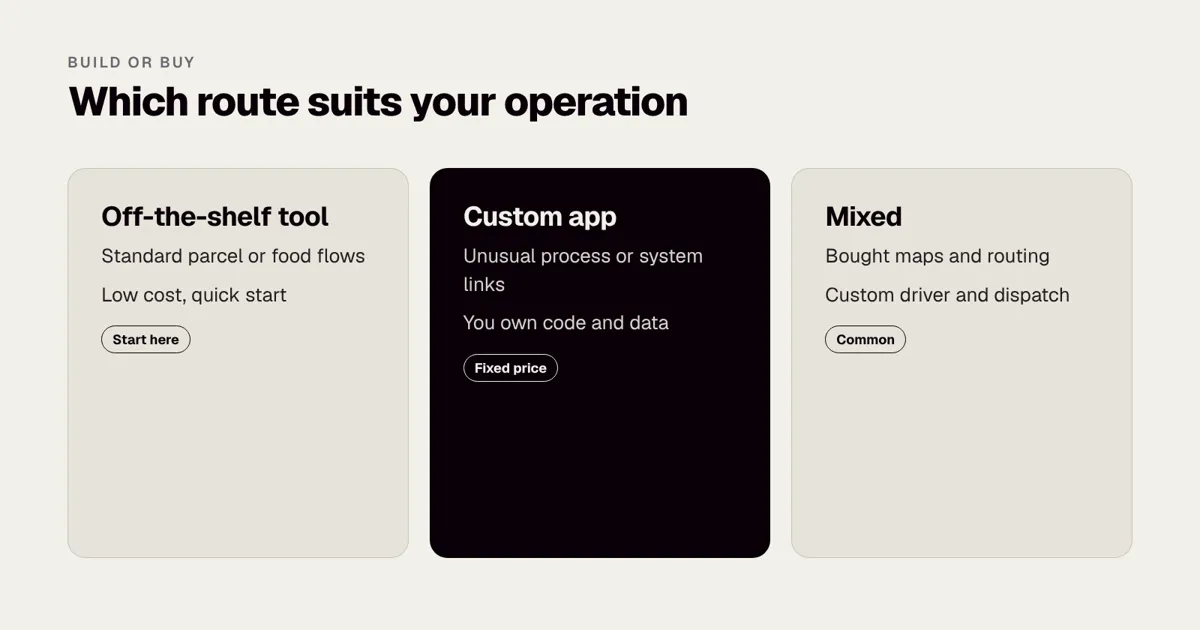
| Driver app | Rarely off the shelf if your process is unusual | Usually custom |
| Dispatch dashboard | Sometimes an off-the-shelf tool | Custom if it is your edge |
| Accounting integration | Use the vendor’s API | Glue code only |
The test is whether the component is where you are different. If your edge is a speciality delivery process, build the driver and dispatch flow. If your edge is price, use standard tools and spend on operations. Our guide Off-the-shelf SaaS vs custom software: when to build explains the decision in more detail, and Low-code vs custom app development covers the middle option.
How do integrations work, and why are they expensive?
An app that does not talk to your existing systems creates double entry. The most common links are:
- Order or ecommerce system. Jobs arrive automatically instead of being typed in.
- Warehouse management. Pick lists, load confirmation and stock updates.
- Accounting or invoicing. Delivery records feed billing.
- Courier or carrier APIs. Labels, tracking numbers and status feeds.
- Customer messaging. SMS or email notifications.
- ERP or CRM. Customer records and job history.
The cost is not the connection itself. It is the unknowns: poor documentation, rate limits, differences between test and live systems, and data that does not match. See What is an API integration? for the basics, and how to add ERP integration to your app and what ERP integration costs for the more demanding case.
Questions to ask before you scope integrations
- Does the other system have a documented, supported API, or only file exports?
- Who owns the other system, and will they give access to a test environment?
- How often must data move: instantly, hourly or nightly?
- What happens when data does not match, such as an unknown postcode?
- Who fixes a failed sync, and how will they know it failed?
- Are there rate limits or fees on the other side?
Answers to these often change the estimate by tens of thousands of pounds, which is why a short discovery phase pays for itself. What happens in a discovery phase, and why it saves money explains what you get from one, and our fixed price Mobile Product Discovery Sprint at £9,500 is built for exactly this kind of scoping. If your existing systems are the problem, our Tech Architecture Audit at £7,500 and Digital Transformation Prep at £7,000 are fixed price ways to understand them first.
How should you design the dispatch dashboard?
The dashboard is where the office spends the whole day, so small friction costs a lot. It should answer four questions at a glance: where is everyone, what is late, what has failed and what is unassigned.
Useful features, in rough order of value:
- A live map with drivers and jobs, filterable by depot or route.
- A list of exceptions: late, failed, unassigned or at risk.
- Drag and drop or one click assignment and reassignment.
- A job detail view with notes, photos, signatures and the customer’s history.
- Search by order number, postcode or customer name.
- Role based access, so a depot manager sees only their depot. See how to add role-based access to your app.
- Reports and exports. How to add an admin dashboard to your app and what an admin dashboard costs cover the build in more depth.
A frequent mistake is to hide the admin build in the budget, or leave it until last. Without good dispatch tools, the best driver app only moves the chaos from the road to the office.
A worked example: a regional courier
Imagine a regional courier with 40 drivers who take jobs by phone and text, with deliveries logged in a spreadsheet at the end of the day. Customers ring the office to ask where their parcel is, which takes up two people for most of the afternoon.
A sensible phase one would be:
- A driver app with a job list, status updates and photo proof of delivery.
- A tracking link texted to the customer when the driver is 10 stops away.
- A dispatch dashboard showing every driver on a map and every failed delivery.
- A nightly export to the finance system.
In the market estimate range, that is a project of roughly £60,000 to £90,000 over 5 to 6 months. Phase two, a few months later, might add route optimisation and a customer rescheduling page, once the courier has real data on failed deliveries and time per stop. This is an illustration, not a quote.
Phase one in more detail
| Item | Rough share of phase one | Notes |
|---|---|---|
| Discovery and design | 10 to 15% | Mapping the day, designing for fast thumb use |
| Driver app, both platforms | 30% | Offline first, photo capture |
| Dispatch dashboard | 20% | Live map, assignment, exceptions |
| Backend and tracking | 15% | Positions, jobs, notifications |
| Finance export | 5% | Nightly file or API call |
| Testing and field trial | 10 to 15% | Real vans, real signal |
| Launch and training | 5% | Driver training, depot rollout |
What the courier gains
If the courier answers 100 customer calls a day and a third are “where is my parcel?”, a tracking link may remove a large share of them. Two office staff who spend the afternoon on that task could move to work that grows the business. The courier also gains a record of every delivery, which settles disputes and supports invoicing. We do not promise a specific saving, because it depends on the operation, but we do suggest you estimate it before you start, so the project has a business case. Our Superdry and Waterstones work shows how we approach delivery at scale: the Waterstones app, mobile site and eBooks API shipped in 12 weeks because scope was agreed and kept tight.
Phase two options, once data exists
- Route optimisation using a third party service, tuned with real stop times.
- A customer page for rescheduling or leaving safe place instructions.
- Driver performance reports, shared openly and used to help rather than punish.
- Capacity planning from historical delivery volumes.
- Integration with a customer’s own ordering system, for business customers.
How do you plan the rollout with drivers?
Drivers decide whether the app succeeds, and they are often sceptical. They have used clumsy tools before, and some will worry about being tracked. A good rollout treats drivers as users, not as data sources.
- Involve drivers in design. Ride along for a day or two. Ask the best and worst drivers what slows them down.
- Explain what is tracked and why. Be clear about when location is recorded, who sees it and what it is used for. Honesty here is both right and practical.
- Test in real vans. Office testing misses glare, gloves, vibration and poor signal. Run a field pilot with a handful of drivers for two to three weeks.
- Train briefly. Ten minutes at the start of a shift, a one page guide and a named person to call.
- Roll out depot by depot. Fix problems with a small group before the whole fleet depends on the app.
- Keep paper as a fallback for the first fortnight, then retire it.
- Collect feedback weekly and show drivers which suggestions were used.
Design rules for a driver app
- Large touch targets that work with gloves.
- High contrast and a readable font in bright sun.
- The next job always visible, with one tap to navigate.
- Few taps to finish a delivery, ideally two or three.
- No typing where a tap or photo will do.
- Voice or hands-free alerts must not distract from driving. Drivers should not use a phone while driving, and the app should be designed so they only interact when stopped.
What about privacy, safety and regulation?
Location and address data are personal data under data protection law. This is general information, not legal advice, and you should check the official guidance and take advice for your own operation. In the UK, the Information Commissioner’s Office publishes guidance on UK GDPR, and our guide to UK GDPR for mobile apps sets out the principles that matter to app owners. For recent changes in UK law, see The UK Data (Use and Access) Act 2025. Rules differ in other regions, so check the regulator for each country in which you operate.
Practical points that apply almost everywhere:
- Be clear about purpose. Track drivers to run deliveries, not to do anything the driver has not been told about.
- Limit what you collect. Do you need location outside working hours? Probably not.
- Limit who sees it. The dispatcher needs live position; marketing does not.
- Limit how long you keep it. Set a retention period for location trails and proof of delivery photos.
- Protect customer data. Addresses, phone numbers and signatures need access control and encryption. See Mobile app security checklist: OWASP MASVS in plain English and the OWASP standards body for the wider context.
- Check employment rules. Monitoring staff can raise employment law questions, so take advice before you introduce driver scoring.
- Check transport rules. If your drivers operate commercial vehicles, other rules apply, such as driver hours and vehicle checks. The UK’s Driver and Vehicle Standards Agency is the official source at the time of writing; check its current guidance for your vehicle type.
Store review for location
Apple and Google both review how apps use location, especially in the background. Write a plain explanation of why you need it, request only the access level you need, and make the permission request appear at a moment when the reason is obvious. Our guide to why Apple rejects apps, and how to avoid it lists the common causes of rejection, including unclear permission requests.
How do you test a logistics app?
A logistics app has more ways to fail than a typical consumer app, because it depends on location, connectivity, hardware and people working under pressure. Our guide to app testing explained: QA, UAT and beta testing covers the general approach. For logistics, add the following.
| Test | What to check | Why it matters |
|---|---|---|
| Offline and reconnect | Jobs, photos and statuses survive loss of signal | Drivers lose signal every day |
| Battery and data | A full shift of tracking on typical phones | A dead phone ends the route |
| Device range | Older and cheaper handsets used by drivers | Fleet phones are rarely new |
| Conflict handling | Reassignments during offline periods | Prevents double visits |
| Load | Hundreds of positions arriving at once | Peak times break weak backends |
| Security | Authentication, data storage and API access | Personal data and business records |
| Usability | Gloves, sunlight, one hand | Real use is not like the office |
| Field pilot | Two to three weeks with real drivers | Finds what labs cannot |
User testing with a small group of drivers, set up as in How to run a usability test on a budget, is often the cheapest way to find friction before launch. Watching a driver try to finish a delivery with wet hands teaches more than a day of review.
Measuring whether the app works
Agree a few numbers before launch and check them monthly:
- Share of deliveries completed with proof of delivery.
- Failed delivery rate and the top reasons given.
- Calls to the office per 100 deliveries.
- Average time between “out for delivery” and “delivered”.
- Driver adoption: the share of drivers using the app daily.
These sit alongside general retention measures covered in App retention: the metrics that matter after launch, and App analytics: what to track from day one lists what to set up. If drivers do not use the app, no other number will improve.
How long will it take, and what slows it down?
Timelines are covered in How long does it take to build an app? Real timelines from 19 years of projects. For logistics apps, the delays tend to come from the same places: waiting for access to a partner’s API, late decisions about who can change a job, and pilot testing in real vans rather than in the office. Put at least two to three weeks of field testing with real drivers into the plan.
A sample timeline for a mid-range project
| Phase | Typical duration | Main output |
|---|---|---|
| Discovery | 2 to 4 weeks | Scope, flows, integration plan, fixed price |
| Design | 3 to 5 weeks | Tested prototype for driver and dispatch |
| Build in cycles | 12 to 16 weeks | Working app and dashboard, demo every two weeks |
| Integration and hardening | 3 to 4 weeks | Connections to existing systems, security checks |
| Field pilot | 2 to 3 weeks | Real drivers, real routes, fixes |
| Launch and rollout | 2 to 4 weeks | Depot by depot, with support |
These ranges overlap and vary with scope. Starting integration work in parallel with the build, rather than at the end, is one of the most reliable ways to shorten the schedule.
Should you build, or buy an off-the-shelf delivery tool?
Off-the-shelf tools exist for many standard workflows, and for a simple operation they may be the right answer. Here is a fair comparison.
| Factor | Off-the-shelf tool | Custom app |
|---|---|---|
| Upfront cost | Low | Higher |
| Running cost | Subscription that grows with drivers or jobs | Hosting and maintenance |
| Fit to your process | Good for standard flows | Built for your flow |
| Integrations | Limited to what the vendor offers | As needed |
| Speed to start | Days or weeks | Months |
| Control and ownership | Vendor controls roadmap | You own the code and data |
| Competitive edge | Same as your competitors | Can be a differentiator |
A sensible route for many businesses is to start with an off-the-shelf tool to learn what matters, then build custom when the tool’s limits cost more than the build. Our guide on off-the-shelf SaaS vs custom software works through the decision. If you have an ageing system rather than a blank sheet, Rebuild or refactor: what it costs to fix an old app is relevant, and our Legacy App Rescue Assessment at a fixed £6,500 shows what is worth keeping.
Common mistakes to avoid
- Designing for the customer first. The driver app decides success.
- Leaving offline until last. It touches the whole architecture.
- Underestimating integrations. Scope them before you price.
- Skipping field tests. Offices are not vans.
- Chasing route optimisation too early. You need data first.
- Tracking too often. Battery, data and cost all suffer.
- Ignoring privacy. Tell drivers and customers what you collect.
- No dispatch tools. The office needs control as much as drivers do.
- No success measures. Agree them before launch.
- Treating launch as the end. Budget for support and updates; see App maintenance costs in the UK.
How do you start?
A practical sequence for a first project looks like this.
- Map the current day. Follow a job from order to invoice and write down every hand-off and phone call.
- List the pain points, with rough numbers: calls per day, failed deliveries, time lost to double entry.
- Decide the first release using the must, should and could list above.
- Check the systems you must connect, and what access you can get.
- Prototype and test with drivers and dispatchers, before any code.
- Agree a fixed price for a defined scope, with clear acceptance tests.
- Plan the field pilot and rollout from the start.
If you want to talk it through, book a 30-minute call with a co-founder, and we will tell you honestly whether you need a custom build or an existing tool. We have been building apps since 2007, including the UK’s first mobile banking app, and we work to a fixed price agreed before development starts.
Frequently asked questions
How much does it cost to build a delivery app in the UK?
As a market estimate, a focused first release costs £40,000 to £120,000, and larger platforms cost £120,000 to £250,000 or more. The range depends on platforms, integrations and how much offline and tracking functionality you need. Rounded Labs quotes a fixed price before development starts.
Do I need my own app, or can I use an off-the-shelf delivery tool?
Off-the-shelf tools suit standard parcel and food delivery workflows and are cheaper to start. A custom app makes sense when your process is unusual, you need tight links to your own systems or the tool becomes a core part of your product.
Should I build the driver app or the customer app first?
Build the driver app and the dispatch dashboard first, because they create the data everything else depends on. A simple tracking link for customers can follow in the same release without needing a full customer app.
How accurate does live tracking need to be?
For parcels, an update every 20 to 30 seconds is usually enough and saves battery. Food delivery and on-demand services often need faster updates, which raises data and map costs.
What permissions will Apple and Google need to see?
Both stores require a clear explanation for location access, especially background location, and review how the app uses it. Write the explanation in plain language and only request the level of access you need.
How long does a logistics app take to build?
A focused first release usually takes 4 to 8 months including discovery, design, build, a field pilot and rollout. Platforms with several depots and many integrations can take 8 to 14 months. Integration access and field testing are the most common causes of delay.
Is driver location data covered by data protection law?
In most regions, yes, because location linked to a named driver is personal data. Be clear about why you collect it, limit who sees it and how long you keep it. This is general information, not legal advice; check your regulator’s guidance and take advice for your own operation.
Can the app work without a signal?
It should. A well-built driver app stores jobs, photos and status updates on the phone and syncs when the connection returns, using agreed rules for conflicts. Offline support typically adds 10 to 20% to the driver app budget, and it is cheaper to design in from the start.
Official sources and further reading
Talk it through with one of our co-founders. 30 minutes, no pressure.