

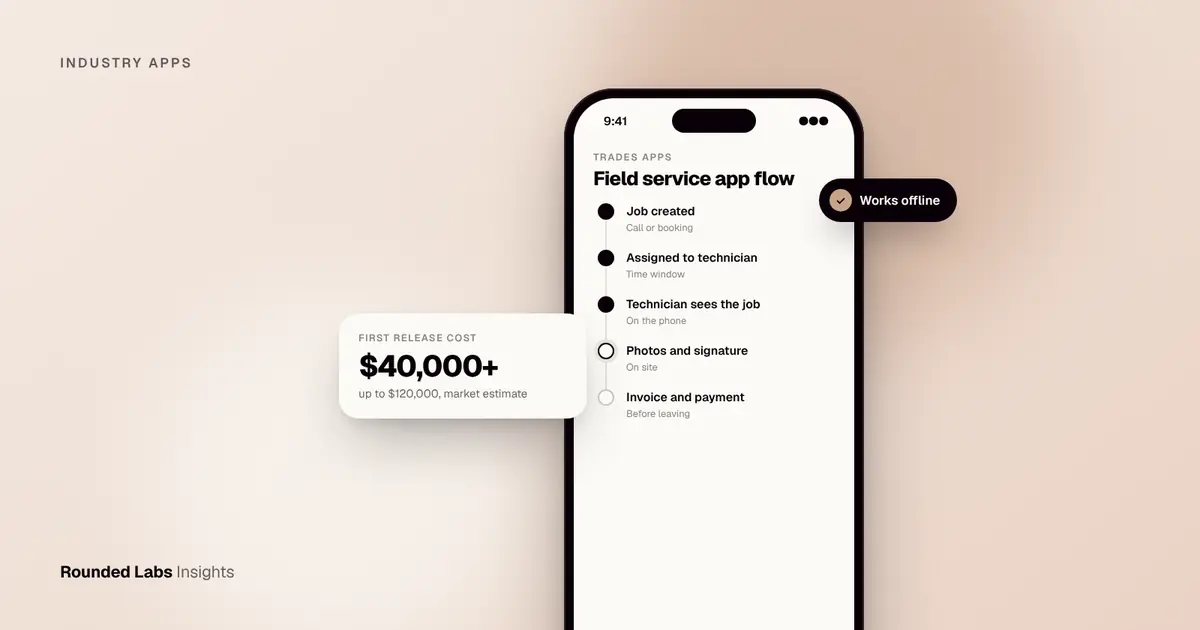
A field service app for a US trades business gives technicians their jobs, customer details, photos, forms and payment collection on a phone, and syncs the results back to the office in real time. A focused first release typically costs $40,000 to $120,000 to build (about £31,500 to £94,500), with a full platform including dispatch, invoicing and integrations running well above that. The biggest factors are offline support, integrations and how many job types you handle.
We have spent 19 years building mobile products, including apps for retailers such as Next and Superdry, whose app we modernised in 2014 for 768 locations in over 100 countries. The same discipline applies to a plumber’s van or an HVAC crew: the app has to work in poor signal, with one thumb, under time pressure. This guide covers what trades apps need, how to scope them, what they cost and how to avoid the usual mistakes. Our mobile app development team builds these at a fixed price agreed before development starts.
Key facts
- Most trades apps have two sides: a technician app on iOS and Android, and an office dashboard for dispatch, quoting and reporting.
- Offline mode is not optional for basements, rural jobs and plant rooms. Plan for it from the start.
- Payment collection on site (card, tap to pay, invoice links, with fees set by your payment provider) is often the feature with the fastest payback.
- A first release that covers scheduling, job details, photos, signatures and invoicing is usually enough to replace paper and spreadsheets.
- Off-the-shelf tools exist and are worth testing first. Custom makes sense when your workflow is the thing that sets you apart.
- Cost figures here are market estimates, not quotes.
What is a field service app?
It is software that connects the office to people working at customers’ sites. For trades businesses (plumbing, electrical, HVAC, roofing, landscaping, cleaning, pest control, appliance repair) the core loop is the same:
- A customer calls or books online and a job is created.
- The office assigns it to a technician with a time window.
- The technician sees the job, address, history and notes on their phone.
- On site they update status, take photos, fill in checklists, add parts and get a signature.
- They send an invoice or take payment before leaving.
- The office sees everything immediately and the books reflect it.
If you also run a booking front end for customers, see Booking and scheduling apps for service businesses. For the cleaning and smaller crew version of the same idea, see Field service apps for cleaning and trades businesses.
What features does a trades business actually need?
Start from the paperwork you want to remove, not from a feature list.
| Feature | What it replaces | Priority for release 1 |
|---|---|---|
| Job list and calendar | Whiteboards, text messages, spreadsheets | Must have |
| Customer and site history | Memory and paper files | Must have |
| Photos, notes and checklists | Phone camera roll, WhatsApp | Must have |
| Digital signature | Carbon copy forms | Must have |
| Quotes and invoices | Word templates, handwritten pads | Must have |
| On-site card payment | Chasing invoices later | Should have |
| GPS and route view | Calls asking “where are you?” | Should have |
| Parts and inventory | Counting the van on Friday | Later |
| Customer notifications (“on my way”) | Phone calls | Later |
| Accounting sync (QuickBooks, Xero) | Re-keying | Later, but plan for it |
Resist adding everything at once. Each extra module adds testing, support and training. A tighter first release gets into technicians’ hands sooner, and their feedback decides what comes next. How to validate an app idea before you spend £50k shows how to test the idea cheaply first.
Should you buy off the shelf or build custom?
Be honest about this, because it is the decision that saves or wastes the most money. Established field service products already handle scheduling, invoicing and payments for typical trades, usually on per-user subscriptions. If your process looks like most plumbers’ or electricians’ processes, one of them may serve you for years.
Build custom when:
- Your workflow is unusual (for example, compliance checklists that vary by contract or asset type).
- Subscription costs per technician will exceed the cost of ownership once you have a large crew.
- You want to sell the software to other businesses, not only use it yourself.
- You need integrations or branding that packaged tools cannot offer.
A sensible middle path is to run an off-the-shelf tool for six months, record what annoys people, then scope the custom version from real evidence.
Not sure whether to buy or build? We will tell you honestly if an existing tool fits, and scope a fixed-price build if it does not. Book a 30-minute call with a co-founder.
Why does offline mode matter so much?
Technicians work in basements, loft spaces, rural properties and commercial plant rooms where signal is weak or absent. An app that shows a spinner when the connection drops will be abandoned within a week. A good offline design means:
- Today’s jobs and customer data are downloaded in advance.
- Everything the technician enters is saved on the phone first and uploaded when a connection returns.
- The app resolves clashes sensibly if the office edited the same job in the meantime.
- Photos upload in the background so they do not block the next job.
This is real engineering effort, and it is a major reason field apps cost more than simple booking apps. Our guide on How to make your app work offline explains the approach in plain terms. Decide early which actions must work offline; taking card payments, for example, usually needs a connection or a compatible reader.
How much does a field service app cost?
These are market estimates for US-based or international studios, not quotes. Your price depends on scope and on the supplier.
| Scope | Typical range (USD) | Approx. GBP | What you get |
|---|---|---|---|
| Focused first release | $40,000 to $120,000 | £31,500 to £94,500 | Technician app, basic office dashboard, jobs, photos, signatures, invoices |
| Full platform | $120,000 to $300,000+ | £94,500 to £236,000+ | Dispatch, route optimisation, payments, accounting sync, customer portal |
| Ongoing improvements | Scoped per release | n/a | New features after launch |
Rounded Labs works at a fixed price agreed before development starts, and projects typically run from £30,000 to £250,000+. See our pricing page for how this works. If you are earlier in your thinking, our Mobile Product Discovery Sprint at £9,500 turns an idea into a scoped plan, and wider cost context is in How much does it cost to build an app in the US? and How much does an MVP cost in the US?.
Worked example: a 12-technician HVAC company
Imagine a company with 12 technicians and two dispatchers, running on paper job sheets and a shared calendar. Their pain points are lost sheets, invoices sent days late and dispatchers phoning to find out who is free.
A sensible first release would include job assignment, a technician app with checklists, photos and signatures, invoice creation on site and a dispatcher board. Offline mode would cover job data and form entry. Accounting sync and inventory would wait for release two. That scope fits comfortably in the focused first release band above. The company would track two things after launch: how many days between job completion and invoice, and how many dispatcher phone calls remain. Those numbers show whether the app is paying for itself.
What else should you plan for?
- Platforms. Most crews carry a mix of iPhones and Android phones. Cross-platform frameworks can cover both from one codebase, as discussed in Native vs cross-platform: what it does to your budget.
- Data and security. You will hold customer addresses, access notes (such as gate codes) and payment data. Use encryption, role-based access and a payments provider so card details never touch your servers. US states have their own privacy laws, so check the current rules for the states where you operate.
- Training and rollout. Run a pilot with two or three technicians for a few weeks. Technicians who feel heard adopt the app; those who feel it is surveillance do not.
- Maps and routing. Mapping services charge by usage, and their prices change, so check the current pricing page and budget for it at scale.
- App store approval. Apple and Google both review apps. Private apps for your own staff can be distributed through managed channels rather than the public stores.
- Logistics overlap. If your business also moves goods or runs deliveries, see Logistics and delivery apps.
How do you start?
- Write down the 10 steps of a typical job, from phone call to payment, and mark which are slow or error-prone.
- Interview three technicians and two office staff about what they dislike.
- Test an off-the-shelf tool for a month if you have not already.
- Choose the smallest feature set that removes the worst pain.
- Get a fixed-price quote for that scope, with a clear list of what is in and out.
Our team can run this process with you, from discovery through build and launch, and we would rather tell you early that your idea needs a smaller scope than let you overspend.
Frequently asked questions
How long does it take to build a field service app?
A focused first release usually takes 3 to 6 months from kickoff to launch, depending on offline requirements and integrations. Larger platforms are built in phases so that technicians can use the first release while later features are developed.
Do my technicians need to use their own phones?
Many businesses allow it, which saves hardware cost, but you should write a simple policy covering data on personal devices. Others issue company phones or tablets with device management. Either way, the app should work on mid-range devices, not just the latest models.
Can the app connect to QuickBooks or Xero?
Yes, both offer integrations that a custom app can use to push invoices and payments. This adds scope, so plan it for release two unless re-keying data is your biggest pain.
Is a custom app cheaper than a subscription tool?
Not at first. For a crew of 5 to 10, subscriptions are usually cheaper for years. Custom starts to pay when your crew is large, your workflow is distinctive or you want to resell the software.
How do I know the app is working?
Track measurable outcomes: days from job completion to invoice, jobs completed per technician per week, missed appointments and paperwork errors. Set a baseline before launch so you can compare.
Official sources and further reading
Talk it through with one of our co-founders. 30 minutes, no pressure.