

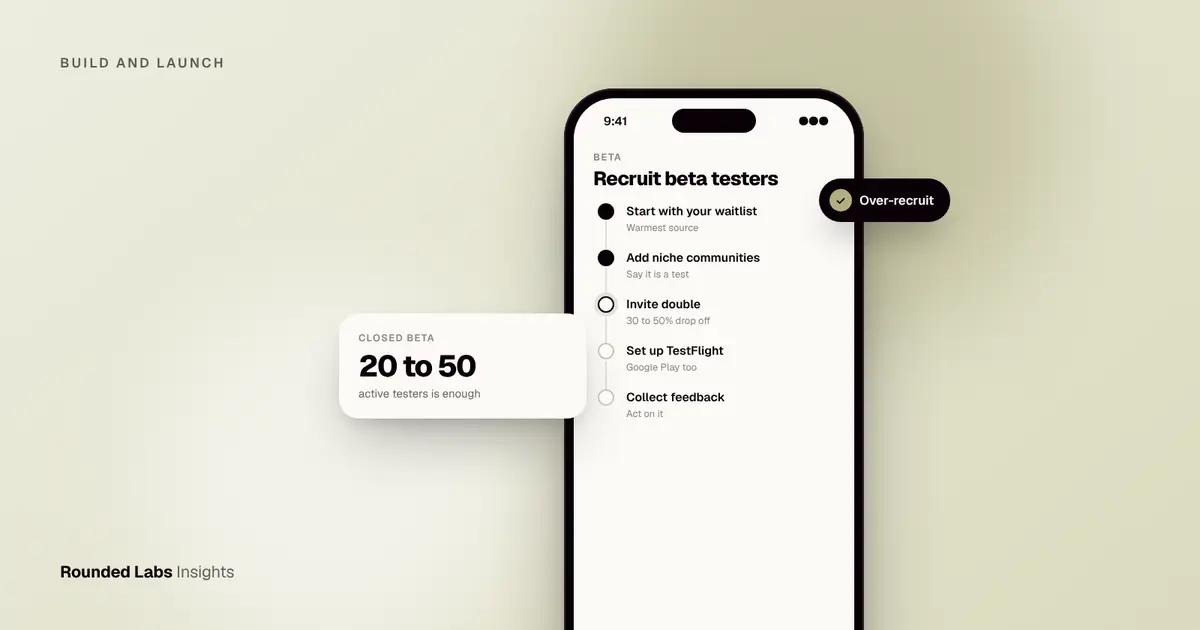
Recruit 20 to 50 committed beta testers for a first closed beta, drawing them from people who already have the problem your app solves: a waiting list, an existing customer base, niche communities and your own network. Expect only 30 to 50% of people who say yes to install and use the build, so invite roughly double the number you need. Quality of fit matters far more than raw volume.
We have taken apps from first build to store release for Superdry, MoBank, the UK’s first mobile banking app, and Dabbl, a trading app for first-time investors, and in each case the people who tested early shaped what shipped. Rounded Labs has been building apps since 2007, and the pattern is consistent: teams that plan their beta as carefully as their build find the serious problems while they are cheap to fix. This guide covers where to find testers, how many you need, what to offer, how to set up TestFlight and Google Play testing, how to keep people engaged and how to turn feedback into decisions. It sits alongside our wider services for building and launching apps.
Key facts
- A closed beta of 20 to 50 active testers is enough to find most serious usability problems and crashes in a first release.
- Expect a 30 to 50% drop-off between “I’m in” and “I installed and used it”, so over-recruit.
- Apple’s TestFlight allows up to 10,000 external testers per app, and builds expire after 90 days.
- Google Play closed testing is open to a limited list of testers; check the current requirements for new personal developer accounts, as Google has set minimum tester numbers and test periods before production access.
- Testers who match your target user give better signal than friends and family, who tend to be polite.
- A beta tests what you have built. If the first release is the wrong size, fix that before you recruit.
What is a beta test, and what is it for?
A beta test puts a near-finished version of your app in the hands of real people outside your team, before it goes on sale to everyone. It is different from the checks your developers run themselves. Developers test whether the app does what the specification says. Beta testers show you whether the specification was right, whether people can find their way around without help, and whether the app survives on phones, networks and habits you did not anticipate.
A good beta answers four questions:
- Does it work? Crashes, broken screens, failed payments and login problems on real devices.
- Can people use it? Do new users reach the main task without being told how?
- Do they want it? Do they come back in the second and third week, or only open it once?
- Is it ready? Is there anything that would embarrass you, or harm users, if released today?
It is not a substitute for demand testing before build. If you have not yet checked whether anyone wants the product, start with How to validate an app idea and How to test demand with a landing page. Our guide App testing explained: QA, UAT and beta testing shows where beta fits among the other kinds of testing, and the short glossary entry on what a beta tester is gives the basic definition.
Alpha, closed beta and open beta
The words are used loosely, so agree what you mean before you recruit.
| Stage | Who takes part | Main purpose | Typical length |
|---|---|---|---|
| Internal alpha | Your team and a few close contacts | Find crashes and broken flows before outsiders see it | 1 to 2 weeks |
| Closed beta | Invited testers who match your audience | Test usability, onboarding and devices with real users | 2 to 4 weeks |
| Open beta | Anyone who wants to join | Test scale, performance and edge cases | 2 to 6 weeks |
| Soft launch | Real release in a small market | Test the full business loop with real money and behaviour | 4 to 12 weeks |
Most first releases need an alpha and a closed beta, and many never need an open beta. Our comparison, beta testing vs soft launch, explains when each pays off.
Who makes a good beta tester?
A good tester is someone who has the problem your app solves, is willing to use an unfinished product, and will tell you honestly what went wrong. Three traits matter most:
- Fit. They belong to your target audience. A budgeting app tested by people who never track money produces opinions, not evidence.
- Availability. They will actually open the app several times over the test period.
- Candour. They will say “I didn’t understand this screen” rather than “looks great”.
Mix a few technical testers, who report crashes precisely, with a larger group of ordinary users, who show you where the design confuses people. A group made only of technical testers will forgive things that a customer would abandon the app over. A group made only of friendly acquaintances will be kind.
A simple tester profile
Before you recruit, write down who you want in two or three lines. For example: “UK adults aged 25 to 45 who currently track their spending in a spreadsheet or notes app, own an iPhone or recent Android phone, and can commit about 20 minutes twice a week for three weeks.” That sentence becomes your screening question, your invitation text and your filter when sign-ups arrive.
Add two or three screening questions to your sign-up form. Good ones are factual, not flattering:
- What phone do you use, and which version of the operating system?
- How do you handle this task today?
- How often did you do it in the last month?
- Can you give us feedback by the date we set?
Factual questions beat “Would you use an app like this?”, because people say yes to be polite.
Who should you avoid?
- People who only want free access and will not give feedback.
- People with a direct stake in your competitor, unless you have agreed rules on confidentiality.
- Anyone you would find hard to disappoint, such as close family. They will rarely tell you the truth.
- Under-18s without a parent or guardian’s agreement. See the section on consent and data below.
Where do you find beta testers?
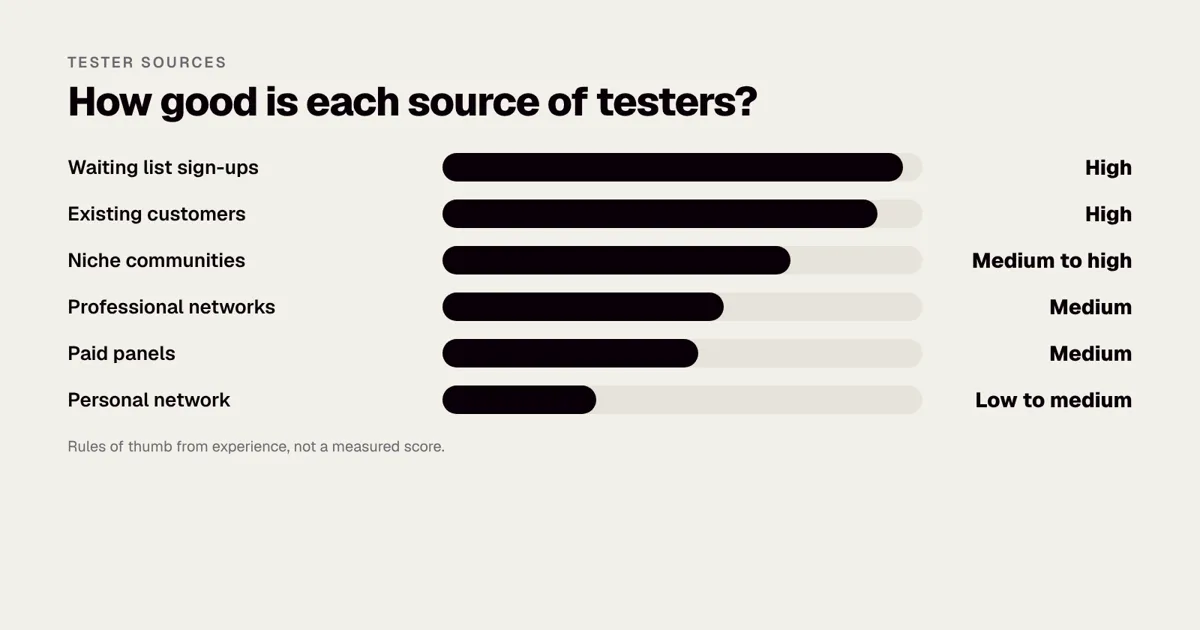
Start with the cheapest, warmest sources and work outwards.
| Source | Typical quality | Effort | Best for |
|---|---|---|---|
| Waiting list or landing page sign-ups | High | Low | Consumer apps with early demand |
| Existing customers or staff | High | Low | Apps extending an existing business |
| Niche communities (Reddit, Discord, Slack groups, forums) | Medium to high | Medium | Specialist or hobby audiences |
| LinkedIn and professional networks | Medium | Medium | B2B and workplace tools |
| Paid testing platforms and panels | Medium | Medium | Larger volumes, device coverage |
| Personal network | Low to medium | Low | A first smoke test only |
| Local universities and meet-ups | Medium | High | Students, local services |
The ratings are rules of thumb from experience, not measurements, and they shift by audience.
Route 1: Your waiting list
If you ran a landing page earlier, those sign-ups are your best list because they asked to hear from you. Email them in stages: a short note that the beta is coming, then an invitation with a deadline, then a reminder. Our guide to testing demand with a landing page explains how to build that list, and How to get your first 1,000 app users shows how it connects to launch.
Route 2: Existing customers and staff
If the app extends an existing business, your customers are already a qualified audience. Invite a mix: your most active customers, a few who rarely engage, and some who have complained. The complainers often give the most useful feedback. For internal apps, include the people who will use it every day, not only their managers. How to roll out an app to frontline workers covers the human side of that rollout.
Route 3: Niche communities
Subreddits, Discord servers, Slack groups, forums and Facebook groups gather people with a shared interest. Read the rules first. Many ban promotion or require moderator approval. Post as a person, not an advert: say who you are, what you are building, what you need, how long it will take and what testers receive. Reply to every comment. A short, honest post in the right community can bring in a dozen well-matched testers in a week, while a broadcast post to many groups wastes goodwill.
Route 4: Professional networks
For B2B and workplace tools, LinkedIn posts and direct messages to people in the target role work well. Offer a short call rather than only an install link, because professionals value having their problem understood. Ask for introductions from people already in your network.
Route 5: Paid panels and testing platforms
Several services provide testers on demand, often with device coverage across many phones. They suit technical checks and larger numbers. They are less suited to subtle product questions because panel members may not match your audience, so screen carefully and check the platform’s own terms and fees on its site.
Route 6: Your personal network
Friends, family and colleagues are quick to recruit, and useful for a smoke test: does it install, does it open, does the main flow complete? Do not rely on them for judgement about whether the product is good.
Route 7: Universities, meet-ups and local groups
For local services, student products or community apps, physical routes work: a talk at a meet-up, a poster, a society newsletter. They take more effort per tester, but they produce motivated people who can be met in person for short sessions.
A decision guide: which routes for which app?
| Your app | Start with | Add | Avoid relying on |
|---|---|---|---|
| Consumer app with a waiting list | Waiting list | Niche communities | Friends only |
| App for an existing customer base | Customers | Staff champions | Paid panels |
| B2B or workplace tool | Customers and professional networks | Intro calls | Open public posts |
| Specialist hobby or health app | Niche communities | Panel screening | Generic panels |
| Local service or marketplace | Local groups, meet-ups | Waiting list | National paid panels |
| Kids or family app | Parents recruited with consent | Schools or clubs, with permission | Open public sign-ups |
How many testers do you need?
It depends on the stage and on what you want to learn.
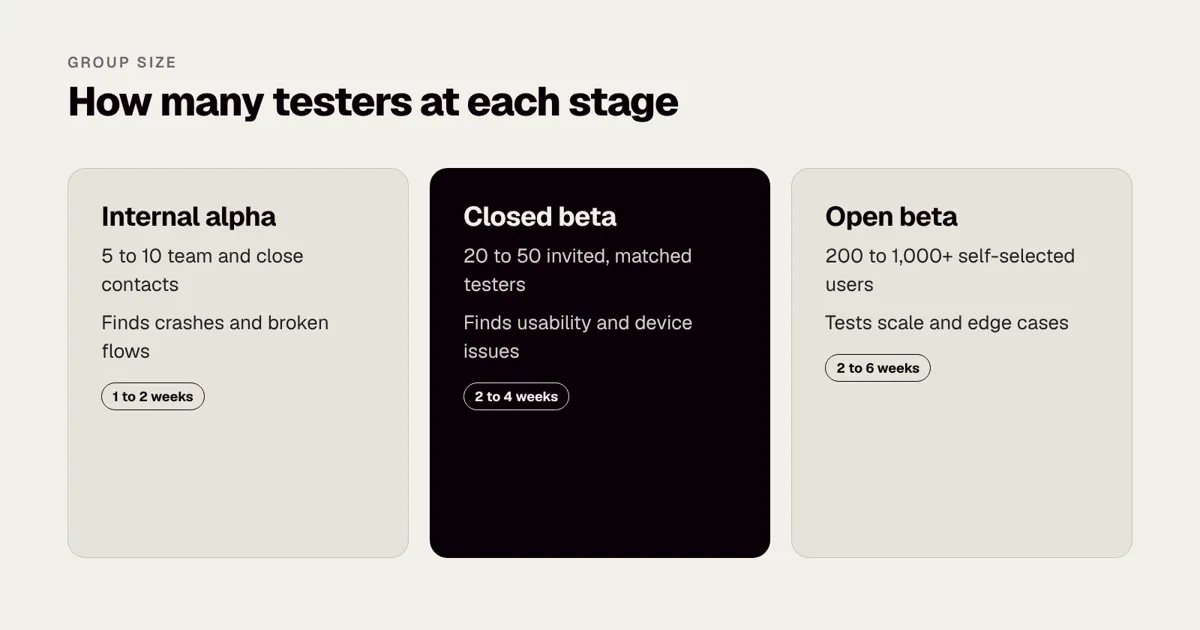
| Stage | Testers | What you learn |
|---|---|---|
| Internal alpha | 5 to 10 (team, close contacts) | Crashes, broken flows |
| Closed beta | 20 to 50 | Usability, onboarding, device issues |
| Open beta | 200 to 1,000+ | Scale, performance, edge cases |
Small groups find a surprising share of the serious problems, because the worst usability problems are shared by many users. A problem that confuses one person in five will show up even with ten people. Rare crashes tied to specific devices and rare data conditions need larger numbers, which is the reason for an open beta when the risk justifies it.
A worked example
Imagine a fitness app that needs 30 active testers for a four-week closed beta. With a 40% activation rate, you need to invite about 75 people. If your waiting list converts 25% of invitations to sign-ups, you need to contact around 300 people. That is a realistic number from a landing page with a few hundred sign-ups, which is why collecting emails early pays off. Plan the group size at the start, not the week you want to ship.
| Step | Calculation | Result |
|---|---|---|
| Active testers wanted | Target for the beta | 30 |
| Activation rate | 40% install and use the app | Invite about 75 |
| Invitation response | 25% say yes | Contact about 300 |
If you only have 120 people on the list, you can still run the beta. Recruit a second source, such as two niche communities, to cover the gap, and accept a smaller group of 15 to 20.
Device and operating system coverage
Numbers are not the only measure. A group of 30 who all use the latest iPhone will miss problems on older Android phones. Aim for a spread:
- At least two or three iPhone models and iOS versions, including one older supported version.
- At least three or four Android makers, with different screen sizes and one low-cost phone.
- Different network conditions, including weak mobile signal and public Wi-Fi.
- Different accessibility settings, such as large text and screen readers.
If your audience is mostly on one platform, weight the group that way, but keep at least a few testers on the other. Our guide to iOS first or Android first can help with that choice, and How to support older phones without slowing down explains what to do with what you find.
What do you offer in return?
Testers give you time, so treat the exchange fairly:
- Early access and a say in the product, which is enough for motivated enthusiasts.
- A free year or lifetime discount for the paid version.
- A small payment or voucher for structured tasks, typically in the range of a few pounds for a short task up to a modest fee for a 30-minute session. Market rates vary, so check what your audience expects.
- Public credit in the app or release notes, if they want it.
Be clear about what you expect: how long the test runs, what they should try, and how to report problems. People drop out when asked for open-ended effort with no end date.
How do incentives compare?
| Incentive | Cost to you | Effect on feedback | Watch out for |
|---|---|---|---|
| Early access only | None | Good from enthusiasts, thin from others | Drop-off after the first week |
| Discount or free subscription | Lost revenue later | Good, with a reason to stay | Must be honoured, so record who was promised what |
| Voucher for a task | A few pounds per person (market estimate) | Reliable completion of set tasks | May attract people who only want the reward |
| Paid session of 30 to 45 minutes | Higher, set by audience (market estimate) | Deep insight | Needs scheduling and a script |
| Charity donation in their name | Small | Pleasant, limited effect | Fewer people care than you expect |
Payments to testers can have tax or employment implications in some cases, and some platforms have rules about incentives. Check with your accountant and the platform’s current terms.
Not sure your build is ready for testers? We run a Mobile Product Discovery Sprint at a fixed price of £9,500 that turns an idea into a tested prototype and plan. Book a 30-minute call with a co-founder.
How do you set up the test itself?
You need a way to get builds to people and a way to hear back.
Distribution on iPhone
On iPhone, use TestFlight, Apple’s official tool. Internal testers (up to 100 members of your App Store Connect team) get builds quickly, while external testers need a short Beta App Review first and join by email invite or public link. At the time of writing, builds expire after 90 days, so plan upload dates. Details change, so check Apple’s current documentation on developer.apple.com before you start. You will need an Apple Developer account in your organisation’s name; our guides on setting up an Apple Developer account for a company and getting a D-U-N-S number cover the steps. The glossary entry on what TestFlight is gives the basics.
Distribution on Android
On Android, use a Google Play closed testing track with an email list or Google Group, or Firebase App Distribution. Play also offers an internal testing track with a smaller, faster group. Google has introduced requirements for some new personal developer accounts, including minimum numbers of testers and test periods before an app can go to production. These requirements have changed over time, so read the current Play Console Help before you plan a schedule. If a requirement applies to you, recruit the testers earlier than you think you need to.
TestFlight or Firebase: how to choose
| Question | TestFlight | Firebase App Distribution |
|---|---|---|
| Platforms | iOS, iPadOS, macOS, tvOS, visionOS | iOS and Android |
| Review needed | Beta App Review for external testers | None from Apple for ad hoc builds, but devices must be registered |
| Join method | Email invite or public link | Email invite or link |
| Build lifetime | 90 days | Set by your configuration |
| Best for | Close to production testing on iPhone | Fast internal builds, both platforms |
We compare the two in detail in TestFlight vs Firebase App Distribution. Many teams use both: Firebase for rapid internal builds, TestFlight and Play tracks for real testers.
The onboarding message
Send one short note covering what the app does, how to install, what to try this week and where to send feedback. Include a deadline. A template:
Subject: Your beta invitation for [App name], 3 weeks, about 20 minutes twice a week
Thanks for offering to help. You are one of about 40 people testing [App name], an app that helps you [one-line purpose].
To start: install from [link]. If the install fails, reply to this email and tell us your phone model.
This week, please try: [one or two tasks, such as “create an account and add your first expense”].
Tell us what you think: use the Feedback button inside the app, or reply here. Tell us what you tried, what you expected and what happened.
The test ends on [date]. We will send a short update each Friday on what we have fixed.
The feedback channel
Use an in-app form or a simple shared form, plus a crash reporting tool so you see failures without anyone writing them up. We compare options in Sentry vs Crashlytics. Ask testers to follow a structure, which we explain in How to give useful feedback on a test build. The structure is simple: what I tried, what I expected, what happened, my phone and system version, and a screenshot.
Consent and data
Tell testers what data you collect during the beta, and avoid using real personal data in test builds. If testers are in the UK or EU, UK GDPR and GDPR apply to their data, so name who is responsible for it. The Information Commissioner’s Office publishes guidance on ico.org.uk, and our guide UK GDPR for mobile apps covers what founders must get right. Keep test data separate from live data, and do not give testers access to real customer records. Under-18s should not join without a parent’s agreement; for apps aimed at children, see ICO children’s code for apps in the UK and COPPA and apps used by children in the US. The US regulator’s site is ftc.gov. This is general information, not legal advice, so check the official source and take advice if your app handles sensitive data.
Ask testers to agree to a short set of beta terms: the app is unfinished, feedback may be used to improve the product, and they will keep unreleased features confidential if that matters. Keep it to a few lines in plain English.
What should testers actually do?
Open-ended requests such as “have a play and tell us what you think” produce vague answers. Give testers tasks that match the questions you want answered. A good task has a clear start, a clear finish and a rough time limit.
Example task list for a first closed beta
| Week | Task | What you learn |
|---|---|---|
| 1 | Install, create an account and reach the home screen | Install problems, sign-up friction (see How to add user login and sign-up to your app) |
| 1 | Complete the main task once, unaided | Whether the core flow is understandable |
| 2 | Use the app on three separate days | Habit, notifications, whether it earns a return visit |
| 2 | Try the one feature you are least sure about | Whether it is needed at all |
| 3 | Change a setting, then delete the account | Settings clarity, data deletion flow |
| 3 | Rate the experience and answer five questions | Overall sentiment, willingness to recommend |
Mix guided tasks with free use. Guided tasks show whether a flow works. Free use shows what people do when no one is telling them.
A short end-of-test survey
Keep it to five to eight questions, with a mix of scores and open text.
- How easy was it to get started? (1 to 5)
- What were you trying to do the first time you opened the app, and did you succeed?
- What confused or annoyed you most?
- What would you miss most if the app disappeared tomorrow?
- How would you describe the app to a friend, in one sentence?
- How disappointed would you be if you could no longer use it? (very, somewhat, not)
- Anything we should have asked, but did not?
Question five is especially valuable. If testers describe the app in words that differ from your pitch, your messaging needs work, not only the product. Our guide on how to run a usability test on a budget adds a method for watching people use the app directly.
How do you keep testers engaged?
Most beta groups fade within two weeks. A few habits keep them active:
- Send a brief weekly update saying what you fixed from their feedback. Nothing motivates a tester more than seeing their report acted on.
- Give small, specific tasks (“try to set up a payment in under two minutes”) instead of “tell us what you think”.
- Reply to every report, even with a one-line acknowledgement.
- Close the test on the date you gave, and thank everyone.
A four-week engagement rhythm
| Day | Action |
|---|---|
| Day 0 | Send the invitation with install steps and week one tasks |
| Day 2 | Short check: “Did the install work?” Fix blockers quickly |
| Day 7 | Friday update: what we fixed, week two tasks |
| Day 14 | Mid-point update and a short pulse question inside the app |
| Day 21 | Week three tasks, reminder of the end date |
| Day 28 | Final survey, thanks and next steps, reward delivery |
How do you handle silence?
Silent testers are normal. Check your analytics to see who installed and who used the app, then send a personal message to those who went quiet. Ask one friendly question: “Did something stop you?” The answers are often useful, such as “I did not have time”, “The invite landed in spam” or “It would not install on my phone”. Remove testers who never opened the app and replace them from your reserve list.
If you also want structured observation of people using the app, a few moderated sessions are worth more than a hundred silent installs; see How to run a usability test on a budget.
What should you measure during the beta?
Comments tell you why. Numbers tell you what. Set up analytics before the beta starts, using the approach in App analytics: what to track from day one and How to set up app analytics events.
| Measure | What it shows | Example of a worrying result |
|---|---|---|
| Install to first open | Whether install and invitation steps work | Many installs but few first opens |
| Onboarding completion | Whether sign-up is understandable | Fewer than half reach the home screen |
| Main task completion | Whether the core purpose works | Many start, few finish |
| Time to complete the main task | Friction | Far longer than you designed for |
| Day 1, day 7 and day 14 return | Early retention signal | Steep fall after day 1 |
| Crash-free sessions | Stability | Falling after each new build (see What is a crash rate?) |
| Drop-off screen | Where people abandon | One screen accounts for most exits |
| Feedback submitted per tester | Engagement with the beta | A few people supplying all feedback |
With small groups, treat these as signals, not statistics. Ten people cannot prove a retention rate, but they can show that nobody came back on day three. Our guide to app retention metrics explains what these numbers mean after launch.
What do you do with the feedback?
Group reports into three buckets: bugs, usability problems and feature requests. Fix crashes and blockers first. Treat a usability problem reported by three or more testers as real. Treat a single feature request as an idea to note, not an order. Check behaviour as well as comments: which screens people abandon, and how many finish the main task.
A simple triage method
Give each issue a severity and a frequency score, then sort.
| Severity | Meaning | Example | Action |
|---|---|---|---|
| Blocker | Stops the main task or loses data | Payment fails, app crashes on launch | Fix before release |
| Major | Seriously hinders use, workaround exists | Search returns wrong results | Fix before release if frequent |
| Minor | Annoying but not harmful | Misaligned text | Schedule |
| Idea | Request for something new | “Add dark mode” | Log, review for later versions |
Then ask how many testers hit the issue. A major issue reported by eight of 30 testers goes ahead of a blocker that only occurs on one obscure device, unless the device is common in your market.
A worked example of triage
Suppose 32 testers produce 94 reports over three weeks. After grouping, you find 11 distinct bugs, 9 usability problems and 14 feature ideas, with the rest duplicates or questions.
| Group | Count | Decision |
|---|---|---|
| Blockers | 2 (login fails on one Android version, photo upload loses data) | Fix, retest with the same testers |
| Major usability | 3 (onboarding step 3 confusing for 12 testers, search filter hidden, notification wording unclear) | Redesign, retest |
| Minor bugs and polish | 14 | Fix the cheap ones, schedule the rest |
| Feature ideas | 14 (3 mentioned by 5 or more testers) | Log, discuss for version two |
This gives you a clear release decision: fix five items, retest, then release. Without grouping, 94 comments would feel overwhelming and the loudest voice would win.
Beware of three feedback traps
- Politeness. “Nice app!” is not data. Ask what they did and what happened.
- Solutions disguised as problems. “Add a button here” often means “I could not find the way to do this”. Ask what they were trying to do.
- Averages that hide extremes. A score of 4 out of 5 can hide three testers who gave up in frustration. Read the low scores first.
Is your app ready to leave beta?
Decide the exit criteria before the test begins. A common set:
- No known blocker issues.
- Crash-free sessions at an agreed level, which you choose with your team.
- At least a stated share of testers complete the main task unaided.
- At least a stated number of testers say they would be disappointed to lose the app.
- Privacy policy, support contact and account deletion are in place. See How to write an app privacy policy and How to handle data deletion requests.
- Store listing assets and descriptions are ready; see How to prepare App Store screenshots and App Store Optimisation basics.
Our App launch checklist lists the steps between a good beta and a store release, and Why Apple rejects apps, and how to avoid it covers the review stage. After release, track App retention, because that is the number your beta was trying to predict. You can also encourage early reviews once the app is stable; see How to ask for app ratings at the right time.
How does beta testing fit into the budget and schedule?
Beta testing is cheap compared with the cost of releasing a flawed app, but it still needs time on both sides. Plan it into the schedule, not after it.
| Task | Typical effort (market estimate) |
|---|---|
| Recruiting and screening 75 invitees | 1 to 2 weeks of part-time effort, mostly in parallel with the build |
| Setting up distribution and analytics | 2 to 4 days |
| Running the beta, with weekly updates | 3 to 4 weeks, with a few hours a week to respond |
| Triage and fixes | 1 to 2 weeks after the beta |
| Retest with a subset of testers | 3 to 5 days |
A project that allows nothing for a beta tends to ship its first beta to the public. Rounded Labs prices projects at a fixed price agreed before development starts, typically £30,000 to £250,000+, with beta testing planned into the schedule; see our pricing page. If testing turns up work that was not in the scope, we agree the change and its price before doing it, which is the approach described in How to manage scope changes without blowing the budget. For how fixed prices compare with other models, read Fixed price vs time and materials for app projects.
What mistakes should you avoid when recruiting beta testers?
- Recruiting only friends. You will hear what you want to hear.
- Recruiting too late. Testers cannot be found overnight. Start collecting names early.
- Under-recruiting. If you need 30 active testers and invite 30, you will end up with 10.
- Asking for too much. Three weeks of daily tasks will lose most people.
- Giving no deadline. Open-ended tests drift.
- Ignoring devices. A beta limited to one phone model misses much.
- Skipping consent. Tell people what you collect and why.
- Changing the app daily. Frequent new builds make feedback hard to compare. Release a build, collect feedback, then release the next.
- Failing to close the loop. If testers never hear back, they will not help next time.
- Treating the beta as marketing. It can build early fans, but the main job is learning.
- Testing the wrong thing. If the first release contains too many features, testers will give shallow feedback on all of them. See What is an MVP? and How to choose features for version one.
- Leaving fixes untested. Re-run the key flow with some of the same testers after changes.
What does a beta look like in three different situations?
The examples below are illustrative, not client case studies. They show the three group sizes from earlier in practice.
Situation 1: A consumer app with a small waiting list
A founder has 180 email sign-ups from a landing page and a budget for four weeks. She wants 20 active testers. With a 40% activation rate she needs 50 invitations, and with a 25% response rate she needs to contact 200 people. She emails all 180 and posts in two relevant communities to cover the gap. She uses TestFlight and a Play closed test, sends a weekly update and offers testers a free first year. At the end, 22 testers are active, 3 patterns of confusion are found in onboarding, and one Android crash is fixed before release.
Situation 2: An internal tool for staff
A retailer builds an app for store managers. The aim is not to find thousands of users but to test whether managers will use it on a busy shop floor. Fifteen managers from five stores take part, chosen to include confident and nervous users. The team visits two stores to watch the app in use, learns that managers use it standing up with one hand, and moves the main button. Distribution is through a private build channel, and staff receive a short guide. Replacing spreadsheets takes patience; see How to replace spreadsheets with an app.
Situation 3: A B2B app with few possible users
A software product for a specialist profession has a total market of a few thousand people. The team recruits 12 testers through professional contacts, each of whom gets a 30-minute onboarding call and a follow-up call at the end. They pay for the time in vouchers. The group is small, but each tester represents a real buyer, and the calls reveal a missing integration. That one finding is worth more than a hundred anonymous installs would have been. For integration planning, see What is an API integration?.
How do you move from beta to launch?
The end of beta is a decision, not a date. Gather the evidence, apply your exit criteria and decide: release, extend the test with a new build, or go back to design. If you release, keep your testers close. They are your first reviewers, your first advocates and often your first paying customers. Thank them in a short message, give them the rewards you promised, and invite them to stay in a smaller feedback group.
Then plan the first months after launch. Early reviews, store ratings and onboarding changes all matter. How to get more app reviews and handle bad ones and How to design a good onboarding flow help here. If the beta shows that the project is behind plan, How to tell if an app project is off track and How to rescue a failing app project can help you work out what to do.
If you want a second opinion on whether your build is ready for testers, book a call with a co-founder and we will tell you what we would test first.
Frequently asked questions
How early should I start recruiting beta testers?
Start collecting interested people as soon as you have a landing page, often months before the build exists. Send formal invitations two to three weeks before the beta begins so you can confirm devices and set expectations.
Should I pay beta testers?
Not always. Motivated early adopters will test for access and influence. Pay when you need specific people at a set time, such as professionals in a niche, or for longer sessions. Check any tax or platform rules that apply to payments.
Can I use friends and family as testers?
Yes for a first smoke test, but not as your only group. They tend to be kind and rarely match your target user, so you may miss serious problems.
What is the difference between a closed and an open beta?
A closed beta is invitation-only, so you control numbers and can talk to people directly. An open beta lets anyone join, which tests scale but gives you less personal feedback. We compare the choice with a soft launch in Beta testing vs soft launch.
How long should a beta test run?
Two to four weeks suits most first releases. Shorter and people do not use the app enough, longer and engagement drops. If your app depends on habits that form over weeks, extend the test but reduce the demands on testers.
What if I do not have a waiting list?
Use communities and professional networks, and offer a clear reward. Start with a small group of 10 to 15 well-matched testers recruited personally, then widen. Our guide How to get your first 1,000 app users covers building an audience.
Do I need testers before I have a finished app?
You need testers before the app is public, but they do not need a finished app. A clickable prototype can be tested with five to eight people to check the idea and flow before development, which is much cheaper than finding a design problem in code.
Official sources and further reading
Talk it through with one of our co-founders. 30 minutes, no pressure.