

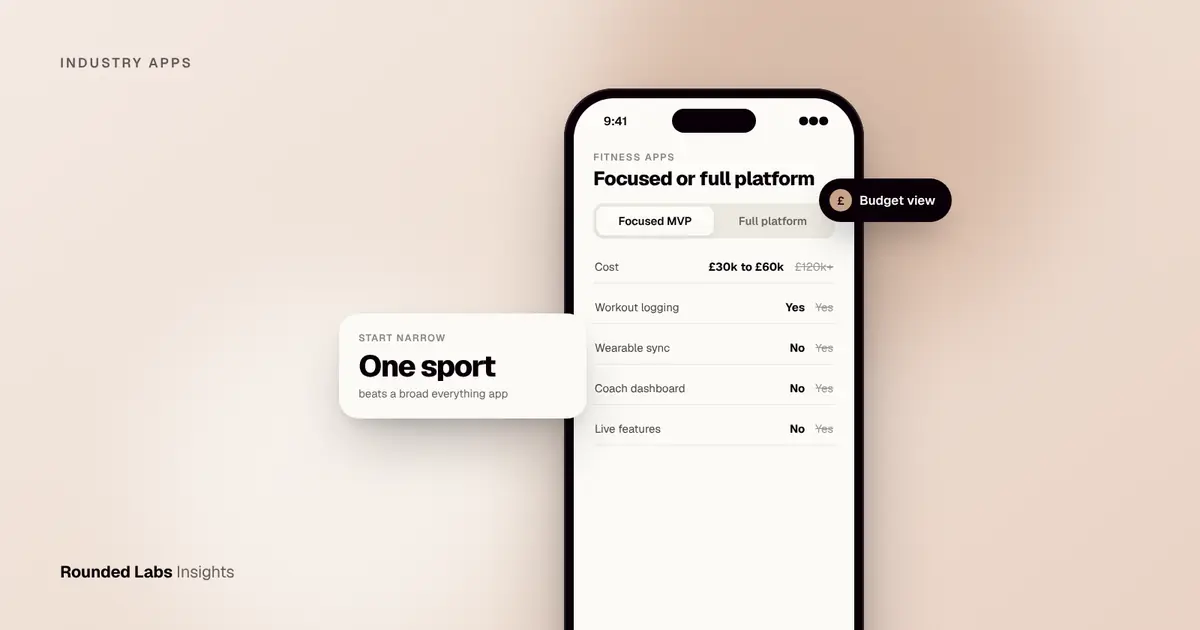
A fitness app typically costs £30,000 to £60,000 for a focused first version with workout tracking and accounts, and £80,000 to £200,000 or more once you add wearable sync, live coaching, payments and a coach dashboard. Most of the spread comes from three choices: how much data you pull from phones and watches, whether you need real-time features, and how carefully you handle health data.
We have 19 years of experience building mobile apps for consumer brands, including Superdry, whose app serves a brand with 768 locations in over 100 countries, and Dabbl, a trading app built for first-time users. The lessons carry over directly to fitness: onboarding that does not scare off beginners, habits that bring people back, and sensitive data handled with care. This guide covers the types of fitness app, the features that matter, what drives cost, wearables, privacy, store rules and a sensible way to launch. The cost figures are market estimates, not quotes, and nothing here is legal advice.
Key facts
- Fitness is a crowded category, so retention matters more than download numbers.
- Apple Health (HealthKit) and Android Health Connect let you read steps, heart rate and workouts with the user’s permission, without building your own device integrations.
- Health and fitness data is sensitive: in the UK and EU it can be special category data under GDPR, and in the US the FTC enforces rules on health data breaches and misleading data claims.
- Rounded Labs works to a fixed price agreed before development starts; projects typically run £30,000 to £250,000+. See the pricing page.
- A narrow first version for one sport or one type of user almost always beats a broad “everything” app.
- Content, such as workout videos and programmes, is a separate budget from the software.
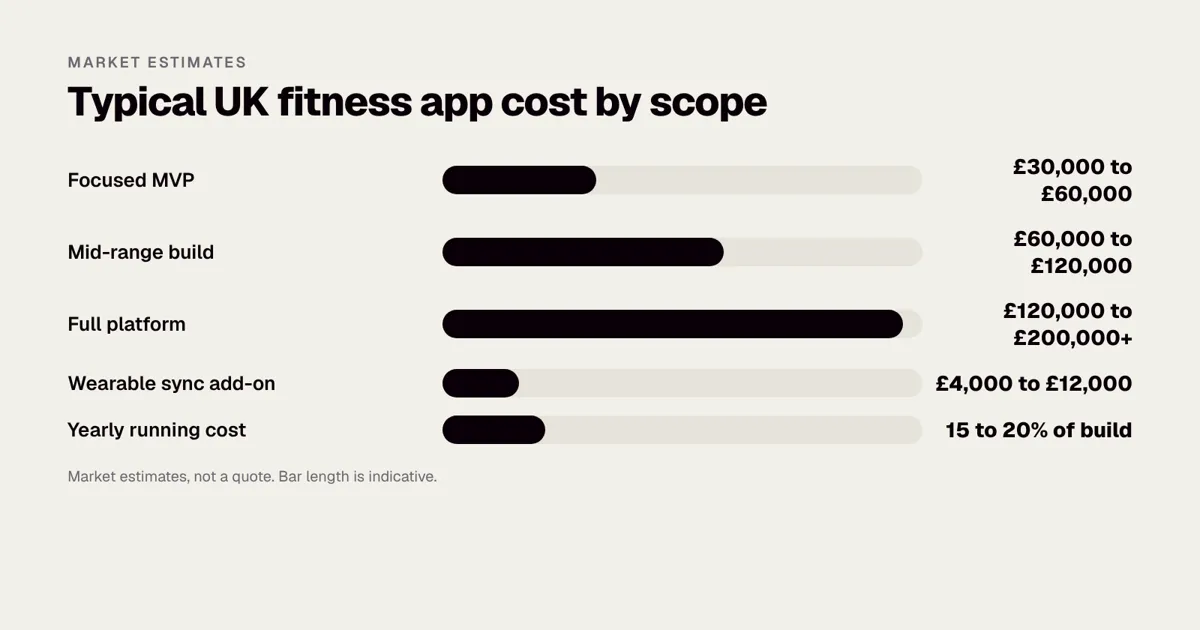
- Running costs are typically 15 to 20% of the build per year, as a market estimate.
What types of fitness and sports apps are there?
The label covers very different products, and they cost different amounts:
| App type | Examples of what it does | Typical complexity |
|---|---|---|
| Workout logger | Exercise library, sets and reps, progress charts | Low to medium |
| Programme or coaching app | Plans from a trainer, check-ins, messaging, video | Medium to high |
| Activity tracker | GPS routes, pace, distance, wearable sync | Medium to high |
| Team and club app | Fixtures, availability, lineups, payments | Medium |
| Gym or studio app | Class booking, memberships, check-in | Medium |
| Live or streamed classes | Video, scheduling, subscriptions | High |
Pick one row for version one. A club app and a streaming platform share almost no code, even though both are called “sports apps”.
How do you choose which type to build?
Start from the person, not the feature list. Ask who is opening the app, in what place and in what mood. A runner checking pace on a trail needs a glanceable screen and reliable GPS. A parent booking a children’s swimming class needs a calendar and a payment. A gym member scanning in at 6am needs speed. A coach checking on 40 clients needs a dashboard. Each of these people defines a different product, and each has a different path to revenue.
| Who is the main user | What they need in the first minute | What usually pays |
|---|---|---|
| Beginner wanting to get started | A first workout with no setup | Subscription after a free trial |
| Regular gym goer | Fast logging and progress | Subscription or gym membership |
| Runner or cyclist | Tracking, pace, route, watch sync | Subscription, premium analysis |
| Team or club member | Fixtures, availability, messages | Club fee or sponsorship |
| Client of a personal trainer | Plan, check-in, message the coach | Coach pays or client pays |
| Studio customer | Class booking and pass balance | Memberships and class packs |
If you are not sure which row fits your idea, How to validate an app idea before you spend £50k and How to test demand with a landing page are cheap ways to find out before you commission anything. For a closer look at the commercial side of sports clubs, see App development for sports clubs in UK: features, rules and costs and AI for sports clubs: use cases that pay back.
What does the market look like?
Fitness is crowded. Many general-purpose trackers are free, backed by large budgets, and well known. A new app rarely wins by being a bit better at everything. It wins by being clearly better for one group: a particular sport, a particular stage of life, a particular coach’s clients, a particular gym. Our guide How to build an app like MyFitnessPal: features, cost and timeline shows how large trackers are built and why copying one is rarely the right first move, and Mistakes to avoid when building a fitness app lists common traps.
Which features does a fitness app need?
Start with the loop that makes someone open the app again next week. For most products that is:
- Fast onboarding. Ask for a goal and a fitness level, then show a first workout within a minute. Long sign-up forms lose beginners.
- Logging that takes seconds. If recording a set needs more than two taps, people stop doing it.
- Progress that is visible. Streaks, personal bests and simple charts. Keep them honest and avoid vanity numbers.
- Reminders that respect the user. Notifications tied to the person’s chosen days, not a daily nag.
- Offline use. Gyms and trails often have poor signal, so the app must save locally and sync later.
Second-wave features include social feeds, challenges, leaderboards, coach dashboards, payments and subscriptions. Add them only after you have evidence that version one is used. Our guide to App retention: the metrics that matter after launch explains which numbers tell you whether people are sticking.
What should be in version one, and what should wait?
| Feature | Version one? | Reason |
|---|---|---|
| Account and profile | Yes | Needed to save progress. See How to add user login and sign-up to your app |
| Goal and level questions at onboarding | Yes, short | Personalises the first workout |
| Workout library or plan | Yes | The core of the product |
| Logging of sets, reps, time or distance | Yes | The daily habit |
| Simple progress view | Yes | Reason to come back |
| Push reminders | Yes | Chosen days and times only |
| Offline logging | Yes | Poor signal is normal |
| Apple Health and Health Connect read | Maybe | Valuable, but adds privacy work |
| Subscriptions | Maybe | Can launch free to learn first |
| Social feed and challenges | No | Needs a community that does not exist yet |
| Live classes and video calls | No | High cost, high risk |
| AI coaching | No | Needs data and careful claims |
| Leaderboards | No | Only meaningful with many users |
Each “No” is an invitation to save money. How to choose features for version one and What is an MVP? show how to draw the line.
How do you design onboarding that does not scare beginners?
Beginners are the largest group in most fitness categories, and also the most likely to leave in the first week. Good onboarding follows a few rules.
- Ask only what you need to give a good first workout. Goal, experience and available time are usually enough. Weight, age and injuries can wait, and you should ask for sensitive data only when you can explain why.
- Show value before registration where possible. Let people see a sample workout before they create an account.
- Use plain language. Terms like “hypertrophy” and “RPE” mean nothing to a newcomer.
- Make the first workout short. Ten minutes done beats forty minutes abandoned.
- Celebrate completion without gimmicks. A clear “done, see you Thursday” works better than confetti.
How to design a good onboarding flow goes through the principles in more detail, and our work on Dabbl: designing stock trading for first-time investors shows how we approach a nervous first-time audience in another sensitive category.
What keeps people coming back?
Retention in fitness depends on a small number of mechanisms.
- A plan the person can follow. Decision fatigue kills habits. A clear “today’s workout” button helps more than a library of 500 exercises.
- Visible progress. A graph that goes up, a personal best, a streak. Keep streaks forgiving, so one missed day does not erase months.
- Social accountability. A coach, a club or a friend. Even a simple “your coach saw this” message changes behaviour.
- Timely nudges. A reminder at the usual workout time, not a generic message at noon.
- Variety. A programme that changes every four to six weeks avoids boredom.
Push notifications people do not turn off and How to add push notifications to your app cover the mechanics. For metrics, App analytics: what to track from day one lists the events worth recording.
How much does a fitness app cost?
These are market estimates for a UK build, assuming one well-scoped product on iOS and Android:
| Scope | Typical range |
|---|---|
| Focused MVP: accounts, logging, plans, reminders | £30,000 to £60,000 |
| Mid-range: wearable sync, subscriptions, content library | £60,000 to £120,000 |
| Full platform: coach dashboard, live features, advanced analytics | £120,000 to £200,000+ |
In dollars and euros, that is roughly $38,000 to $76,000 for the MVP and €35,000 to €70,000. Exchange rates move, so treat these as a guide. Rounded Labs prices projects as a fixed sum agreed before development starts, so you know the total before the first sprint; see Fixed price vs time and materials for app projects for why that matters. If you are still deciding on scope, our App specification guide helps you write one a supplier can price accurately. For more regional detail, see How much does a fitness app cost in UK? and How much does a fitness app cost in Europe?.
What drives the price up?
- Real-time features such as live classes, group sessions or live leaderboards.
- Many device integrations and custom Bluetooth sensors rather than the standard health platforms.
- Video, because hosting, encoding and playback add both build and running costs.
- Payments and subscriptions across the App Store, Google Play and the web.
- Content production. The app is software; the exercise videos and programmes are a separate budget that founders often forget.
Where does the money go in a mid-range build?
The split below is a market estimate for a mid-range fitness app with wearable sync and subscriptions.
| Area | What it covers | Share of build |
|---|---|---|
| Discovery and design | Journeys, wireframes, prototype, visual design | 12 to 18% |
| Core app | Accounts, onboarding, plans, logging, progress | 30 to 35% |
| Health data and wearables | HealthKit, Health Connect, permissions, sync | 8 to 12% |
| Subscriptions and payments | Store billing, trials, restore purchases | 8 to 10% |
| Admin and content tools | Programme editor, user admin, reports | 10 to 15% |
| Privacy, security and testing | Consent flows, data export and deletion, device testing | 10 to 15% |
| Launch | Store listings, review handling, monitoring | 4 to 6% |
A worked cost example: a strength training app with coach plans
A personal trainer with 300 clients wants an app where clients follow plans, log sets and message their coach. The coach needs a simple web dashboard. Here is how a mid-range build might break down. These are market estimates, not quotes.
| Item | Estimated cost |
|---|---|
| Discovery, wireframes and prototype | £8,000 to £12,000 |
| Client app on iOS and Android, built cross-platform | £22,000 to £34,000 |
| Coach web dashboard | £10,000 to £16,000 |
| Subscriptions and payments | £5,000 to £8,000 |
| Health platform read access | £4,000 to £7,000 |
| Privacy features, security and testing | £6,000 to £10,000 |
| Launch and handover | £3,000 to £5,000 |
| Total build | £58,000 to £92,000 |
Add the cost of recording and editing exercise videos, which depends heavily on how many movements you film and who does it, and legal advice on terms and privacy notices. Running costs would typically be 15 to 20% of the build per year. See App maintenance costs in the UK and The hidden costs of building an app: store fees, hosting and APIs for the wider picture.
What do you pay in store fees?
At the time of writing, developer accounts cost $99 a year for Apple and a one-off $25 for Google. Apple’s standard commission on digital subscriptions and in-app purchases is 30%, falling to 15% for eligible small developers and for subscriptions after the first year, and Google applies similar tiers. Rules and rates change and differ by region, so check the current terms on the Apple Developer site and Google’s own developer pages before you set your price. If you sell physical services, such as a personal training session in a gym, those are normally outside in-app purchase rules, but how you describe and take payment matters, so check the guidelines.
How do wearables and health data work?
Do not write a separate integration for every watch and tracker. Both major platforms provide a shared layer:
- Apple HealthKit stores health and fitness data on the iPhone, and your app can read and write types such as workouts, steps and heart rate once the user grants permission.
- Health Connect is Android’s equivalent, giving apps a single way to read and write data from other fitness apps and devices.
This means your app can show data recorded by an Apple Watch, a Garmin or another app, as long as that source writes to the platform store. If you want a companion app on the wrist, read Apple Watch and wearable apps for business first, because a watch app is a second product with its own design and testing needs. For the build detail, see How to add wearable sync to your app and What does wearable sync cost to build in an app?.
Planning a fitness or sports app? We help founders cut a big idea down to a version that can launch, get real users and prove retention. Book a 30-minute call with a co-founder and we will sketch the scope and a fixed price range with you.
Which data should you read, and which should you leave alone?
The best rule is to read only what your features need. Each data type you request adds a permission prompt, a privacy disclosure and a security responsibility.
| Data type | Useful for | Sensitivity | Comment |
|---|---|---|---|
| Steps and distance | Activity summary, challenges | Low to medium | Common and easy to explain |
| Workouts and duration | Training history | Medium | Core for most fitness apps |
| Heart rate | Intensity, recovery | High | Ask only if you use it |
| Sleep | Recovery insights | High | Easy to over-interpret |
| Weight and body measures | Goal tracking | High | Handle with care |
| Location and routes | Run and ride maps | High | Show on a map, minimise storage |
| Menstrual or reproductive data | Specialist apps | Very high | Needs specialist advice |
Treat everything from the middle of this table downwards as sensitive, and ask whether you can deliver the feature without storing the data on your own servers. Sometimes you can read from the phone, show a result and keep nothing.
What can go wrong with wearable data?
- Duplicates. The same workout can be recorded by a watch and a phone app. Your app must decide which source wins.
- Gaps and delays. Data may arrive hours late. Do not show a missed day because a watch has not synced.
- Different definitions. Active minutes and calories are calculated differently by different devices, so comparing users across devices can mislead.
- Permission changes. Users can turn off access at any time. Your app must keep working and explain what is missing.
- Background limits. Operating systems limit what an app can do in the background, which affects continuous tracking.
Test with several real devices, not just a simulator. App testing explained: QA, UAT and beta testing covers the types of testing you need.
Maps, GPS and live tracking
Route tracking is a common feature in running and cycling apps, and it brings cost and complexity. Continuous GPS drains batteries and needs careful background handling. Maps services charge by usage, so your running costs rise with your user base. Plan for a clear “pause” and “stop” model, and be careful with privacy: a map of where someone runs reveals their home and routine. Consider default privacy zones around home and work. How to add maps and location tracking to your app explains the options.
Should you build native or cross-platform?
For most fitness products, cross-platform frameworks such as Flutter and React Native work well for screens, plans, logging and accounts. Native code becomes more attractive when you depend heavily on background location, continuous heart-rate streaming or tight watch integration, since those features sit close to the operating system. Many teams build the main app cross-platform and write small native modules for the sensor-heavy parts. The trade-offs are covered in Native vs cross-platform and Flutter vs React Native in 2026.
| Situation | Usually better | Why |
|---|---|---|
| Plans, logging, accounts, reminders | Cross-platform | One codebase, lower cost |
| Heavy background GPS tracking | Native modules inside a cross-platform app | Closer control of the operating system |
| Watch companion app | Native for the watch | Watch platforms have their own tools |
| Live video classes | Cross-platform with a video service | Use a proven provider |
| Web dashboard for coaches | Web technology | Coaches use laptops |
How do subscriptions and payments work?
Most consumer fitness apps use subscriptions, often with a free trial. Getting the flow right is as important as the price. Show clearly what the user gets, the price, the renewal date and how to cancel. Clear terms protect users and reduce refunds and complaints, and regulators and the app stores both expect honesty here.
Practical points:
- Offer a free tier or trial so people can experience the habit before paying.
- Show the price and renewal terms before the final tap.
- Make cancelling easy, or reviewers and regulators will notice.
- Handle restore purchases so users who switch phones keep access.
- Think about web purchases, which may avoid store commission in some regions but need their own accounts and support. Check current store rules.
How to add subscriptions to your app, How to add in-app payments to your app and How to design a paywall that converts cover the detail, and App monetisation: subscriptions, in-app purchases or ads? compares the models. For coaches who sell plans, a marketplace-style flow adds more cost; see How much does a marketplace app cost to build in the UK?.
What privacy rules apply to fitness data?
Health and fitness data tells you about a person’s body and routines, so regulators treat it with care. This is general information, not legal advice, and laws change, so check the official sources and take advice for your own app.
- UK and EU. Data about health is special category data under GDPR, which generally means you need a clear lawful basis and, in most apps, explicit consent. Practical steps include collecting only what you need, explaining why, letting users export or delete their data, and doing a data protection impact assessment for larger products. For the wider picture, see GDPR for US companies launching an app in Europe, UK GDPR for mobile apps: what founders must get right and UK GDPR lawful bases for apps: a plain English guide. Check the current guidance from the ICO and the European Data Protection Board.
- US. There is no single federal health privacy law for consumer fitness apps. HIPAA usually does not apply unless you work with healthcare providers or insurers. The FTC does act against apps that share health data without proper consent or make misleading privacy promises, and its Health Breach Notification Rule can apply to health apps outside HIPAA. State laws add further duties, so check the current rules for the states you serve. See FTC Health Breach Notification Rule: a plain English guide and US state privacy laws and your app: CCPA and the rest. The FTC publishes current guidance.
- App stores. Apple and Google both require clear permission prompts and accurate privacy disclosures for health data, and they review how you use it.
A good habit is to ask for each permission at the moment it is useful. Requesting location and heart rate on the first screen lowers trust and approval rates.
A privacy checklist for a fitness app
- List every piece of personal data you collect and why.
- Mark which items are health or sensitive data.
- Choose a lawful basis and, where needed, collect explicit consent separately from general terms.
- Write a privacy notice in plain language, and link it at sign-up and in settings.
- Give users a way to export and delete their data, including from backups on a schedule.
- Avoid sharing health data with advertising or analytics providers unless you have a clear lawful basis and consent.
- Encrypt data in transit and at rest, and restrict staff access.
- Complete the Apple privacy nutrition label and the Google data safety form accurately.
- Plan what you will do in a data breach, including who you tell and how quickly.
Mobile app security checklist: OWASP MASVS in plain English covers the security side, and The UK Data (Use and Access) Act 2025: what changes for apps summarises a recent UK change.
Children and young people
Many sports clubs and fitness products attract under 18s. If children are likely to use your app, additional rules apply. In the UK, the ICO’s Children’s Code sets expectations for design, and in the US, COPPA applies to under 13s. Read ICO children’s code for apps: a plain English guide and COPPA and apps used by children, and think carefully before collecting any health data about a young person. For clubs, consider letting a parent or coach manage the account.
Health claims and medical devices
A fitness app that helps people train is not usually a medical device. An app that diagnoses, monitors or treats a condition may be. If you suggest a user has a medical issue, interpret heart rhythm, or recommend treatment, your software may fall under medical device rules, which change process, testing and cost. In the UK, the Medicines and Healthcare products Regulatory Agency (MHRA) is the regulator, and in the EU, medical device regulation applies; see EU Medical Device Regulation for health apps: a plain English guide. Keep your wording within fitness and general wellbeing unless you are prepared for regulation, and take specialist advice if you are in doubt. For healthcare-led products, Healthcare apps in the UK: NHS DTAC and compliance is the right starting point.
What worked example shows how to phase a build: a running club app?
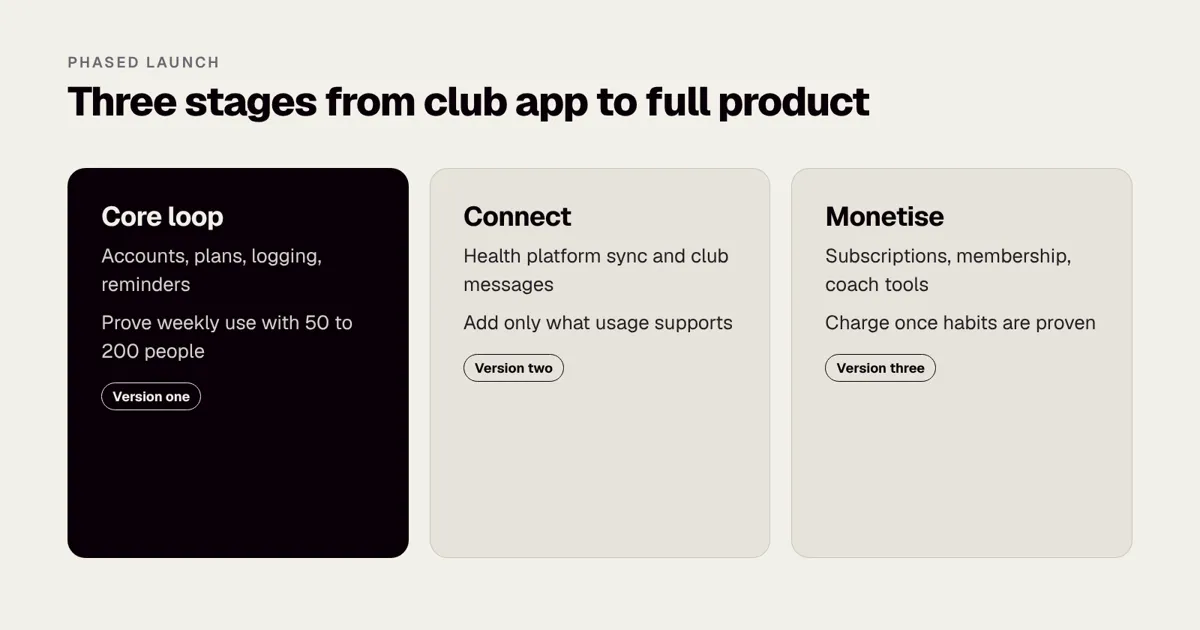
Imagine a local running club with 600 members that wants fixtures, weekly session sign-up and pace groups. A sensible version one has member accounts, a session calendar, sign-up with a cap per group, push reminders and a simple results board. It skips GPS tracking, social feeds and video. That scope sits at the lower end of the MVP range above. Once members use it every week, the club can add Health Connect and HealthKit sync so runs recorded on a watch appear automatically, then a paid membership tier.
The point is sequence: ship the useful core, watch what members actually do, then spend on the next layer. Our guide on how to validate an app idea before you spend £50k applies here, as does the timeline guidance in How long does it take to build an app?.
How would the phases look?
| Phase | What ships | What you learn | Estimated cost |
|---|---|---|---|
| 1 | Accounts, session calendar, sign-up, reminders | Do members use it weekly? | £28,000 to £40,000 |
| 2 | Results board, pace groups, club messages | Which groups are most active? | £10,000 to £18,000 |
| 3 | Health platform sync, route sharing | Do members want automatic logging? | £12,000 to £20,000 |
| 4 | Paid membership tier, club shop | Will members pay? | £10,000 to £18,000 |
These are market estimates for a UK build, not quotes. The point of phasing is that the club can stop after any phase if usage does not justify the next step.
What does a second example look like: a studio class booking app?
A boutique studio offers 60 classes a week and sells class packs and memberships. Its customers book through a website that is hard to use on a phone, and the front desk spends hours on the telephone. The app needs a timetable, booking and waiting lists, pass balances, payment, reminders and check-in with a QR code. The staff need a simple admin to set the timetable and see attendance.
This is a booking product more than a fitness product, and the main risks are different from a tracker. Overbooking, failed payments and cancellation rules cause most support calls. Plan the rules first: how late can a customer cancel, what happens to a pass if the studio cancels, and who handles a no-show. How to add booking calendar to your app and Mistakes to avoid when building a booking app cover this in detail. Booking and scheduling apps for service businesses is a related guide for the wider category.
How do you find a development partner for a fitness app?
Look for evidence of three things: a record of shipping consumer apps, care with sensitive data and a clear way to control cost. Ask for examples of apps that are live in the stores, ask how the team handles permissions and privacy, and ask how a fixed price is agreed before development starts. How to choose an app development company in the UK: a 2026 checklist, 20 questions to ask an app developer before you sign and What a good app development proposal looks like give you a framework.
At Rounded Labs we have been building apps since 2007 and built the UK’s first mobile banking app, MoBank, so we are used to products where trust and reliability are central. We have also worked at scale: Superdry across 768 locations in over 100 countries, and Waterstones, where we delivered an app, a mobile site and an eBooks API in 12 weeks. Our fixed-price productised services help before a full build: a Mobile Product Discovery Sprint at £9,500 turns an idea into a prototype and a costed plan, and a Tech Architecture Audit at £7,500 reviews an existing system. Projects typically run £30,000 to £250,000+. See the pricing page.
Questions to ask a supplier before you sign
- Which consumer apps have you shipped, and can I see them live?
- How do you handle health data and permissions?
- How will we agree scope and a fixed price before development starts?
- What happens if Apple or Google rejects the app?
- Who owns the code and the designs when the project ends?
- What does support look like after launch?
See Why Apple rejects apps, and how to avoid it and Who owns the code? IP, contracts and escrow for UK app projects.
How should you launch and grow a fitness app?
Launch to a small group first. A club, a gym, a coach’s existing clients or a local running community gives you real users and honest feedback without the cost of mass marketing. Aim for a first cohort of 50 to 200 people who share the same need.
The first 90 days
- Weeks 1 to 2. Soft launch to the first cohort. Watch onboarding completion and first workout completion.
- Weeks 3 to 6. Fix the top three friction points. Talk to ten users. Check the reminder schedule.
- Weeks 7 to 12. Measure week four retention. If people are returning, add the next feature. If not, change the core loop before adding anything.
Useful numbers to watch include the share of new users who finish a first workout, the share still active after a week and after a month, and the number of workouts per active user per week. See App retention: the metrics that matter after launch. How to get your first 1,000 app users and App Store Optimisation basics for UK businesses cover acquisition, and How to get more app reviews and handle bad ones covers reviews.
Where could AI fit?
AI features, such as personalised plans, form feedback from the camera or a chat coach, are tempting. They are also risky in a health context, because wrong advice can harm people and claims can attract regulators. If you explore AI, start with low-risk uses such as summarising a user’s week or suggesting a plan from a set of coach-approved options, and avoid anything that sounds like medical advice. How to add AI features to an existing app, Computer vision in mobile apps and Making AI features safe: hallucinations, privacy and security set out how to approach this.
What are the most common mistakes in fitness app projects?
- Building for everyone. A broad app competes with free giants. A narrow one can win a niche.
- Forgetting content. Programmes and videos take time and money, and quality matters.
- Asking for too much data too early. Permission requests on the first screen lower trust.
- Ignoring offline use. Gyms and trails have patchy signal.
- Overbuilding social features before a community exists.
- Making medical claims by accident. Keep wording within fitness and wellbeing.
- Underbudgeting running costs. Hosting, video, maps and updates continue every year.
- Skipping retention measurement. Downloads are not success; weekly use is.
- Hiding cancellation. It leads to refunds, complaints and store reviews that hurt growth.
- Skipping real-device testing of wearables, GPS and background behaviour.
Mistakes to avoid when building a fitness app expands on several of these.
What should you do next?
Use this list to move from idea to a costed plan.
- Write one sentence naming the person you serve and the problem you solve.
- Choose one app type from the table at the top, and one first group of users.
- List the five features that make up the core loop, and park the rest.
- Decide which health data you truly need, and which you can leave alone.
- Decide how the app will make money before you design the screens.
- Budget for content, legal advice, store fees and running costs, not only the build.
- Test demand with a prototype or a landing page before you commission the full build.
- Ask two or three suppliers to quote against the same written scope.
If you would like help, talk to a co-founder and we will tell you which row of the cost table you are in. Our Mobile Product Discovery Sprint is a fixed-price way to turn an idea into a prototype and a plan; details are on the pricing page. If you already have an app that needs attention, How to audit an existing app’s code and How to rescue a failing app project are useful next reads.
Frequently asked questions
How long does it take to build a fitness app?
A focused MVP usually takes around three to five months from discovery to store release, depending on scope and how quickly decisions are made. Apps with wearable sync, video or payments take longer. Allow extra time for App Store and Google Play review. See How long does it take to build an app?.
Do I need a doctor or clinical approval?
Not for a general fitness or wellbeing app. If you make medical claims, such as diagnosing or treating a condition, your software may be regulated as a medical device, which changes the process and cost. Keep your wording within fitness and general wellbeing, or take specialist advice.
How do fitness apps make money?
The usual models are subscriptions, one-off programme purchases, club or gym memberships, and corporate wellness contracts. Advertising works at large scale but sits badly with sensitive health data. Choose the model before you design the screens, because it shapes the whole flow.
Can I use data from Apple Watch and Garmin?
Yes, through Apple HealthKit and Android Health Connect, provided the watch or its companion app writes into them and the user grants permission. Direct integrations with a specific brand’s cloud service are possible but add cost and maintenance.
What should I build first?
The smallest loop that gets someone to complete a workout, see their progress and come back. Everything else, including social features and leaderboards, can wait until you have real usage data.
How much does it cost to run a fitness app each year?
As a market estimate, budget 15 to 20% of the build cost per year for hosting, updates, support and security. Video, maps and wearable features can push this higher. Content refresh is a separate cost.
Is health data from a fitness app covered by HIPAA?
Usually not, unless you work with healthcare providers or insurers. In the US, other rules such as the FTC Health Breach Notification Rule and state privacy laws can still apply. This is general information, not legal advice, so check the official sources and take advice for your own app.
Official sources and further reading
Talk it through with one of our co-founders. 30 minutes, no pressure.