

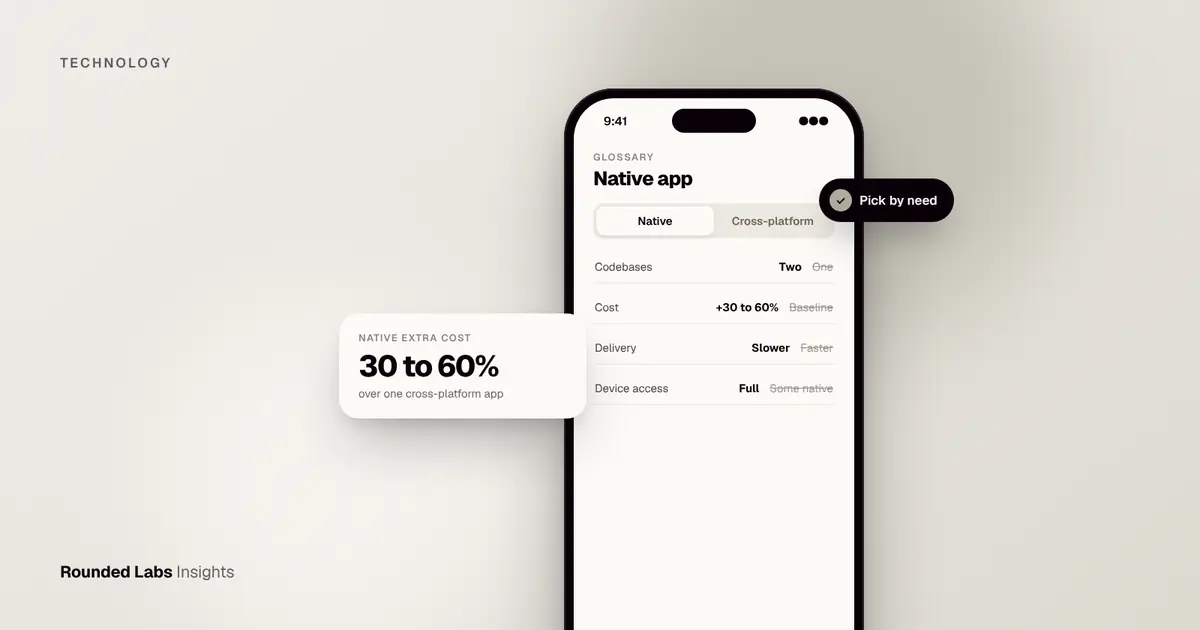
A native app is a mobile app built specifically for one operating system, using that platform’s own languages and tools: Swift and SwiftUI for iPhone and iPad, Kotlin and Jetpack Compose for Android. Native apps get the best performance, the fullest access to device features and the most platform-familiar experience, at the cost of building and maintaining a separate app for each platform.
We have built native apps since before the App Store opened, including early iPhone apps for Waterstones, Next and HMV, and we have been in business since 2007. This guide explains what native means today, how it compares with the alternatives, what it costs and, most usefully, how to decide whether your product needs it. Cost figures are market estimates, not quotes.
Key facts
- iOS native: Swift, with SwiftUI or UIKit, built in Xcode.
- Android native: Kotlin, with Jetpack Compose or XML views, built in Android Studio.
- Best for: performance-critical, graphics-heavy or deeply device-integrated apps.
- Two native apps usually cost 30 to 60% more than one cross-platform app of the same scope (market estimate).
- Many cross-platform apps still include some native code for specific features, so native skills matter either way.
- Rounded Labs works to a fixed price agreed before development starts, whichever approach you choose. See the pricing page.
What does “native” actually mean?
The word comes from the idea of an app being “native” to its environment. An iPhone has an operating system (iOS), a set of official development kits, a set of official programming languages and a user interface toolkit. A native iPhone app is written in those languages, uses those kits and draws its screens with that toolkit. An Android phone has its own equivalent set, and a native Android app uses that one instead.
The practical consequence is that a native app speaks directly to the operating system. When it wants to read the camera, play a haptic tap, schedule a notification or draw a scrolling list, it calls the platform’s own code, with nothing in between translating the request. That directness is the source of nearly every advantage and every disadvantage in this guide.
A short history
When Apple opened the App Store in 2008, native was the only way to build an iPhone app, and the language was Objective-C. Android apps were written in Java. Over the years both platforms modernised. Apple introduced Swift in 2014 and SwiftUI, a declarative way to describe screens, in 2019. Google named Kotlin a preferred language for Android development in 2019 and promoted Jetpack Compose as its modern interface toolkit. Today a new native project will almost always use Swift and Kotlin, while older codebases carry Objective-C and Java that still need maintenance.
What native is not
It helps to rule out some common confusions.
- A native app is not the same as an app that merely looks good. Plenty of cross-platform apps look excellent, and plenty of native apps are poorly designed.
- A native app is not necessarily more secure. Security depends on how you design, build and test the app. See our mobile app security checklist.
- A native app is not “an app from the app store” by definition. Hybrid and cross-platform apps are also distributed through the stores.
- A native app does not mean you cannot share a backend. Both native apps normally talk to the same server, as we explain later.
How is a native app different from other app types?
Four broad approaches exist, and many real products mix them. The table gives the plain comparison.
| Type | How it is built | Strengths | Limits |
|---|---|---|---|
| Native | Separate apps in Swift and Kotlin | Best performance, full device access, platform feel | Two codebases, higher cost |
| Cross-platform | One codebase with Flutter, React Native or Kotlin Multiplatform | Lower cost, faster delivery | Some native work still needed; framework dependency |
| Hybrid | Web code inside a native wrapper (for example Ionic, Capacitor) | Reuse of web skills | Weaker performance and feel |
| Progressive web app | A website that installs to the home screen | No app store needed | Limited device features, weaker presence on iOS |
What is a cross-platform app explains the second row in detail, and PWA vs native app: which does your business need compares the last row with native. If you are weighing a drag and drop builder, low-code vs custom app development covers what those tools can and cannot do.
Where the lines blur
In practice the categories overlap. A Flutter or React Native app is cross-platform, but it calls native code for payments, biometric login and push notifications, and it ships inside a native shell. A Kotlin Multiplatform project shares business logic between platforms but may keep fully native screens. A “native” app may embed a web view for a help centre or a legal page. So the useful question is rarely “is it purely native?” and more often “which parts of this product need to be native, and which can be shared?”
Which languages and tools do native developers use?
Each platform has an official toolchain, maintained by the platform owner, and it is free to download.
| iOS and iPadOS | Android | |
|---|---|---|
| Main language today | Swift | Kotlin |
| Older language still found | Objective-C | Java |
| Modern interface toolkit | SwiftUI | Jetpack Compose |
| Older interface toolkit | UIKit | XML layouts and Views |
| Official development environment | Xcode (runs on macOS only) | Android Studio (macOS, Windows, Linux) |
| Store | Apple App Store | Google Play |
| Annual developer account | Apple Developer Program | Google Play Console |
Apple documents its language at Swift and its design rules at the Human Interface Guidelines. Google documents Kotlin for Android and its wider developer resources at Android Developers. JetBrains, the company that created Kotlin, publishes the language itself at kotlinlang.org.
Swift and SwiftUI
Swift is a modern, strongly typed language designed to catch many mistakes before an app runs. SwiftUI lets a developer describe a screen as a function of its data: change the data and the screen updates. It is quicker to write than the older UIKit approach for most screens, though UIKit remains important for complex custom behaviour and for older codebases. Our comparison SwiftUI vs UIKit for new iOS apps explains when each is the better choice.
Kotlin and Jetpack Compose
Kotlin is concise, null-safe and fully interoperable with Java, which made it easy for Android teams to adopt gradually. Jetpack Compose does for Android what SwiftUI does for iOS: a declarative way to build screens. The two toolkits look similar in spirit, which helps teams that work on both platforms to reason about shared designs.
Why the toolchain matters to a buyer
You do not need to learn these tools, but three consequences are worth knowing. First, building an iOS app requires a Mac, so any team needs Apple hardware and the processes to manage signing certificates and provisioning. Second, each platform releases a new major version of its operating system every year, which means annual compatibility work. Third, hiring and continuity: Swift and Kotlin are different skill sets, so a native project needs people who are good at each, not one generalist who is adequate at both.
What are the advantages of native apps?
Performance you can feel
Native code runs directly on the device and uses the platform’s own rendering engine. For most business apps the difference from a well built cross-platform app is small and users cannot tell. It becomes visible in specific places: very long lists with images, complex animation, video playback and editing, camera processing, games, augmented reality and anything that must respond within a few milliseconds. If you have ever used an app that stutters when scrolling, you have seen what poor performance looks like. Our guide on why apps feel slow, and how to fix it covers the common causes, and many of them are backend or image problems that affect native and cross-platform apps equally.
New device features on day one
Apple and Google add capabilities every year: new widget types, lock screen features, new camera modes, on-device machine learning, health sensors, wearables and car integrations. These arrive in the native development kits first. A cross-platform framework needs time to wrap each new feature, and sometimes a project simply waits, or writes the native part itself. If your product’s value depends on a brand new feature, native avoids the wait. Examples include Apple Watch and wearable apps for business and on-device AI on iPhone.
Platform feel and accessibility
Users carry strong habits from the other apps on their phone: where the back gesture goes, how a sheet slides up, how text scales when they change their accessibility settings. Native toolkits give you those behaviours by default. Accessibility is a good example. Screen readers, larger text, reduced motion and switch controls are built into the native toolkits, and using the standard components gets most of the way there. Cross-platform tools support accessibility too, but a team has to check it works as expected on each platform. See App accessibility: the European Accessibility Act and UK guidance.
Stability and independence
A native app depends on the platform owner and on nothing else. A cross-platform app depends on the platform owner and on its framework’s maintainers. Frameworks such as Flutter and React Native are well supported, but any dependency is a risk to manage across a product’s life of five or ten years. With native there is one less link in the chain.
Deep hardware access
Bluetooth accessories, near field communication, custom camera pipelines, background location, health sensors and low level audio are all available first and most fully through native interfaces. If your product talks to a medical device, a smart lock, a scanner or a vehicle, a native layer is almost always involved, even in a cross-platform build. Our implementation guides on Bluetooth device pairing and biometric login show how this looks in practice.
What are the disadvantages of native apps?
Higher build cost
Two apps cost more than one. The saving from a cross-platform approach comes from sharing the work that is the same on both sides: screens, business logic and tests. With two native apps, that work is done twice. Market estimates put the extra at 30 to 60% over a cross-platform build of the same scope, but the exact figure depends on how much of your app is custom interface and how much is shared backend work. Native vs cross-platform: what it does to your budget goes through the numbers.
Two skill sets to hire and keep
You need iOS and Android engineers, and you need to keep them. If an engineer leaves and you have only one on that platform, the app may stall. Ask every supplier how they cover absence, and make sure the code is documented well enough for a new person to pick up.
Feature drift
When two teams build two apps, they can drift apart. One app gets a feature a month earlier. A bug is fixed on one side and not the other. The two apps start to behave differently, and support staff cannot answer questions without asking which phone the customer has. The fix is process: one backlog, one set of acceptance criteria and regular joint reviews.
More testing
Each app is tested on its own range of devices and operating system versions. Android in particular runs on a very wide range of screen sizes and manufacturer variations. Automated tests help, but your test effort is closer to double than to one and a half. App testing explained: QA, UAT and beta testing covers how testing is structured.
Slower to respond to change
Every change to a native app that touches code requires a new build, a store review and a user update. We return to this in the section on early native apps, because it shapes how you should design the product.
Native or cross-platform? We build both and will recommend what fits your product, budget and roadmap. Book a 30-minute call with a co-founder.
When should you choose native?
| Choose native when | Example |
|---|---|
| Performance is part of the product | Games, AR, video editing, real-time trading |
| You rely on the newest platform features | Apple Watch, widgets, on-device AI, CarPlay |
| Deep hardware integration is needed | Bluetooth medical devices, custom camera processing |
| You only need one platform | An iPad app for field staff on company devices |
| You have strong separate iOS and Android teams | Large consumer brands with dedicated teams |
For most business apps built from scratch, cross-platform offers better value. iOS first or Android first covers whether to launch on one platform first, which is often the cheapest way to start native.
A decision test in six questions
Answer these honestly before you commit. Each “yes” nudges you toward native.
- Does a core feature depend on something that only the native kit offers, such as a widget, a watch app, or a custom camera pipeline?
- Would a one frame delay or a dropped frame harm the experience, as in a game, a drawing tool or a live trading screen?
- Do you need a feature on the day the new operating system releases it?
- Is your audience concentrated on one platform, so that a single native app reaches nearly everyone who matters?
- Does your organisation already employ iOS and Android engineers, or have a long term arrangement with a supplier that does?
- Is the product expected to live for many years with a stable team, so that framework independence has real value?
If you answered yes to none or one of these, cross-platform will probably serve you better. Two or three suggests a mixed approach with native modules. Four or more points toward fully native.
Scenarios from real project types
A field service app on company iPads. The employer controls the hardware and only needs iPad. A native iOS app avoids building anything twice, can use the camera and signature capture natively and can work offline. Native wins because only one platform is needed.
A consumer retail app with a large audience on both platforms. The core is a catalogue, search, basket, checkout and loyalty. Almost all of that is shared. Cross-platform is the strong default, with native modules for payments, push notifications and perhaps Apple Pay and Google Pay. The Superdry work is a good example of retail scale: the business has 768 locations in over 100 countries, so reliability and consistent behaviour matter more than raw frame rate.
A fitness app with workout tracking, heart rate and a watch app. Sensors, background tasks and the watch are all native territory. Even if the main screens are cross-platform, the health and watch parts would be native. We cover this domain in Sports and fitness apps.
A banking or investing app. Security, biometrics and smooth real-time data matter, and the user’s trust depends on polish. Many financial firms choose native for the main experience. We built MoBank, the UK’s first mobile banking app, and later Dabbl, a trading app for first-time investors, so we know how demanding this area is.
A simple content or booking app for a small business. There is little that requires native. Cross-platform, or even a progressive web app, will cost less and deliver the same value.
How much does a native app cost?
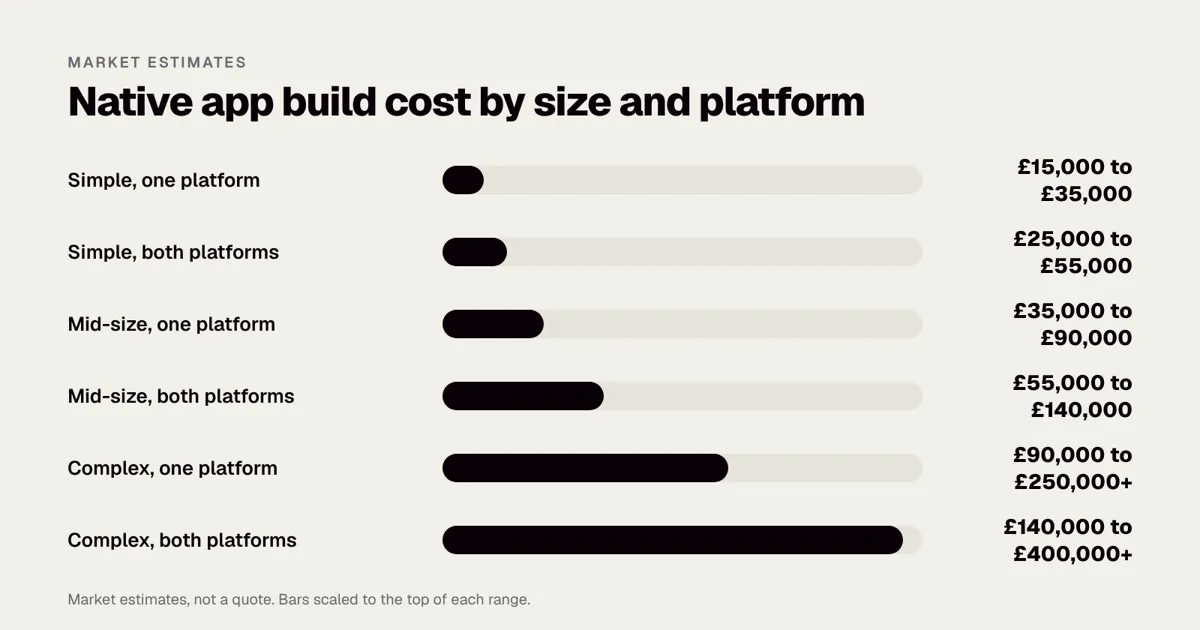
The ranges below are market estimates, not quotes. Real prices depend on scope, team and timeline.
| App size | One native platform (UK) | Both platforms native (UK) |
|---|---|---|
| Simple | £15,000 to £35,000 | £25,000 to £55,000 |
| Mid-size | £35,000 to £90,000 | £55,000 to £140,000 |
| Complex | £90,000 to £250,000+ | £140,000 to £400,000+ |
See our app cost guide, How much does it cost to build an app in the US? 2027 prices in dollars for the US and App development cost in Europe for Europe. For individual features, App feature costs: login, payments, chat and maps breaks down the parts.
What drives the price up or down
| Cost driver | Effect on price | Why |
|---|---|---|
| Number of distinct screens | Linear | Every screen is designed, built and tested twice in native |
| Custom animation and design | Strong | Bespoke interaction takes more engineering than standard components |
| Offline mode | Strong | Local storage, sync and conflict handling on both platforms |
| Integrations (payments, ERP, CRM) | Moderate to strong | Each integration needs build and test on the backend and both apps |
| Hardware features | Moderate | Bluetooth and sensors need device testing |
| Regulated sector | Moderate | Security reviews, audit trails and documentation add time |
| Platform scope | Large | One platform versus two is the single largest lever |
How we price
Rounded Labs always works to a fixed price agreed before development starts, set out on our pricing page. Projects typically run from £30,000 to £250,000+. If you are not sure where your product sits, our productised services are designed to answer that question first: the Mobile Product Discovery Sprint is £9,500, the Tech Architecture Audit is £7,500 and the Legacy App Rescue Assessment is £6,500. A fixed price only means something when the scope is written down, which is why we begin with discovery. What happens in a discovery phase, and why it saves money explains the process, and Fixed price vs time and materials for app projects explains why we prefer fixed price.
A worked example: a native iOS app for a field team
Suppose a company with 60 engineers wants an iPad app to replace paper job sheets. The scope: job list, offline checklists, photos with annotations, customer signatures, parts lookup and sync with an existing back office system.
| Item | Typical effort | Market estimate |
|---|---|---|
| Discovery, workflow mapping and design | 3 to 4 weeks | £8,000 to £14,000 |
| iPad app in Swift and SwiftUI | 10 to 12 weeks | £28,000 to £42,000 |
| Offline storage and sync | 4 to 5 weeks | £10,000 to £16,000 |
| Backend API and admin screens | 6 to 8 weeks | £15,000 to £24,000 |
| Back office integration | 3 to 4 weeks | £8,000 to £14,000 |
| Testing, device rollout and training | 3 weeks | £6,000 to £10,000 |
| Total | About 5 to 6 months | £75,000 to £120,000 |
Because it is iPad only, there is no Android build. Had the company insisted on iPad and Android tablets, the app work would roughly double, and a cross-platform build might have been cheaper. The lesson is that platform scope is a business decision before it is a technical one.
How is a native app built?
A typical native project runs two parallel tracks that share design, backend and planning.
- Shared discovery and design. One product design, adapted to each platform’s conventions, such as navigation bars on iOS and Material components on Android. This is where you decide what is in the first release.
- Shared backend. One API and database serve both apps. What is a backend as a service? explains backend options, and Firebase, Supabase or a custom backend? helps you choose between them.
- Two app builds. An iOS developer works in Swift and Xcode; an Android developer in Kotlin and Android Studio. Each uses the platform’s own libraries for networking, storage and notifications.
- Testing. Each app is tested on a range of real devices, with automated tests in a CI/CD pipeline. What is CI/CD for apps? explains how builds and tests are automated.
- Release. The iOS app goes through App Store review, the Android app through Google Play review, usually on the same day for a well prepared submission.
How the two tracks stay in step
Keeping features in step across two apps needs a shared backlog and regular joint reviews, otherwise the platforms drift apart. Practical habits that work:
- One written specification with acceptance criteria that apply to both platforms. Our free app specification template is a starting point.
- A single design file with platform variants clearly marked, not two separate designs.
- Weekly demonstrations where both builds are shown side by side.
- A shared definition of done: a feature is finished only when it works on both platforms or the difference is recorded as a deliberate decision.
- A shared test plan, so a bug found on one platform prompts a check on the other.
The first 90 days
In a well run native project, the first weeks are mostly design, architecture and the backend contract. Visible app screens appear a few weeks in, usually on one platform first, because it is faster to prove a design on one platform before replicating it. By the end of the first quarter you should be able to hold a working build on a real phone and test the core journey. Working with an app agency: the first 90 days describes what good looks like.
What skills does a native team need?
At minimum: an iOS engineer, an Android engineer, a backend engineer, a designer who knows both platforms’ guidelines, and a tester. Larger apps add a product manager and more engineers per platform. Make sure each platform has more than one person who understands the code, so the app is not dependent on a single developer.
| Role | What they do | Why it matters |
|---|---|---|
| iOS engineer | Builds the Swift app, handles signing and App Store rules | Apple rules are strict and change each year |
| Android engineer | Builds the Kotlin app and tests across devices | Device variety creates edge cases |
| Backend engineer | Builds APIs, data, security and integrations | Both apps depend on it |
| Designer | Designs flows, components and states for both platforms | Consistency without copying one platform onto the other |
| Tester | Plans device coverage and regression checks | Catches issues one platform has and the other does not |
| Product owner | Owns the backlog and decisions | Prevents drift and scope creep |
If you are comparing ways to staff this, App agency vs freelancer vs in-house team sets out the trade offs, and How to choose an app development company in the UK gives a checklist for choosing a supplier.
What did early native apps teach us?
When we built the Next iPhone app in 2009, native was the only option. We designed parts of the checkout to be controlled from the server so the app could change without waiting for App Store review. That principle still matters: whichever approach you choose, design so that frequent business changes do not need a full app release.
In practice that means deciding in advance which things will change often. Promotional banners, product ranges, copy, feature switches and some pricing logic are good candidates to control from the server. Core navigation, security and payments rarely change and are better fixed in the app. Be careful with the rules: store policies limit how far an app may change its own behaviour after review, so server driven content is fine, while downloading new executable code to change what the app does is not. Check the current Apple and Google developer rules before you design this.
We took a similar approach on the Waterstones project, where an app, a mobile site and an eBooks API were delivered in 12 weeks. A tight timeline rewards sharing the backend and agreeing the contract between app and server early, so both sides can be built in parallel.
Is native development still relevant?
Yes. Cross-platform frameworks have closed much of the gap, but native remains the foundation they build on. Even cross-platform apps need native expertise for payments, notifications, permissions and new platform features. A good mobile team understands both.
There is also a business reason native stays relevant. Platform owners decide what is allowed, how updates are reviewed and which features appear first. A team that understands the native layer can read a new operating system’s release notes and know what affects your product. A team that only knows a framework is waiting for the framework’s maintainers to tell them.
Can you mix native and cross-platform?
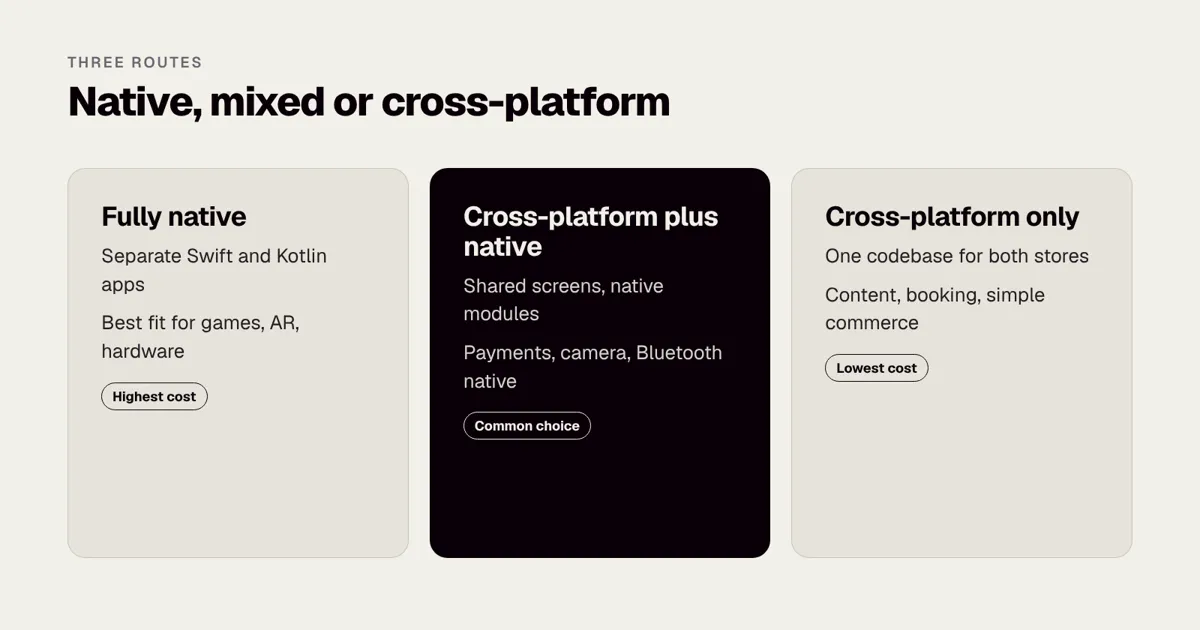
Often the best answer is both. There are three common patterns.
| Pattern | What is shared | What stays native | Good fit |
|---|---|---|---|
| Cross-platform with native modules | Screens, navigation, most logic | Payments, camera, Bluetooth, notifications | Most business and retail apps |
| Shared logic, native screens | Business rules, networking, data models (for example Kotlin Multiplatform) | Every screen | Products where feel matters but logic is complex |
| Native app plus a thin web layer | Content pages and forms | App shell and core journeys | Content heavy apps with a small native core |
Kotlin Multiplatform vs Flutter compares two of the leading routes, and Flutter vs React Native in 2026 compares the two most popular cross-platform frameworks. For a long term view of cost, The total cost of owning an app over five years shows why ownership cost matters more than build cost.
Moving from one approach to another
Teams sometimes start cross-platform to reach the market and later move their most demanding screens to native. Others start native on one platform, prove the product and later add the second platform. Both are legitimate. Converting a native app wholesale to cross-platform usually means rebuilding the interface and much of the logic, so plan any such move as a project with a budget, not a switch. Shared logic through Kotlin Multiplatform is the most gradual route. If you already have an ageing app and you are weighing rebuild against repair, Rebuild or refactor: what it costs to fix an old app and What is technical debt? are worth reading first.
What does native cost to maintain?
Build cost is the smaller part of the story over several years. A native app needs steady care.
- Annual operating system releases. Both platforms ship a major version each year. Test your app against the beta releases in summer so it is ready on launch day. How to prepare your business app for each new iOS release gives a routine.
- Store requirements. Apple and Google update their rules, such as the minimum software kit version used to build submissions and the target Android version. At the time of writing both enforce yearly deadlines, so check their developer sites for the current requirement.
- Library and security updates. Third party components need regular updates. Old libraries are a common source of security flaws.
- Two codebases. Fixes and improvements are made twice.
- Developer accounts. At the time of writing, an Apple Developer Program membership costs $99 a year and a Google Play developer account is a one-off $25. Check Apple’s programme page and Google’s current pages before budgeting.
App maintenance costs in the UK: what to budget after launch has a line by line budget, and market estimates for annual maintenance commonly sit at 15 to 25% of the build cost. Treat that as a planning figure, not a promise.
How should native apps be tested?
Testing is where a native approach most visibly costs more, and also where it earns its keep, because native tooling is mature.
Levels of testing
- Unit tests check small pieces of logic, such as pricing rules or date handling. They are fast and cheap and should run on every change.
- Integration tests check that the app and the backend agree about data.
- User interface tests drive the app like a user, tapping through the main journeys. They are slower and need care to keep reliable.
- Device testing runs the app on real phones and tablets, old and new, small and large, with low battery, poor signal and different languages.
- Beta and user acceptance testing puts the app in the hands of real people before release. Apple’s TestFlight and Google’s testing tracks allow this.
What to test on each platform
| Area | iOS focus | Android focus |
|---|---|---|
| Devices | Recent iPhones and iPads, plus the oldest model you support | A spread of manufacturers, screen sizes and memory levels |
| Operating system | Current and previous major versions | Current plus several earlier versions, as adoption is slower |
| Permissions | Prompts for camera, location, notifications, tracking | Runtime permissions and background limits that vary by manufacturer |
| Interruptions | Calls, low power mode, background refresh | Battery optimisation, doze mode, app standby |
| Accessibility | VoiceOver, Dynamic Type | TalkBack, font scaling |
For security, add a review against the OWASP mobile standards (see the OWASP Mobile Application Security project) and, for higher risk apps, an independent test. What is penetration testing for apps? explains what to expect.
What mistakes should you avoid?
These are the patterns we see most often when a native project goes wrong.
- Choosing native for prestige. Native is a means to an end. If nobody can say which feature needs it, you may be paying for two apps you do not need.
- Building both platforms at the same time with no plan. Launching one platform first, learning, then adding the other is often cheaper and safer. See iOS first or Android first.
- No shared specification. Two teams interpreting the same vague brief produce two different apps.
- Ignoring the backend. Most slow apps are slow because of slow servers or oversized images. A faster language will not fix that.
- Hard coding things that change. If every banner change needs a store release, marketing will resent the app. Design for server controlled content from the start.
- Leaving accessibility to the end. It is cheaper to build it in than to retrofit it.
- Skipping the store rules. Rejections cost days. Why Apple rejects apps, and how to avoid it lists the common reasons.
- No continuity plan. Make sure you own the code and that more than one person understands it. Who owns the code? IP, contracts and escrow for UK app projects explains what to ask for in a contract.
- Measuring nothing. Without analytics you will not know which screens matter. App analytics: what to track from day one is a short starting list.
A pre-commission checklist
Use this list before you brief a supplier or ask for a price.
- Write down the three jobs the app must do for your users in the first release.
- List every device feature the app needs, and mark each as essential or nice to have.
- Decide which platforms you must support at launch and why, using your own customer data if you have it.
- Decide whether any single feature demands native code, and name it.
- List your integrations, such as payments, accounts, stock systems or CRM.
- Decide which content must change without a release.
- Agree who inside your business owns the product after launch.
- Set a budget range and a launch window, and ask suppliers to quote a fixed price against the same written scope. Our guide to how to brief an app development agency shows how.
- Plan how you will measure success, for example retention and task completion. App retention: the metrics that matter after launch covers the main ones.
- Decide what the first release leaves out. What is an MVP? explains how to draw that line.
If you are unsure about the answers, that is the right moment for a short discovery step rather than a full build. The Mobile Product Discovery Sprint is a fixed price £9,500 and ends with a costed plan you can take to any supplier.
How do you choose between suppliers for a native project?
Ask each supplier the same questions and compare the answers side by side.
| Question | What a good answer sounds like |
|---|---|
| Which of your engineers will work on my iOS and Android apps? | Named people with relevant, recent examples, and cover if one is absent |
| Can I see native apps you have shipped? | Live store links and a willingness to explain what was hard |
| How do you keep the two apps in step? | A shared backlog, shared acceptance criteria and joint reviews |
| What do you recommend if native is not necessary? | A straight answer, even if it means a smaller project |
| Who owns the code and the store accounts? | You do, with the repository and accounts in your name |
| How is the price set? | A fixed price against a written scope, with change handled openly |
| What happens after launch? | A clear plan for operating system updates and fixes |
20 questions to ask an app developer before you sign and Red flags when hiring app developers go deeper. We have shipped native apps for large UK brands and a proof point worth asking any supplier for is the same kind of evidence: live apps, real scale and long term relationships.
What should you do next?
If you are still deciding, the cheapest step is to write the jobs-to-be-done list and the decision test above, then discuss them with someone who builds both kinds of app and has no reason to push you either way. Book a call with a co-founder and we will give you an honest view of whether your product needs native, cross-platform or a mix, and which of our fixed price services fits your stage. If you already have an app that needs an independent opinion, the Tech Architecture Audit at £7,500 reviews the code, the structure and the risks, and the Legacy App Rescue Assessment at £6,500 looks at whether to repair or rebuild.
Frequently asked questions
What is an example of a native app?
Apple’s built-in apps such as Messages and Photos are native iOS apps. Many banking, camera and gaming apps are native because they need top performance and full device access. Google’s own apps, such as its camera app on Pixel phones, are native Android apps built with the same tools available to any developer.
Is a native app better than a cross-platform app?
Not always. Native is better for performance-critical and device-heavy apps. Cross-platform is often better value for business, commerce and content apps where speed and cost matter more. The right answer depends on your features, your audience and your budget, not on a general ranking.
What language are native iOS apps written in?
Swift, using SwiftUI or UIKit for the interface. Older apps may use Objective-C, and a single app can mix all three. Apple publishes the language and its documentation at developer.apple.com.
What language are native Android apps written in?
Kotlin is Google’s recommended language, with Jetpack Compose for the interface. Older apps may use Java, and the two languages work together inside one project. Android Studio is the official development environment.
Can I convert a native app to cross-platform later?
Yes, but it usually means rebuilding the interface and much of the logic. Some teams adopt Kotlin Multiplatform to share logic gradually while keeping native interfaces. See Kotlin Multiplatform vs Flutter for how that route compares.
How much more does native cost than cross-platform?
As a market estimate, two native apps cost 30 to 60% more than one cross-platform app of the same scope. A single native app for one platform can cost less than a cross-platform app for two, which is why platform scope matters so much. Rounded Labs quotes a fixed price against a written scope, so you know the figure before development starts.
Do native apps work offline?
They can, because they have full access to local storage and background processing, but offline mode is a design decision, not an automatic benefit. You must decide what data is stored, how it syncs and how conflicts are resolved. See How to make your app work offline.
Official sources and further reading
Talk it through with one of our co-founders. 30 minutes, no pressure.