

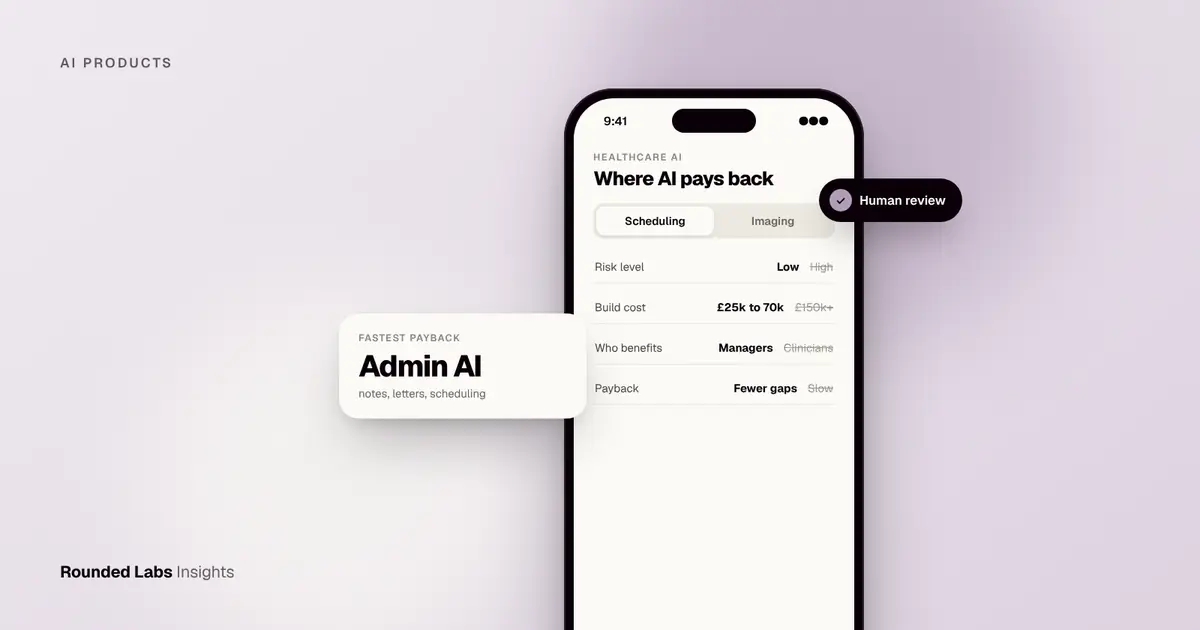
The AI use cases that pay back fastest in healthcare are administrative: clinical note drafting, referral and letter processing, appointment scheduling and patient messaging triage. They save staff time without making clinical decisions. Typical builds cost £30,000 to £120,000, and the ones that diagnose or recommend treatment usually need medical device approval, which adds months and cost.
Healthcare is the sector where AI promises the most and where a wrong choice costs the most. We built an AI prototype for the Bavarian government, where accuracy, audit trails and procurement scrutiny shaped every decision, and the same discipline applies to health. This guide sorts healthcare AI ideas into those that pay back, those that need caution and those to avoid, and it shows how to plan a first project through our AI product development service. It is general information, not legal or clinical advice.
Key facts
- Administrative AI (notes, letters, scheduling, triage of messages) is the lowest-risk and quickest to pay back.
- AI that diagnoses, predicts disease or recommends treatment is usually regulated as a medical device in the UK, US and EU.
- Health data is special category data under UK and EU GDPR and protected health information under HIPAA in the US.
- A human should review every AI output that touches a patient record or a clinical decision.
- Most of the cost is integration, testing and governance, not the AI model itself.
- Our projects are fixed price, agreed before development starts; see our pricing page.
Which healthcare AI use cases pay back?
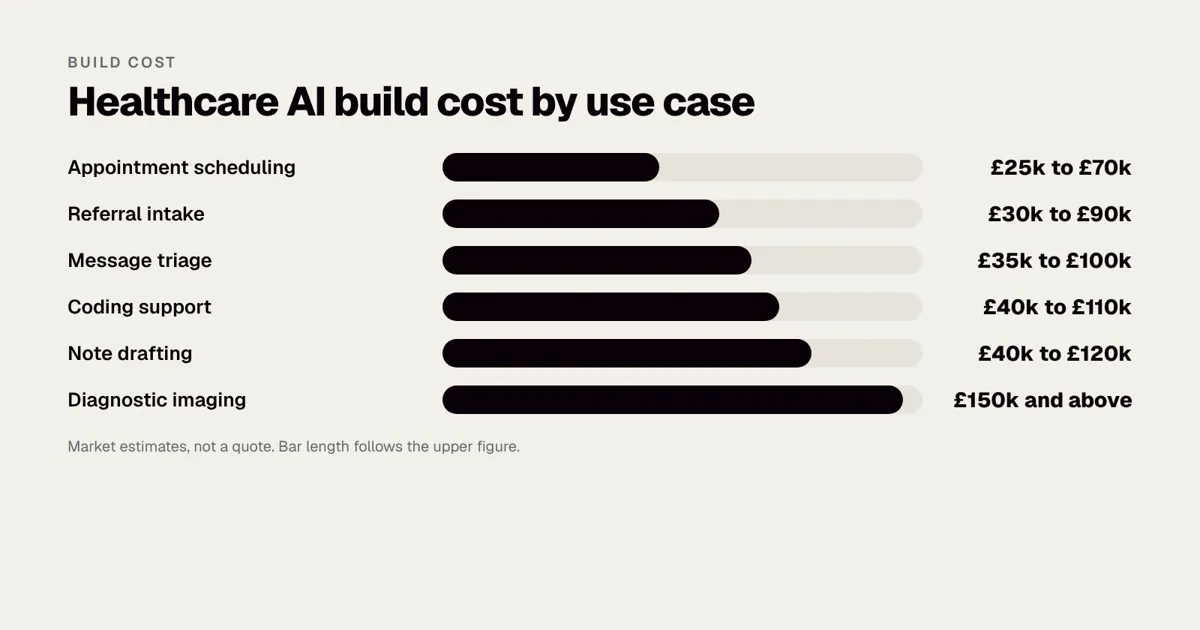
Payback comes from time saved on work that is repetitive, high volume and not a clinical judgement. The table ranks common use cases by how readily they earn their cost. Figures are market estimates for a first production version, not quotes.
| Use case | Who benefits | Risk level | Typical build cost | Payback signal |
|---|---|---|---|---|
| Clinical note and letter drafting from consultations | Clinicians | Medium | £40,000 to £120,000 | Minutes saved per appointment |
| Referral and document intake (reading PDFs, faxes, scans) | Admin teams | Low to medium | £30,000 to £90,000 | Fewer hours of manual data entry |
| Appointment scheduling and no-show prediction | Practice managers | Low | £25,000 to £70,000 | Fewer empty slots |
| Patient message triage and drafted replies | Front desk, nurses | Medium | £35,000 to £100,000 | Shorter response times |
| Coding and billing support | Revenue teams | Medium | £40,000 to £110,000 | Fewer rejected claims |
| Imaging or symptom analysis for diagnosis | Clinicians, patients | High | £150,000 and above, plus approval | Clinical outcomes, slow to prove |
The lower rows of the table are where regulators pay closest attention, and where payback is hardest to prove, because it depends on clinical evidence rather than hours saved. Our guide to AI document processing covers the intake pattern in more depth.
Why administrative work wins first
Healthcare organisations carry a heavy load of writing, filing, chasing and re-keying. Much of it is necessary, little of it needs clinical judgement, and a lot of it is done by skilled people who would rather be doing something else. AI is good at the middle layer of this work: turning messy input (speech, scans, free text) into a structured draft that a person can check quickly.
That pattern has three useful properties. The output is a draft, so a person remains accountable. The saving is easy to count, because you can time the task before and after. And the data you need is usually already in your systems. A diagnostic tool has none of these properties: its output is a judgement, its value is measured in outcomes that take years to show, and the evidence needed is formal.
What does each use case involve in practice?
Clinical note and letter drafting
A clinician finishes a consultation and has to write the note, any referral letter and perhaps a patient summary. Tools in this category capture the conversation, with consent, convert speech to text, and ask a language model to produce a structured draft in the format the specialty uses. The clinician edits and signs it.
What makes it hard is not the summary. It is the details: matching templates for each specialty, handling accents and medical terms, keeping out things that were said but should not be recorded, and putting the final note into the right place in the patient record. A good build also records which parts of the note came from the conversation and which were added by the clinician.
Choose this when clinicians are your most expensive time and notes are a known source of overtime. Avoid it if your record system has no practical way to receive the output, because copy and paste will cancel out the saving.
Referral and document intake
Practices and hospitals receive referrals, test results, discharge letters and forms, often as PDFs, scans or faxes. Someone reads each, decides where it goes and types key facts into the system. AI can read the document, extract the fields, flag missing information and propose a destination. A person confirms.
This is among the safest places to start because the AI is extracting, not deciding, and every field can be shown next to the passage it came from. It is also easy to measure: documents handled each hour, error rate and time to filing. See AI document processing for UK businesses for the general pattern, and RAG for business owners if you want staff to be able to ask questions of a large set of internal documents.
Appointment scheduling and no-show prediction
Empty slots cost money and delay care. AI can predict which appointments are likely to be missed, suggest overbooking levels, send tailored reminders and offer cancelled slots to people on a waiting list. Much of the value comes from simple logic and messaging, with prediction as an extra.
Choose this when you have a year or more of booking history and a clear problem with missed appointments. Take care that predictions are not used to deny care to groups of people who are statistically more likely to miss appointments. A fairness check belongs in the scope.
Patient message triage and drafted replies
Front desks and nurses spend hours on messages: prescription requests, test result queries, admin questions and the occasional urgent worry hidden in a routine message. AI can sort messages by type, draft replies for staff to approve and flag wording that suggests urgency.
The risk is in the urgent message that is missed or misfiled. A safe design treats AI as a second pair of eyes rather than a gatekeeper: every message still reaches a person, and the AI only changes the order and suggests the draft. Our guide to voice and chat interfaces in apps covers the design side of patient-facing conversations.
Coding and billing support
Where services are billed to insurers or commissioners, coding errors lead to rejected claims and delays. AI can suggest codes from clinical notes, check documentation for gaps and flag likely rejections before submission. The saving appears in fewer rejections and faster payment. Because a wrong code has financial and sometimes legal consequences, a coder reviews the suggestions and the system keeps a clear record of who accepted what.
Patient-facing assistants
Chat assistants that answer questions about opening hours, preparation for a procedure or how to use a service are useful and, if limited to approved content, relatively low risk. The risk rises sharply when the assistant starts to interpret symptoms. A sensible rule is that the assistant answers from a reviewed library of content, says clearly when it cannot help, and hands over to a person for anything clinical. Our guide to AI agents inside apps covers when automated assistants are worth building.
Imaging and symptom analysis
Tools that read scans, photographs or symptom descriptions to suggest a diagnosis sit at the far end of the risk scale. They need clinical evidence, regulatory approval, post-market monitoring and usually a specialist team. Some are very valuable, but they are products in their own right, not features to bolt on. If you are going in this direction, read the section on regulation below first, and see computer vision in mobile apps.
Which use cases need regulatory approval?
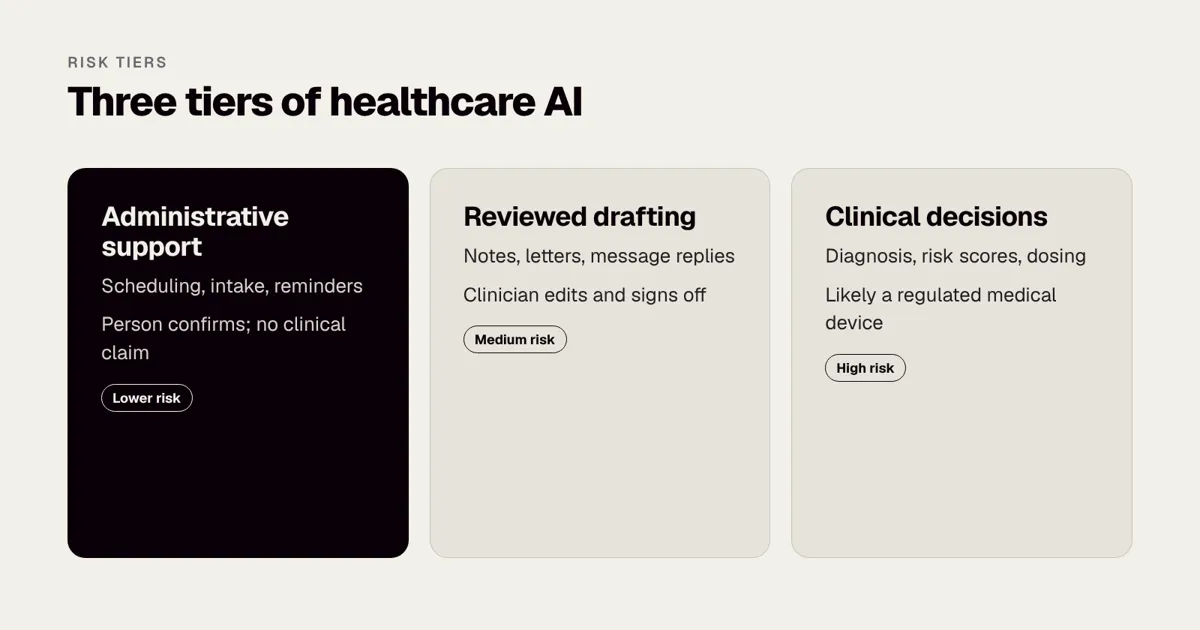
If your software is intended to diagnose, monitor, predict or treat a condition, regulators are likely to treat it as a medical device, whatever technology sits inside. Intended purpose is the test: what you claim the software does, not how clever it is.
- UK: the MHRA regulates software as a medical device, and NHS suppliers also face clinical safety standards. See MHRA rules for software as a medical device and DCB0129 clinical safety for health apps.
- US: the FDA regulates software that meets the medical device definition and publishes a list of AI-enabled devices it has authorised. HIPAA applies to the data in any case; see How to build a HIPAA-compliant app.
- EU: the Medical Device Regulation applies, and the EU AI Act classes many AI medical devices as high-risk, with extra duties on data quality, documentation and human oversight. The AI Act applies in stages, so check the current official dates and any changes to them. Our guide to the EU AI Act for app and SaaS owners explains what applies and when.
A drafting tool that a clinician always reviews and signs off usually sits in a different category from one that suggests a diagnosis on its own. Wording matters: decide your intended purpose early, and take advice before you market anything as clinical.
How intended purpose shows up in real wording
The line between an administrative tool and a regulated one often turns on a few words in your product description, your marketing and your user interface. The examples below are illustrative, not legal conclusions. At the time of writing, regulators in each region publish their own guidance, so check it and take specialist advice.
| What the product says it does | Likely direction | Why |
|---|---|---|
| “Drafts a consultation note for the clinician to edit” | Administrative support | The output is text; the clinician decides what is recorded |
| “Extracts patient details from referral letters” | Administrative support | Data entry, with a person confirming |
| “Sends reminders to reduce missed appointments” | Administrative support | No clinical purpose |
| “Flags patients at high risk of deterioration” | Likely regulated | Predicts a clinical condition |
| “Suggests a diagnosis from the symptoms entered” | Likely regulated | Diagnostic purpose |
| “Recommends a medicine dose” | Likely regulated | Drives treatment decisions |
| “Reads a scan and highlights suspicious areas” | Likely regulated | Analyses medical images for clinical use |
A common trap is a tool that begins as a note drafter and then adds “suggested diagnoses” because users ask for it. That change can alter the regulatory status of the whole product. Treat every new feature as a possible change to intended purpose, and record the decision.
Bodies to know
In the UK, the MHRA regulates medical devices, NHS England publishes guidance for health technology and the Care Quality Commission inspects providers who use it. In the US, the FDA maintains information on AI-enabled devices. In the EU, the European Commission publishes the AI Act framework. Nothing here replaces advice from a regulatory specialist for your product.
What does a worked example look like?
Take an illustrative private clinic group with 40 clinicians, each seeing about 18 patients a day, who want to cut the time spent writing consultation notes and referral letters. This is a scenario for planning, not a client story.
- Scope: the AI listens to a consultation, with patient consent, and drafts a structured note and a referral letter. The clinician edits and approves. Nothing is filed without sign-off.
- Time saved: if drafting saves four minutes per patient, that is 72 minutes per clinician per day, or about 48 hours a day across 40 clinicians.
- Value: at a loaded staff cost of £60 an hour, the saving is about £2,900 a day. Even if only half is realised in practice, a £100,000 build pays back in roughly three to four months of operation. Treat these numbers as a model to test with a pilot, not a promise.
- Costs to add: consent capture, integration with the clinic’s record system, a review screen, audit logging, and running costs for speech and language model calls.
The model is the easy part. Matching the output to the way each specialty writes notes, and connecting it safely to the patient record, is where the budget goes.
Have a healthcare AI idea and want to know if it pays back? We will help you separate the safe, profitable use case from the regulated one before you spend anything. Book a 30-minute call with a co-founder.
Stress-testing the numbers
A payback model is only as good as its weakest assumption. The table below shows how the same clinic’s result moves when you change the time saved and the share of that time which turns into something useful. All figures are illustrative and use the same 40 clinicians, 18 patients a day and £60 an hour loaded cost.
| Minutes saved per patient | Share of saving realised | Daily value | Months to repay a £100,000 build, at about 21 working days a month |
|---|---|---|---|
| 4 | 100% | about £2,880 | about 1.7 |
| 4 | 50% | about £1,440 | about 3.3 |
| 2 | 50% | about £720 | about 6.6 |
| 1 | 50% | about £360 | about 13.2 |
| 2 | 25% | about £360 | about 13.2 |
The takeaway is that the case holds up even in cautious scenarios, but it depends on whether time saved becomes more patients seen, shorter days, less overtime or reduced locum use. If saved minutes simply disappear into the day, the cash value is lower, though the benefit to staff wellbeing may be real. Decide beforehand which outcome you are aiming for and how you will count it.
A second example: referral intake
Imagine an outpatient department that receives 3,000 referrals a month, and each takes an administrator about six minutes to read, check and enter. That is 300 hours a month. If AI extraction cuts the time to two minutes of review per referral, the saving is about 200 hours a month. At the same £60 an hour loaded cost, that is about £12,000 a month before running costs. A build at the middle of the table’s range would repay in under a year even after allowing for running costs, but the real test is the error rate: if reviewers must fix one field in five, the saving shrinks. A pilot on a sample of real referrals will tell you.
What data and privacy rules apply?
Health data gets the strictest treatment in every region we work in.
- UK and EU: health data is special category data under GDPR, so you need a lawful basis plus an extra condition, and a data protection impact assessment is normally required. See How to build a GDPR-compliant app.
- UK NHS suppliers: expect to complete the Data Security and Protection Toolkit; see NHS DSPT for app suppliers. The toolkit itself is run at the DSP Toolkit site.
- US: HIPAA requires a business associate agreement with any vendor that handles protected health information, including AI providers. Not every AI vendor will sign one, so check before you design around it. The HHS HIPAA pages explain the rules.
- Everywhere: confirm in writing whether your AI provider stores prompts, trains on your data or processes it outside your region. Many healthcare projects choose providers that offer zero retention and regional hosting.
Our guide to making AI features safe covers prompt injection, hallucinations and leakage, which matter more when the data is a patient record. The Information Commissioner’s Office publishes guidance on AI and data protection for UK organisations. Laws and guidance change, so check the official source at the time you plan, and take legal advice. This guide is general information, not legal advice.
A data checklist before you build
| Question | Why it matters |
|---|---|
| What exact data does the AI see? | Minimise it; do not send what the task does not need |
| Where is it processed and stored? | Regional hosting may be required by contract or law |
| Does the provider keep prompts or train on them? | Many enterprise plans allow you to turn this off; get it in writing |
| Who can see outputs and logs? | Logs of patient data are patient data |
| How long do you keep audio, transcripts and drafts? | Set a retention period and delete on schedule |
| How does a patient exercise their rights? | Access, correction and deletion must reach the AI’s copies too |
| What is the lawful basis and who signed off the DPIA? | A named owner and a dated record |
| What happens to recordings of consultations? | Consent, storage and retention need explicit rules |
Consent and transparency
Where a consultation is recorded or processed by AI, patients should be told clearly, in plain language, before it starts, and offered a way to say no without affecting their care. Signage, a short spoken statement and a line in the booking message all help. If a patient declines, the clinician needs a one-click way to switch the tool off for that appointment, and the workflow must continue by hand. Build this in from the beginning. Retrofitting consent is slow and awkward.
How do you make AI safe enough for clinical settings?
Safety is a design task, not a disclaimer.
- Keep a human in the loop for anything that enters a record or reaches a patient.
- Show sources. Where the AI summarises a document, link each statement back to the passage it came from.
- Measure accuracy on your own data before launch, with a test set reviewed by clinicians, and keep measuring after launch.
- Log everything: inputs, outputs, edits and approvals, so an error can be traced.
- Plan for failure. If the AI is down or unsure, the workflow must still work by hand.
- Avoid fully automated clinical decisions until you have the evidence and approval to support them.
Computer vision in healthcare, such as reading wound photos or scans, needs particular care; see computer vision in mobile apps.
The kinds of error to plan for
Language models can produce fluent text that is wrong. In healthcare the useful way to think about this is to list the specific errors that matter and design against each.
| Error type | Example | Design response |
|---|---|---|
| Invented detail | A note includes an allergy the patient never mentioned | Show source passages; highlight any statement without a source |
| Omission | A medication change is missing from the summary | Checklists for key fields; ask the clinician to confirm them |
| Misattribution | A relative’s history is recorded as the patient’s | Ask the AI to label speakers; review screens that separate them |
| Wrong patient | Draft saved to another record | Confirm patient identity on the review screen before filing |
| Over-confidence | The tool states a probability that is not supported | Avoid numerical risk scores unless validated |
| Drift | Accuracy falls after a new template or system update | Scheduled re-testing and alerts on edit rates |
| Prompt injection | A document contains instructions that change the AI’s behaviour | Treat document text as data; limit what the AI is permitted to do |
Our guide to making AI features safe goes through these in more detail, and How to add audit logs to your app explains what a useful audit trail looks like.
How to test accuracy on your own data
- Collect a representative sample. Include typical cases and the awkward ones: strong accents, poor scans, unusual specialties.
- Create a reference. Have clinicians or senior administrators produce the correct output for each item, or review the AI’s output and mark errors.
- Define what counts as an error. Separate harmless wording differences from clinically meaningful mistakes.
- Measure by category. An overall score hides serious rare errors; report errors by type and severity.
- Set a go and no-go threshold before you look at the results, and agree who decides.
- Re-test after changes. A new model version, template or data source can change behaviour.
- Keep a record with dates, versions and results; auditors and buyers will ask for it.
Human oversight that actually works
“A human reviews it” is only a safety measure if the human has the time, information and incentive to review. If the review screen makes errors hard to see, or the clinician is pushed to approve in bulk, the control exists only on paper. Good review screens show the draft beside the source, highlight the parts most likely to be wrong, make edits quick and track how often each part is changed. If clinicians accept nearly everything without edits, that is a warning sign, not a success.
How do you integrate with clinical systems?
Integration decides whether a pilot becomes part of daily work. A tool that lives in a separate window and needs copy and paste will lose to the clinician’s habits.
| Integration | What it involves | Typical difficulty |
|---|---|---|
| Electronic health record read access | Pulling patient context, appointments, medicines | Medium to high; depends on the vendor’s interfaces |
| Electronic health record write access | Filing notes, letters and tasks | High; needs vendor approval and testing |
| Scheduling and booking systems | Slots, cancellations, reminders | Medium |
| Identity and access | Single sign-on, role-based permissions | Medium; see How to add role-based access to your app |
| Messaging and telephony | Patient messages, SMS, call recordings | Medium |
| Document stores and fax gateways | Referral intake | Low to medium |
| Standards such as HL7 FHIR | A common format for exchanging health data | Helpful where the vendor supports it |
The HL7 organisation publishes the FHIR standard, and many modern record systems offer interfaces based on it, though support and completeness vary between vendors. Ask early what your record system exposes and what the vendor charges for access. Our guide to API integration explains the building blocks, and What is an API? covers the basics.
Three integration strategies
- Side by side. The AI tool runs next to the record system and the user pastes in the result. Cheapest and fastest, but the saving is smaller and errors can creep in at the paste step.
- Embedded. The tool opens inside the record system, often as a panel, and files the output with one click. Better experience, but depends on the vendor.
- Back-end. The AI runs on documents and messages as they arrive, before a person sees them, and prepares the work. Best for intake and triage, and needs strong logging.
For most first projects, side by side during a pilot and embedded afterwards is a sensible path.
Should you buy a product, configure a platform or build?
Not every healthcare AI need requires a custom build. The right choice depends on how specific your workflow is and how much you need to control the data.
| Option | Strengths | Limits | Suits |
|---|---|---|---|
| Off-the-shelf product | Fast to start, regulated products are already approved | Little room to fit your workflow; subscription cost; supplier dependence | Common needs such as general dictation |
| Platform you configure | Moderate flexibility, faster than a full build | Limited by the platform’s features | Teams with standard processes |
| Custom build | Fits your workflow and systems, you control data and roadmap | Higher upfront cost, you own governance | Distinctive workflows, many integrations, or a product you will sell |
Our guide to custom AI versus off-the-shelf ChatGPT tools covers this choice in general terms, and choosing an AI model for a business app compares commercial and open source models. A short explanation of the technology behind these tools is in What is an LLM?. For healthcare, the key questions are where the data goes, whether the supplier signs the agreements you need, and whether the product is already approved for the use you intend.
What does healthcare AI cost to build and run?
Build cost depends on integration far more than on the AI. Connecting to electronic health record systems, booking systems and identity providers often takes as long as building the AI feature. Rounded Labs prices projects at a fixed price agreed before development starts, typically £30,000 to £250,000+, and healthcare AI projects tend to sit in the middle and upper part of that range. See our pricing page.
Running costs include model usage, speech to text, hosting in an approved region, monitoring and periodic accuracy reviews. Usage costs scale with volume, so design for efficiency from the start; our guide to keeping AI running costs under control shows how. For a first project, a Mobile Product Discovery Sprint at £9,500 is a sensible way to prove the idea and fix the scope before you commit to a full build.
Where the build budget goes
| Area | Share of a typical build | What it covers |
|---|---|---|
| Integration | 25 to 35% | Record system, scheduling, identity, messaging |
| AI feature and prompts | 15 to 20% | The model work, templates, evaluation set |
| Review interface | 10 to 15% | The screens clinicians use to check and approve |
| Security, privacy and audit | 10 to 15% | Access control, logging, retention, consent |
| Testing and clinical review | 10 to 15% | Accuracy testing, user trials, safety review |
| Deployment and training | 5 to 10% | Rollout, staff guidance, support |
These shares are market estimates for planning and vary by project. The point to remember is that the AI feature on its own is a minority of the work.
Running costs to expect
| Cost | What drives it | How to keep it down |
|---|---|---|
| Model usage | Number and length of documents, notes or messages | Use smaller models for simple tasks; trim inputs |
| Speech to text | Hours of audio | Process only the parts that need it; set retention limits |
| Hosting in an approved region | Volume and availability needs | Right-size the environment; scale on demand |
| Monitoring and accuracy reviews | Frequency and staff time | Automate checks; review samples, not everything |
| Support and updates | Number of users and change requests | A clear support route and a quarterly update plan |
| Supplier licences | Per-user or per-use fees from vendors | Compare vendors’ current pricing pages before committing |
A reasonable planning assumption is that yearly running costs will be a meaningful fraction of the build, with usage-based costs rising as adoption grows. Ask for projected running costs at your expected volume, written next to the build price.
How do you sell it to the people who must use it?
Even a well-built tool fails if clinicians and administrators do not trust or adopt it. A few lessons recur.
- Involve a clinical lead from day one. Someone respected by their peers should shape the workflow and be willing to say what works.
- Start with volunteers. Early users who want the tool give better feedback than reluctant ones.
- Measure what they care about. Time to finish notes, evenings spent on paperwork and edits needed are more persuasive than a total cost figure.
- Make the first week easy. Short training, quick support and a clear way to report problems.
- Show the edits. If users can see that their corrections improve the tool, they feel heard.
- Be honest about limits. Say what the tool does not do, and keep a way for users to switch it off.
Procurement and assurance in the NHS
Suppliers to the NHS usually have to show evidence on data security, clinical safety and technical standards. Typical items include the Data Security and Protection Toolkit, clinical safety documentation under the DCB0129 standard for manufacturers, and the Digital Technology Assessment Criteria. Our guides to NHS DSPT for app suppliers, DCB0129 clinical safety for health apps and healthcare apps in the UK explain what each involves. Buyers will also look for evidence from trials or pilots, so plan the evaluation as part of the project rather than as an afterthought. National guidance on evidence is published by bodies such as NICE.
How should you choose your first project?
Pick a use case that meets four tests:
- High volume: the task happens hundreds of times a week.
- Low clinical risk: a person checks the output, and no regulated claim is made.
- Measurable: you can count minutes, errors or missed slots before and after.
- Accessible data: the information you need already exists in digital form.
Start with a narrow pilot in one department, measure it for 8 to 12 weeks, then widen. How to scope an AI MVP and How to add AI features to an existing app explain how to keep that first build small enough to finish and learn from.
A scoring grid for your shortlist
Score each idea from 1 (poor) to 5 (strong) on the criteria below. The numbers are only a prompt for discussion, but ideas that score low on safety or data access rarely make good first projects.
| Criterion | Question to ask |
|---|---|
| Volume | How many times a week does the task happen? |
| Time per task | How many minutes does it take today? |
| Safety | If the AI is wrong, what is the worst realistic result, and would a person catch it? |
| Data access | Is the input digital, clean and legally usable for this purpose? |
| Integration | Can the output reach the right system without heavy vendor work? |
| Sponsor | Is there a named clinical or operational lead who wants it? |
| Regulatory position | Does the intended purpose stay administrative? |
| Measurability | Can you capture a baseline now? |
A pilot plan in eight steps
- Name the task and the owner. One task, one department, one accountable person.
- Capture a baseline. Time the task and record error rates for two to four weeks before any AI is used.
- Write the intended purpose in a sentence and have a regulatory adviser confirm it is administrative.
- Complete the data protection impact assessment and agree consent wording.
- Build the smallest useful version, with the human review screen and audit log from the start.
- Test on a reference set with clinician review and agree the go and no-go threshold.
- Run the pilot for 8 to 12 weeks with volunteers, tracking time, edits, errors and satisfaction.
- Decide: widen, change or stop, based on the numbers you set in advance.
Our guide to what an MVP is explains why starting small is not a compromise, and how long it takes to build an app gives a view of realistic timelines.
How long does a healthcare AI project take?
A focused pilot often takes 3 to 5 months including testing. The table shows a typical shape for an administrative use case. These are market estimates and assume prompt access to data and systems.
| Phase | Typical length | What happens |
|---|---|---|
| Scoping and data review | 2 to 4 weeks | Use case, baseline, data access, intended purpose, risks |
| Prototype and test set | 3 to 6 weeks | Working draft output, evaluation on real examples |
| Build and integration | 6 to 10 weeks | Review screen, record system link, audit log, consent |
| Clinical and security review | 2 to 4 weeks | Safety review, privacy sign-off, penetration testing |
| Pilot | 8 to 12 weeks | Volunteer users, measurement, fixes |
| Decision and rollout | 4 to 8 weeks | Wider deployment, training, support |
Some phases overlap, and delays most often come from waiting for access to systems and sign-off from governance teams. A project that must achieve medical device approval will take considerably longer, and the timeline depends on the regulator and the evidence required.
What mistakes should you avoid?
- Starting with the most exciting idea. Diagnosis tools get the headlines; paperwork tools get the payback.
- Ignoring intended purpose. A small change in marketing wording can alter the regulatory position.
- Underestimating integration. If the output cannot reach the record, the saving evaporates.
- No baseline. Without a before measurement, you cannot show the after.
- Treating the human review as a formality. If reviewers cannot see errors, oversight is theatre.
- Using public AI tools with patient data. Check terms, data location and agreements before any real data is used.
- Skipping consent and communication. Patients and staff should know when AI is involved.
- Leaving governance to the end. Privacy, safety and security sign-off take time; start them early.
- Choosing a supplier who cannot explain failure. Ask what happens when the AI is wrong, unsure or offline.
- Scaling before learning. Widen only after the pilot has told you what works.
What have we learned from public-sector AI work?
Healthcare shares many traits with the public-sector work we have done, where procurement is slow, scrutiny is high and trust matters more than novelty. For the Bavarian government we built an AI prototype that used computer vision for land classification, and the main lessons were about process rather than model choice: define accuracy in terms the buyer understands, keep a complete record of how results were produced, and make the human reviewer’s job as easy as possible. You can read about the approach in How we built AI land classification for the Bavarian government and the procurement side in From prototype to procurement.
The same principles apply to health: a modest tool that is auditable and trusted beats an impressive one that cannot explain itself. We have built mobile products since 2007, including the UK’s first mobile banking app, MoBank, and we know how seriously regulated buyers examine suppliers. That experience shapes how we plan security, logging and documentation in every project.
How do other sectors compare?
Healthcare is one of several sectors where the same pattern holds: administrative AI pays back first, and decision-making AI needs more care. If you work in a neighbouring area, these guides may help.
- AI for dental practices covers appointment, recall and note-writing use cases in a smaller setting.
- AI for pharmacy looks at prescription workflow and stock.
- AI for home care and AI for social care cover rota, visit notes and compliance paperwork.
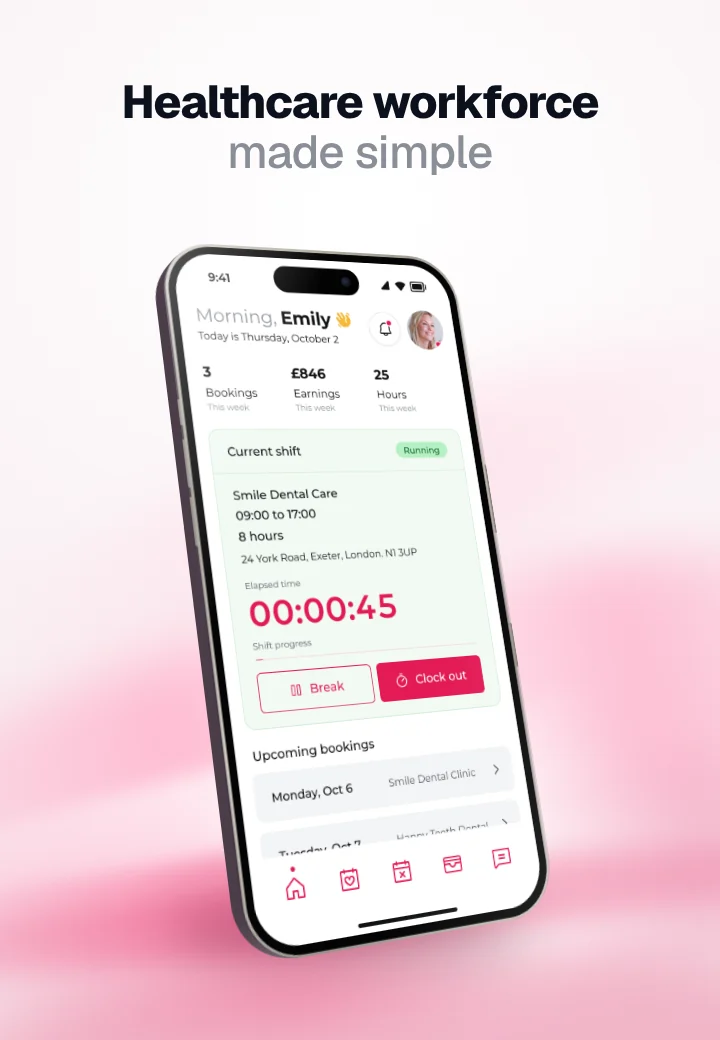
- Staffing and shift booking apps for healthcare agencies covers workforce tools.
- How much does a telehealth app cost in the UK? and How much does a mental health app cost in the UK? show what the surrounding app costs.
What questions should you ask a supplier?
- Which use cases have you delivered in a regulated setting, and what was your role?
- What is the intended purpose of the product, and has a regulatory adviser confirmed it?
- Where does data go, who can see it and does the AI provider keep or train on it?
- Will the AI provider sign a business associate agreement or data processing agreement as needed?
- How will accuracy be measured on our data, and who sets the threshold?
- What does the review screen look like, and how does it help a clinician spot errors?
- How does the tool behave when it is unsure or offline?
- Which systems will you integrate with, and who pays for the vendor’s access fees?
- What logs are kept, for how long, and who can read them?
- What are the running costs at our expected volume, and how do they change if usage doubles?
- Is the price fixed, and what exactly is in scope? We agree a fixed price before development starts; see Fixed price vs time and materials.
If you want an independent view of a proposal, you can book a call with a co-founder. For an honest comparison of quotes in general, see App development quotes compared.
What should you do next?
- List the five most time-consuming repetitive tasks in your organisation and time each one.
- Score them on the grid above and pick the best candidate.
- Write a one-sentence intended purpose and check it remains administrative.
- Check your data protection position and name an owner for the assessment.
- Decide whether to buy, configure or build.
- Run a discovery sprint or small prototype using sample or synthetic data.
- Plan a pilot with a baseline, a threshold and a decision date.
- Ask suppliers for fixed-price proposals against the same written scope.
If you would like help with the early steps, a Mobile Product Discovery Sprint at £9,500 fixed turns an idea into a costed plan, and our Tech Architecture Audit at £7,500 fixed reviews whether your existing systems can support AI features before you build.
Frequently asked questions
Is AI in healthcare regulated?
It depends on what the software is for. AI that supports admin tasks is generally not a medical device, but AI that diagnoses, monitors or treats usually is. Data protection law applies in both cases.
Can we use ChatGPT or a public AI tool with patient data?
Not without checking the terms, the data location and, in the US, whether the provider will sign a business associate agreement. Many organisations use enterprise or private deployments instead, with no training on their data.
How long does a healthcare AI project take?
A focused pilot often takes 3 to 5 months including testing. Projects that need medical device approval take considerably longer, and the timeline depends on the regulator and the evidence required.
Will AI replace clinicians?
The use cases that pay back today support clinicians by removing paperwork. Decisions that affect a patient remain with a qualified person, and regulators expect that oversight.
What is the cheapest way to test an idea?
A discovery sprint or a small prototype using sample or synthetic data. It shows whether the AI is accurate enough and whether staff will use it, before you invest in integration.
Do patients have to consent to AI being used in their consultation?
It depends on the use and the law that applies, but openness is good practice everywhere. Tell patients clearly what the tool does and give them a way to opt out without affecting their care. Take advice on the lawful basis and consent wording for your setting.
How do we know the AI is accurate enough?
Test it on a sample of your own real cases, reviewed by clinicians, with thresholds set before you look at the results. Then keep measuring after launch, because accuracy can change when templates, systems or models change.
Official sources and further reading
- Medicines and Healthcare products Regulatory Agency (MHRA)
- FDA: Artificial intelligence-enabled medical devices
- HHS: HIPAA for professionals
- European Commission: AI Act regulatory framework
- Information Commissioner’s Office
- NHS England
- Data Security and Protection Toolkit
- Care Quality Commission
- NICE
- HL7 International
Talk it through with one of our co-founders. 30 minutes, no pressure.