

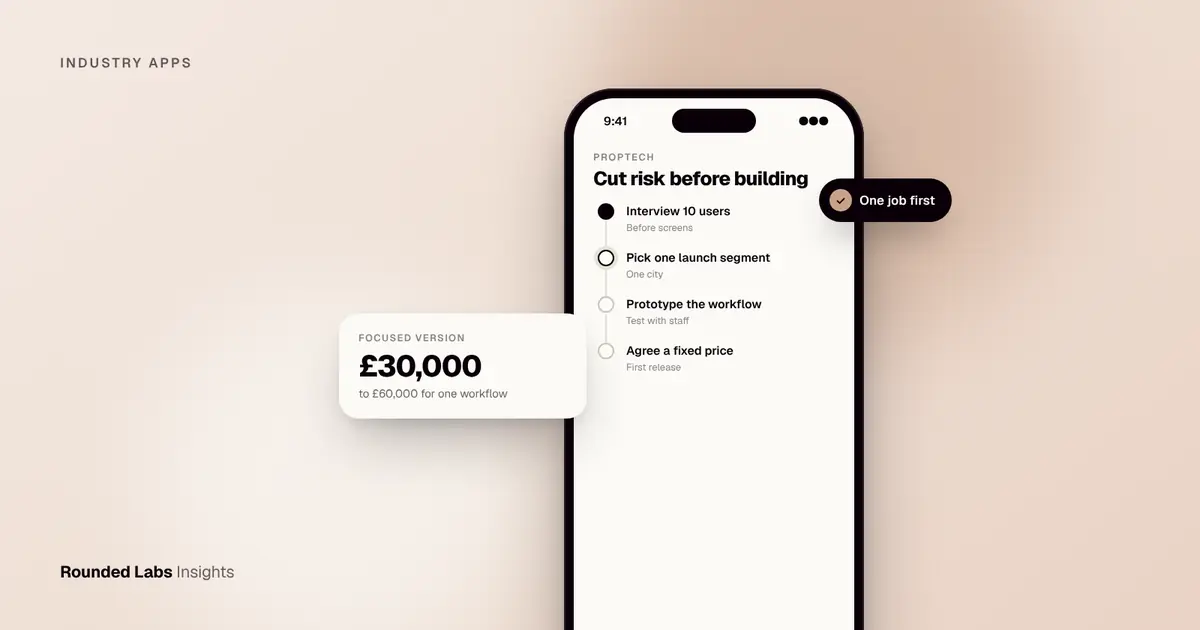
A UK proptech app typically costs £30,000 to £60,000 for a focused first version that does one job well, such as tenant maintenance requests or viewing bookings, and £100,000 to £250,000+ for a full platform with agent, landlord and tenant sides. The biggest cost drivers are integrations with property data and payments, not screens, and UK lettings and sales rules shape what you can automate.
We have spent 19 years building apps for brands that run many locations and large catalogues, including Superdry, whose app serves a business with 768 locations in over 100 countries. The same disciplines apply to property: dependable data, clear roles and a product that staff actually use. This guide covers which proptech apps work, what they cost, which UK rules matter and how to scope a first release. Rules change, so treat it as general information, not legal advice, and check the current requirements for your model.
Key facts
- Most successful proptech apps start with one workflow (maintenance, viewings, tenant onboarding) rather than a whole platform.
- Market estimates: £30,000 to £60,000 for a focused first version, £100,000 to £250,000+ for a multi-sided platform.
- Rounded Labs prices on a fixed price agreed before development starts, see our pricing page.
- Integrations (listings feeds, referencing, e-signature, payments, accounting) often cost more than the app screens.
- UK lettings reform, data protection and anti-money-laundering rules affect design. Check the current position before launch.
- The legal duty for safety certificates, deposits and notices stays with the landlord or agent, not with the software.
What kinds of proptech apps are worth building?
Proptech covers a wide range, but the ideas that tend to survive contact with real users solve a daily frustration for one group:
| App type | Main user | Core job |
|---|---|---|
| Tenant app | Renters | Report repairs, pay rent, find documents |
| Agent or landlord app | Letting agents, landlords | Manage properties, inspections, compliance dates |
| Viewing and booking app | Buyers, renters | Book, reschedule and get reminders for viewings |
| Property search | Buyers, renters | Search, save, alert and enquire |
| Maintenance and contractor app | Contractors, managers | Dispatch jobs, photos, quotes, sign-off |
| Investor or portfolio app | Landlords, investors | Track yield, costs and documents |
Booking is a common starting point because the logic is well understood. Our guide to booking and scheduling apps for service businesses covers the patterns, and many apply directly to viewings and inspections. For the wider real estate picture, see App development for real estate in the UK and How much does a real estate app cost in UK?.
Who pays, and why that matters
Before choosing a type, ask who would pay for it. Tenants rarely pay for an app, because the landlord or agent chooses how repairs are reported. Agents and landlords pay when software saves staff time or reduces risk. Buyers and renters use search tools for free, so search-led products depend on advertising, lead fees or a partnership with an agent. Contractors pay when a platform brings them work.
This is why tools for property professionals usually reach revenue faster than consumer-facing products. The customer is a business, the benefit is measurable (hours saved, fewer missed compliance dates, fewer complaints) and the buying decision is made by a small number of people. Consumer property search, by contrast, competes with the large established portals for attention and needs significant marketing to gain traction.
Four product shapes that recur
- The single workflow tool. One job, done well, for one user group. For example, a repairs reporting app for a lettings agency.
- The two-sided workflow. Two groups need to coordinate, for example tenants and the agency team, or agents and contractors.
- The data product. An app built mostly on aggregated property data, such as local area insight, yield calculators or portfolio analysis.
- The marketplace. Supply and demand meet, such as trades people and landlords. This is the hardest to launch. How much does a marketplace app cost to build in the UK? explains why.
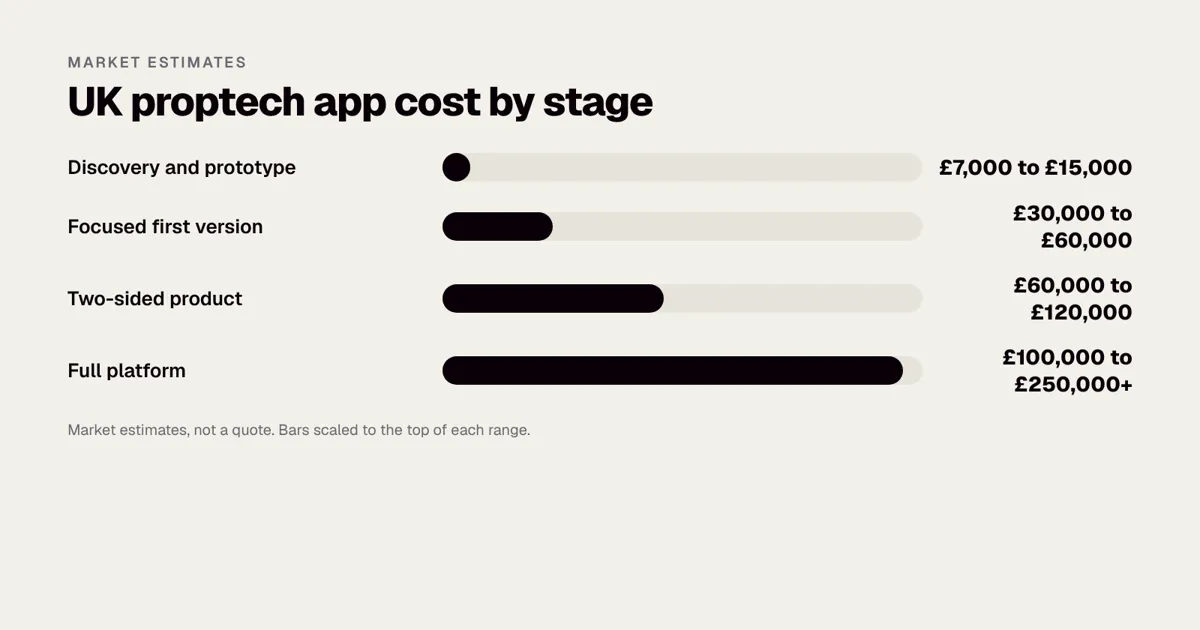
What does a proptech app cost in the UK?
These are market estimates, not quotes, and they assume a native or cross-platform mobile app with a web admin area.
| Scope | Typical range | Typical timeline |
|---|---|---|
| Discovery and prototype | £7,000 to £15,000 | 2 to 4 weeks |
| Focused first version (one workflow, one user group) | £30,000 to £60,000 | 3 to 5 months |
| Two-sided product (for example tenant plus agent) | £60,000 to £120,000 | 5 to 8 months |
| Full platform with payments, marketplace or AI | £100,000 to £250,000+ | 8 to 14 months |
Our own productised options sit at the front of that table: the Mobile Product Discovery Sprint is £9,500, and the Tech Architecture Audit is £7,500 if you already have a codebase. Projects with us are fixed price, agreed before development starts, and typically run £30,000 to £250,000+. For wider budgeting, see App maintenance costs in the UK and How long does it take to build an app?.
What moves the price
| Driver | Effect | Why |
|---|---|---|
| Number of user roles | Strong | Each role needs its own screens, permissions and testing |
| Integrations | Strong | Each external system adds build, test and an ongoing dependency |
| Payments and deposits | Strong | Reconciliation, refunds and records add back office work |
| Offline use | Moderate to strong | Inspectors and contractors often work without signal |
| Document generation | Moderate | Templates, signatures and storage with an audit trail |
| Maps and search | Moderate | Location features are costly to tune and carry usage fees |
| Admin dashboard | Moderate | Agents need to see, assign, report and export |
| Branding and custom design | Moderate | Standard components are cheaper than bespoke interaction |
| Data migration | Variable | Moving records from an existing property system is rarely trivial |
Nearly every founder underestimates the middle of that table. A tenant screen that shows a repair status looks simple. Behind it sits a job record, a contractor assignment, a notification rule, a photo store, a permission check and an admin view. That hidden work is where most of the budget goes. Our guide on app feature costs: login, payments, chat and maps breaks the individual parts down.
How do you choose the first workflow?
A first release should prove one thing. Choose it using a simple scoring exercise. For each candidate workflow, score from 1 (weak) to 5 (strong) on the criteria below, then compare totals.
| Criterion | What to ask |
|---|---|
| Frequency | Do users face this problem weekly, or once a year? |
| Pain | Does it cost time, money or complaints today? |
| Reach | How many people share the problem in your launch segment? |
| Willingness to pay | Will a business pay to remove it, and can you name one that would? |
| Simplicity | Can you deliver it without three integrations? |
| Data access | Do you already have, or can you easily get, the data it needs? |
Maintenance reporting often scores well on frequency, pain and simplicity. Viewing management scores well on reach. Compliance reminders score well on pain but depend on getting clean property records first. A portfolio dashboard for small landlords scores well on willingness to pay only if the target users are numerous and easy to reach.
Before scoring, speak to people. How to validate an app idea before you spend £50k describes a low cost way to do it. Ten honest interviews with agents and tenants will tell you more than a month of design.
Which UK rules affect a property app?
The exact rules depend on whether you sell, let, manage or advise, and on whether the property is in England, Scotland, Wales or Northern Ireland. This section is general information, not legal advice. At the time of writing, the areas below most often change the design, but laws, fees and dates change, so check each official source before you build or launch.
Lettings reform
- Renters’ Rights Act 2025. This Act reforms English tenancy law, including the end of fixed-term assured tenancies and no-fault evictions, and its provisions are being brought into force in stages, with further elements such as a landlord register and an ombudsman to follow. Rules differ in Scotland, Wales and Northern Ireland. If your app generates tenancy documents or notices, check the current official text and commencement position on GOV.UK and legislation.gov.uk, and have a solicitor review the templates.
- Tenant fees. In England the Tenant Fees Act 2019 restricts the payments that agents and landlords may charge tenants. Any payment flow in your app should be reviewed against it.
- Deposits. Tenancy deposits generally have to be protected in an approved scheme and the tenant given prescribed information. An app that takes or tracks deposits needs a reliable audit trail.
Right to Rent
Landlords and agents in England must check that a renter has the right to rent. If your app collects identity documents, you are handling sensitive data and must secure it accordingly. Do not assume that a photo upload meets the legal requirement for a check. The Home Office publishes the current rules and approved methods, and these have changed in the past, including the introduction of digital identity routes. Check the current guidance on GOV.UK.
Data protection
UK GDPR applies to tenant and buyer data, including ID documents, income evidence and messages. The ICO expects you to collect only what you need and to keep it only as long as necessary. See the Information Commissioner’s Office for current guidance, and our own guide, UK GDPR for mobile apps: what founders must get right. Recent legislative changes are summarised in The UK Data (Use and Access) Act 2025: what changes for apps. In practice this means:
- A privacy notice written in plain English that names who controls the data and why.
- A lawful basis for each category of data, and a documented retention period.
- A way to export or delete a person’s data on request, with exceptions the law allows.
- Contracts with every supplier who handles personal data on your behalf.
- Access controls so that a contractor sees a tenant’s contact details only for the job they are on.
Anti-money-laundering
Estate agency businesses must register with HMRC for supervision and carry out customer due diligence, and some lettings agents above a rent threshold are also within scope. If your app supports this, it needs an audit trail showing what checks were done, when and by whom. HMRC publishes the current guidance, starting at HM Revenue and Customs. An app can make the process more reliable, but it does not replace the agent’s legal responsibility.
Redress and client money
Agents must belong to a government-approved redress scheme such as The Property Ombudsman, so complaints handling often needs a place in the product. Letting agents who hold client money must also belong to an approved client money protection scheme in England. If your platform moves or holds funds, speak to a lawyer early, because payments regulation may apply. How much does a fintech app cost in the UK? explains what changes when money handling enters the picture.
Safety records
Gas safety, electrical safety, smoke and carbon monoxide alarms, and energy performance certificates all have rules and expiry dates. Compliance reminders are a strong feature, but the legal duty stays with the landlord. Treat the app as a diary and a record, and say so clearly in the product. Do not display wording that implies the app guarantees compliance.
Not sure which workflow to build first? We help property founders pick one job, test it and price it before committing. Book a 30-minute call with a co-founder.
What features should the first version include?
Start with the job, then add only what supports it. For a tenant maintenance app, for instance:
- Sign in with email or phone, linked to a tenancy.
- Report an issue with photos and a short description.
- Status updates and push notifications as the job moves.
- A message thread with the agent or contractor.
- A simple admin view to assign and close jobs.
Leave rent payments, deposit tracking and AI triage for version two unless they are the core idea. Good retention comes from solving a regular need; see App retention: the metrics that matter after launch for what to track once you are live.
Must have, should have, later
| Feature | Release 1 | Release 2 | Later |
|---|---|---|---|
| Account and tenancy link | Yes | ||
| Repair report with photos | Yes | ||
| Status tracking and push notifications | Yes | ||
| Agent dashboard | Yes | ||
| Contractor view | Basic | Full quotes and sign-off | |
| In-app messaging | Simple thread | Attachments and templates | |
| Rent payments | Yes | ||
| Document vault | Yes | ||
| AI triage of issue type | Yes | ||
| Marketplace of contractors | Yes |
Building features such as in-app chat, push notifications and file upload is well understood, and each can be costed separately. Pricing guidance for the individual components is in What does in-app chat cost to build in an app? and What does push notifications cost to build in an app?.
Roles and permissions
The permission model is the part of a property app that is most expensive to change later. Decide early who can see what.
| Role | Can see | Cannot see |
|---|---|---|
| Tenant | Own tenancy, own jobs, own documents | Other tenants, landlord finances |
| Landlord | Own properties, jobs and costs | Other landlords’ properties, tenant private messages unless shared |
| Agent staff | Properties and tenancies they manage | Branches they are not assigned to, depending on policy |
| Contractor | Jobs assigned to them, access details for those jobs | Tenant history, other contractors’ jobs |
| Administrator | Everything, with a record of access | Nothing is hidden, but every view is logged |
Role-based access is a standard pattern; see How to add role-based access to your app and How to add audit logs to your app. A tenant who moves out, a landlord who sells a property, or a branch that closes must all be handled without exposing old data to the wrong person.
What data and integrations does a property app need?
Property apps rarely stand alone. They connect to the systems that agents already use and to public data sources. Each connection is a cost and a dependency.
| Integration | What it gives you | Typical difficulty |
|---|---|---|
| Agency property management system | Properties, tenancies, landlords, rent | High: formats vary, access depends on the vendor |
| Listings portals and feeds | Property advertisements | Moderate: commercial agreement and format rules |
| HM Land Registry data | Ownership and price paid information | Moderate: licensing and data matching |
| EPC register | Energy performance certificate data | Moderate: matching addresses reliably |
| Referencing providers | Tenant checks | Moderate to high: consent, results, regulation |
| E-signature | Signed agreements | Moderate: legal validity and record keeping |
| Payments | Rent, fees, deposits | High: reconciliation and regulation |
| Accounting packages | Ledgers and reports | Moderate |
| Maps and geocoding | Location search, travel times | Moderate: usage costs |
Official data sources include HM Land Registry and the government’s property data services on GOV.UK. Check each source’s current licence terms before relying on it commercially. What is an API integration? explains how these connections work, and How to add CRM integration to your app covers a common one. For payment features, How to add Stripe integration to your app outlines the typical approach, and Stripe’s own site at stripe.com publishes current fees.
Build, buy or connect?
For each capability, ask which of three routes fits.
| Route | When it fits | Watch out for |
|---|---|---|
| Build it yourself | It is your core value | Ongoing maintenance |
| Buy a service through an API | The capability is common (e-signature, payments, referencing) | Per-use fees and vendor dependence |
| Connect to the customer’s existing system | Agents already run their business in it | Vendor cooperation and different data formats |
The trap is building something you could buy. A custom e-signature feature, for example, rarely makes sense. The opposite trap is relying so heavily on a third party that your product has no value of its own. A good proptech app owns the workflow and the user experience, and rents the commodity parts.
What are the hard technical parts?
- Property data. Listings feeds, EPC data and Land Registry information come from different sources with different formats. Budget time for cleaning and matching. Addresses are particularly awkward: the same flat can be written five ways.
- Integrations. Referencing, e-signature, accounting and payment providers each add API work, testing and an ongoing dependency.
- Maps and search. Location search and alerts are expensive to get right, and map services have usage costs.
- Roles and permissions. A tenant, landlord, agent and contractor each see different data. Get the permission model right early, as it is costly to change.
- Poor signal. Many inspections happen in basements and stairwells. Our guide on how to make your app work offline explains how to save photos and notes safely until a connection returns.
- Photos and files. Repair photos, inventories and inspection reports create large files. You need compression, secure storage and a retention policy.
- Notifications. Too many and users turn them off. Push notifications people do not turn off offers practical rules.
Security and trust
Tenant and landlord data is personal and often sensitive. Basic expectations include encryption in transit and at rest, strong sign-in, rate limiting, logging, regular dependency updates and an incident plan. The National Cyber Security Centre publishes practical guidance at ncsc.gov.uk. Our mobile app security checklist translates the mobile security standards into plain English, and How to add two-factor authentication to your app covers an important control for agent accounts.
How does a build run from start to launch?
A sensible plan for a focused first version runs in five stages.
- Discovery (2 to 4 weeks). Interview users, map the current workflow, choose the first job, define the data and integrations and agree the scope in writing. What happens in a discovery phase, and why it saves money explains the output.
- Design and prototype (2 to 4 weeks). Build a clickable prototype and test it with real staff and tenants. It is much cheaper to change a prototype than a finished app.
- Build (8 to 14 weeks). Develop the mobile app, the backend and the admin dashboard, with demonstrations every fortnight.
- Pilot (4 to 6 weeks). Run the product with one branch or one portfolio. Measure, fix and train.
- Rollout. Extend to more branches, add the second release and keep a fixed list of ideas for later.
Why a fixed price helps in property
Property businesses often have strict budgets and a committee that approves spend. A fixed price agreed before development starts makes that approval straightforward and keeps the supplier accountable for delivering the scope. It also forces the useful discipline of writing down exactly what is in and out of the first release. See Fixed price vs time and materials for app projects for the reasoning, and What a good app development proposal looks like for what to expect in writing.
A worked example: a letting agent’s maintenance app
Imagine an agency managing 400 tenancies that handles repairs by phone and email. Staff lose time chasing contractors, and tenants cannot see progress.
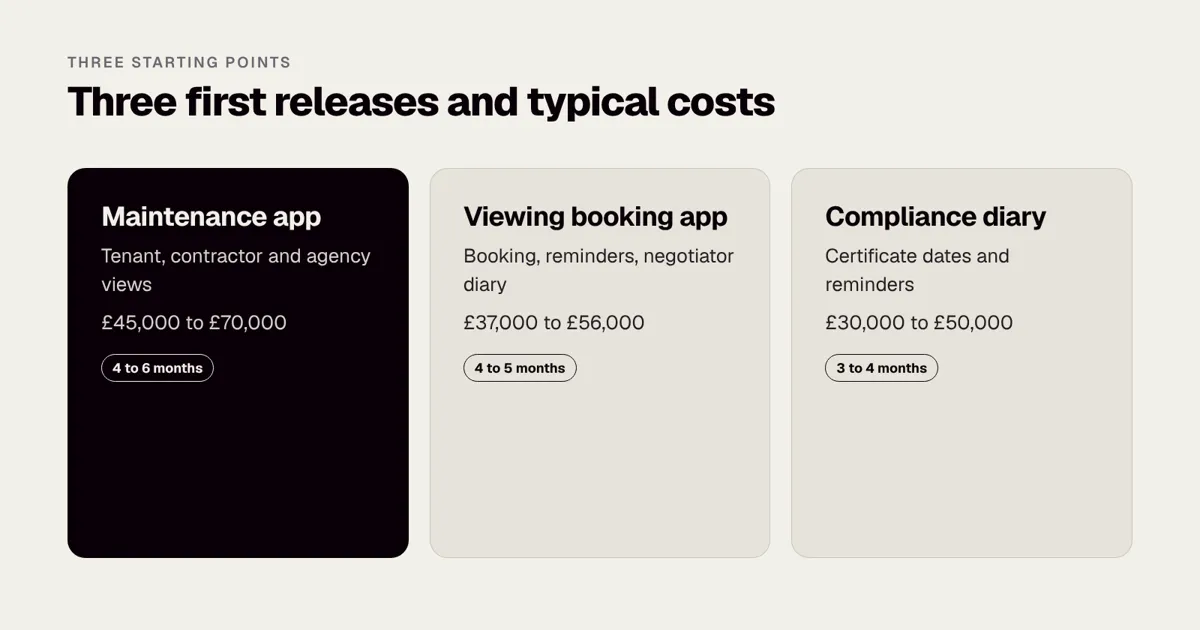
A fixed-price first version might include a tenant app for reporting and tracking, a contractor view for quotes and completion photos, and a web dashboard for the agency. The estimate in the market for that scope is around £45,000 to £70,000, with the main costs in the dashboard, notifications and a clean integration to the agency’s existing property system.
| Item | Typical effort | Market estimate |
|---|---|---|
| Discovery, workflow mapping and design | 3 to 4 weeks | £8,000 to £12,000 |
| Tenant app: sign in, report, track, message | 6 to 8 weeks | £12,000 to £18,000 |
| Contractor view: jobs, quotes, completion photos | 4 to 5 weeks | £7,000 to £11,000 |
| Agency web dashboard and reports | 5 to 6 weeks | £9,000 to £14,000 |
| Property system integration | 3 to 4 weeks | £6,000 to £10,000 |
| Testing, pilot and training | 3 weeks | £3,000 to £5,000 |
| Total | About 5 to 6 months | £45,000 to £70,000 |
The success measure should be operational: fewer chasing calls, faster time to close a job and fewer complaints. The agency tests with one branch, fixes what staff dislike, then rolls out. That mirrors how we approach large estates of users, as in the Superdry work, where scale demanded a rollout plan from the start.
What the numbers should look like after launch
Set baselines before launch so you can prove value. A suitable set of measures for this example:
| Measure | How to capture it | What good looks like |
|---|---|---|
| Phone calls about repairs per month | Phone system log, before and after | Falling steadily |
| Median days from report to completion | Job timestamps | Falling, with fewer jobs stuck |
| Share of tenants who report in the app | App against other channels | Rising, then stable |
| Contractor completion photo rate | Job records | Close to all jobs |
| Complaints about repairs | Complaints log | Falling |
| Staff time per job | Time sample from two or three staff | Falling |
Do not claim improvements before you have data. A pilot of 50 to 100 tenancies for six weeks will give you enough evidence to present to the wider business.
A second example: a viewing and booking app for a small agency group
A group of three branches wants to stop double-booked viewings and no-shows. Buyers and renters should book a slot from a listing, receive reminders and be able to reschedule. Negotiators should see a clear diary, with travel time between appointments.
| Item | Typical effort | Market estimate |
|---|---|---|
| Discovery and design | 2 to 3 weeks | £6,000 to £9,000 |
| Booking flow and reminders (mobile and web) | 6 to 8 weeks | £12,000 to £18,000 |
| Negotiator diary and availability rules | 4 to 5 weeks | £8,000 to £12,000 |
| Calendar sync and listing links | 3 to 4 weeks | £5,000 to £8,000 |
| Admin, reporting and testing | 3 to 4 weeks | £6,000 to £9,000 |
| Total | About 4 to 5 months | £37,000 to £56,000 |
This sits inside the focused first version band. Calendar logic and reminders are the same patterns used in other service businesses; see How to add a booking calendar to your app and How to add calendar sync to your app. The main design questions are about rules: how long a slot lasts, how much travel time to allow, what happens when a negotiator is ill and how to handle accompanied and unaccompanied viewings. Settle those with the branch managers before design starts.
How do property apps make money?
A product needs a commercial model that matches who values it. The following are common patterns in the market. These are options, not a recommendation, and you should test the model with real prospects before building.
| Model | Who pays | Works best for | Risk |
|---|---|---|---|
| Software subscription per agency or branch | Agents | Workflow tools | Slow sales cycles |
| Per-property or per-tenancy fee | Agents or landlords | Maintenance and compliance tools | Margins if numbers are small |
| White label app for agencies | Agents | Tenant apps under the agency brand | Support load per client |
| Lead or referral fee | Third parties | Search and marketplaces | Dependence on traffic |
| Transaction fee | Users | Payments and deposits | Regulation, disputes |
| Data licensing | Businesses | Data products | Licence terms, quality |
App monetisation: subscriptions, in-app purchases or ads? discusses the consumer side. For a business-to-business product, an agency will usually want a clear price, a pilot period and a simple contract.
How do you get agents and tenants to actually use it?
Adoption is where many property apps fail. The software is fine, but staff keep using the old way, so tenants never see a benefit. Plan adoption as carefully as the build.
For agents and staff
- Involve two or three real negotiators or property managers in design reviews. They will spot unrealistic flows quickly.
- Replace, do not add. If staff must update the old system and the new app, they will stop using the new one. Either integrate or retire the old process for the pilot group.
- Train in the branch, with real jobs, for an hour, not in a long presentation.
- Appoint a champion in each branch who can answer questions.
- Track usage weekly during the pilot and speak to people who are not using it.
For tenants and landlords
- Make the app useful on day one: a tenant should be able to report a repair in under a minute.
- Provide a fallback, such as phone, so tenants without a smartphone are not excluded. Accessibility matters; App accessibility: the European Accessibility Act and UK guidance explains how to build for everyone.
- Send status messages that tell people what will happen next, not generic updates.
- Respect notification fatigue. A good rule is that every message should either report progress or ask for a decision.
- Provide a clear way to ask for help and to delete data, for the privacy reasons described earlier.
What mistakes do property app founders make?
- Building a marketplace first. It needs supply and demand together. A tool for agents is usually easier to launch.
- Underestimating integrations. The first quote assumes a clean connection to the agency’s system. Sometimes there is no API, and the work becomes much larger.
- Automating legal decisions. The app can prompt and record, but a notice or a compliance decision is the landlord’s or agent’s responsibility. Have a solicitor review any generated documents.
- Ignoring staff. If agents do not benefit, they will not use the product.
- Collecting too much data. ID documents and income evidence carry real risk. Collect only what the process needs and delete it when it is no longer needed.
- No offline plan. Inspections and contractor work happen where the signal is poor.
- Launching everywhere. One city, one agency segment, one workflow is easier to support and learn from.
- No ownership of the code or accounts. Make sure the code, the cloud accounts and the store accounts are in your name. Who owns the code? IP, contracts and escrow for UK app projects explains what to include in a contract.
- Skipping the maintenance budget. Operating system updates, integrations and security patches continue after launch. Plan for them from the start.
How do you reduce risk before you build?
- Interview 10 users across tenants, landlords and agents before sketching screens. Our article on how to validate an app idea before you spend £50k shows a low-cost method.
- Choose one launch segment, for example small agents in one city, and learn from them.
- Prototype the workflow and test it with real staff.
- Agree a fixed price for the first release, with extra ideas parked on a clear list.
- Get legal review of anything that produces tenancy documents or notices.
- Write a specification. Our free app specification template helps you capture screens, rules and integrations in one place.
- Decide what is not in version one. What is an MVP? explains how to draw the line without shipping something useless.
If your idea is for community or membership groups instead, see Membership and community apps for clubs and charities. If your property business also runs trades and inspections, Field service apps for cleaning and trades businesses covers the job dispatch patterns, and Internal staff apps: replacing spreadsheets and paper covers the internal side. To book a conversation about scope, speak to a co-founder via our contact page.
A pre-build checklist for property founders
- Name the single user group and the single job for release 1.
- List the three measures that will tell you it worked.
- Identify every system the app must connect to, and confirm access to each in writing.
- List the personal data you will collect, why, and for how long you will keep it.
- Confirm which UK nations the product will cover and which rules apply there.
- Decide who reviews generated documents, and when.
- Confirm who handles complaints and where they sit in the product.
- Choose a pilot branch or portfolio and a date.
- Agree who owns the product internally after launch.
- Get a fixed price against a written scope, and ask what is excluded.
What about rent payments, deposits and tenant onboarding in version two?
Once the first workflow is working, the next requests are almost always about money and paperwork. Treat them as separate projects, each with its own scope and risks.
Rent payments
Collecting rent through an app sounds simple, but it adds reconciliation, failed payment handling, receipts, arrears workflows and, depending on who holds the money, regulatory questions. Most agencies already have a way of collecting and holding rent in a client account, so the first question is whether your app should take payments at all or simply show the tenant’s balance and link to the agency’s existing method. Showing a balance and a payment history is far cheaper than moving money, and often delivers most of the tenant benefit. If you do take payments, use a regulated provider, record every transaction against a tenancy and make refunds a deliberate, logged action.
Deposits
Deposit handling is bound by scheme rules and time limits. An app can help by prompting the agent at the right moments, storing the prescribed information and keeping the tenant informed, but it should integrate with the approved scheme rather than imitate it. Disputes at the end of a tenancy depend on good evidence, so check-in and check-out reports with dated photos are a valuable feature in their own right, and a natural second release for a maintenance product.
Tenant onboarding
Onboarding collects ID, references and signatures, often under time pressure at the start of a tenancy. It is a good candidate for automation because the steps are repetitive and the cost of delay is real, but it concentrates the most sensitive data you will hold. Design for minimum collection, short retention, strict access and clear consent. Choose a referencing and e-signature provider that fits your volume and check how each handles data held in the UK.
Reporting for landlords
Landlords value a simple monthly picture: rent received, repairs and costs, upcoming compliance dates and documents. A reporting view built on the data you already hold is often an inexpensive way to add value for the people who pay the agency. Keep it factual and avoid presenting estimates of value or yield unless you can explain exactly where the numbers come from, since misleading figures can create legal and reputational risk.
What does Rounded Labs bring to a proptech project?
We are not a property specialist and do not pretend to be. What we bring is delivery experience with products that run at scale, with many users and many locations, and 19 years of building mobile software since 2007, including the UK’s first mobile banking app, MoBank. For property that translates into practical habits: rollout plans that start small, clear role models, careful integration work and honest estimates. We also built the Waterstones app, mobile site and eBooks API in 12 weeks, a reminder that a tight, well-defined scope can be delivered quickly when the contract between app and backend is agreed first.
If you want an independent view before committing, our fixed price services are designed for that: the Mobile Product Discovery Sprint at £9,500 for a new product, the Tech Architecture Audit at £7,500 for an existing codebase and the Legacy App Rescue Assessment at £6,500 for an app that has stalled. They are listed on the pricing page.
Frequently asked questions
How much does it cost to build a property app in the UK?
A focused first version usually costs £30,000 to £60,000 on the market, and a full multi-sided platform £100,000 to £250,000+. Integrations and compliance work often decide where in that range you land. These are market estimates, not quotes, and Rounded Labs agrees a fixed price before development starts.
Should I build a marketplace or a tool for agents?
Tools for agents usually reach revenue faster, because the buyer is a business that pays for time saved. Marketplaces need supply and demand at once, which makes them harder and more expensive to launch. A tool can later grow into a marketplace once you have users and data.
Do I need an app, or is a responsive website enough?
A responsive website can be enough for search and enquiries. An app earns its place when users need notifications, camera use, offline access or daily repeat use, as with maintenance and inspections. Some products use both, with a website for first contact and an app for ongoing use.
How long does a proptech MVP take to build?
Most focused versions take 3 to 5 months from kickoff, after a few weeks of discovery. Two-sided products take longer because each side needs its own design and testing. Integration with an agency’s existing system is the most common cause of delay.
Can the app handle tenancy agreements and deposits?
It can, but the legal rules are strict and changing. Use proven e-signature and deposit scheme integrations, and have a solicitor review the documents and notices. This is general information, not legal advice, so check the current rules on GOV.UK.
Do I need to register with the ICO?
Many UK organisations that process personal data must pay a data protection fee to the ICO, unless an exemption applies. The ICO publishes a self-assessment on its website, so check it for your business. Registration is separate from your wider UK GDPR duties.
Can AI help in a property app?
It can help with tasks such as classifying a repair report or drafting a reply, but it adds cost and risk and is better left until the core workflow is proven. If you do add it, keep a person in the loop for decisions that affect tenants. See How to add an AI chatbot to your app.
Official sources and further reading
Talk it through with one of our co-founders. 30 minutes, no pressure.